




- Posts: 215
- Thank you received: 2
3 Post Moderation Rule for New Boarders (25 Jan 2021)
New boarders will have their posts moderated - Don't worry if you cannot see your post immediately.
Editing ProRes 4444 XQ - Synology Ejecting + FCPX Crashing Issues, etc.
26 Aug 2022 16:01 - 27 Aug 2022 01:14 #121981
by Shane M
Hi,
I’m having a nightmare time trying to get through a pretty simple edit of Alexa footage (ProRes 4444 XQ).
It seemed to work ok after importing and working with the footage to get started. The skimmer seems buttery smooth when scrubbing as I’d imaging ProRes should be, but after editing a while when I hit spacebar to playback, it started to beach ball and crash.
My Synology NAS drive (DS1819+) would actually even get bumped offline (drive not mounted on desktop anymore). I’ve been editing from this drive over 10Gbe for a couple years now with virtually zero problems with any kind of footage. It has about 15-20% free.
I’m using a newish 14” M1 Pro MacBook Pro. I’m fully updated on MacOS and FCPX, etc.
Since I started having issues, naturally, I tried to make proxies of these original ProRes 4444 XQ files in FCPX that I thought might be less taxing on the system. That creates major problems as well. It starts churning through a few clips, then starts locking up and crashing out like previously. I've tried the usual trash prefs, new library, etc.
I attached a couple PDF's of the crash reports as well. One seems to have something to do with kernel panics and the other one seems a little different.
Any ideas? Thanks
I’m having a nightmare time trying to get through a pretty simple edit of Alexa footage (ProRes 4444 XQ).
It seemed to work ok after importing and working with the footage to get started. The skimmer seems buttery smooth when scrubbing as I’d imaging ProRes should be, but after editing a while when I hit spacebar to playback, it started to beach ball and crash.
My Synology NAS drive (DS1819+) would actually even get bumped offline (drive not mounted on desktop anymore). I’ve been editing from this drive over 10Gbe for a couple years now with virtually zero problems with any kind of footage. It has about 15-20% free.
I’m using a newish 14” M1 Pro MacBook Pro. I’m fully updated on MacOS and FCPX, etc.
Since I started having issues, naturally, I tried to make proxies of these original ProRes 4444 XQ files in FCPX that I thought might be less taxing on the system. That creates major problems as well. It starts churning through a few clips, then starts locking up and crashing out like previously. I've tried the usual trash prefs, new library, etc.
I attached a couple PDF's of the crash reports as well. One seems to have something to do with kernel panics and the other one seems a little different.
Any ideas? Thanks
Last edit: 27 Aug 2022 01:14 by Shane M.
Please Log in to join the conversation.


26 Aug 2022 17:25 - 26 Aug 2022 17:43 #121984
by DaveM
Replied by DaveM on topic Editing ProRes 4444 XQ - Crashing Issues, etc.
Shane, it looks like there is an issue with your NAS (items in the logs mention smbfs).
Have you edited this exact kind of footage before? Do you have enough free drive space? Once you go below 20% free you could run into issues with not having enough swap space, room for other temporary files, etc.
You could try moving the footage to a fast, local SSD or to the internal storage for a test and see if that works...
P.S. - joema should be lurking over the next few days and may be able to provide a more elaborate (i.e., better) explanation of what's happening (from looking at your log info).
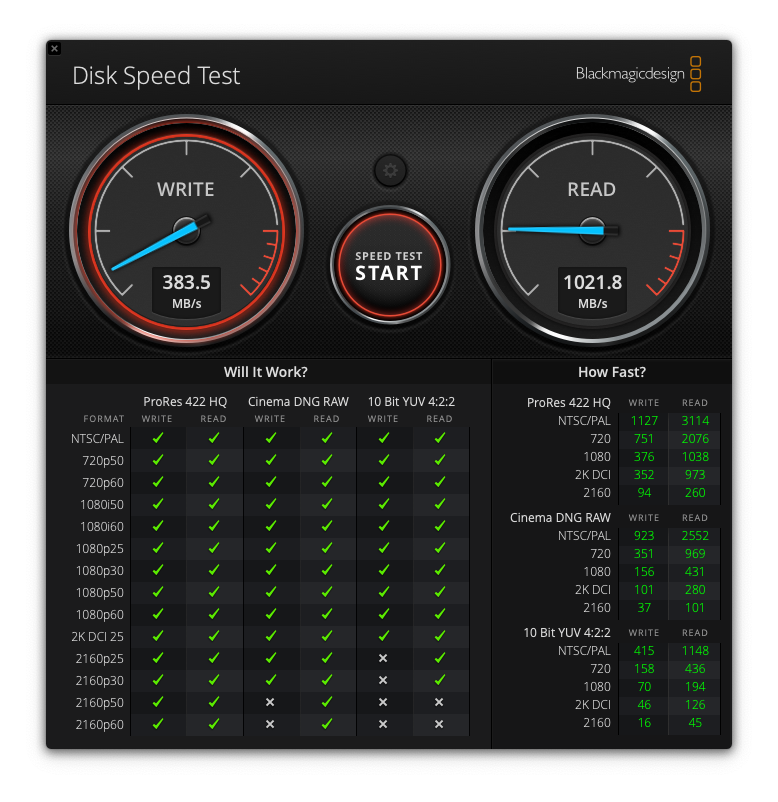
P.P.S. - Besides inadequate drive space, if your effective usable bandwith between your Mac and the NAS isn't fast enough you could run into issues. You might want to take a look at the target data rates at the end of the Apple ProRes whitepaper and compare that to what you are getting as results from Blackmagic Disk Speed Test:
www.apple.com/final-cut-pro/docs/Apple_ProRes.pdf
Have you edited this exact kind of footage before? Do you have enough free drive space? Once you go below 20% free you could run into issues with not having enough swap space, room for other temporary files, etc.
You could try moving the footage to a fast, local SSD or to the internal storage for a test and see if that works...
P.S. - joema should be lurking over the next few days and may be able to provide a more elaborate (i.e., better) explanation of what's happening (from looking at your log info).
P.P.S. - Besides inadequate drive space, if your effective usable bandwith between your Mac and the NAS isn't fast enough you could run into issues. You might want to take a look at the target data rates at the end of the Apple ProRes whitepaper and compare that to what you are getting as results from Blackmagic Disk Speed Test:
www.apple.com/final-cut-pro/docs/Apple_ProRes.pdf
Last edit: 26 Aug 2022 17:43 by DaveM.
Please Log in to join the conversation.

26 Aug 2022 19:55 - 26 Aug 2022 19:58 #121985
by joema
Replied by joema on topic Editing ProRes 4444 XQ - Crashing Issues, etc.
I agree with Dave it might (at least superficially) be related to the NAS I/O. The kernel panic cannot be caused by FCP and indicates general system instability at a hardware or driver level. It does mention an SMB kernel extension but it appears to be Apple-provided.
The FCP crash was caused by multiple threads being hung up waiting on "IO Surface" calls which are used to move frame buffer data.
If the mounted drive vanishes from the view of Finder or the terminal command ls /Volumes, that is not caused by FCP. It happened beneath FCP, which may have precipitated the crash. In theory all apps should handle all system conditions gracefully. E.g, out of space, or drive goes off line should generate app-layer errors to that effect but those are asynchronous events that may happen when a multithreaded app is deep into other logic. It sometimes uncovers bugs in the app's exception processing. In most cases if those bugs were fixed the app (instead of crashing) would raise an error and your task would stop, so you wouldn't be much better off.
I notice there is apparently a AKiTiO Thunderbolt3 Dock Pro connected, also two monitors? There was a previous FCP problem that was related to two monitors but I've never been able to reproduce it. A few past MacOS problems seemed related to external Thunderbolt Docks. As a test if you could try to reproduce it with only one monitor plugged in and without the AkiTiO dock, that might be informative.
If you post any other logs, please copy/paste or save those to a plain text file. Otherwise they are difficult to read due to line wrapping. If it raises a crash dialog you can select that with CMD+A, copy with CMD+C and paste to TextEdit with CMD+V. Make sure TextEdit is configured via the menu Format>Make Plain Text. Then save that as a .txt file and attach that.
The FCP crash was caused by multiple threads being hung up waiting on "IO Surface" calls which are used to move frame buffer data.
If the mounted drive vanishes from the view of Finder or the terminal command ls /Volumes, that is not caused by FCP. It happened beneath FCP, which may have precipitated the crash. In theory all apps should handle all system conditions gracefully. E.g, out of space, or drive goes off line should generate app-layer errors to that effect but those are asynchronous events that may happen when a multithreaded app is deep into other logic. It sometimes uncovers bugs in the app's exception processing. In most cases if those bugs were fixed the app (instead of crashing) would raise an error and your task would stop, so you wouldn't be much better off.
I notice there is apparently a AKiTiO Thunderbolt3 Dock Pro connected, also two monitors? There was a previous FCP problem that was related to two monitors but I've never been able to reproduce it. A few past MacOS problems seemed related to external Thunderbolt Docks. As a test if you could try to reproduce it with only one monitor plugged in and without the AkiTiO dock, that might be informative.
If you post any other logs, please copy/paste or save those to a plain text file. Otherwise they are difficult to read due to line wrapping. If it raises a crash dialog you can select that with CMD+A, copy with CMD+C and paste to TextEdit with CMD+V. Make sure TextEdit is configured via the menu Format>Make Plain Text. Then save that as a .txt file and attach that.
Last edit: 26 Aug 2022 19:58 by joema.
Please Log in to join the conversation.
26 Aug 2022 20:46 #121986
by Shane M
Replied by Shane M on topic Editing ProRes 4444 XQ - Crashing Issues, etc.
Thanks for your replies!
Yes, I have the MacBook Pro in clamshell mode hooked in to the Akitio 10Gbe Thunderbolt Dock. I have a cat7 cable going to my NAS which has the Synology 10Gbe + SSD Cache combo card.
I tried creating proxies with one monitor and no monitors and that had no effect. I have to use the dock to connect to the NAS via 10Gbe so I cant really eliminate that, although its been working fine for years with multiple Macs and for the better part of a year with this current Mac and so nothing has really changed hardware wise.
I did an experiment where I put some of these ProRes 4444 XQ files on a SSD and created a new library with them in it and had FCPX make proxies just like I was trying before and that seemed to work fine without any issues. The problem is that none of my SSD drives wouldn't come close to fitting that whole project, so unfortunately thats not really an option right now and honestly I don't think they make SSD's in that capacity.
My hunch is that if I go buy a 5TB cheap regular spinning external drive, then copy the project over to that, I could successfully create the proxies and hopefully at least somewhat continue the project since this is time sensitive to get the rough cut done and clips off to VFX and color etc. But the NAS is the real workhorse for me and so many other project are on it, so I desperately need to find out what is causing it to drop out...
In all fairness, none of the other projects seem to cause any issues. It seems like these ultra high end ProRes 4444 XQ files are just breaking it...and I understand that it might not have lightning fast performance when dealing with files like that, but there must be some way to make the connection at least stable like any USB drive, even if its a laggy experience because its not fast enough to handle the data throughput, no?
I came across this post mentioning turning on "Server Performance Mode" and I gave it a try but it didn't seem to do anything: discussions.apple.com/thread/251102946
Yes, I have the MacBook Pro in clamshell mode hooked in to the Akitio 10Gbe Thunderbolt Dock. I have a cat7 cable going to my NAS which has the Synology 10Gbe + SSD Cache combo card.
I tried creating proxies with one monitor and no monitors and that had no effect. I have to use the dock to connect to the NAS via 10Gbe so I cant really eliminate that, although its been working fine for years with multiple Macs and for the better part of a year with this current Mac and so nothing has really changed hardware wise.
I did an experiment where I put some of these ProRes 4444 XQ files on a SSD and created a new library with them in it and had FCPX make proxies just like I was trying before and that seemed to work fine without any issues. The problem is that none of my SSD drives wouldn't come close to fitting that whole project, so unfortunately thats not really an option right now and honestly I don't think they make SSD's in that capacity.
My hunch is that if I go buy a 5TB cheap regular spinning external drive, then copy the project over to that, I could successfully create the proxies and hopefully at least somewhat continue the project since this is time sensitive to get the rough cut done and clips off to VFX and color etc. But the NAS is the real workhorse for me and so many other project are on it, so I desperately need to find out what is causing it to drop out...
In all fairness, none of the other projects seem to cause any issues. It seems like these ultra high end ProRes 4444 XQ files are just breaking it...and I understand that it might not have lightning fast performance when dealing with files like that, but there must be some way to make the connection at least stable like any USB drive, even if its a laggy experience because its not fast enough to handle the data throughput, no?
I came across this post mentioning turning on "Server Performance Mode" and I gave it a try but it didn't seem to do anything: discussions.apple.com/thread/251102946
Please Log in to join the conversation.
26 Aug 2022 21:49 #121987
by joema
Admittedly there are not cheap but neither is an Alexa
I use this 8TB Samsung 870 QVO drive for Time Machine backup, because it's faster than a mechanical drive but not really performance critical. It's $630: www.amazon.com/dp/B089C3TZL9/
I have two OWC Thunderbay 4 Minis with 4 x 4TB Samsung EVO 870 drives in RAID-0 for 16TB each. Perf. is about 1,250 MB/sec read, 1,370 MB/sec write (this is the chassis only): eshop.macsales.com/item/OWC/TB3IVKIT000/
The current cost of that using 4 x 4TB Samsung 870 EVO SSDs is about $2,000.
You are correct it's easy with high-res low-compression codecs to reach a point where the datasets won't fit on a single drive. That leads to RAID or NAS which in turn leads to issues with redundancy, potential reliability, etc. A few years ago my team had a large NAS stolen from a car. No RAID level will protect from that. Fortunately we had a separate NAS unit in another car with duplicate data.
Your NAS should work for this application, but there are many nuances about tuning and managing a NAS. For a mission-critical scenario I'd probably use Jellyfish (expensive as it is), since I've never seen any owner of that looking for help in forums: www.lumaforge.com/jellyfish/
One easy thing to try is switch it from SMB to NFS. In an older article which is no longer on line, Lumaforge recommended that FCP installations use NFS.
You could also try creating 50% ProRes Proxies on a separate SSD drive, using the NAS only for reading during that process. Those proxies would be less than 1/20th the size due to the combination of 1/2 the linear resolution, avoiding 4444 and more space-efficient encoding. Apple Silicon CPUs are very fast at ProRes-to-ProRes transcoding due to the dedicated ProRes encode/decode accelerator.
Replied by joema on topic Editing ProRes 4444 XQ - Crashing Issues, etc.
...The problem is that none of my SSD drives wouldn't come close to fitting that whole project, so unfortunately thats not really an option right now and honestly I don't think they make SSD's in that capacity...
Admittedly there are not cheap but neither is an Alexa
I use this 8TB Samsung 870 QVO drive for Time Machine backup, because it's faster than a mechanical drive but not really performance critical. It's $630: www.amazon.com/dp/B089C3TZL9/
I have two OWC Thunderbay 4 Minis with 4 x 4TB Samsung EVO 870 drives in RAID-0 for 16TB each. Perf. is about 1,250 MB/sec read, 1,370 MB/sec write (this is the chassis only): eshop.macsales.com/item/OWC/TB3IVKIT000/
The current cost of that using 4 x 4TB Samsung 870 EVO SSDs is about $2,000.
You are correct it's easy with high-res low-compression codecs to reach a point where the datasets won't fit on a single drive. That leads to RAID or NAS which in turn leads to issues with redundancy, potential reliability, etc. A few years ago my team had a large NAS stolen from a car. No RAID level will protect from that. Fortunately we had a separate NAS unit in another car with duplicate data.
Your NAS should work for this application, but there are many nuances about tuning and managing a NAS. For a mission-critical scenario I'd probably use Jellyfish (expensive as it is), since I've never seen any owner of that looking for help in forums: www.lumaforge.com/jellyfish/
One easy thing to try is switch it from SMB to NFS. In an older article which is no longer on line, Lumaforge recommended that FCP installations use NFS.
You could also try creating 50% ProRes Proxies on a separate SSD drive, using the NAS only for reading during that process. Those proxies would be less than 1/20th the size due to the combination of 1/2 the linear resolution, avoiding 4444 and more space-efficient encoding. Apple Silicon CPUs are very fast at ProRes-to-ProRes transcoding due to the dedicated ProRes encode/decode accelerator.
Please Log in to join the conversation.
27 Aug 2022 00:32 #121990
by Shane M
Replied by Shane M on topic Editing ProRes 4444 XQ - Crashing Issues, etc.
Yes, all good points. Problem is mostly timing, as im getting on a plane to head to a shoot for another project tomorrow morning so I cant even order anything as far as SSD's etc. I picked up a 5TB portable drive locally to put the project on and I'm sure it will take forever to copy over and very laggy but maybe I can actually make progress getting this timeline laid out so I can send off the full quality clips to the other parties involved. Jellyfish certainly would be great but way out of budget.
Another thing I'll to try is deleting as much as I possibly can off the NAS right now and giving it another go. Maybe that will help...probably not, but maybe.
I will also try switching to NFS, although I remember it being more cumbersome to get in to the NAS and some other weirdness way back when I first set this all up so I've been on SMB ever since, not really knowing the technical differences, as long as it worked.
Strangely, if I open the files in Compressor (via the Synology NAS, just like in FCPX) and use one of the half size ProRes Proxy presets on these 4444 XQ clips, it churns through them just fine and promptly makes the proxies. Problem is that FCPX refuses to relink to these files as it claims the "audio doesn't match" or something - even if I select pass-through audio. So that doesn't seem to work either.
Another thing I'll to try is deleting as much as I possibly can off the NAS right now and giving it another go. Maybe that will help...probably not, but maybe.
I will also try switching to NFS, although I remember it being more cumbersome to get in to the NAS and some other weirdness way back when I first set this all up so I've been on SMB ever since, not really knowing the technical differences, as long as it worked.
Strangely, if I open the files in Compressor (via the Synology NAS, just like in FCPX) and use one of the half size ProRes Proxy presets on these 4444 XQ clips, it churns through them just fine and promptly makes the proxies. Problem is that FCPX refuses to relink to these files as it claims the "audio doesn't match" or something - even if I select pass-through audio. So that doesn't seem to work either.
Please Log in to join the conversation.

27 Aug 2022 00:42 #121991
by TerryB
Replied by TerryB on topic Editing ProRes 4444 XQ - Crashing Issues, etc.
You could also post to the Storage & Archiving forum on Creative Cow. There are some savvy NAS storage folks there that might have suggestions.
Please Log in to join the conversation.
21 Feb 2023 21:59 #124323
by TerryB
Replied by TerryB on topic Editing ProRes 4444 XQ - Crashing Issues, etc.
@shane82388 Did you find a solution to your NAS disconnects problem?
Yes, all good points. Problem is mostly timing, as im getting on a plane to head to a shoot for another project tomorrow morning so I cant even order anything as far as SSD's etc. I picked up a 5TB portable drive locally to put the project on and I'm sure it will take forever to copy over and very laggy but maybe I can actually make progress getting this timeline laid out so I can send off the full quality clips to the other parties involved. Jellyfish certainly would be great but way out of budget.
Another thing I'll to try is deleting as much as I possibly can off the NAS right now and giving it another go. Maybe that will help...probably not, but maybe.
I will also try switching to NFS, although I remember it being more cumbersome to get in to the NAS and some other weirdness way back when I first set this all up so I've been on SMB ever since, not really knowing the technical differences, as long as it worked.
Strangely, if I open the files in Compressor (via the Synology NAS, just like in FCPX) and use one of the half size ProRes Proxy presets on these 4444 XQ clips, it churns through them just fine and promptly makes the proxies. Problem is that FCPX refuses to relink to these files as it claims the "audio doesn't match" or something - even if I select pass-through audio. So that doesn't seem to work either.
Please Log in to join the conversation.
- EmilySalis
-

- Offline
- New Member
-

Less
More
- Posts: 1
- Thank you received: 0
21 Feb 2023 22:46 #124325
by EmilySalis
Replied by EmilySalis on topic Editing ProRes 4444 XQ - Synology Ejecting + FCPX Crashing Issues, etc.
I will also try switching to NFS, although I remember it being more cumbersome to get in to the NAS and some other weirdness way back when I first set this all up so I've been on SMB ever since, not really knowing the technical differences, as long as it worked.
Please Log in to join the conversation.
22 Feb 2023 00:14 #124329
by Shane M
Replied by Shane M on topic Editing ProRes 4444 XQ - Crashing Issues, etc.
I ended up just buying a much faster (peak speed of 2700MB/s) 4TB NVMe drive that I put in a Thunderbolt 4 enclosure and moved the project to that. (pricey!) It sucked to have to drop the money just to be able to finish the edit but there wasn't a lot else I could do at that point.
I haven't had any ProRes 4444XQ footage come in since then and everything else I cut (ProRes, BRAW, R3D, etc) all works fine regardless of resolution.
I haven't had any ProRes 4444XQ footage come in since then and everything else I cut (ProRes, BRAW, R3D, etc) all works fine regardless of resolution.
Please Log in to join the conversation.
22 Feb 2023 01:35 #124331
by TerryB
Replied by TerryB on topic Editing ProRes 4444 XQ - Synology Ejecting + FCPX Crashing Issues, etc.
Thank you for the info Shane. So you're not seeing smb disconnects when working with non-4444XQ media? What macOS and FCP versions are you running?
Please Log in to join the conversation.
04 Mar 2023 02:06 #124452
by Shane M
Replied by Shane M on topic Editing ProRes 4444 XQ - Synology Ejecting + FCPX Crashing Issues, etc.
I'm was and am still running Mac OS Monterrey 12.5.1 and FCPX 10.6.4. I have had so many projects stacking up and I never want do updates mid project so I'm not on the latest and greatest but not too far behind either. I will update when I get a lull, but I have a feeling it wont make much of a difference.
I had also tried all of this on an Intel MacBook Pro and had the same results, just as a side note.
I had also tried all of this on an Intel MacBook Pro and had the same results, just as a side note.
Please Log in to join the conversation.
04 Mar 2023 02:44 - 04 Mar 2023 02:45 #124454
by TerryB
Replied by TerryB on topic Editing ProRes 4444 XQ - Synology Ejecting + FCPX Crashing Issues, etc.
Shane, I've been trying to find a solution to an intermittent SMB disconnect problem and posted to the StudioSysAdmin slack group. A studio network engineer suggested changing a network stack setting to disable TCP segment offloading. I tried it and noticed a small drop in network performance when tested with the ATTO Disk benchmark utility but didn't have any SMB disconnects. It wasn't an exhaustive test and our disconnects are intermittent so it might not actually be fixing anything, but I thought I'd pass it along to you in case you're adventurous.
To set it back to the default, enabled:
The non-default setting won't survive across reboots, so if it helps and you want the disabled setting to stick, you'll need to enter
in /etc/sysctl.conf.
Code:
sudo sysctl -w net.inet.tcp.tso=0
To set it back to the default, enabled:
Code:
sudo sysctl -w net.inet.tcp.tso=1
The non-default setting won't survive across reboots, so if it helps and you want the disabled setting to stick, you'll need to enter
Code:
net.inet.tcp.tso=0
Last edit: 04 Mar 2023 02:45 by TerryB.
Please Log in to join the conversation.
