




- Posts: 16
- Thank you received: 0
3 Post Moderation Rule for New Boarders (25 Jan 2021)
New boarders will have their posts moderated - Don't worry if you cannot see your post immediately.
restore point
26 Aug 2022 13:25 #121975
by Teris2212
restore point was created by Teris2212
Is there a way to save everything that's on my timeline as a backup point (in case I screw up later) and then I can return to this point and continue from there ? something like time machine
Please Log in to join the conversation.
- Tom Wolsky
-

- Offline
- Moderator
-

26 Aug 2022 13:29 #121976
by Tom Wolsky
Replied by Tom Wolsky on topic restore point
Duplicate project as Snapshot is designed to do what you want I think.
Please Log in to join the conversation.
26 Aug 2022 15:27 #121978
by Teris2212
Replied by Teris2212 on topic restore point
I will try this , thank you !!
Please Log in to join the conversation.

26 Aug 2022 15:29 - 26 Aug 2022 15:36 #121979
by VTC
Replied by VTC on topic restore point
Duplicate as snapshot works well enough but sometimes I end up working on the wrong timeline version as, if you do it bunches, it populates with numerous choices and unintentionally working the wrong one, as does using a FCP auto saved version.
I'll get to a point and export an XML tagged with date-time exported. Multiple undo, undo, undos doesn't always work for me. FCP autosave is acceptable but there are times I wish I could save manually and then revert to last save like Resolve & most other apps offer. (Certainly don't like FCP treating me like I'm too feeble to remember or know when to save on my own accord.)
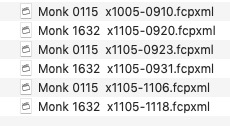
I'll get to a point and export an XML tagged with date-time exported. Multiple undo, undo, undos doesn't always work for me. FCP autosave is acceptable but there are times I wish I could save manually and then revert to last save like Resolve & most other apps offer. (Certainly don't like FCP treating me like I'm too feeble to remember or know when to save on my own accord.)
Last edit: 26 Aug 2022 15:36 by VTC.
Please Log in to join the conversation.
26 Aug 2022 15:48 #121980
by Teris2212
Replied by Teris2212 on topic restore point
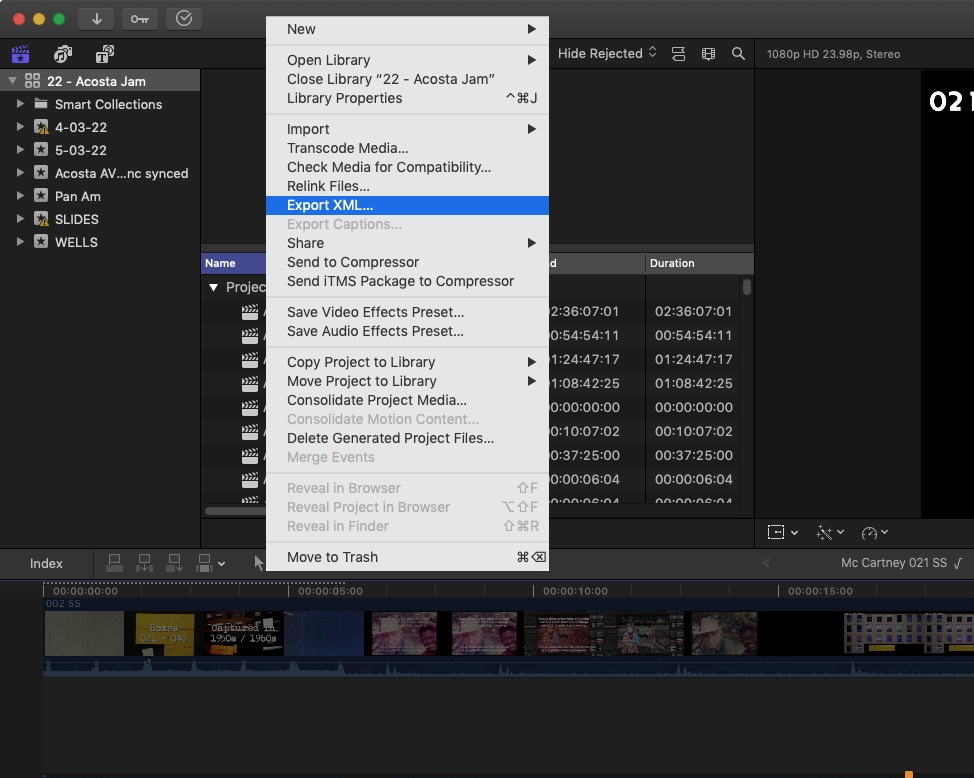
How do you export this XML file ?
Please Log in to join the conversation.
26 Aug 2022 16:09 #121982
by VTC
Replied by VTC on topic restore point
Please Log in to join the conversation.
26 Aug 2022 17:10 #121983
by Teris2212
Replied by Teris2212 on topic restore point
Thanks !!
Please Log in to join the conversation.


27 Aug 2022 04:20 - 27 Aug 2022 04:21 #121994
by Larrie
Replied by Larrie on topic restore point
Another option is to select the Project in the Browser and use the Edit/Duplicate function to duplicate the project.
If you name your project like this “Project Name V 0” the “0” will increment to the next higher number every time you make a duplicate. The space between the “V” (version) and the number is required.
If you name your project like this “Project Name V 0” the “0” will increment to the next higher number every time you make a duplicate. The space between the “V” (version) and the number is required.
Last edit: 27 Aug 2022 04:21 by Larrie.
Please Log in to join the conversation.
27 Aug 2022 17:54 #121996
by Teris2212
Replied by Teris2212 on topic restore point
Awesome , thanks
Please Log in to join the conversation.

27 Aug 2022 18:39 #121997
by TerryB
Replied by TerryB on topic restore point
Larrie, I believe the duplicate method means that the compound and multicam clips in the duplicated project still point to their original parents so any changes to this later version's compounds or mullticams will also affect prior versions. Maybe the OP is not using compounds or multicams so this would not be a concern.
support.apple.com/guide/final-cut-pro/du...45/10.6.2/mac/11.5.1
support.apple.com/guide/final-cut-pro/du...45/10.6.2/mac/11.5.1
Please Log in to join the conversation.
- Tom Wolsky
-
- Offline
- Moderator
-
27 Aug 2022 18:42 #121998
by Tom Wolsky
Replied by Tom Wolsky on topic restore point
That's why it's so important to use Duplicate as Snapshot for this.
"When you duplicate a project as a snapshot, Final Cut Pro embeds copies of compound or multicam “parent” clips in the duplicate, so any changes to other instances of those clips do not affect the duplicate."
"When you duplicate a project as a snapshot, Final Cut Pro embeds copies of compound or multicam “parent” clips in the duplicate, so any changes to other instances of those clips do not affect the duplicate."
Please Log in to join the conversation.
- Andreas Kiel
-

- Offline
- Platinum Member
-

Less
More
- Posts: 1077
- Thank you received: 189
28 Aug 2022 08:29 #122003
by Andreas Kiel
Replied by Andreas Kiel on topic restore point
When you use XML be aware that some settings like Drop Zone are missing, RGB color values probably will have "rounding errors"
Please Log in to join the conversation.
