


- Posts: 13
- Thank you received: 1
3 Post Moderation Rule for New Boarders (25 Jan 2021)
New boarders will have their posts moderated - Don't worry if you cannot see your post immediately.
Has anyone had a freeze from TWO sidebar icons blue at same time?
- jim@jimcutler.com
-
 Topic Author
- Offline
- New Member
-

Less
More
22 Aug 2022 03:31 - 22 Aug 2022 03:32 #121912
by jim@jimcutler.com
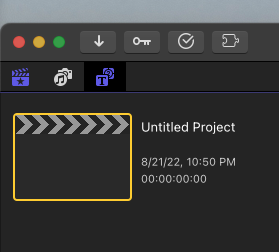
FCPX becomes unusable for me when this happens: The icon at the left is normally Blue for Libraries. When I click the icon for Titles and Generators it then properly then turns blue to show that I have selected it, but the other icon (Libraries) remains selected and blue, too! This puts FCPX in a state where no Titles or Generators will appear, and everything is stuck. Has anyone else seen this? It's happened a few times this year and again right now.
My info: Latest vers of FCPX. Latest OSX version. Mac Pro 2019 rediculously loaded in every way. Intel.
What I've tried: Deleting FCPX prefs both manually and Opt-Command at FCPX app start. I've uninstalled and reinstalled FCPX.
My info: Latest vers of FCPX. Latest OSX version. Mac Pro 2019 rediculously loaded in every way. Intel.
What I've tried: Deleting FCPX prefs both manually and Opt-Command at FCPX app start. I've uninstalled and reinstalled FCPX.
Last edit: 22 Aug 2022 03:32 by jim@jimcutler.com.
Please Log in to join the conversation.


22 Aug 2022 03:49 #121913
by Redifer
Replied by Redifer on topic Has anyone had a freeze from TWO sidebar icons blue at same time?
I've never once seen this happen even on my Intel units. My response is not at all helpful, so apologies for that.
The Mac Pro you have is probably a system that not a lot of people own, due to its absolutely bonkers price. So I'm wondering if it's something where the machine is at fault and not enough users out there to notice. Have you reported it to Apple using their feedback system?
The Mac Pro you have is probably a system that not a lot of people own, due to its absolutely bonkers price. So I'm wondering if it's something where the machine is at fault and not enough users out there to notice. Have you reported it to Apple using their feedback system?
Please Log in to join the conversation.

22 Aug 2022 13:27 #121918
by DaveM
Replied by DaveM on topic Has anyone had a freeze from TWO sidebar icons blue at same time?
Jim, other than trying to narrow down the conditions under which this occurs, I'd suggest possibly removing any third-party plugins or custom templates you may have installed to see if that helps. You could start with any customized or third-party generators, titles, or templates.
I have a modestly configured 2019 Mac Pro (and a 2012 Mac Pro) that I use with FCP and have never seen this behavior.
I have a modestly configured 2019 Mac Pro (and a 2012 Mac Pro) that I use with FCP and have never seen this behavior.
Please Log in to join the conversation.
- jim@jimcutler.com
-
Topic Author
- Offline
- New Member
-
Less
More
- Posts: 13
- Thank you received: 1
22 Aug 2022 13:33 #121919
by jim@jimcutler.com
Replied by jim@jimcutler.com on topic Has anyone had a freeze from TWO sidebar icons blue at same time?
Dave, I have to think that must be the reason. I will try that and report back. Thank you.
Please Log in to join the conversation.
22 Aug 2022 13:43 #121920
by DaveM
Replied by DaveM on topic Has anyone had a freeze from TWO sidebar icons blue at same time?
Jim, a bit less likely cause might be due to any other software that is running while FCP is, such as CommandPost, Keyboard Maestro, input/mouse drivers, or other "automation utilities" (i.e., anything that could be triggered by UI "events")...
Please Log in to join the conversation.
- jim@jimcutler.com
-
Topic Author
- Offline
- New Member
-
Less
More
- Posts: 13
- Thank you received: 1
22 Aug 2022 18:53 #121929
by jim@jimcutler.com
Replied by jim@jimcutler.com on topic Has anyone had a freeze from TWO sidebar icons blue at same time?
I'm OP with a possible solution. As DaveM mentioned it is probably caused by third party installs. In my case, plugin packages. I got a small utility from PFS that seems to have fixed what was jamming up fcpx. It's a little utility called FxRun that quote, "It's a script that relaunches the plugins used to run our products". I ran it as a regular application, I saw a lot of PFS dialogues flash by me, and now that it's done I no longer have the problem.
I have way too many plugin packages that I just don't need and will pare them way back. I hope this really is the solution, and that my post will help others. The link they gave me to FxRun is: pixelfxplugs.s3.us-west-1.amazonaws.com/PFS+FxRun.zip
I have way too many plugin packages that I just don't need and will pare them way back. I hope this really is the solution, and that my post will help others. The link they gave me to FxRun is: pixelfxplugs.s3.us-west-1.amazonaws.com/PFS+FxRun.zip
Please Log in to join the conversation.
