




- Posts: 3
- Thank you received: 0
3 Post Moderation Rule for New Boarders (25 Jan 2021)
New boarders will have their posts moderated - Don't worry if you cannot see your post immediately.
Is it possible to have an effect applied to a clip but not affect those beneath?
19 Aug 2022 13:20 #121896
by 5Alive
Is it possible to have an effect applied to a clip but not affect those beneath? was created by 5Alive
Hi,
Question is essentially the title: Is it possible to have an effect applied to a clip but not affect those beneath?
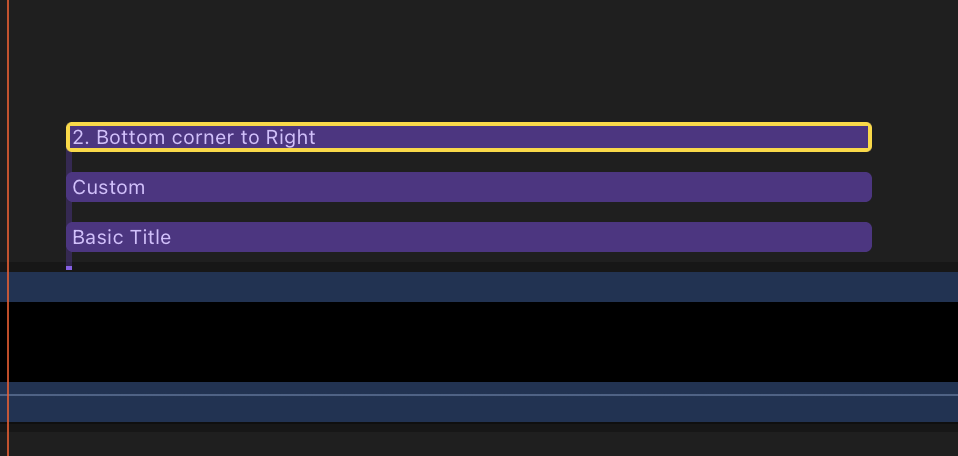
The clip I want to apply the effect to is the one at the top (highlighted in the picture) without affecting those beneath it. The highlighted clip is a Title template. I appreciate that technically ,I could move the laye/clip that's highlighted down the list or put it even below the A-roll itself to ensure the A-roll clip isn't affected, but then the clip that has the effect cannot be seen.
If the answer is a no, then it's not an issue and I'll just look for another way of doing the effect I want to do.
Thanks
Question is essentially the title: Is it possible to have an effect applied to a clip but not affect those beneath?
The clip I want to apply the effect to is the one at the top (highlighted in the picture) without affecting those beneath it. The highlighted clip is a Title template. I appreciate that technically ,I could move the laye/clip that's highlighted down the list or put it even below the A-roll itself to ensure the A-roll clip isn't affected, but then the clip that has the effect cannot be seen.
If the answer is a no, then it's not an issue and I'll just look for another way of doing the effect I want to do.
Thanks
Please Log in to join the conversation.
- Tom Wolsky
-

- Offline
- Moderator
-

19 Aug 2022 13:34 #121897
by Tom Wolsky
Replied by Tom Wolsky on topic Is it possible to have an effect applied to a clip but not affect those beneath?
There is no image attached. Normally an effect only the clip it's applied to. If it's a title, then it might work differently depending on exactly what title you're using.
Please Log in to join the conversation.
- Andreas Kiel
-

- Offline
- Platinum Member
-

Less
More
- Posts: 1077
- Thank you received: 189
19 Aug 2022 14:45 #121898
by Andreas Kiel
Replied by Andreas Kiel on topic Is it possible to have an effect applied to a clip but not affect those beneath?
It depends on the title.
Some use the underlying lanes others don't.
In the little preview icons you can see which will use the background: those which will show this default landscape

If you don't see it doesn't mean it it won't, but it is likely it won't use.
I you own Motion you can open a copy of the title and clear the background.
Some use the underlying lanes others don't.
In the little preview icons you can see which will use the background: those which will show this default landscape
If you don't see it doesn't mean it it won't, but it is likely it won't use.
I you own Motion you can open a copy of the title and clear the background.
Please Log in to join the conversation.

19 Aug 2022 15:50 #121903
by VTC
Replied by VTC on topic Is it possible to have an effect applied to a clip but not affect those beneath?
Just a thought but wouldn't turning the clip into a compound clip isolate the properties for that clip and that clip only for you?
Please Log in to join the conversation.
- Andreas Kiel
-
- Offline
- Platinum Member
-
Less
More
- Posts: 1077
- Thank you received: 189
19 Aug 2022 20:06 #121904
by Andreas Kiel
Replied by Andreas Kiel on topic Is it possible to have an effect applied to a clip but not affect those beneath?
Yes.
You can attach a title (with background processing) to a gap (or a generator or another title with no background) then make a compound and then move to final destination
You can attach a title (with background processing) to a gap (or a generator or another title with no background) then make a compound and then move to final destination
Please Log in to join the conversation.
20 Aug 2022 13:36 #121905
by 5Alive
Replied by 5Alive on topic Is it possible to have an effect applied to a clip but not affect those beneath?
Thanks for the responses. I didn't realise the image didn't attach. Hopefully it's attached this time,
Please Log in to join the conversation.
26 Aug 2022 14:41 #121977
by 5Alive
Replied by 5Alive on topic Is it possible to have an effect applied to a clip but not affect those beneath?
I forgot to mention that this solution worked where you create a compound clip and then use that compound clip in the timeline. This will definitely help my workflow. Thanks Andreas 👍
Please Log in to join the conversation.
