


- Posts: 8
- Thank you received: 0
3 Post Moderation Rule for New Boarders (25 Jan 2021)
New boarders will have their posts moderated - Don't worry if you cannot see your post immediately.
Audio out of sync on imported clips
- jondennis101
-
 Topic Author
- Offline
- New Member
-

Less
More
18 Jul 2022 22:12 #121488
by jondennis101
Audio out of sync on imported clips was created by jondennis101
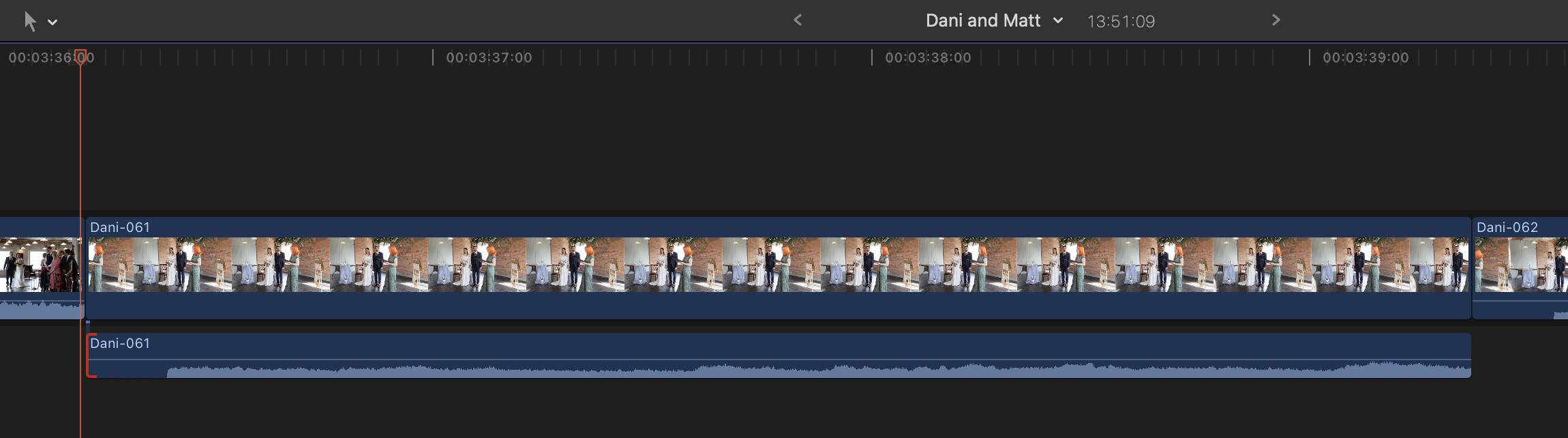
Hi! First post, I'm hoping somebody knows the answer as Google doesn't. I have moved from Premiere Pro to FCP and all is good apart from the audio within a clips does not import in sync with the footage. FCP creates a small gap in the audio at the beginning of every clip imported (pic attached). The audio is in sync prior to being imported so I assume I have something wrong in settings. I'm still getting to grips with FCP but I believe I am importing into a new event, with settings at 4K 23.98p stereo. I shoot 4k 50Fps clips on a Canon R6. I had no issues in Premier Pro. I am a photographer rather than videographer, so my technical knowledge on film editing is fairly basic, I just wondered if anyone knew why FCP is generating a delay on the audio when it imports? Files are MP4. Thanks in advance
Please Log in to join the conversation.


18 Jul 2022 22:24 - 18 Jul 2022 22:25 #121489
by DaveM
Replied by DaveM on topic Audio out of sync on imported clips
If you play a clip in the Browser is it in sync?
With 50 fps footage, you probably want to edit in a 50p or a 25p Project/timeline, not 23.976p.
With 50 fps footage, you probably want to edit in a 50p or a 25p Project/timeline, not 23.976p.
Last edit: 18 Jul 2022 22:25 by DaveM.
Please Log in to join the conversation.
- jondennis101
-
Topic Author
- Offline
- New Member
-
Less
More
- Posts: 8
- Thank you received: 0
18 Jul 2022 22:32 #121490
by jondennis101
Replied by jondennis101 on topic Audio out of sync on imported clips
Hi Dave, yep from checking in the browser it is in sync played through that. What should that mean for the export? As I edit around 200 short clips along the timeline. I will change to a 25p project thanks
Please Log in to join the conversation.
- jondennis101
-
Topic Author
- Offline
- New Member
-
Less
More
- Posts: 8
- Thank you received: 0
18 Jul 2022 22:37 #121491
by jondennis101
Replied by jondennis101 on topic Audio out of sync on imported clips
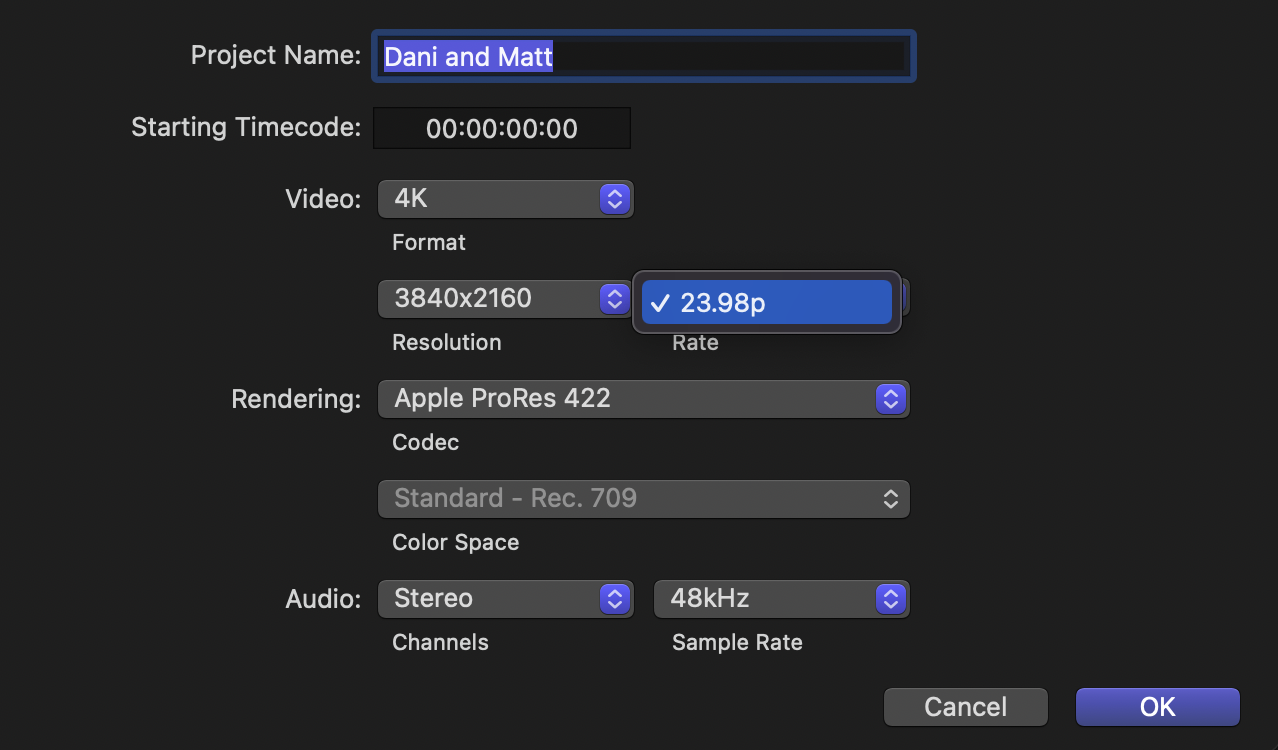
as a follow-up (apologies for the newbie questions!) but it gives me no other option to select other than 23.98p. Should I expect to see a 25p option or is this not possible on an already created project ? Thanks
Please Log in to join the conversation.
19 Jul 2022 00:10 - 19 Jul 2022 00:11 #121492
by DaveM
Replied by DaveM on topic Audio out of sync on imported clips
Yeah, basically you can't change frame rate.
Create a new Project with the proper settings (25p, let's say).
Copy everything from the "bad" project and paste it into the new Project.
Hope this helps.
Create a new Project with the proper settings (25p, let's say).
Copy everything from the "bad" project and paste it into the new Project.
Hope this helps.
Last edit: 19 Jul 2022 00:11 by DaveM.
Please Log in to join the conversation.
- jondennis101
-
Topic Author
- Offline
- New Member
-
Less
More
- Posts: 8
- Thank you received: 0
19 Jul 2022 06:30 #121493
by jondennis101
Replied by jondennis101 on topic Audio out of sync on imported clips
This worked Dave thanks for the help. It still has the initial gap in audio which isn't a problem but the sound is at least in sync. I assume if I import everything from scratch next time at 25p it won't create the audio gap.
Thank you
Thank you
Please Log in to join the conversation.
19 Jul 2022 13:21 #121494
by DaveM
Replied by DaveM on topic Audio out of sync on imported clips
Glad to help. From your original screenshot it looked like the audio waveform was shifted in time. I'm not sure what you mean by "a gap". Perhaps, someone else can see something I missed. Does this "gap" appear on all imported clips? Did you import media with audio and video in the same file, or did you import separate audio and video files and sync them in FCP?
Please Log in to join the conversation.

19 Jul 2022 18:25 #121496
by dmetz
Replied by dmetz on topic Audio out of sync on imported clips
The way you import into the event/library may have something to do with it, as well as your camera offload process.
There may also be something unusual about the audio track, like bit rate/depth settings during record, compared to other cameras.
If your camera generates a folder tree on it's internal storage, you may need to alter the way that you import.
Any or none of these ideas may (or not) be in play. ;^)
There may also be something unusual about the audio track, like bit rate/depth settings during record, compared to other cameras.
If your camera generates a folder tree on it's internal storage, you may need to alter the way that you import.
Any or none of these ideas may (or not) be in play. ;^)
Please Log in to join the conversation.
- jondennis101
-
Topic Author
- Offline
- New Member
-
Less
More
- Posts: 8
- Thank you received: 0
19 Jul 2022 18:28 #121497
by jondennis101
Replied by jondennis101 on topic Audio out of sync on imported clips
Thanks yes I did wonder, I drag and drop but I wonder if FCP doesn't like this. I didn't have any issues in Premiere Pro, but overall I'm preferring FCP. I'll play a bit more
Please Log in to join the conversation.
- jondennis101
-
Topic Author
- Offline
- New Member
-
Less
More
- Posts: 8
- Thank you received: 0
19 Jul 2022 18:29 #121498
by jondennis101
Replied by jondennis101 on topic Audio out of sync on imported clips
Hi Dave, the gap I'm referring to is the time shift, so the same thing. For some reason FCP is inserting a silence of a fraction of second on each clip. I will try other ways of importing and see if it helps
Please Log in to join the conversation.
19 Jul 2022 19:13 #121499
by dmetz
Replied by dmetz on topic Audio out of sync on imported clips
Does the R6 generate .mp4 video with timecode embedded, or does it use sidecar files in the folder structure?
I've been looking for specifics regarding the camera's card structure and nothing useful comes up.
I've been looking for specifics regarding the camera's card structure and nothing useful comes up.
Please Log in to join the conversation.
19 Jul 2022 20:20 - 19 Jul 2022 21:31 #121500
by DaveM
Replied by DaveM on topic Audio out of sync on imported clips
Jon, I found some R6 4K HEVC MP4 files to test (yours could be different, of course).
These files have embedded timecode. I imported by dragging and dropping into an Event. No issues with audio.
Looking again at your screenshot in the original post, it seems like you somehow did a "detach audio" command. If the original clips have audio, you could open a clip in a timeline, expand audio, expand audio components, detach audio, or break apart clip items. It appears that you detached the audio. The red mark at the left end of the audio clip is the clip "in-point" trim/edit mark. The audio clip's waveform appears to have been shifted to the right.
Since the clip plays back fine in the Browser, this suggests that something was done to the clip in the Project/timeline, unless it was just due to the FPS setting.
It would be nice if you could upload a problematic clip (Dropbox or similar) and post a link here, so we could check it out. Thanks.
These files have embedded timecode. I imported by dragging and dropping into an Event. No issues with audio.
Looking again at your screenshot in the original post, it seems like you somehow did a "detach audio" command. If the original clips have audio, you could open a clip in a timeline, expand audio, expand audio components, detach audio, or break apart clip items. It appears that you detached the audio. The red mark at the left end of the audio clip is the clip "in-point" trim/edit mark. The audio clip's waveform appears to have been shifted to the right.
Since the clip plays back fine in the Browser, this suggests that something was done to the clip in the Project/timeline, unless it was just due to the FPS setting.
It would be nice if you could upload a problematic clip (Dropbox or similar) and post a link here, so we could check it out. Thanks.
Last edit: 19 Jul 2022 21:31 by DaveM.
Please Log in to join the conversation.
- jondennis101
-
Topic Author
- Offline
- New Member
-
Less
More
- Posts: 8
- Thank you received: 0
20 Jul 2022 13:33 #121503
by jondennis101
Replied by jondennis101 on topic Audio out of sync on imported clips
Yea that's right Dave, I'm going to get to the end of this project and then try again on the next one. I have come across a new issue though, since changing the project to 25p, I can't sync my external audio up, the film footage plays slower (I think) than the external recording so I can't get the voices to match. I assume I will probably need to revert to original settings, but just to give some explanation to what I do, I shoot weddings but photos and film simultaneously, I timeline around 200 short clips, detach the audio, I then use the on camera sound for maybe only 10 clips and then I sync up some external audio to a few of the other clips. It all worked fine in Premiere Pro, so hopefully I can get over these small hurdles!
Please Log in to join the conversation.
20 Jul 2022 13:54 - 20 Jul 2022 14:02 #121504
by DaveM
Replied by DaveM on topic Audio out of sync on imported clips
Jon, thanks for providing the additional info. It is sort of clear to me (I hope).
Do you have a good reason for detaching the audio? That can lead to sync issues.
If you are syncing external audio to video, you should consider using the "sync clip" feature and do this in the Browser (before you start building timelines, ideally). Then, for any channels you don't want used, you can view the audio tab of the inspector and uncheck unwanted channels.
You should decide the deliverable frame rate before you shoot and make sure settings on your camera and audio recorder are appropriately configured. Mismatched metadata settings can cause some NLEs to wrongly interpret how to process clips. When you edit mismatched clips into a Project/timeline, an automatic rate confrom may be applied. This automatic rate confrom can mess with your video (and audio). Be sure to check that your audio is recording at 48k Hz sampling rate on all devices, and use 48k Hz for Projects in FCP.
There is a bit of a learning curve to sort out how to effectively use audio in FCP, especially when syncing external audio. You might want to read the "Audio Roles" white paper or read through the manual for more info:
www.apple.com/final-cut-pro/resources/
(Scroll down to the white papers section.)
Do you have a good reason for detaching the audio? That can lead to sync issues.
If you are syncing external audio to video, you should consider using the "sync clip" feature and do this in the Browser (before you start building timelines, ideally). Then, for any channels you don't want used, you can view the audio tab of the inspector and uncheck unwanted channels.
You should decide the deliverable frame rate before you shoot and make sure settings on your camera and audio recorder are appropriately configured. Mismatched metadata settings can cause some NLEs to wrongly interpret how to process clips. When you edit mismatched clips into a Project/timeline, an automatic rate confrom may be applied. This automatic rate confrom can mess with your video (and audio). Be sure to check that your audio is recording at 48k Hz sampling rate on all devices, and use 48k Hz for Projects in FCP.
There is a bit of a learning curve to sort out how to effectively use audio in FCP, especially when syncing external audio. You might want to read the "Audio Roles" white paper or read through the manual for more info:
www.apple.com/final-cut-pro/resources/
(Scroll down to the white papers section.)
Last edit: 20 Jul 2022 14:02 by DaveM.
Please Log in to join the conversation.
- jondennis101
-
Topic Author
- Offline
- New Member
-
Less
More
- Posts: 8
- Thank you received: 0
20 Jul 2022 14:17 #121505
by jondennis101
Replied by jondennis101 on topic Audio out of sync on imported clips
I'll have a read of the paper cheers. I detach so that I can quickly and easily discard the audio (delete) I don't need and have visibility on the timeline of the clips which I am using the camera audio. I couldn't see a clearer way to do this but open to suggestions for a better way. I generally don't know which sound I will use until I have my complete timeline as I've no idea which clips worked well for the film until I've pieced it all together, if that makes sense. My external audio is then processed and I add it in for clips I use which require clear sound (Vows and speech). Most of the film just has backing music and audio isn't used
Please Log in to join the conversation.
20 Jul 2022 14:33 - 20 Jul 2022 14:46 #121506
by DaveM
Replied by DaveM on topic Audio out of sync on imported clips
Your way seems to work, aside from any sync issues. However, as I alluded to previously, you could simply turn off or disable the audio for clips instead of detaching and deleting. It's always nice to have options. 
Cheers.
Cheers.
Last edit: 20 Jul 2022 14:46 by DaveM.
Please Log in to join the conversation.
