



- Posts: 272
- Thank you received: 2
3 Post Moderation Rule for New Boarders (25 Jan 2021)
New boarders will have their posts moderated - Don't worry if you cannot see your post immediately.
How do you permanently clear meta data fields for "clean" video exports?
17 Jul 2022 00:35 #121441
by Slaughter
I'm sure this must be covered somewhere, but I am having trouble finding it.
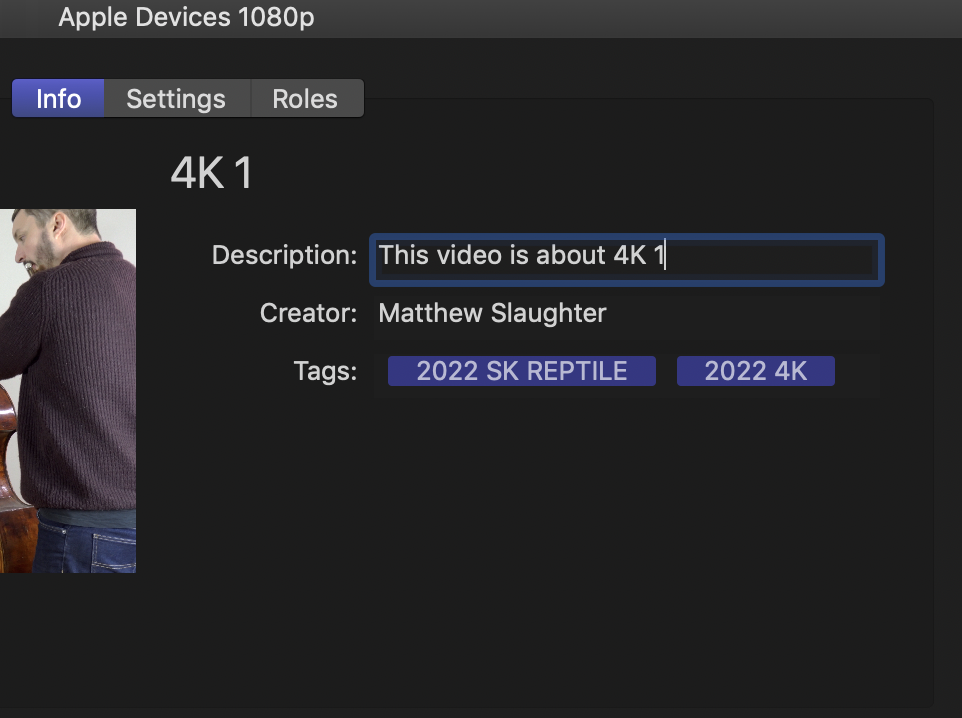
As per attachment -
Can anyone please advise how to permanently clear the "creator", "description" and "meta data" fields? It is quite irritating having to clear these for every single export. I have tried to find the counterparts for these fields in the extended info view but can't see them anywhere to clear them... in any case, for me, I have no use for them and would rather not have this metadata in my video files, especially when they are for clients....
Many thanks!
FCPX 10.4.10 (no I can't upgrade...)
OSX Mojave (no I can't upgrade...)
Imac pro
As per attachment -
Can anyone please advise how to permanently clear the "creator", "description" and "meta data" fields? It is quite irritating having to clear these for every single export. I have tried to find the counterparts for these fields in the extended info view but can't see them anywhere to clear them... in any case, for me, I have no use for them and would rather not have this metadata in my video files, especially when they are for clients....
Many thanks!
FCPX 10.4.10 (no I can't upgrade...)
OSX Mojave (no I can't upgrade...)
Imac pro
Please Log in to join the conversation.


17 Jul 2022 02:00 #121444
by DaveM
Replied by DaveM on topic How do you permanently clear meta data fields for "clean" video exports?
Two ways I can think of, right now:
1. Create a custom destination in Compressor, where, in the General tab, you select to remove all metadata and annotations. You can then import the destination in FCP's preferences. You could create a Droplet application from Compressor, as well.
2. Use a tool like Shutter Encoder, which is free, and choose to "Re-Wrap" file(s) and leave "Preserve metadata" unselected in the Advanced features settings.
1. Create a custom destination in Compressor, where, in the General tab, you select to remove all metadata and annotations. You can then import the destination in FCP's preferences. You could create a Droplet application from Compressor, as well.
2. Use a tool like Shutter Encoder, which is free, and choose to "Re-Wrap" file(s) and leave "Preserve metadata" unselected in the Advanced features settings.
Please Log in to join the conversation.
17 Jul 2022 04:03 #121448
by Slaughter
Replied by Slaughter on topic How do you permanently clear meta data fields for "clean" video exports?
Thanks. So FCPX forces this upon users and offers no native way to manage it? I'm not sure it bothers me enough to use an external application or script to deal with it. I expected that FCPX was a smart enough application to know that users should be allowed to customize this sort of thing. Ah well...
Please Log in to join the conversation.
17 Jul 2022 04:18 #121450
by DaveM
Replied by DaveM on topic How do you permanently clear meta data fields for "clean" video exports?
Creating a set of destinations in Compressor that you can use in FCP is an "advanced" way to deal with this.
Of course, you could just delete that info on your final export for each project.
You use the feedback feature from the Final Cut Pro menu to ask Apple to make "ignore all metadata" or something similar a preference setting.
You could use a Folder Action to automatically run the Compressor droplet whenever a new file is added to a given folder. A tool like Hazel can do this kind of thing, as well.
Some options to consider, at least...
Of course, you could just delete that info on your final export for each project.
You use the feedback feature from the Final Cut Pro menu to ask Apple to make "ignore all metadata" or something similar a preference setting.
You could use a Folder Action to automatically run the Compressor droplet whenever a new file is added to a given folder. A tool like Hazel can do this kind of thing, as well.
Some options to consider, at least...
Please Log in to join the conversation.

17 Jul 2022 04:24 #121451
by dgwvideo
Creating history....one edit at a time !
Replied by dgwvideo on topic How do you permanently clear meta data fields for "clean" video exports?
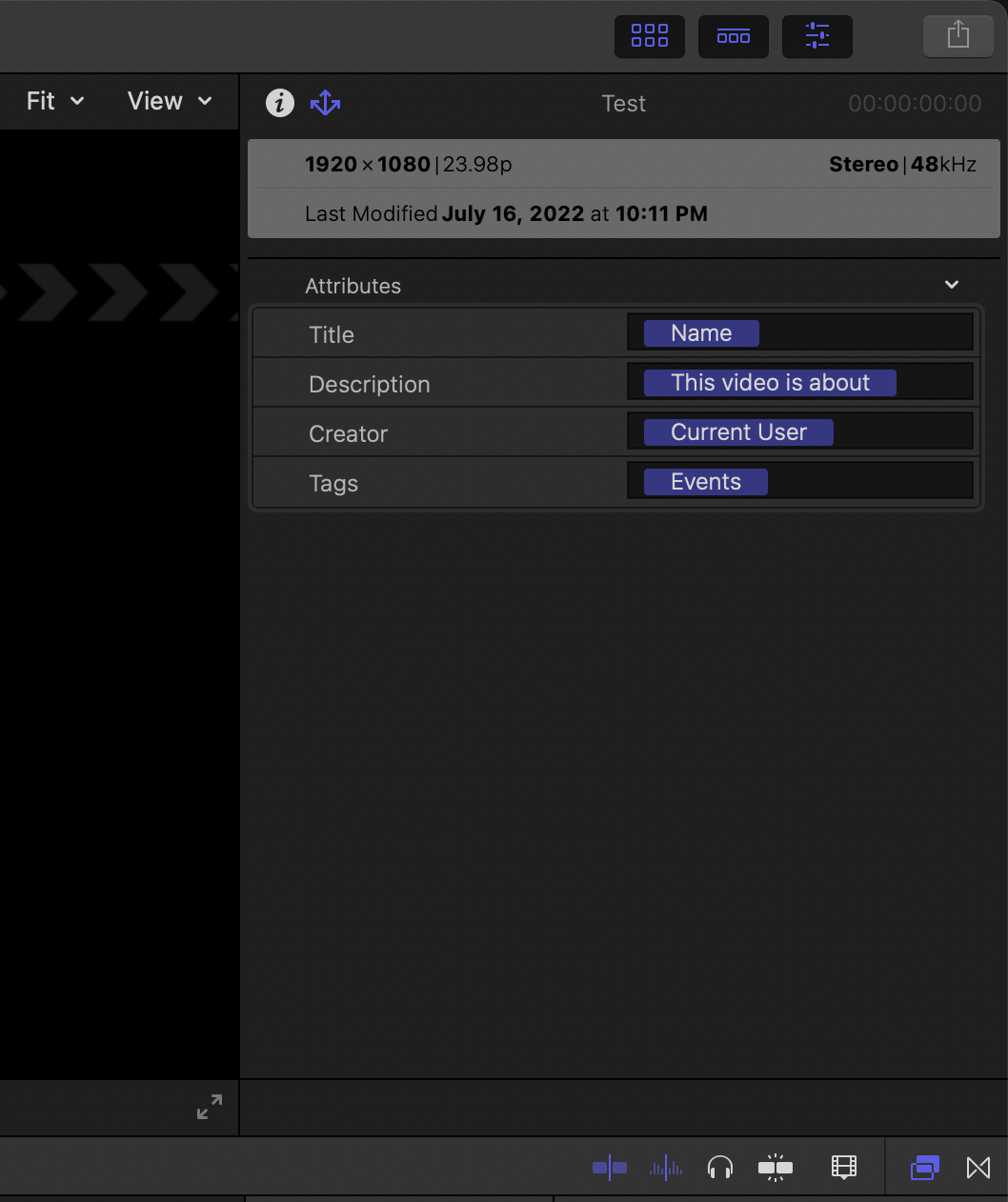
You can absolutely do this in FCP for each project within a library. Select the project and click on the descriptor icon to the right of the info icon. This allows you to clear the tags, creator and description that appears on exports from FCP. Likewise, you can change the defaults to anything you want. A name is required for the title since FCP cannot export a blank file and needs to have a filename. This needs to be done for every project within the library. See the screenshot.
Creating history....one edit at a time !
Please Log in to join the conversation.
17 Jul 2022 04:34 - 17 Jul 2022 04:42 #121453
by DaveM
Replied by DaveM on topic How do you permanently clear meta data fields for "clean" video exports?
Thanks Dan. That escaped me earlier. Sorry about that Slaughter... my bad.
The Attributes menu in the Share inspector has lots of additional fields, besides the default ones...
The Attributes menu in the Share inspector has lots of additional fields, besides the default ones...
Last edit: 17 Jul 2022 04:42 by DaveM.
Please Log in to join the conversation.
17 Jul 2022 06:30 #121457
by Slaughter
Replied by Slaughter on topic How do you permanently clear meta data fields for "clean" video exports?
Yay! It works! Thankyou!
Please Log in to join the conversation.
17 Jul 2022 14:03 #121459
by dgwvideo
Creating history....one edit at a time !
Replied by dgwvideo on topic How do you permanently clear meta data fields for "clean" video exports?
I only wish this could apply to the library also. We often provide 10 to 15 deliverables to clients and have multiple projects in that client library. We have to modify the export data in every project. It would be nice if your settings stuck with all projects within a library unless you change them, but sadly it doesn’t.
Creating history....one edit at a time !
Please Log in to join the conversation.
