


- Posts: 86
- Thank you received: 1
3 Post Moderation Rule for New Boarders (25 Jan 2021)
New boarders will have their posts moderated - Don't worry if you cannot see your post immediately.
Snapshot not working - Yellow warning triangle
- ETdroneHome
-
 Topic Author
- Offline
- Premium Member
-

Less
More
09 Jul 2022 21:25 #121289
by ETdroneHome
Snapshot not working - Yellow warning triangle was created by ETdroneHome
I am running 12.4 on an Mac Studio and 10.6.3 and cannot Snapshot duplicate certain projects. I started with FCP a couple of years ago and through a lack of knowledge all my projects within a library are in one event. Over time the projects have gotten too long and I want to "start over" to clean this up. All the projects work correctly, render and share and nothing is remiss in the timeline.
Through Youtube vids I decided that Snapshot duplication would be the best for me due to the many compound clips that I use. So I created a new library and wanted to duplicate specific projects and move them to the new library to edit them. Snapshot is not working.
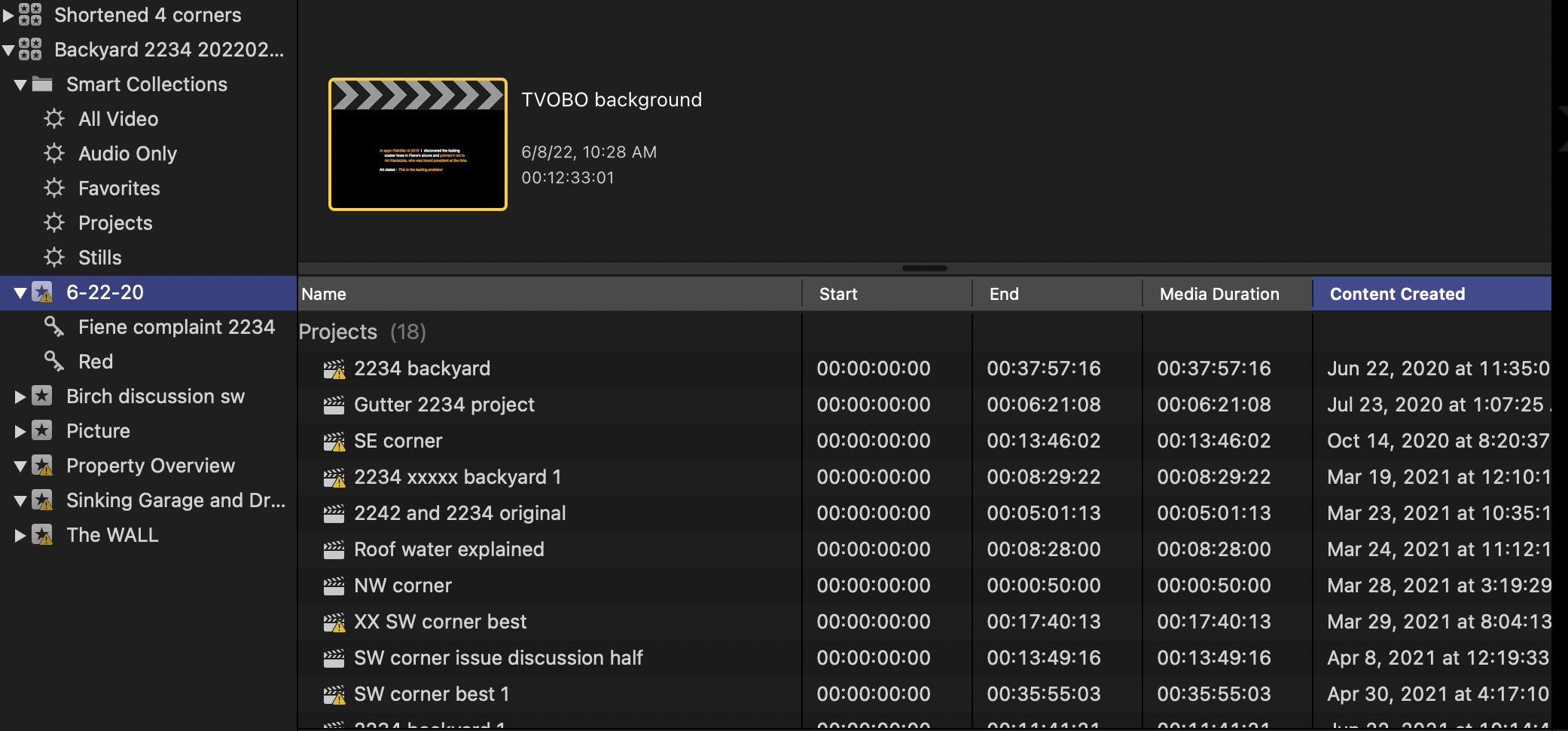
Normally I only look at filmstrip mode and do not see any problems. Today I looked at the list view and see a yellow warning exclamation symbol and do not know what that means.
I am able to Snapshot a project
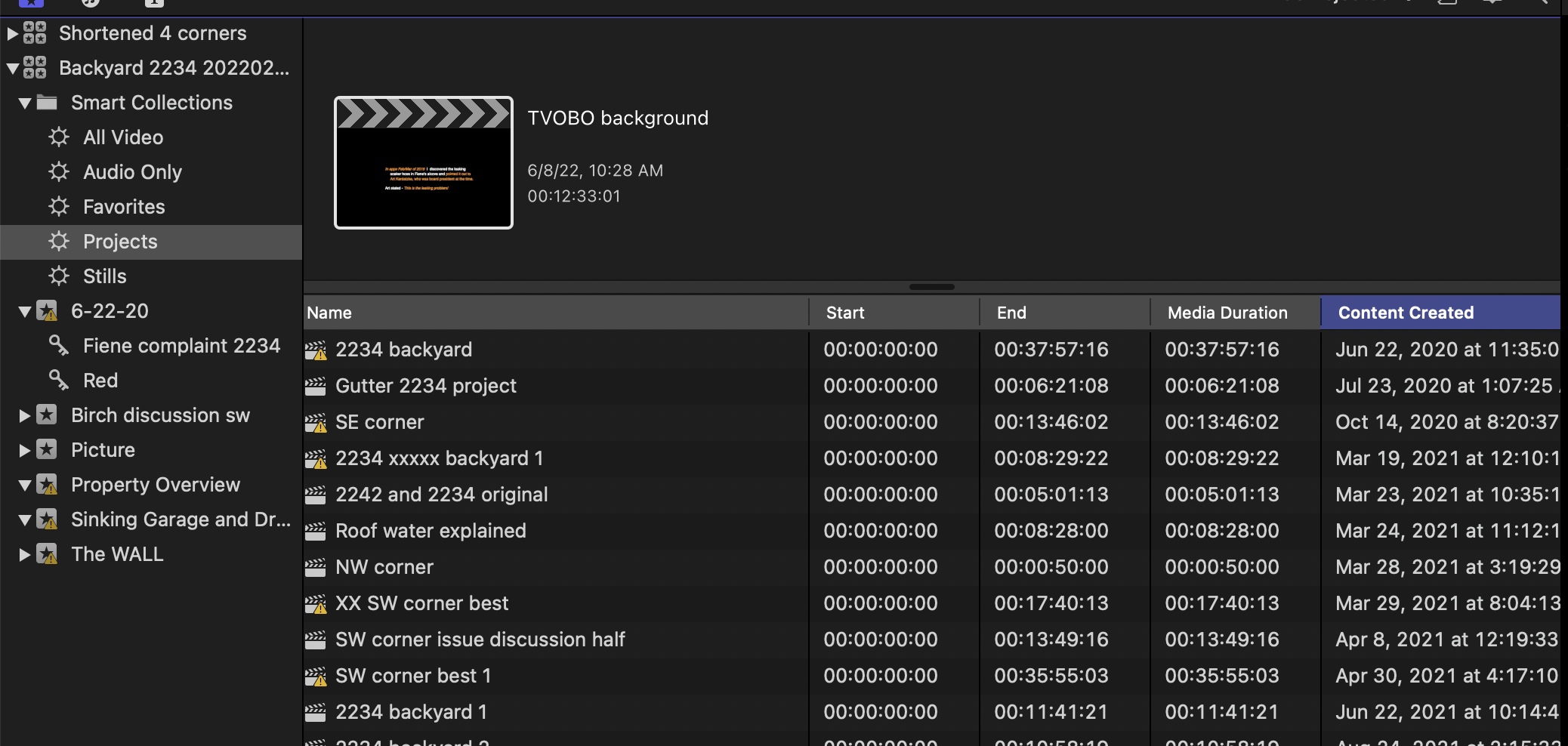 that does not have this symbol. I rebooted and deleted preferences and that did not help.
Any help would be appreciated.
Rich
Through Youtube vids I decided that Snapshot duplication would be the best for me due to the many compound clips that I use. So I created a new library and wanted to duplicate specific projects and move them to the new library to edit them. Snapshot is not working.
Normally I only look at filmstrip mode and do not see any problems. Today I looked at the list view and see a yellow warning exclamation symbol and do not know what that means.
I am able to Snapshot a project
Any help would be appreciated.
Rich
Please Log in to join the conversation.


10 Jul 2022 00:34 #121291
by DaveM
Replied by DaveM on topic Snapshot not working - Yellow warning triangle
It seems like when you copied/moved Projects and Events that connections to media files were lost.
Here are some quick reads to help you figure things out:
Alert icons in Final Cut Pro:
support.apple.com/guide/final-cut-pro/al...a7/10.6.2/mac/11.5.1
Copy or move items between libraries in Final Cut Pro:
support.apple.com/guide/final-cut-pro/co...a3/10.6.2/mac/11.5.1
Intro to media management in Final Cut Pro:
support.apple.com/guide/final-cut-pro/in...bd/10.6.2/mac/11.5.1
Hope this helps.
Here are some quick reads to help you figure things out:
Alert icons in Final Cut Pro:
support.apple.com/guide/final-cut-pro/al...a7/10.6.2/mac/11.5.1
Copy or move items between libraries in Final Cut Pro:
support.apple.com/guide/final-cut-pro/co...a3/10.6.2/mac/11.5.1
Intro to media management in Final Cut Pro:
support.apple.com/guide/final-cut-pro/in...bd/10.6.2/mac/11.5.1
Hope this helps.
Please Log in to join the conversation.
- ETdroneHome
-
Topic Author
- Offline
- Premium Member
-
Less
More
- Posts: 86
- Thank you received: 1
10 Jul 2022 20:23 #121304
by ETdroneHome
Replied by ETdroneHome on topic Snapshot not working - Yellow warning triangle
DaveM thanks for your input.
I was aware of the red symbols / yellow triangle docs. That is not what I saw in the list view, it was only a yellow triangle and only in list view, hence my question.
However your assessment was spot on and its presence was due in many cases to missing images etc but not in all cases.
So I am updating this post in case someone else runs into the problem of snapshot not working but FCP not providing an error msg explaining why it did not work.
After I cleaned up the missing images several projects still had the yellow triangle in the list view but no Red icon with the yellow symbols in the time line.
In an attempt to isolate the problem I opened the smallest project it contained one compound clip. I opened the clip and no symbols were in its timeline. So I copied the contents, closed the CC and deleted it and pasted the contents into the timeline and the symbol disappeared.
Using this approach I was able to get the yellow symbol removed from several other projects.
In a few other cases merely opening the CC to look for the RED/Yellow symbol and closing it 'reset' something. This approach did not reset the 'trial' CC.
I am not sure what was reset using this approach but it did.
Thanks again for your help.
Rich
I was aware of the red symbols / yellow triangle docs. That is not what I saw in the list view, it was only a yellow triangle and only in list view, hence my question.
However your assessment was spot on and its presence was due in many cases to missing images etc but not in all cases.
So I am updating this post in case someone else runs into the problem of snapshot not working but FCP not providing an error msg explaining why it did not work.
After I cleaned up the missing images several projects still had the yellow triangle in the list view but no Red icon with the yellow symbols in the time line.
In an attempt to isolate the problem I opened the smallest project it contained one compound clip. I opened the clip and no symbols were in its timeline. So I copied the contents, closed the CC and deleted it and pasted the contents into the timeline and the symbol disappeared.
Using this approach I was able to get the yellow symbol removed from several other projects.
In a few other cases merely opening the CC to look for the RED/Yellow symbol and closing it 'reset' something. This approach did not reset the 'trial' CC.
I am not sure what was reset using this approach but it did.
Thanks again for your help.
Rich
Please Log in to join the conversation.
10 Jul 2022 21:12 #121306
by DaveM
Replied by DaveM on topic Snapshot not working - Yellow warning triangle
It's likely that some clips just aren't being "refreshed". Seems like you learned more about FCP. That's good. And, thanks for sharing your findings with the rest of us!
Cheers.
Cheers.
Please Log in to join the conversation.
11 Jul 2022 17:47 #121326
by dmetz
Replied by dmetz on topic Snapshot not working - Yellow warning triangle
I've had this issue intermittently over the years, been going on for awhile. It only ever happens after I relink media, and hasn't happened in quite awhile now.
I've been able to clear the warning triangles by opening the affected timeline / CC, adding a gap clip to the end, and then deleting it. Sometimes they'll clear after a relaunch too.
I've been able to clear the warning triangles by opening the affected timeline / CC, adding a gap clip to the end, and then deleting it. Sometimes they'll clear after a relaunch too.
Please Log in to join the conversation.
