




- Posts: 22
- Thank you received: 0
3 Post Moderation Rule for New Boarders (25 Jan 2021)
New boarders will have their posts moderated - Don't worry if you cannot see your post immediately.
Looking for a tutorial to make my own animated wedding titles in Apple Motion.
04 Jul 2022 00:45 #121219
by rleiman
Looking for a tutorial to make my own animated wedding titles in Apple Motion. was created by rleiman
Greetings Everyone.
I did a Google search for "apple motion wedding titles tutorial" and only found other sellers selling the templates they made and no tutorials. I'm hoping to locate tutorials to do that. I would love to know the secret on how they made the flourishes for their templates. I already have one of those template packs and want to make the animated flourish titles by like they did. I'm sure this is possible in Apple Motion, otherwise all those sellers would not have been able to make all of those templates.
Thanks in advance.
Truly,
Emad
I did a Google search for "apple motion wedding titles tutorial" and only found other sellers selling the templates they made and no tutorials. I'm hoping to locate tutorials to do that. I would love to know the secret on how they made the flourishes for their templates. I already have one of those template packs and want to make the animated flourish titles by like they did. I'm sure this is possible in Apple Motion, otherwise all those sellers would not have been able to make all of those templates.
Thanks in advance.
Truly,
Emad
Please Log in to join the conversation.


04 Jul 2022 03:41 - 04 Jul 2022 03:42 #121220
by DaveM
Replied by DaveM on topic Looking for a tutorial to make my own animated wedding titles in Apple Motion.
You might try Ripple Training's Motion courses. They have a one-hour introduction to Motion on their YouTube channel.
Once you're familiar with Motion, you could try to find some Motion title templates that are similar to what you'd like to do. If you can find examples that aren't "locked", you can right-click in FCP and open them in Motion. There, you could modify them, or simply dissect them to figure out how they work.
Once you're familiar with Motion, you could try to find some Motion title templates that are similar to what you'd like to do. If you can find examples that aren't "locked", you can right-click in FCP and open them in Motion. There, you could modify them, or simply dissect them to figure out how they work.
Last edit: 04 Jul 2022 03:42 by DaveM.
Please Log in to join the conversation.
- Karsten Schlüter
-

- Offline
- Moderator
-

Less
More
- Posts: 3790
- Thank you received: 718
04 Jul 2022 04:07 #121221
by Karsten Schlüter
Welcome rleiman to fop.co
reminds me of "How to cook a 5 course menu?" .... a very generic question, not easy to answer, not knowing your skills with Motion etc.
For a start, select in FCP Titles/Build in/Out, Ornaments, and right-clicking on it 'Open a copy in Motion', you'll see something like that:
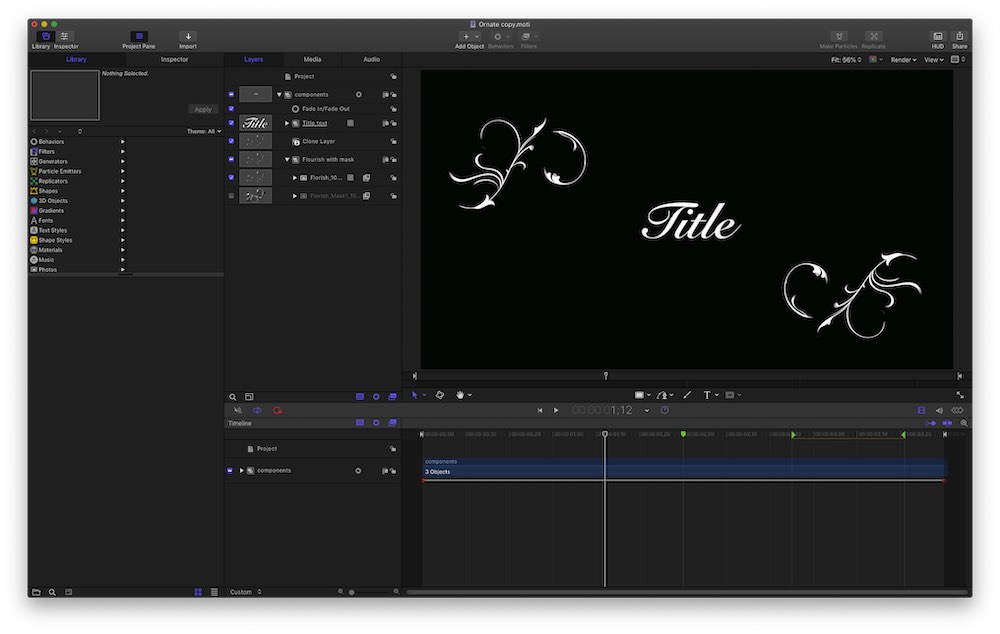
The not-so-secret sauce are: topic-related selection of fonts, flourish graphics, animated masks and write-on behaviors… I'd say, no beginners task, but no rocket-science either.
Follow Dave's advice, learn the basics. Or purchase a ready-made wedding template…
Replied by Karsten Schlüter on topic Looking for a tutorial to make my own animated wedding titles in Apple Motion.
… . I would love to know the secret on how they made the flourishes for their templates.....
Welcome rleiman to fop.co
reminds me of "How to cook a 5 course menu?" .... a very generic question, not easy to answer, not knowing your skills with Motion etc.
For a start, select in FCP Titles/Build in/Out, Ornaments, and right-clicking on it 'Open a copy in Motion', you'll see something like that:
The not-so-secret sauce are: topic-related selection of fonts, flourish graphics, animated masks and write-on behaviors… I'd say, no beginners task, but no rocket-science either.
Follow Dave's advice, learn the basics. Or purchase a ready-made wedding template…
Please Log in to join the conversation.
04 Jul 2022 15:58 #121224
by rleiman
Replied by rleiman on topic Looking for a tutorial to make my own animated wedding titles in Apple Motion.
Thank you so much but I don't have final cut pro. I did find under Library -> Content -> Drawings several Ornaments that I can take a closer look at.
Please Log in to join the conversation.
05 Jul 2022 13:37 #121235
by rleiman
Replied by rleiman on topic Looking for a tutorial to make my own animated wedding titles in Apple Motion.
Hi Karsten,
Is there a tutorial on how they set up this ornament? I'm at the absolute beginner level with Motion and would love to create something like this and add it into the ornament section of the library or another area of the library for custom ornaments.
Truly,
Emad
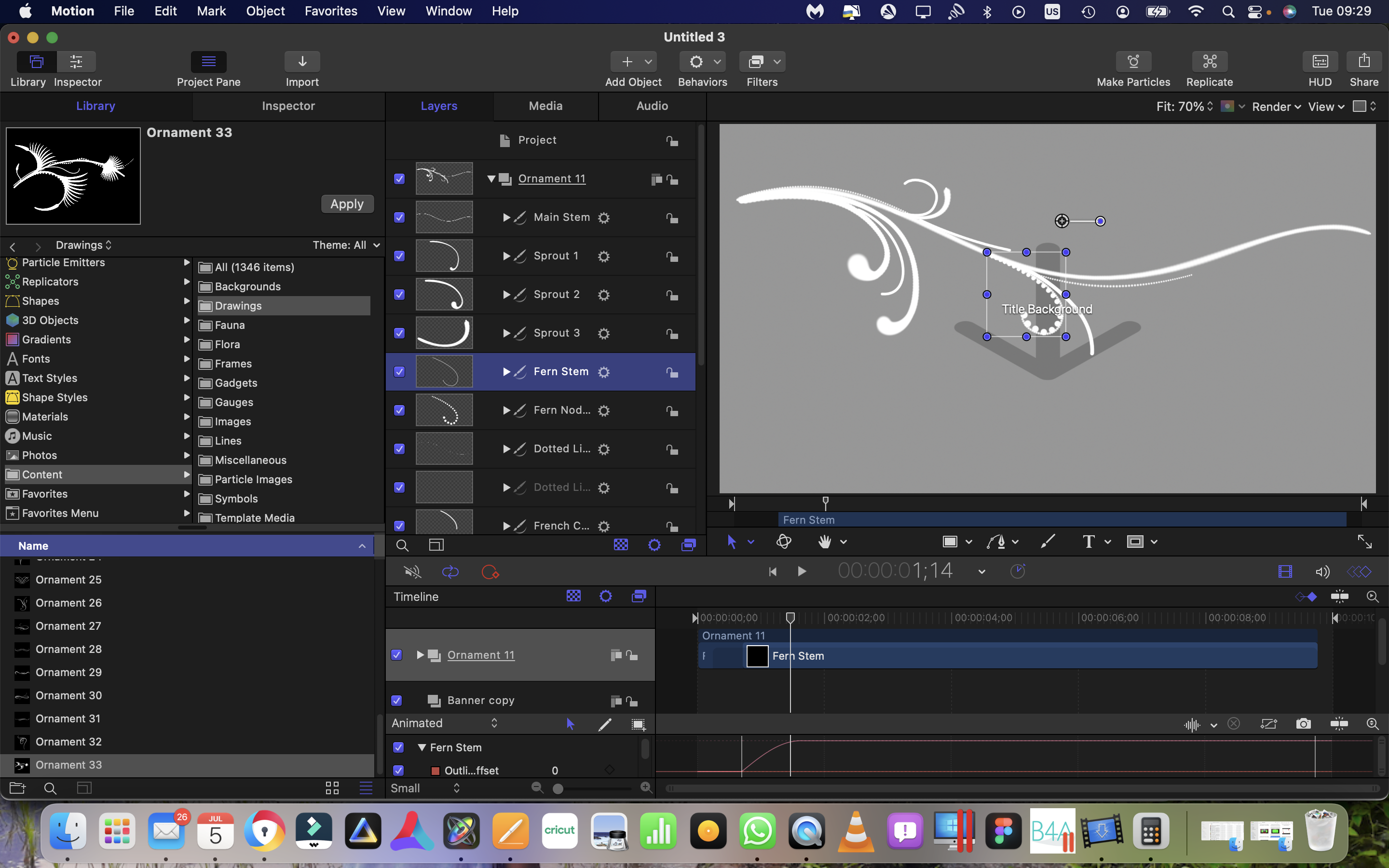
Is there a tutorial on how they set up this ornament? I'm at the absolute beginner level with Motion and would love to create something like this and add it into the ornament section of the library or another area of the library for custom ornaments.
Truly,
Emad
Please Log in to join the conversation.
- Karsten Schlüter
-
- Offline
- Moderator
-
Less
More
- Posts: 3790
- Thank you received: 718
07 Jul 2022 05:05 - 07 Jul 2022 05:05 #121257
by Karsten Schlüter
Follow detailed advice Motion-Master fox_m gave you at -discussions.
You have to understand the 'layers' principle of Motion, Masking and Behaviors.
I'm not aware of any tutorials for this 'effect', no 'one click solution'.
Start with a single line/stroke, how to animate it with masks and the Write-On behavior.
It doesn't get any better than Fox' advice
Replied by Karsten Schlüter on topic Looking for a tutorial to make my own animated wedding titles in Apple Motion.
Hi Karsten,
Is there a tutorial on how they set up this ornament? I'm at the absolute beginner level with Motion....
Follow detailed advice Motion-Master fox_m gave you at -discussions.
You have to understand the 'layers' principle of Motion, Masking and Behaviors.
I'm not aware of any tutorials for this 'effect', no 'one click solution'.
Start with a single line/stroke, how to animate it with masks and the Write-On behavior.
It doesn't get any better than Fox' advice
Last edit: 07 Jul 2022 05:05 by Karsten Schlüter.
Please Log in to join the conversation.
07 Jul 2022 22:11 #121264
by rleiman
Replied by rleiman on topic Looking for a tutorial to make my own animated wedding titles in Apple Motion.
Hi Karsten,
I'm doing that now. Thanks for all of the replies.
Truly,
Emad
I'm doing that now. Thanks for all of the replies.
Truly,
Emad
Please Log in to join the conversation.
