


- Posts: 2
- Thank you received: 0
3 Post Moderation Rule for New Boarders (25 Jan 2021)
New boarders will have their posts moderated - Don't worry if you cannot see your post immediately.
FCPX Multicam with separate audio tracks in one clip
01 Feb 2012 21:40 #3697
by jepstein
FCPX Multicam with separate audio tracks in one clip was created by jepstein
I'm editing a three-camera interview and the material was recorded so that camera A has 2 separate audio tracks: track 1 is the mic of one subject, track 2 is the mic of the other.
Within a multicam clip, I see how I can switch audio from camera A to B.
I don't see a way of switching from Angle:A Track:1 to Angle: A Track 2.
What am I missing?
Thanks,
Jim
Within a multicam clip, I see how I can switch audio from camera A to B.
I don't see a way of switching from Angle:A Track:1 to Angle: A Track 2.
What am I missing?
Thanks,
Jim
Please Log in to join the conversation.

02 Feb 2012 01:15 #3705
by funkpost
Replied by funkpost on topic Re: FCPX Multicam with separate audio tracks in one clip
I simply dont get what you are trying to say. Could you re-phrase it?
Please Log in to join the conversation.

02 Feb 2012 04:50 #3712
by BenB
Replied by BenB on topic Re: FCPX Multicam with separate audio tracks in one clip
I'm going to VERY STRONGLY recommend anyone interested in multicam read that whole section of the user manual. There's way more to it than meets the eye, and it has a very specific way of working.
You have two "channels" of audio on cam 1 that is your audio track, so you want to switch video between angles, but not audio. Very easy.
In the Angle Viewer are three icons at the top left. The first switches and cuts both audio and video. The second switches and cuts only video. The third icon switches and cuts only audio.
With the first one highlighted, Option-click (which switches but does not cut) the angle who's audio you want to use. Then click the middle icon so that from now on you only switch/cut video angles, not audio.
You have two "channels" of audio on cam 1 that is your audio track, so you want to switch video between angles, but not audio. Very easy.
In the Angle Viewer are three icons at the top left. The first switches and cuts both audio and video. The second switches and cuts only video. The third icon switches and cuts only audio.
With the first one highlighted, Option-click (which switches but does not cut) the angle who's audio you want to use. Then click the middle icon so that from now on you only switch/cut video angles, not audio.
Please Log in to join the conversation.

02 Feb 2012 05:43 - 02 Feb 2012 05:44 #3720
by tomsia
Replied by tomsia on topic Re: FCPX Multicam with separate audio tracks in one clip
I've stumbled on the same problem as jepstein.
Imagine, or better - try the scenario:
- you have multi-angle shoot with two microphones recorded respectively to one angle's camera audio channel one and channel two. So called Dual Mono situation.
- you edit multi cam to the storyline, select the angle with proper audio track and perform video only angle cuts, threw some portions out and so on.
-now you want to refine your audio - clean or silence some portions of one or another audio channel on already edited Storyline.
- you can not. you have a stereo pair. period. all audio channel controls are greyed out.
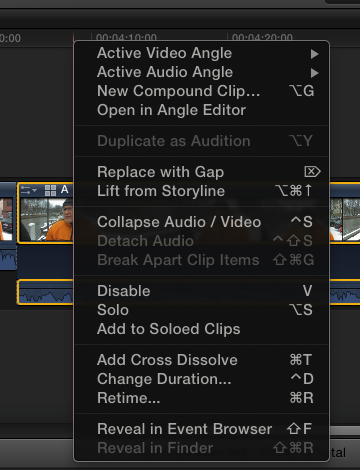
With an ordinary clip with Dual Mono Audio you have an option to "Break Apart Clip Items" in order to get to the separated audio channels on the Project timeline.
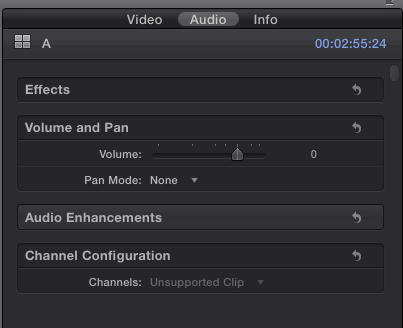
I attach some screenshots to illustrate. Hope the question now is clear?
Well, there is one VERY DIRTY workaround - you have to open the multi clip in Angle Editor and open the angle in question in the timeline by right-clicking on it. Well, and you can clean the ALL audio, or find the piece of interest by timecode and clean only this place. It will propagate through all the instances of this particular Multiclip in all Projects. Maybe that was the idea? But in this case it was too way exotic for convenient editing...
Imagine, or better - try the scenario:
- you have multi-angle shoot with two microphones recorded respectively to one angle's camera audio channel one and channel two. So called Dual Mono situation.
- you edit multi cam to the storyline, select the angle with proper audio track and perform video only angle cuts, threw some portions out and so on.
-now you want to refine your audio - clean or silence some portions of one or another audio channel on already edited Storyline.
- you can not. you have a stereo pair. period. all audio channel controls are greyed out.
With an ordinary clip with Dual Mono Audio you have an option to "Break Apart Clip Items" in order to get to the separated audio channels on the Project timeline.
I attach some screenshots to illustrate. Hope the question now is clear?
Well, there is one VERY DIRTY workaround - you have to open the multi clip in Angle Editor and open the angle in question in the timeline by right-clicking on it. Well, and you can clean the ALL audio, or find the piece of interest by timecode and clean only this place. It will propagate through all the instances of this particular Multiclip in all Projects. Maybe that was the idea? But in this case it was too way exotic for convenient editing...
Last edit: 02 Feb 2012 05:44 by tomsia.
Please Log in to join the conversation.
02 Feb 2012 06:03 - 02 Feb 2012 06:06 #3722
by BenB
Replied by BenB on topic Re: FCPX Multicam with separate audio tracks in one clip
No, you don't configure audio in the Project timeline. Open the multiclip from the Browser into it's own timeline, setup audio configurations there.
Remember, changes made to the multiclip in it's own timeline effect all copies of it everywhere. Which is why the user manual suggests making a copy of it before configuring and editing.
The 3 location workflow allows for a great deal of flexibility. 1- You can configure, filter, keyframe, etc, in the Multiclip's own timeline. 2- You can set how switch and cuts work in the Angle Viewer. 3- You do your edits in a Project Timeline.
Again, I strongly urge everyone interested to read the whole Multicam section of the user manual, as there is more to it than meets the eye, and most of the questions I'm personally fielding are answered there. It's a very elegant solution that gives a great deal of flexibility.
Remember, changes made to the multiclip in it's own timeline effect all copies of it everywhere. Which is why the user manual suggests making a copy of it before configuring and editing.
The 3 location workflow allows for a great deal of flexibility. 1- You can configure, filter, keyframe, etc, in the Multiclip's own timeline. 2- You can set how switch and cuts work in the Angle Viewer. 3- You do your edits in a Project Timeline.
Again, I strongly urge everyone interested to read the whole Multicam section of the user manual, as there is more to it than meets the eye, and most of the questions I'm personally fielding are answered there. It's a very elegant solution that gives a great deal of flexibility.
Last edit: 02 Feb 2012 06:06 by BenB.
Please Log in to join the conversation.
- Tom Wolsky
-

- Offline
- Moderator
-

02 Feb 2012 06:18 #3723
by Tom Wolsky
Replied by Tom Wolsky on topic Re: FCPX Multicam with separate audio tracks in one clip
"Remember, changes made to the multiclip in it's own timeline effect all copies of it everywhere. Which is why the user manual suggests making a copy of it before configuring and editing."
If you edit the multicam clip into a new project and make the changes and edits there, it does not effect the multicam clip in the browser. This was the workflow in legacy versions of FCP and should still be used. Of course in legacy versions there was no option to open the multiclip in its own timeline.
If you edit the multicam clip into a new project and make the changes and edits there, it does not effect the multicam clip in the browser. This was the workflow in legacy versions of FCP and should still be used. Of course in legacy versions there was no option to open the multiclip in its own timeline.
Please Log in to join the conversation.
02 Feb 2012 06:20 #3724
by tomsia
Replied by tomsia on topic Re: FCPX Multicam with separate audio tracks in one clip
I do understand it very clear. I've red the manual VERY thoroughly.
I only can't find the way how to access multiclip's audio as two separate mono channels in the editing timeline at the same time?
With stereo recording - absolutely no problem. New Multiclip is GREAT.
Multiclip's active angle's mono audio channels. On the timeline. At the same time. As separate audio "tracks".
Is there an easy way to do it at this moment? I'm still struggling to find out.
BTW, if I check the Audio tab in Inspector with Multiclip selected in the timeline, the Channel Configuration reads as "Channels: Unsuported clip". No way to change anything here.
I only can't find the way how to access multiclip's audio as two separate mono channels in the editing timeline at the same time?
With stereo recording - absolutely no problem. New Multiclip is GREAT.
Multiclip's active angle's mono audio channels. On the timeline. At the same time. As separate audio "tracks".
Is there an easy way to do it at this moment? I'm still struggling to find out.
BTW, if I check the Audio tab in Inspector with Multiclip selected in the timeline, the Channel Configuration reads as "Channels: Unsuported clip". No way to change anything here.
Please Log in to join the conversation.
02 Feb 2012 06:32 #3725
by BenB
Replied by BenB on topic Re: FCPX Multicam with separate audio tracks in one clip
I open it from the Browser into it's own Timeline, and have no problem configuring the audio channels of each clip as I need them. Not following what the problem is.
Please Log in to join the conversation.
02 Feb 2012 06:53 #3727
by tomsia
Replied by tomsia on topic Re: FCPX Multicam with separate audio tracks in one clip
Maybe I am lost in translation - english is not my native language 
I would like to have a representation of mono channels as separate tracks in the main editing timeline for on the fly correction while I am cutting multiclip. I edit show with two microphones recorded to two camera audio channels as Dual Mono in uncontrolled environment. So there are lots of unexpected noises to deal with.
With an ordinary clip on the timeline I can use "Break Apart Clip Components" and end up with two audio tracks attached to video track. I can't do it with multiclip. It's very big inconvenience to me. So I still have to stick with FCP 7 just for that reason
I lack more convenient way to deal with camera mono tracks in FCP X at all.
Going to fill a FCP X Feedback form
I would like to have a representation of mono channels as separate tracks in the main editing timeline for on the fly correction while I am cutting multiclip. I edit show with two microphones recorded to two camera audio channels as Dual Mono in uncontrolled environment. So there are lots of unexpected noises to deal with.
With an ordinary clip on the timeline I can use "Break Apart Clip Components" and end up with two audio tracks attached to video track. I can't do it with multiclip. It's very big inconvenience to me. So I still have to stick with FCP 7 just for that reason
I lack more convenient way to deal with camera mono tracks in FCP X at all.
Going to fill a FCP X Feedback form
Please Log in to join the conversation.
02 Feb 2012 07:16 #3732
by BenB
Replied by BenB on topic Re: FCPX Multicam with separate audio tracks in one clip
If you simply need to keyframe audio levels, you can do that in the Project Timeline.
If you need to edit audio further, you can simply right-click that specific clip in the Project Timeline, "Open In Angle Editor", do what you need to the audio there, then jump back to the Project timeline with either the Timeline history buttons or Cmd+left/rigth brackets shortcuts. Pretty quick and easy.
If you need to edit audio further, you can simply right-click that specific clip in the Project Timeline, "Open In Angle Editor", do what you need to the audio there, then jump back to the Project timeline with either the Timeline history buttons or Cmd+left/rigth brackets shortcuts. Pretty quick and easy.
Please Log in to join the conversation.
02 Feb 2012 16:38 #3752
by tomsia
Replied by tomsia on topic Re: FCPX Multicam with separate audio tracks in one clip
Ouch, it was close....
It could work if...
1. "Open In Angle Editor" jumps to position you left playhead/skimmer last time. Not to the frame you standing on in Timeline. So you have to navigate to the frame of interest in "Angle Editor" every time you jump to it from Timeline.
2. In the "Angle Editor" You still can't access mono channels and set the levels on them INDEPENDENTLY. All the point is - I want to change levels on mono audio channels independently from each other. Actually you can do it IF in "Angle Editor" you right-click on the clip and chose "Open In Timeline". So to say - you dive to the second layer of the dream But still - there's not the same frame as in Timeline nor in "Angle Editor"....
At last I managed to formulate the problem - INDEPENDENT changes of audio levels and filters on mono audio channels.
So for now I consider it kind of omission from Apple's side.
Filling the Feedback form. Hoping for improvements.
Or am I still missing something? Just cross-checking to be sure.
It could work if...
1. "Open In Angle Editor" jumps to position you left playhead/skimmer last time. Not to the frame you standing on in Timeline. So you have to navigate to the frame of interest in "Angle Editor" every time you jump to it from Timeline.
2. In the "Angle Editor" You still can't access mono channels and set the levels on them INDEPENDENTLY. All the point is - I want to change levels on mono audio channels independently from each other. Actually you can do it IF in "Angle Editor" you right-click on the clip and chose "Open In Timeline". So to say - you dive to the second layer of the dream
But still - there's not the same frame as in Timeline nor in "Angle Editor"....At last I managed to formulate the problem - INDEPENDENT changes of audio levels and filters on mono audio channels.
So for now I consider it kind of omission from Apple's side.
Filling the Feedback form. Hoping for improvements.
Or am I still missing something? Just cross-checking to be sure.
Please Log in to join the conversation.
02 Feb 2012 21:30 #3767
by jepstein
Replied by jepstein on topic Re: FCPX Multicam with separate audio tracks in one clip
I agree with Tomsia. I still don't see an easy way on the fly to switch between dual mono tracks recorded on the same camera. Someone posted on the FCP Listerserv yesterday with the same problem (cut and pasted below).
I worked around the issue by dropping my clip into a compound clip and deleting the second audio channel within the compound clip and making the first channel stereo. Then I multicam synced the compound clip with the other clips, including the original. The compound angle I used for audio only when switching on the fly. There has to be a better solution.
From the FinalCutPro-L list:
"Audio issues in multicam:
Scenario - 2 cameras with on-board audio + synced 4-channel broadcast wave audio recorder. Create multicam clip synced by TC and assign audio angle as the audio track. Only the wave files are the real audio (4 different mics). Edit the multicam clip to a new project (timeline). Cut cameras (video only) in the sequence. Unfortunately there is no way to access the individual audio tracks in the edited timeline. Cannot break apart and the Inspector ID's audio as "unsupported clip". Thoughts?"
I worked around the issue by dropping my clip into a compound clip and deleting the second audio channel within the compound clip and making the first channel stereo. Then I multicam synced the compound clip with the other clips, including the original. The compound angle I used for audio only when switching on the fly. There has to be a better solution.
From the FinalCutPro-L list:
"Audio issues in multicam:
Scenario - 2 cameras with on-board audio + synced 4-channel broadcast wave audio recorder. Create multicam clip synced by TC and assign audio angle as the audio track. Only the wave files are the real audio (4 different mics). Edit the multicam clip to a new project (timeline). Cut cameras (video only) in the sequence. Unfortunately there is no way to access the individual audio tracks in the edited timeline. Cannot break apart and the Inspector ID's audio as "unsupported clip". Thoughts?"
Please Log in to join the conversation.
02 Feb 2012 21:39 #3770
by BenB
Replied by BenB on topic Re: FCPX Multicam with separate audio tracks in one clip
Yep, it's not perfected yet, but there are ways to work around. I'd not use the audio clip in the multicam, but add it as a connected clip after the edit, then you have access to it.
Why do you make a mono track two tracks? That's not really "stereo", just two mono tracks. Never understood why folks do this.
You could also separate out the channels of the audio clip. Duplicate the clip, take the two duplicate, remove one channel of each. Then use those two separated clips with your multiclip, two separate audio tracks to cut or edit with.
Several work arounds in the mean time.
Why do you make a mono track two tracks? That's not really "stereo", just two mono tracks. Never understood why folks do this.
You could also separate out the channels of the audio clip. Duplicate the clip, take the two duplicate, remove one channel of each. Then use those two separated clips with your multiclip, two separate audio tracks to cut or edit with.
Several work arounds in the mean time.
Please Log in to join the conversation.
- jeffkevwood
-

- Offline
- New Member
-

Less
More
- Posts: 2
- Thank you received: 0
03 Feb 2012 18:58 - 03 Feb 2012 18:59 #3811
by jeffkevwood
Replied by jeffkevwood on topic Re: FCPX Multicam with separate audio tracks in one clip
tomsia, I would definitely use pluraleyes most of the time to give you a more editable outcome. You can always add a multicam track as the video track if the action becomes too complicated to cut on normal timeline with the angles as secondary storylines.
I have played with multicam a lot now and after the initial excitement the inability to edit audio as connected clips makes it less sufficient than I first thought. Yes you can add audio after, or you can edit all the audio and make a compound of it to use as the audio track in your multicam clip. But this adds another step. I fully expect apple to give us a more elegant way of editing the audio in a ready synced multicam clip in the next update. PLEASE!!!
Thanks,
Jeff
I have played with multicam a lot now and after the initial excitement the inability to edit audio as connected clips makes it less sufficient than I first thought. Yes you can add audio after, or you can edit all the audio and make a compound of it to use as the audio track in your multicam clip. But this adds another step. I fully expect apple to give us a more elegant way of editing the audio in a ready synced multicam clip in the next update. PLEASE!!!
Thanks,
Jeff
Last edit: 03 Feb 2012 18:59 by jeffkevwood.
Please Log in to join the conversation.
03 Feb 2012 19:14 #3812
by tomsia
Replied by tomsia on topic Re: FCPX Multicam with separate audio tracks in one clip
Yes, Jeff, definitely it should be more elegant.
And for a time being and for my particular project I did a such workaround:
1. I have my sound on one of the cameras. Dual Mono.
2. I put into compound clip multicam clip AND additionally sync to it the camera clip with my sound track by hand.
3. Break apart the clip with sound. Delete the video part of it.
4. I finish up having Multiclip with muted sound and to attached sound tracks.
Now I use this Compound clip to cut dialog for the first pass. Then I "Break apart" the edited Compound in the timeline and have access to Multiclip angles and to my two mono tracks for the second pass.
BTW Angle color balancing and some sound filtering I did before I started to cut.
Tiny bit of circus and we good to go!
Best regards,
Tomas.
And for a time being and for my particular project I did a such workaround:
1. I have my sound on one of the cameras. Dual Mono.
2. I put into compound clip multicam clip AND additionally sync to it the camera clip with my sound track by hand.
3. Break apart the clip with sound. Delete the video part of it.
4. I finish up having Multiclip with muted sound and to attached sound tracks.
Now I use this Compound clip to cut dialog for the first pass. Then I "Break apart" the edited Compound in the timeline and have access to Multiclip angles and to my two mono tracks for the second pass.
BTW Angle color balancing and some sound filtering I did before I started to cut.
Tiny bit of circus and we good to go!
Best regards,
Tomas.
Please Log in to join the conversation.
- jeffkevwood
-
- Offline
- New Member
-
Less
More
- Posts: 2
- Thank you received: 0
03 Feb 2012 19:17 - 03 Feb 2012 19:18 #3813
by jeffkevwood
Replied by jeffkevwood on topic Re: FCPX Multicam with separate audio tracks in one clip
All sounds good and similar to my method. You do know you can colour correct each angle in the angle viewer and it will filter through to your already cut multicam clip? I like this, it makes it real quick.
J
J
Last edit: 03 Feb 2012 19:18 by jeffkevwood.
Please Log in to join the conversation.
03 Feb 2012 19:23 #3814
by tomsia
Replied by tomsia on topic Re: FCPX Multicam with separate audio tracks in one clip
Yeah!
All other aspects of Multicam are absolutely insanely great!
Besides this "mono channels" thing. But today - who uses "mono" anyway...?)))
Happy editing!
Tomas.
All other aspects of Multicam are absolutely insanely great!
Besides this "mono channels" thing. But today - who uses "mono" anyway...?
)))Happy editing!
Tomas.
Please Log in to join the conversation.
09 Feb 2012 22:27 #4199
by BenB
Replied by BenB on topic Re: FCPX Multicam with separate audio tracks in one clip
Voice is always mono, as are some sound effects.
Please Log in to join the conversation.

15 Apr 2012 19:35 #7053
by RonPriest
Hey Tom, has Apple perhaps fixed this in version 10.0.4 because I'm seeing just the opposite. I'm seeing what Bin had originally stated when quoting the users guide:
"Remember, changes made to the multiclip in it's own timeline effect all copies of it everywhere. Which is why the user manual suggests making a copy of it before configuring and editing."
Additionally I might add, I'm just now accomplishing my first multi-audio track/multicam edit in FCPX which also happens to be after the release of 10.0.4, and am not having any problems editing my individual audio tracks in the multi-track audio track when I open it in it's own timeline from the Angle Editor. So I'm wondering if I'm not understanding the OP problem, or if there have been some undocumented fixes in version 10.0.4?
Is everyone else still having problems with this workflow?
Replied by RonPriest on topic Re: FCPX Multicam with separate audio tracks in one clip
Tom Wolsky wrote: "If you edit the multicam clip into a new project and make the changes and edits there, it does not effect the multicam clip in the browser. This was the workflow in legacy versions of FCP and should still be used. Of course in legacy versions there was no option to open the multiclip in its own timeline."
Hey Tom, has Apple perhaps fixed this in version 10.0.4 because I'm seeing just the opposite. I'm seeing what Bin had originally stated when quoting the users guide:
"Remember, changes made to the multiclip in it's own timeline effect all copies of it everywhere. Which is why the user manual suggests making a copy of it before configuring and editing."
Additionally I might add, I'm just now accomplishing my first multi-audio track/multicam edit in FCPX which also happens to be after the release of 10.0.4, and am not having any problems editing my individual audio tracks in the multi-track audio track when I open it in it's own timeline from the Angle Editor. So I'm wondering if I'm not understanding the OP problem, or if there have been some undocumented fixes in version 10.0.4?
Is everyone else still having problems with this workflow?
Please Log in to join the conversation.
15 Apr 2012 19:50 - 15 Apr 2012 19:51 #7055
by BenB
Replied by BenB on topic Re: FCPX Multicam with separate audio tracks in one clip
The user manual is now updated to 10.0.4 and states "When you open any multicam clip in the Angle Editor (whether from the Event Browser or the Timeline) you are in fact opening the parent multicam clip from the Event Browser. Any changes you make to a multicam clip in the Angle Editor are inherited by all of its child clips, in all projects. These changes include sync or trimming adjustments, clip speed retiming, video or audio effects such as color correction, and added or deleted angles. For example, if you delete an angle from a parent multicam clip, the angle is deleted from all child clips."
The opposite is true for Compound and other types of clips. Drop it into a Timeline, and it's an independent copy.
The opposite is true for Compound and other types of clips. Drop it into a Timeline, and it's an independent copy.
Last edit: 15 Apr 2012 19:51 by BenB.
Please Log in to join the conversation.
