




- Posts: 6
- Thank you received: 0
3 Post Moderation Rule for New Boarders (25 Jan 2021)
New boarders will have their posts moderated - Don't worry if you cannot see your post immediately.
MUCH NEEDED ADVICE ON SUITABLE WORKFLOW!
08 Jun 2022 16:57 #120853
by BARUDIE
MUCH NEEDED ADVICE ON SUITABLE WORKFLOW! was created by BARUDIE
Hi everyone, here asking for some brotherly advice and recommendations on a certain multi-cam workflow that would be suitable for the way I shot my documentary.
I shot the footage on 3 different cameras; a Canon (24fp-60fp), a JVC camcorder (25fp), and an iPhone 12 (24fp-60fp). The Canon was the main camera, while the JVC and the iPhone acted as different angle shots and b-roll. Alternating at different times on impulse/need.
Sometimes the audio source was connected directly to the Canon, on other shoot days they were separated.
Before I started at all, I organized all my footage and audio (renamed, numbered, and tagged) and transcoded to proxy. Plan is I will go through every interview in separate timelines, mark audio with topics, and then move the edits I want to the main project timeline and organize accordingly.
I have many clips and they're all over the place and it will take me FOREVER if I manually sync all these clips together before having to go over everything and doing the actual editing. I have a deadline and my back is against the wall on this one and I'm wondering what would be the fastest and most efficient way to redeem my near-chaotic approach during production.
Is it best to manually do it for more control? Is there a more advanced way to create new multicam clips, or synchronized clips? I'm still pretty much a beginner though I've watched endless amounts of YouTube tutorials and read plenty but yes, this is the first project I work on with this magnitude, AND I have a close deadline. So I can really use all the help I can get!
Another thing, I tried to sync two clips at a time, one from the Canon (24fp) and another from the JVC camcorder (25fp) and it synced alright when I open the synchronized clip, but once I copy that to the main timeline, it falls out of sync, I assume it's because the frames are not aligned properly. How do I fix this problem?
I shot the footage on 3 different cameras; a Canon (24fp-60fp), a JVC camcorder (25fp), and an iPhone 12 (24fp-60fp). The Canon was the main camera, while the JVC and the iPhone acted as different angle shots and b-roll. Alternating at different times on impulse/need.
Sometimes the audio source was connected directly to the Canon, on other shoot days they were separated.
Before I started at all, I organized all my footage and audio (renamed, numbered, and tagged) and transcoded to proxy. Plan is I will go through every interview in separate timelines, mark audio with topics, and then move the edits I want to the main project timeline and organize accordingly.
I have many clips and they're all over the place and it will take me FOREVER if I manually sync all these clips together before having to go over everything and doing the actual editing. I have a deadline and my back is against the wall on this one and I'm wondering what would be the fastest and most efficient way to redeem my near-chaotic approach during production.
Is it best to manually do it for more control? Is there a more advanced way to create new multicam clips, or synchronized clips? I'm still pretty much a beginner though I've watched endless amounts of YouTube tutorials and read plenty but yes, this is the first project I work on with this magnitude, AND I have a close deadline. So I can really use all the help I can get!
Another thing, I tried to sync two clips at a time, one from the Canon (24fp) and another from the JVC camcorder (25fp) and it synced alright when I open the synchronized clip, but once I copy that to the main timeline, it falls out of sync, I assume it's because the frames are not aligned properly. How do I fix this problem?
Please Log in to join the conversation.

08 Jun 2022 23:13 - 09 Jun 2022 03:23 #120860
by DaveM
Replied by DaveM on topic MUCH NEEDED ADVICE ON SUITABLE WORKFLOW!
Do you know what your deliverables are? Frame rate,frame size, etc.?
You need to decide on a master frame rate for the film. It's probably good to use 24 (23.976) fps, as that was what your primary camera used, as well as the iPhone. You could slow down the JVC footage to 24 (23.976) fps if that's acceptable. The audio may need some adjusting (pitch correction).
We know the three sources for video, but what are all of the sources for audio, besides the Canon?
Depending on how you answer the above questions or decide how to proceed, you might be better importing media into FCP then creating proxies inside of FCP. That way, you can re-link to the original footage for final renders.
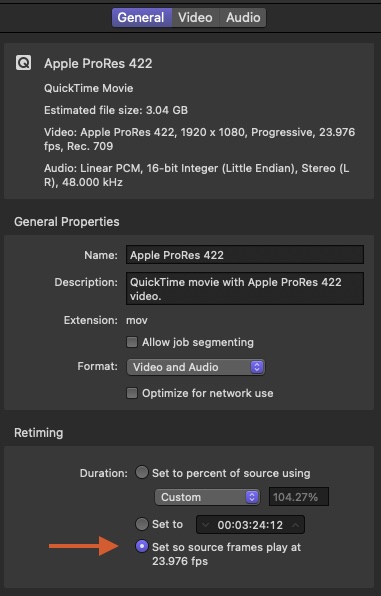
So, if you will be using 23.976 fps as your base frame rate, one thing you could do is take the 25 fps clips and process them in Compressor. Compressor has an option where the video frame rate can be changed, so that the timing of frame playback changes but no frames are added or removed. In this case, the audio is adjusted and pitch-corrected to maintain sync with the video. The 25 fps video and audio is slowed by around 4%. See the attached screenshot for more info...
You'll have to decide if the 4% decrease in playback speed causes any issues. Note that your primary footage won't change.
~~~~~
But, if you need to create a 25 fps deliverable, you would do sort of the opposite of what's described above and move things to 25 fps. Action will be sped up for your 23.976 fps footage by around 4%. In this case, the bulk of your footage will be retimed. This may not be desirable (or it may not matter).
Cheers.
You need to decide on a master frame rate for the film. It's probably good to use 24 (23.976) fps, as that was what your primary camera used, as well as the iPhone. You could slow down the JVC footage to 24 (23.976) fps if that's acceptable. The audio may need some adjusting (pitch correction).
We know the three sources for video, but what are all of the sources for audio, besides the Canon?
Depending on how you answer the above questions or decide how to proceed, you might be better importing media into FCP then creating proxies inside of FCP. That way, you can re-link to the original footage for final renders.
So, if you will be using 23.976 fps as your base frame rate, one thing you could do is take the 25 fps clips and process them in Compressor. Compressor has an option where the video frame rate can be changed, so that the timing of frame playback changes but no frames are added or removed. In this case, the audio is adjusted and pitch-corrected to maintain sync with the video. The 25 fps video and audio is slowed by around 4%. See the attached screenshot for more info...
You'll have to decide if the 4% decrease in playback speed causes any issues. Note that your primary footage won't change.
~~~~~
But, if you need to create a 25 fps deliverable, you would do sort of the opposite of what's described above and move things to 25 fps. Action will be sped up for your 23.976 fps footage by around 4%. In this case, the bulk of your footage will be retimed. This may not be desirable (or it may not matter).
Cheers.
Last edit: 09 Jun 2022 03:23 by DaveM.
Please Log in to join the conversation.
- Carsten Orlt
-

- Offline
- Platinum Member
-

Less
More
- Posts: 422
- Thank you received: 82
09 Jun 2022 04:01 #120863
by Carsten Orlt
Replied by Carsten Orlt on topic MUCH NEEDED ADVICE ON SUITABLE WORKFLOW!
Your problem is indeed huge!
Shooting at diff frame rates and trying to sync/multicam diff frame rates will not work. You have to pick your master delivery frame rate and conform all other frame rates to that master one.
You can't speed up or slow down anything you conform because that will cause your audio to run out of sync. Think about it this way. One second recording time is one second in any frame rate, just the divider changes. So if you e.g. play a clip recorded at 24 Fps, at 25 Fps it becomes 4% faster and therefor shorter than one second. If you then try to sync the 2 clips the audio will not match because one is shorter than the other.
The only way to sync 2 diff frame rates is to convert one of them to the other, in case of shot at 24 change to 25 you have the software (Compressor) create one extra frame so 1 second still is one second.
You don't have that problem when the audio is recorded externally from the video camera(s) on an audio only recorder. Audio doesn't run in frames but in samples per second (44Khz,48Khz,96Khz,etc). So a second in audio can be synced to any frame rate per second in video.
One thing you could consider is to separate the audio from the video for certain clips. Say you recorded the master audio at 24 on one camera, but want to use the B-cam with that audio but it was shot at 25, you could export the audio of the 24 Fps video to an audio only file, and then sync that to the 25 Fps B-cam. It's just an option, you have to figure out what gets you to the finish line the quickest.
FCP can use audio, timecode, markers as the reference to sync 2 clips. If you haven't recorded frame rate identical timecode on all your sources than you can only manually sync clips (Multicam is the same as it is just syncing multiple clips into one clip). So in your case you can only use manual syncing, syncing one by one. But this will only work for 2 video clips if the frame rate is the same. See above.
So if I understand your description correctly syncing clips will be a major workload and tricky because of the diff frame rates. If you do not need to sync you can use all the diff frame rates in one project. Whatever frame rate you choose for the project, FCP will convert the not matching frame rates to the project one. Because FCP will need to add or drop frames depending of the direction of the frame rate change, and this can cause not desirable motion outcomes, you sometimes can choose to not convert but to play at the project frame rate. Which will speedup or slow down your clip (Choose 'Automatic Speed' in the retime menu under the viewer).
Sorry for having better news.
Shooting at diff frame rates and trying to sync/multicam diff frame rates will not work. You have to pick your master delivery frame rate and conform all other frame rates to that master one.
You can't speed up or slow down anything you conform because that will cause your audio to run out of sync. Think about it this way. One second recording time is one second in any frame rate, just the divider changes. So if you e.g. play a clip recorded at 24 Fps, at 25 Fps it becomes 4% faster and therefor shorter than one second. If you then try to sync the 2 clips the audio will not match because one is shorter than the other.
The only way to sync 2 diff frame rates is to convert one of them to the other, in case of shot at 24 change to 25 you have the software (Compressor) create one extra frame so 1 second still is one second.
You don't have that problem when the audio is recorded externally from the video camera(s) on an audio only recorder. Audio doesn't run in frames but in samples per second (44Khz,48Khz,96Khz,etc). So a second in audio can be synced to any frame rate per second in video.
One thing you could consider is to separate the audio from the video for certain clips. Say you recorded the master audio at 24 on one camera, but want to use the B-cam with that audio but it was shot at 25, you could export the audio of the 24 Fps video to an audio only file, and then sync that to the 25 Fps B-cam. It's just an option, you have to figure out what gets you to the finish line the quickest.
FCP can use audio, timecode, markers as the reference to sync 2 clips. If you haven't recorded frame rate identical timecode on all your sources than you can only manually sync clips (Multicam is the same as it is just syncing multiple clips into one clip). So in your case you can only use manual syncing, syncing one by one. But this will only work for 2 video clips if the frame rate is the same. See above.
So if I understand your description correctly syncing clips will be a major workload and tricky because of the diff frame rates. If you do not need to sync you can use all the diff frame rates in one project. Whatever frame rate you choose for the project, FCP will convert the not matching frame rates to the project one. Because FCP will need to add or drop frames depending of the direction of the frame rate change, and this can cause not desirable motion outcomes, you sometimes can choose to not convert but to play at the project frame rate. Which will speedup or slow down your clip (Choose 'Automatic Speed' in the retime menu under the viewer).
Sorry for having better news.
Please Log in to join the conversation.
09 Jun 2022 08:50 #120867
by BARUDIE
Replied by BARUDIE on topic MUCH NEEDED ADVICE ON SUITABLE WORKFLOW!
Thank you for your replies. Really helped make things clearer.
Not sure yet how long this method will hold up, but what I ended up doing was selecting clips of the same scene from different angles, plus the master audio file, and creating a new multicam clip for each scene shot with more than one camera.
It will take a minute finding and pairing multiple footage amidst everything, and I'll have to listen individually to each, but it seems hell of a lot less time consuming than sending all my camcorder footage through Compressor, which is a little pricey for me right now, and reimporting it and transcoding it in FCP. Then synchronizing it all again.
With this method it audio syncs perfectly well and I guess it conforms both clips to 23.98fps. So far, so good.
To answer your questions though, my master frame rate is 23.98fps. I purposely used the 60fps on my Canon and iPhone, however, the 25fps of the camcorder was kind of a smack on the back of the head.
Not sure yet how long this method will hold up, but what I ended up doing was selecting clips of the same scene from different angles, plus the master audio file, and creating a new multicam clip for each scene shot with more than one camera.
It will take a minute finding and pairing multiple footage amidst everything, and I'll have to listen individually to each, but it seems hell of a lot less time consuming than sending all my camcorder footage through Compressor, which is a little pricey for me right now, and reimporting it and transcoding it in FCP. Then synchronizing it all again.
With this method it audio syncs perfectly well and I guess it conforms both clips to 23.98fps. So far, so good.
To answer your questions though, my master frame rate is 23.98fps. I purposely used the 60fps on my Canon and iPhone, however, the 25fps of the camcorder was kind of a smack on the back of the head.
Please Log in to join the conversation.
