


- Posts: 17
- Thank you received: 0
3 Post Moderation Rule for New Boarders (25 Jan 2021)
New boarders will have their posts moderated - Don't worry if you cannot see your post immediately.
Is There Any Way To Customize Layout For Multiple Screens?
04 Jun 2022 16:16 #120828
by KB
Is There Any Way To Customize Layout For Multiple Screens? was created by KB
I've got a portable 13" monitor I'm using next to my MBP for post work and the only options I've found for FCPX is to select the "Dual Monitor" workspace but all it does is put the Browser in the secondary monitor.
I've tried playing around with the options but what I'd like to do is have the browser and scopes over on the secondary (lower res) screen and the viewers and timeline on the main screen where accurate color and video is more important.
Is there any way to do any customization in FCPX for anything like this?
I've tried playing around with the options but what I'd like to do is have the browser and scopes over on the secondary (lower res) screen and the viewers and timeline on the main screen where accurate color and video is more important.
Is there any way to do any customization in FCPX for anything like this?
Please Log in to join the conversation.

04 Jun 2022 17:39 - 04 Jun 2022 18:08 #120829
by VTC
Replied by VTC on topic Is There Any Way To Customize Layout For Multiple Screens?
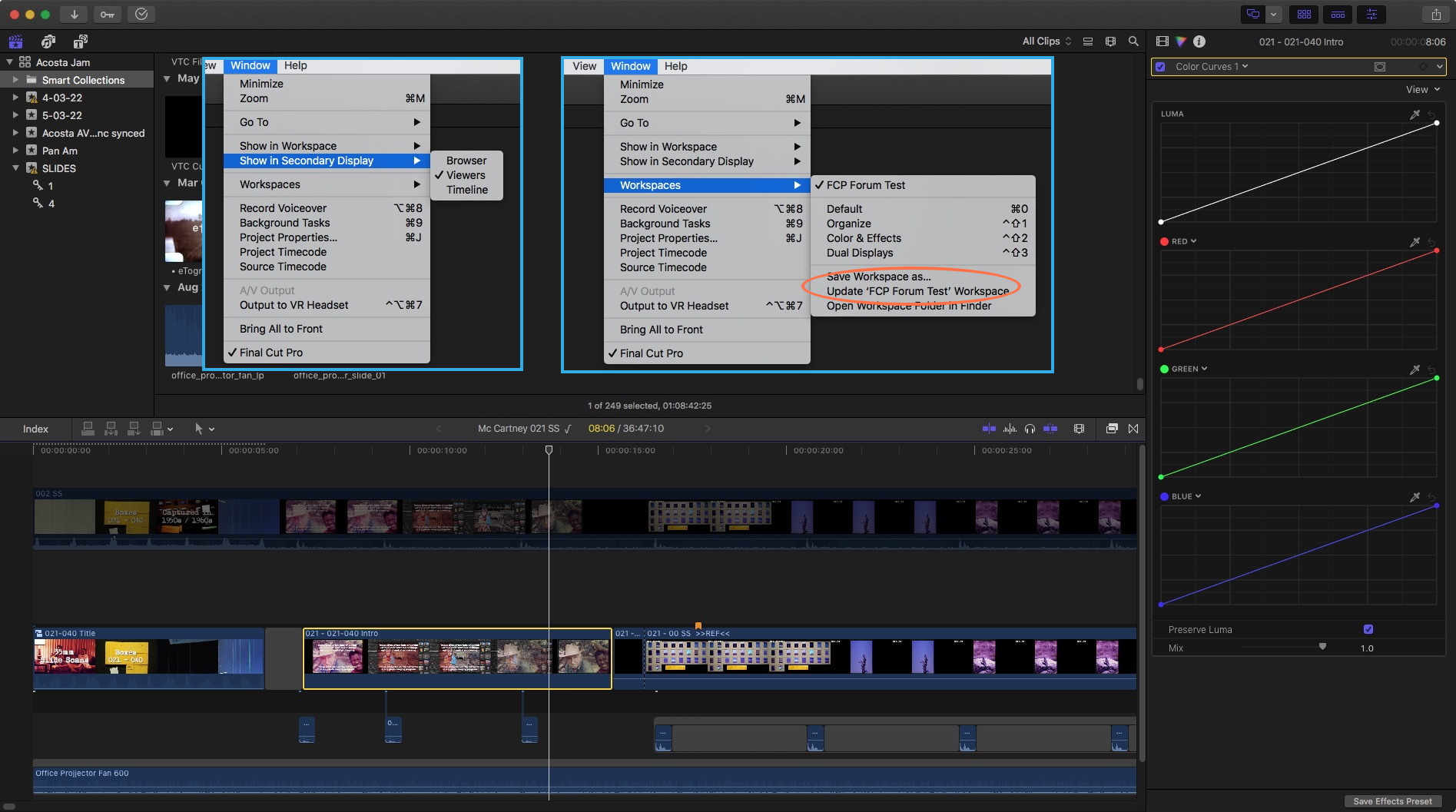
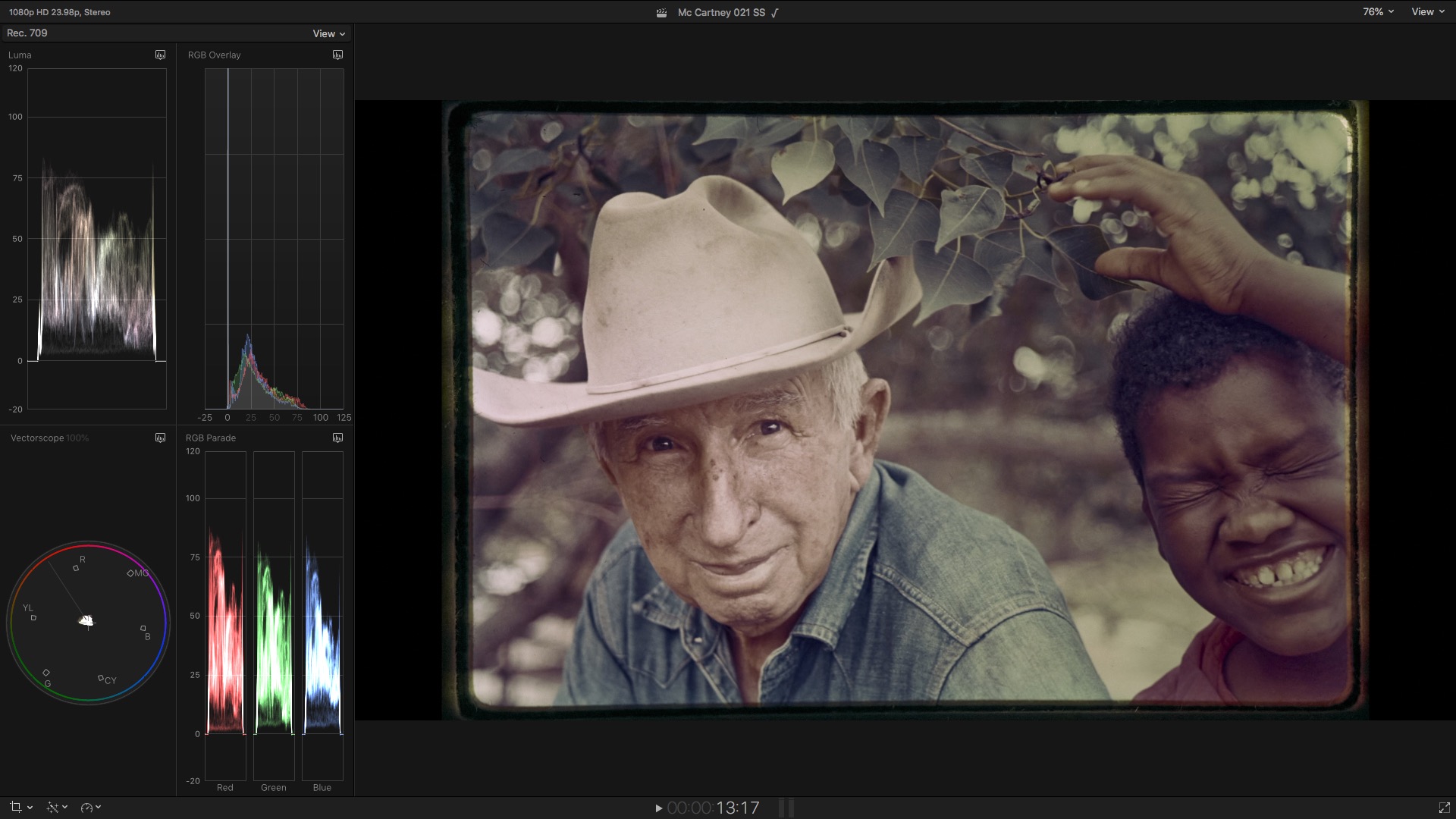
I'd forgo having the timeline and viewer sharing the same space since it's not as important for color correcting. I see no configurable option to park the timeline on the same page as the viewer or the browser sharing the scopes page. You can swap window positions as to where the layout lands.


Last edit: 04 Jun 2022 18:08 by VTC.
Please Log in to join the conversation.
- Carsten Orlt
-

- Offline
- Platinum Member
-

Less
More
- Posts: 422
- Thank you received: 82
05 Jun 2022 21:00 - 05 Jun 2022 21:02 #120834
by Carsten Orlt
Replied by Carsten Orlt on topic Is There Any Way To Customize Layout For Multiple Screens?
You can save diff layouts via the Window>Workspaces menu.
With 2 monitors you have the following options:
When FCP launches it'll be on one monitor which is normally your main monitor. You can send either the Viewer, Browser or Timeline to the 2nd monitor. Scopes are always part of the Viewer UI element, so wherever the viewer is there will be your scopes.
Apart from sending a single UI element to the 2nd screen you can turn of either the Browser, Timeline, Inspector, Timeline Index or Effects. This will be saved in any custom Workspace you create.
If you want to swap what you regard your 2nd monitor, you have to move the main FCP main UI to the 'other' monitor and then use the 'show on 2nd monitor' command for again Viewer, Timeline or Browser.
Whichever layout you set up, including element size and details like the exact scopes layout, can be saved and recalled via the Window>Workspaces menu. The only limitation is I think that reversing what the 2nd monitor is will not be saveable, but I actually haven't tried it yet.
With 2 monitors you have the following options:
When FCP launches it'll be on one monitor which is normally your main monitor. You can send either the Viewer, Browser or Timeline to the 2nd monitor. Scopes are always part of the Viewer UI element, so wherever the viewer is there will be your scopes.
Apart from sending a single UI element to the 2nd screen you can turn of either the Browser, Timeline, Inspector, Timeline Index or Effects. This will be saved in any custom Workspace you create.
If you want to swap what you regard your 2nd monitor, you have to move the main FCP main UI to the 'other' monitor and then use the 'show on 2nd monitor' command for again Viewer, Timeline or Browser.
Whichever layout you set up, including element size and details like the exact scopes layout, can be saved and recalled via the Window>Workspaces menu. The only limitation is I think that reversing what the 2nd monitor is will not be saveable, but I actually haven't tried it yet.
Last edit: 05 Jun 2022 21:02 by Carsten Orlt.
Please Log in to join the conversation.


05 Jan 2023 02:12 #123505
by Smesh
Can you explain how you do this? I have four monitors:
My maxed out M1 Max MacBook Pro screen (extended display)
LG Ultrafine 5k (main display)
Dell Ultrasharp U2723qe 4k display
LG 55" C1 OLED
I also have a Ninja V+ that I would like to run for false color, etc using a Ultrastudio Monitor3G
I cannot for the life of me get final cut to let me choose the monitors I want to run everything on. The main window ends up on the LG, but if I select the dual monitor option it wants to put the other window on the MBP screen. I cannot move that screen over. Even if I move the main FCP window to the dell, the second monitor is ALWAYS the MBP.
What's worse that every time you muck about trying to fix display settings, display settings goes wicked out, mirrors everything and orphans your content and settings on some random monitor. You cannot say a display layout in Display Preferences either, so this is time consuming as hell. I wish FCPX would work like DaVinci Resolve for monitor setup.
Am I missing something? How do I get this working right? I have searched and searched.
Replied by Smesh on topic Is There Any Way To Customize Layout For Multiple Screens?
I'd forgo having the timeline and viewer sharing the same space since it's not as important for color correcting. I see no configurable option to park the timeline on the same page as the viewer or the browser sharing the scopes page. You can swap window positions as to where the layout lands.
Can you explain how you do this? I have four monitors:
My maxed out M1 Max MacBook Pro screen (extended display)
LG Ultrafine 5k (main display)
Dell Ultrasharp U2723qe 4k display
LG 55" C1 OLED
I also have a Ninja V+ that I would like to run for false color, etc using a Ultrastudio Monitor3G
I cannot for the life of me get final cut to let me choose the monitors I want to run everything on. The main window ends up on the LG, but if I select the dual monitor option it wants to put the other window on the MBP screen. I cannot move that screen over. Even if I move the main FCP window to the dell, the second monitor is ALWAYS the MBP.
What's worse that every time you muck about trying to fix display settings, display settings goes wicked out, mirrors everything and orphans your content and settings on some random monitor. You cannot say a display layout in Display Preferences either, so this is time consuming as hell. I wish FCPX would work like DaVinci Resolve for monitor setup.
Am I missing something? How do I get this working right? I have searched and searched.
Please Log in to join the conversation.


05 Jan 2023 21:01 #123517
by mattj
Replied by mattj on topic Is There Any Way To Customize Layout For Multiple Screens?
I have similar issues. I'm running 2 external and wanting to add the third. I've had a hard enough time managing getting two screens to light up 4K@60Hz, though I'm on a MBP M1Max. I've tried 4 different hubs, but getting both external screens to work with Apple's Retina Scaling feature (thumbnail scaling/resolution selector) in the display settings has been a nightmare. Are you using only internal TB4 ports on the Studio, or are you using a hub?
I'd forgo having the timeline and viewer sharing the same space since it's not as important for color correcting. I see no configurable option to park the timeline on the same page as the viewer or the browser sharing the scopes page. You can swap window positions as to where the layout lands.
Can you explain how you do this? I have four monitors:
My maxed out M1 Max MacBook Pro screen (extended display)
LG Ultrafine 5k (main display)
Dell Ultrasharp U2723qe 4k display
LG 55" C1 OLED
I also have a Ninja V+ that I would like to run for false color, etc using a Ultrastudio Monitor3G
I cannot for the life of me get final cut to let me choose the monitors I want to run everything on. The main window ends up on the LG, but if I select the dual monitor option it wants to put the other window on the MBP screen. I cannot move that screen over. Even if I move the main FCP window to the dell, the second monitor is ALWAYS the MBP.
What's worse that every time you muck about trying to fix display settings, display settings goes wicked out, mirrors everything and orphans your content and settings on some random monitor. You cannot say a display layout in Display Preferences either, so this is time consuming as hell. I wish FCPX would work like DaVinci Resolve for monitor setup.
Am I missing something? How do I get this working right? I have searched and searched.
Please Log in to join the conversation.
