




- Posts: 23
- Thank you received: 0
3 Post Moderation Rule for New Boarders (25 Jan 2021)
New boarders will have their posts moderated - Don't worry if you cannot see your post immediately.
Audio Config required for Broadcast (questions)....
03 Jun 2022 19:42 - 03 Jun 2022 20:05 #120811
by Srfr4Life
Audio Config required for Broadcast (questions).... was created by Srfr4Life
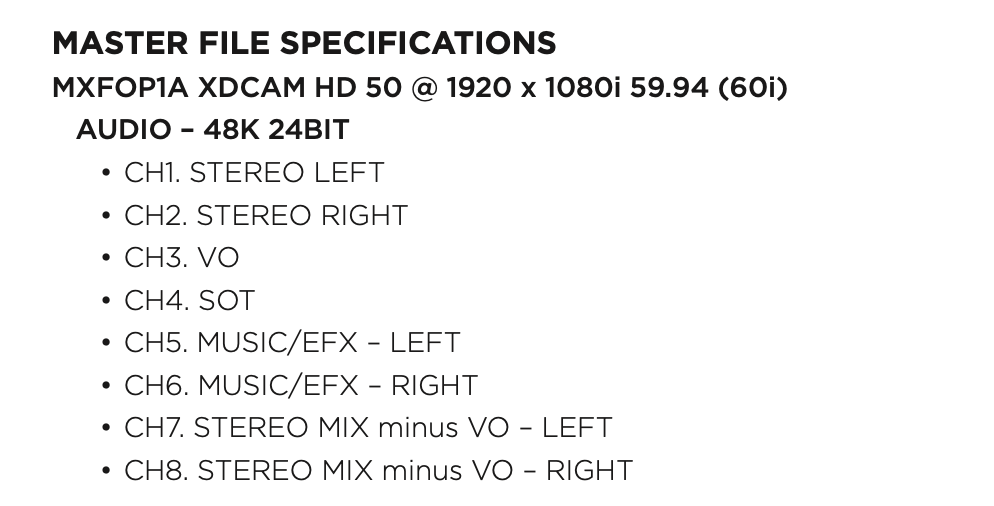
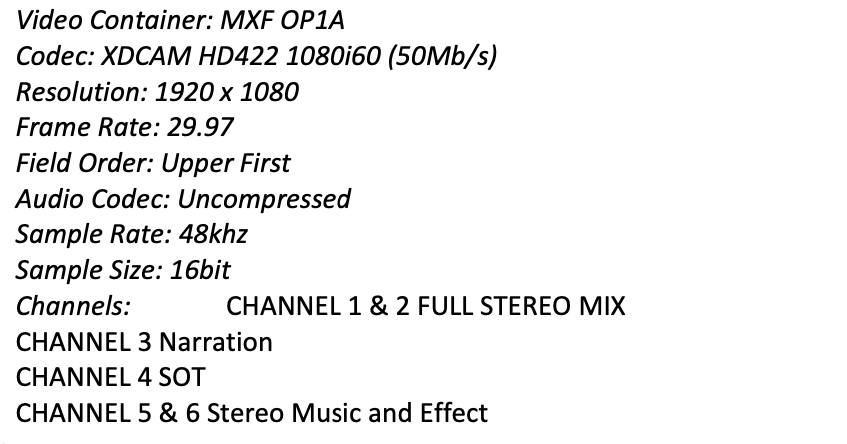
I'm submitting to a new network and trying to understand how I can accomplish the audio portion. Attached is the configuration instructions in text:
I import my camera's .mov file into FCPX, audio included. It's 4 mono tracks on the video file. Two are Lav A & Lav B. The other 2 are internal mic/scratch tracks.
The end product is everything mixed down to 2 stereo tracks. No problem here.
1 - In the attachment, the network shows that my VO track/s need to be assigned to Channel 3. This network edits with Premiere, so no help from them. I'm assuming the mono tracks from my video file are then assigned as Sub Roles and specifically Channel 3 Sub Role?
2 - Looking at the Channel assignment guide the network provided, what exactly would be on tracks 1 & 2?
Here are all my tracks imported/used:
A. 2 Mono VO's -goes to Channel 3
B. Music (stereo) -5 & 6
C. Effects (Stereo) -5 & 6
When I look at the imported camera video file in the audio inspector (Audio Configuration section), I can choose between four mono or 2 stereo. If I keep them in 4 Mono, I hear the tracks play in both R/L stereo. In the Audio Inspector, if I put the 4 mono tracks in '2 stereo,' One of the mono tracks goes to L, the other to R.
Seems to make sense to keep the tracks in 4 Mono, then assign it's output to be 2 stereo (in the Audio Enhancements section of the Audio Inspector). When I do this and right click the audio track for Sub Roles, I can only assign it one of the channels and not two like I would think stereo represents. Lot's of confusion here.
Appreciate any responses.
I import my camera's .mov file into FCPX, audio included. It's 4 mono tracks on the video file. Two are Lav A & Lav B. The other 2 are internal mic/scratch tracks.
The end product is everything mixed down to 2 stereo tracks. No problem here.
1 - In the attachment, the network shows that my VO track/s need to be assigned to Channel 3. This network edits with Premiere, so no help from them. I'm assuming the mono tracks from my video file are then assigned as Sub Roles and specifically Channel 3 Sub Role?
2 - Looking at the Channel assignment guide the network provided, what exactly would be on tracks 1 & 2?
Here are all my tracks imported/used:
A. 2 Mono VO's -goes to Channel 3
B. Music (stereo) -5 & 6
C. Effects (Stereo) -5 & 6
When I look at the imported camera video file in the audio inspector (Audio Configuration section), I can choose between four mono or 2 stereo. If I keep them in 4 Mono, I hear the tracks play in both R/L stereo. In the Audio Inspector, if I put the 4 mono tracks in '2 stereo,' One of the mono tracks goes to L, the other to R.
Seems to make sense to keep the tracks in 4 Mono, then assign it's output to be 2 stereo (in the Audio Enhancements section of the Audio Inspector). When I do this and right click the audio track for Sub Roles, I can only assign it one of the channels and not two like I would think stereo represents. Lot's of confusion here.
Appreciate any responses.
Last edit: 03 Jun 2022 20:05 by Srfr4Life.
Please Log in to join the conversation.
- Tom Wolsky
-

- Offline
- Moderator
-

03 Jun 2022 20:03 #120812
by Tom Wolsky
Replied by Tom Wolsky on topic Audio Config required for Broadcast (questions)....
Do they really mean 59.94i? There’s only one camera I’ve ever seen that shoots that, the Fuji FinePix S8200. I think they mean 29.97i.
Please Log in to join the conversation.
03 Jun 2022 20:08 #120813
by Srfr4Life
Replied by Srfr4Life on topic Audio Config required for Broadcast (questions)....
Yes. Another confusing topic, but from my understanding... there's something about 59.94i (or P) that makes it the same thing as 29.97i. The video requirement is actually pretty easy to control in Compressor when making that output requirement.
Please Log in to join the conversation.


03 Jun 2022 23:37 - 03 Jun 2022 23:41 #120816
by DaveM
Replied by DaveM on topic Audio Config required for Broadcast (questions)....
The spec. is using incorrect notation. 1080i29.97 is okay, but 1080i59.94 isn't. There _is_ a big difference between "i" and "p". If that's not clear to you then you don't understand things well enough and you'll likely have problems with QA...
Compressor shows one setting that seems to match the spec.: MXF 1080i29.97 XDCAM HD 422 50 Mbps. If you use that but change the frame rate to 59.94, it's incorrect.
Mono audio plays back equally to both L and R channels, if your configuration is correct (for a stereo output project). A mistake is to assume there is no difference just because you hear audio in both speakers.
Your camera audio may be two sets of mono audio, with duplicated mono channels (4 mono channels or 2 "stereo" tracks with duplicated mono channels). If the audio wasn't recorded as actual stereo, then you have 4 mono channels. Many cameras record a mono signal on to two channels. The thing is you don't want to use 2 mono channels as if they were a stereo pair. Pick one and disable the other.
So, it seems you have Lav A and Lav B. They would each be a mono channel. If they are two speakers, you would have only one active on a given clip, unless you want audio of them talking at the same time. You could assign each Lav to a separate subrole (each one being mono). Again, with stereo speakers on your system, mono audio plays equally to each speaker (but it isn't a stereo signal).
Channels 1 and 2 seem to be the master stereo output, and channels 7 and 8 would be the master stereo output minus the VO.
Hope this helps...
Compressor shows one setting that seems to match the spec.: MXF 1080i29.97 XDCAM HD 422 50 Mbps. If you use that but change the frame rate to 59.94, it's incorrect.
Mono audio plays back equally to both L and R channels, if your configuration is correct (for a stereo output project). A mistake is to assume there is no difference just because you hear audio in both speakers.
Your camera audio may be two sets of mono audio, with duplicated mono channels (4 mono channels or 2 "stereo" tracks with duplicated mono channels). If the audio wasn't recorded as actual stereo, then you have 4 mono channels. Many cameras record a mono signal on to two channels. The thing is you don't want to use 2 mono channels as if they were a stereo pair. Pick one and disable the other.
So, it seems you have Lav A and Lav B. They would each be a mono channel. If they are two speakers, you would have only one active on a given clip, unless you want audio of them talking at the same time. You could assign each Lav to a separate subrole (each one being mono). Again, with stereo speakers on your system, mono audio plays equally to each speaker (but it isn't a stereo signal).
Channels 1 and 2 seem to be the master stereo output, and channels 7 and 8 would be the master stereo output minus the VO.
Hope this helps...
Last edit: 03 Jun 2022 23:41 by DaveM.
Please Log in to join the conversation.
04 Jun 2022 02:30 - 04 Jun 2022 02:32 #120817
by Srfr4Life
Replied by Srfr4Life on topic Audio Config required for Broadcast (questions)....
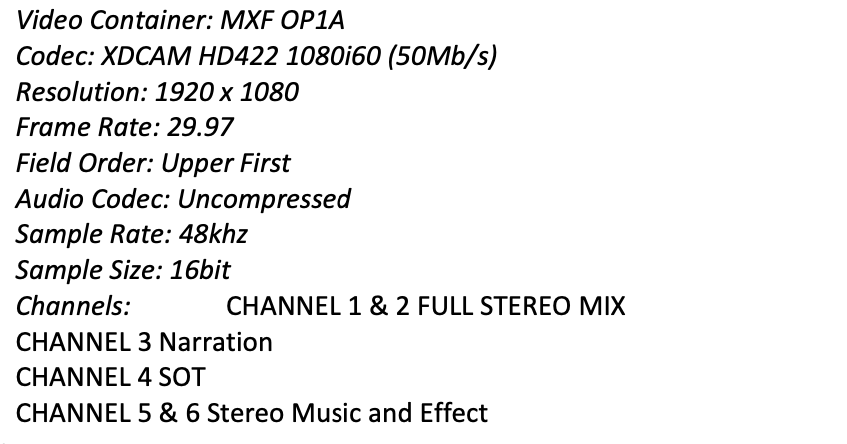
Thanks for the reply DaveM. I do understand Interleve and Progressive are different. I was hoping you and I could talk about the network's requirement more and the 1080i59.94. Attached are parts of two different documents the network provides to people like me. I've attached a second screen shot. Both screen shots I've attached on this Forum/Topic I created are documents from the network. Is that video output achievable in Compressor?
Last edit: 04 Jun 2022 02:32 by Srfr4Life. Reason: Forgot something
Please Log in to join the conversation.
04 Jun 2022 02:34 #120818
by Srfr4Life
Replied by Srfr4Life on topic Audio Config required for Broadcast (questions)....
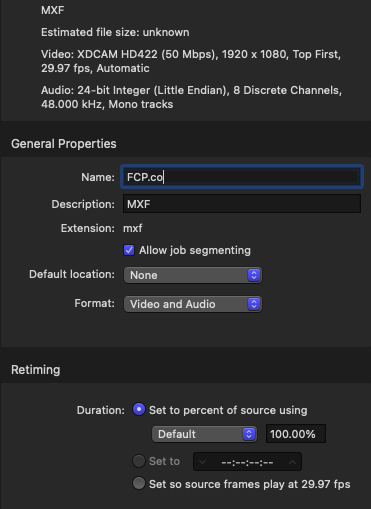
Here's a third attachment of what I created off a pre-existing setting on Compressor. I think it lines up with the network's requirement?
Please Log in to join the conversation.
04 Jun 2022 03:24 - 04 Jun 2022 03:26 #120820
by DaveM
Replied by DaveM on topic Audio Config required for Broadcast (questions)....
Okay, cool... thanks for the additional info...
I believe that your adapted preset in Motion looks correct but may need adjustments for the audio portion (switching from 8 discrete mono channels to multitrack).
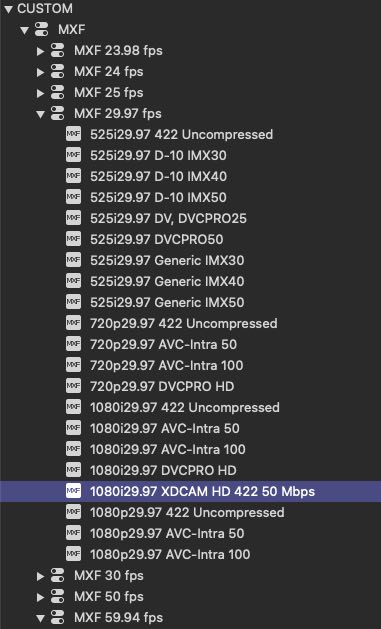
I used this preset to start with:
"Custom -> MXF -> MXF 29.97 fps -> 1080i29.97 XDCAM HD 422 50 Mbps"
(See attached file for a screenshot of this.)
This preset and yours appear to be the same. I ran a test file just to check the main video settings and opened the output file in Invisor (Media Info will do, too) and everything seems to check out.
I would suggest you get things set up in FCP and export a small, 30-second to 1-minute test file and run that through Compressor.
Then, forward the MXF test file to the broadcaster and have them sign off on it (as being valid). You might want to make sure the audio and video levels meet their standards (aside from the the file format). I'd imagine you'd want to work with the QA department...
Cheers.
I believe that your adapted preset in Motion looks correct but may need adjustments for the audio portion (switching from 8 discrete mono channels to multitrack).
I used this preset to start with:
"Custom -> MXF -> MXF 29.97 fps -> 1080i29.97 XDCAM HD 422 50 Mbps"
(See attached file for a screenshot of this.)
This preset and yours appear to be the same. I ran a test file just to check the main video settings and opened the output file in Invisor (Media Info will do, too) and everything seems to check out.
I would suggest you get things set up in FCP and export a small, 30-second to 1-minute test file and run that through Compressor.
Then, forward the MXF test file to the broadcaster and have them sign off on it (as being valid). You might want to make sure the audio and video levels meet their standards (aside from the the file format). I'd imagine you'd want to work with the QA department...
Cheers.
Last edit: 04 Jun 2022 03:26 by DaveM.
Please Log in to join the conversation.
04 Jun 2022 03:36 - 04 Jun 2022 03:40 #120821
by Srfr4Life
Replied by Srfr4Life on topic Audio Config required for Broadcast (questions)....
Understood and thanks again for the reply. Feeling pretty confident about the video portion now. And yes, I'll be submitting my sample Monday, working with the networks rep.
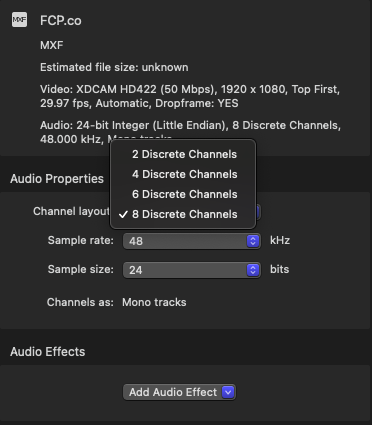
In terms of audio, I understand you stated changing 8 discrete mono to multi-channel. Can you look at the attached screen shot and tell me if you might understand how to achieve this mix?
UPDATED: There's only options for 2 discrete, 4 discrete, 6 discrete and 8. Also Attached.
In terms of audio, I understand you stated changing 8 discrete mono to multi-channel. Can you look at the attached screen shot and tell me if you might understand how to achieve this mix?
UPDATED: There's only options for 2 discrete, 4 discrete, 6 discrete and 8. Also Attached.
Last edit: 04 Jun 2022 03:40 by Srfr4Life.
Please Log in to join the conversation.
04 Jun 2022 04:12 - 04 Jun 2022 14:59 #120823
by DaveM
Replied by DaveM on topic Audio Config required for Broadcast (questions)....
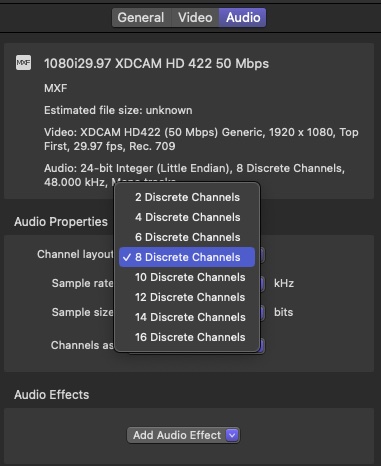
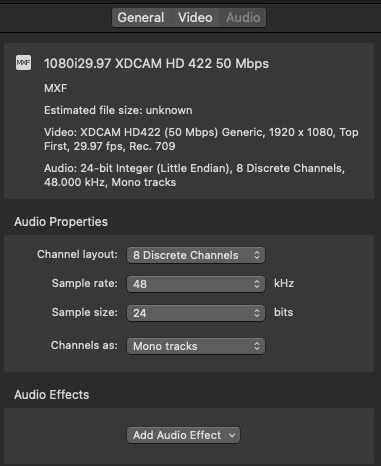
Okay, I suggested something that may not be needed (the multitrack option). See attached screenshots of the audio Inspector in Compressor. I can select from 2 to 16 channels.
Your first spec. sheet states 8 channels (the last two being for the stereo mixdown without VO). The other screenshots show just 6 channels.
Regardless of whether you need 6 or 8 channels, tthe "Channels as: Mono tracks" is probably the correct option. The multitrack option is for one track with many channels.
For my test file, the output MXF from Compressor has 8 channels but only two have any audio during playback (since the source test file was just stereo).
(Sorry, I'm a bit rusty with how MXF files are structured. Most of what I submit nowadays is ProRes.)
Once you've chosen the number of channels in the audio inspector in Compressor things should work, provided you have routed audio in FCP properly using subroles and roles (during export).
P.S. - If you use 8 channels for the MXF file, you might be able to use the preset available within FCP itself and not have to use Compressor...
Your first spec. sheet states 8 channels (the last two being for the stereo mixdown without VO). The other screenshots show just 6 channels.
Regardless of whether you need 6 or 8 channels, tthe "Channels as: Mono tracks" is probably the correct option. The multitrack option is for one track with many channels.
For my test file, the output MXF from Compressor has 8 channels but only two have any audio during playback (since the source test file was just stereo).
(Sorry, I'm a bit rusty with how MXF files are structured. Most of what I submit nowadays is ProRes.)
Once you've chosen the number of channels in the audio inspector in Compressor things should work, provided you have routed audio in FCP properly using subroles and roles (during export).
P.S. - If you use 8 channels for the MXF file, you might be able to use the preset available within FCP itself and not have to use Compressor...
Last edit: 04 Jun 2022 14:59 by DaveM.
Please Log in to join the conversation.


09 Jun 2022 10:35 - 09 Jun 2022 10:37 #120870
by petersxs
Replied by petersxs on topic Audio Config required for Broadcast (questions)....
HI, I think The is a quite common spec. here in Austria it's the same except the framerate =25 . The Broadcasters want MXF container with XDCam Hd422 at 50Mbit / sec and Alway 8 Discrete Mono Channel with Mix on 1 & 2 . Even When it is a Live recording and you have only 1 & 2 ( no VO od Add. Music, SFX ) then the other channels are empty. Bit You always have to have 8 Mono Channels at 48 kHz. according to specs. ( the execution may vary  ADD edit.-- -23 LUF Loudness of Master mix 1& 2 Stereo . Be ware of Pan Rule!
ADD edit.-- -23 LUF Loudness of Master mix 1& 2 Stereo . Be ware of Pan Rule!
Last edit: 09 Jun 2022 10:37 by petersxs.
Please Log in to join the conversation.
09 Jun 2022 17:19 #120872
by Srfr4Life
Replied by Srfr4Life on topic Audio Config required for Broadcast (questions)....
Thanks for the info petersxs. From the information I've received,, I'm probably over worried about my work 
Curious.... if I need to have VO on Channel 3... how is that executed in FCPX?
If someone put me on the spot, I'd say it's Roles/Sub-Roles? But even then I'm not totally sure. The last MXF file I exported... I re-imported into FCP to look at the file with the FCP interface. I right-clicked all VO tracks and assigned them to Sub-Role 3 of the 'Dialogue' Role thinking they would show up on the same with the imported file. Looks like it all got mixed down to 1 & 2.
Curious.... if I need to have VO on Channel 3... how is that executed in FCPX?
If someone put me on the spot, I'd say it's Roles/Sub-Roles? But even then I'm not totally sure. The last MXF file I exported... I re-imported into FCP to look at the file with the FCP interface. I right-clicked all VO tracks and assigned them to Sub-Role 3 of the 'Dialogue' Role thinking they would show up on the same with the imported file. Looks like it all got mixed down to 1 & 2.
Please Log in to join the conversation.
