


- Posts: 197
- Thank you received: 27
3 Post Moderation Rule for New Boarders (25 Jan 2021)
New boarders will have their posts moderated - Don't worry if you cannot see your post immediately.
Semitransparent Elements in Files Exported From After Effects With Alpha Channel
02 May 2022 22:01 - 03 May 2022 15:59 #120374
by smg669
Semitransparent Elements in Files Exported From After Effects With Alpha Channel was created by smg669
Hey all. This is a repost of a thread I made on Twitter:
This is the #FinalCutPro bug that I am most desperate to be fixed. I've reported it many times over... spanning years. IT'S TIME TO FIX THIS! If you create a file with an alpha and semitransparent elements in After Effects, when the file is placed in Final Cut Pro the semitransparent elements render incorrectly. Specifically things like soft drop shadows. Here is a sample with the same graphic composited and rendered intact (with BG) out of After Effects... followed by just the text elements rendered out with an alpha and then married with the background in FCP.
Note that the drop shadows composited within FCP are not as dark/opaque. Now here are the same text elements composited in DaVinci Resolve. Note that all instances match the self-contained AE render exactly.
I tried all combinations of alpha rendering in AE and alpha handling in FCP (premultiplication, codec, bitdepth) to no avail. Naturally these same elements composite properly in Premiere. Any thoughts? Anyone notice this and have a workaround? Here is a .zip of the project files.
drive.google.com/file/d/1-gBTi4dqcuz9RWo...VB7/view?usp=sharing
This is the #FinalCutPro bug that I am most desperate to be fixed. I've reported it many times over... spanning years. IT'S TIME TO FIX THIS! If you create a file with an alpha and semitransparent elements in After Effects, when the file is placed in Final Cut Pro the semitransparent elements render incorrectly. Specifically things like soft drop shadows. Here is a sample with the same graphic composited and rendered intact (with BG) out of After Effects... followed by just the text elements rendered out with an alpha and then married with the background in FCP.
Note that the drop shadows composited within FCP are not as dark/opaque. Now here are the same text elements composited in DaVinci Resolve. Note that all instances match the self-contained AE render exactly.
I tried all combinations of alpha rendering in AE and alpha handling in FCP (premultiplication, codec, bitdepth) to no avail. Naturally these same elements composite properly in Premiere. Any thoughts? Anyone notice this and have a workaround? Here is a .zip of the project files.
drive.google.com/file/d/1-gBTi4dqcuz9RWo...VB7/view?usp=sharing
Last edit: 03 May 2022 15:59 by smg669.
Please Log in to join the conversation.
02 May 2022 22:01 #120375
by smg669
Replied by smg669 on topic Semitransparent Elements in Files Exported From After Effects With Alpha Channel
Hey all. This is a repost of a thread I made on Twitter:
This is the #FinalCutPro bug that I am most desperate to be fixed. I've reported it many times over... spanning years. IT'S TIME TO FIX THIS! If you create a file with an alpha and semitransparent elements in After Effects, when the file is placed in Final Cut Pro the semitransparent elements render incorrectly. Specifically things like soft drop shadows. Here is a sample with the same graphic composited and rendered intact (with BG) out of After Effects... followed by just the text elements rendered out with an alpha and then married with the background in FCP.
Note that the drop shadows composited within FCP are not as dark/opaque. Now here are the same text elements composited in DaVinci Resolve. Note that all instances match the self-contained AE render exactly.
I tried all combinations of alpha rendering in AE and alpha handling in FCP (premultiplication, codec, bitdepth) to no avail. Naturally these same elements composite properly in Premiere. Any thoughts? Anyone notice this and have a workaround? Here is a .zip of the project files.
drive.google.com/file/d/1-gBTi4dqcuz9RWo...VB7/view?usp=sharing
This is the #FinalCutPro bug that I am most desperate to be fixed. I've reported it many times over... spanning years. IT'S TIME TO FIX THIS! If you create a file with an alpha and semitransparent elements in After Effects, when the file is placed in Final Cut Pro the semitransparent elements render incorrectly. Specifically things like soft drop shadows. Here is a sample with the same graphic composited and rendered intact (with BG) out of After Effects... followed by just the text elements rendered out with an alpha and then married with the background in FCP.
Note that the drop shadows composited within FCP are not as dark/opaque. Now here are the same text elements composited in DaVinci Resolve. Note that all instances match the self-contained AE render exactly.
I tried all combinations of alpha rendering in AE and alpha handling in FCP (premultiplication, codec, bitdepth) to no avail. Naturally these same elements composite properly in Premiere. Any thoughts? Anyone notice this and have a workaround? Here is a .zip of the project files.
drive.google.com/file/d/1-gBTi4dqcuz9RWo...VB7/view?usp=sharing
Please Log in to join the conversation.
- Tom Wolsky
-

- Offline
- Moderator
-

02 May 2022 22:47 #120376
by Tom Wolsky
Replied by Tom Wolsky on topic Semitransparent Elements in Files Exported From After Effects With Alpha Channel
The second video seems linked to the same file as the first.
Please Log in to join the conversation.
- editDr0ideka
-
- Offline
- New Member
-

Less
More
- Posts: 5
- Thank you received: 2
03 May 2022 14:01 #120384
by editDr0ideka
Replied by editDr0ideka on topic Semitransparent Elements in Files Exported From After Effects With Alpha Channel
This is not a bug. It is what the developers of Final Cut Pro thought what give the best results. Have a look into this white paper:
images.apple.com/final-cut-pro/docs/Work..._Final_Cut_Pro_X.pdf
It clearly states that the FCP color management transforms everything into a "linearized version of the Rec. 709 color space". The important word here is LINEAR. If you set After Effects into linear compositing mode (gamma=1.0), the results should look identical. Haven't tried it myself as I am an apple motion user. Please let us know if it fixes the problem.
It clearly states that the FCP color management transforms everything into a "linearized version of the Rec. 709 color space". The important word here is LINEAR. If you set After Effects into linear compositing mode (gamma=1.0), the results should look identical. Haven't tried it myself as I am an apple motion user. Please let us know if it fixes the problem.
Please Log in to join the conversation.
03 May 2022 16:00 #120389
by smg669
Replied by smg669 on topic Semitransparent Elements in Files Exported From After Effects With Alpha Channel
Thanks, Tom. I've updated the link to the second video in the OP
Please Log in to join the conversation.
03 May 2022 17:41 #120392
by smg669
Replied by smg669 on topic Semitransparent Elements in Files Exported From After Effects With Alpha Channel
I've tried your suggestion. In anticipation of this, I changed the face colour of the text objects in my test file. In the colour management section of the AE module I set the "Convert to linear light" to "ON". This succeeded in completely munging the colours of my text objects (whereas before they were the same as they were in AE) while still messing up the transparency values of the drop shadow elements as they had done before. Coincidentally, enabling this option in After Effects brought my render times from 5 seconds to 6 minutes and 56 seconds. So, still seems like a bug to me - especially since EVERY OTHER EDITING APP ON THE MARKET handles these After Effects outputs with alpha channels flawlessly.
This is not a bug. It is what the developers of Final Cut Pro thought what give the best results. Have a look into this white paper: images.apple.com/final-cut-pro/docs/Work..._Final_Cut_Pro_X.pdf
It clearly states that the FCP color management transforms everything into a "linearized version of the Rec. 709 color space". The important word here is LINEAR. If you set After Effects into linear compositing mode (gamma=1.0), the results should look identical. Haven't tried it myself as I am an apple motion user. Please let us know if it fixes the problem.
Please Log in to join the conversation.

31 May 2022 09:32 #120776
by vicky
Replied by vicky on topic Semitransparent Elements in Files Exported From After Effects With Alpha Channel
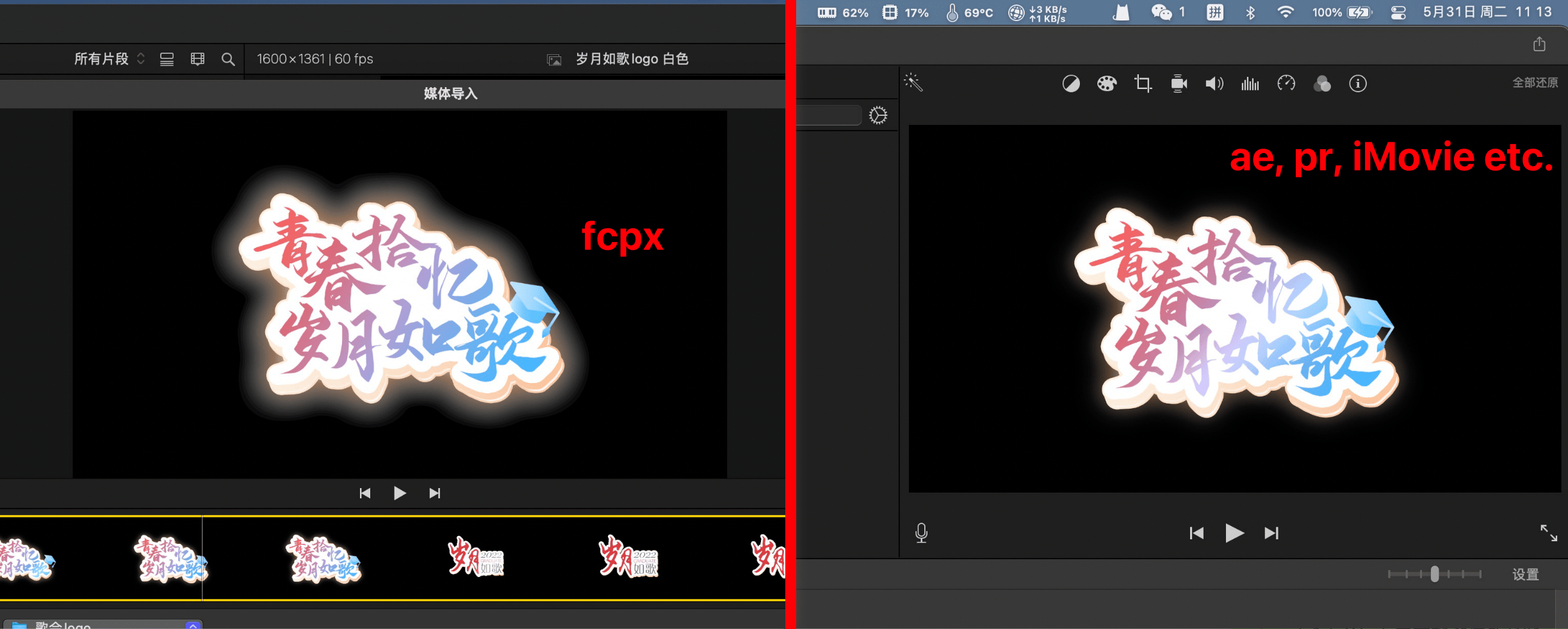
I think we are facing the same problem, and it's even more obvious for me ...
Please Log in to join the conversation.
