




- Posts: 12
- Thank you received: 1
3 Post Moderation Rule for New Boarders (25 Jan 2021)
New boarders will have their posts moderated - Don't worry if you cannot see your post immediately.
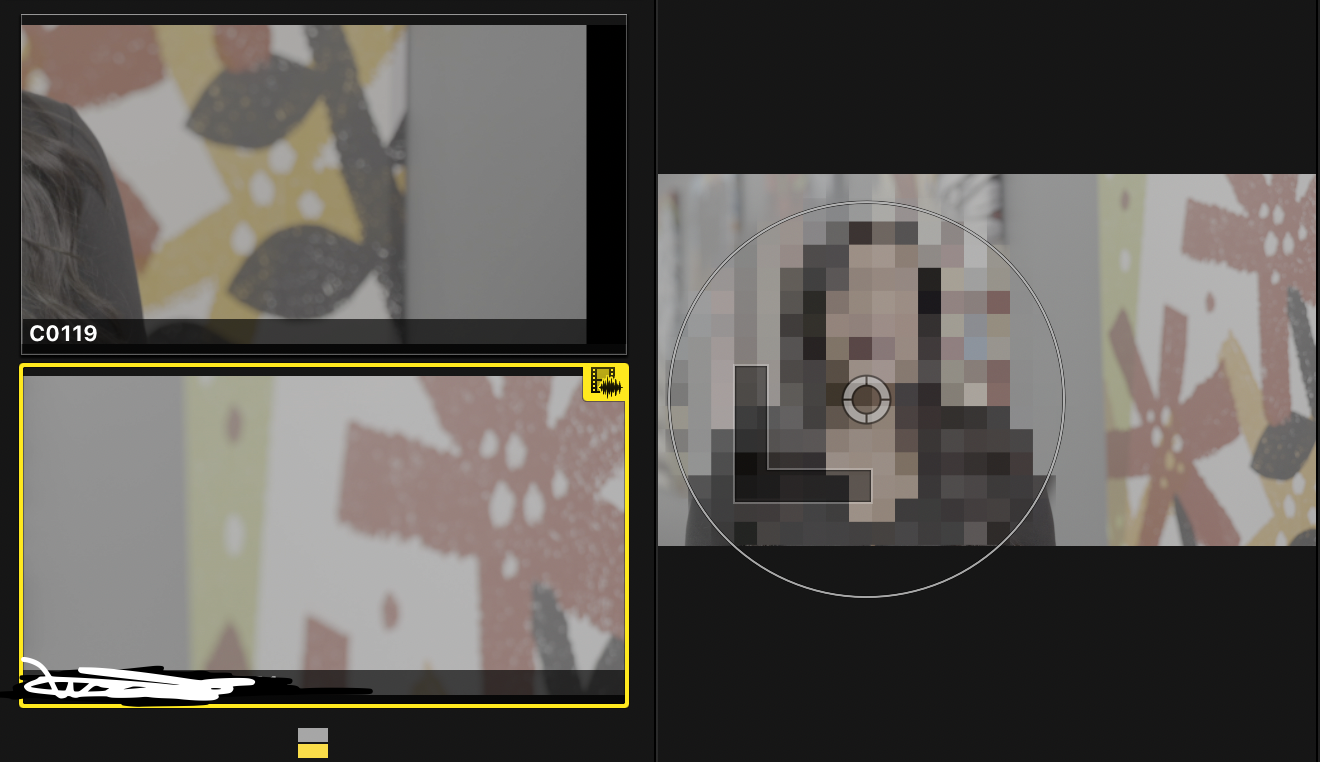
Multicam window blowing up scale
02 May 2022 18:51 #120368
by BulldogPH
Multicam window blowing up scale was created by BulldogPH
Wondering if this is a bug or something I can fix. When I make edits to change angle by clicking in the multicam window the scale blows way up. This would be really annoying on more than a 2 camera shoot. It's done it to me on 3 camera shoots as well. It goes away after changing the angle again but comes right back on the next edit or when previewing the clip.
Please Log in to join the conversation.
02 May 2022 18:52 #120369
by BulldogPH
Replied by BulldogPH on topic Multicam window blowing up scale
To add, it doesn't have to do with the effect on the video.
Please Log in to join the conversation.
- Tom Wolsky
-

- Offline
- Moderator
-

02 May 2022 18:54 #120370
by Tom Wolsky
Replied by Tom Wolsky on topic Multicam window blowing up scale
What are the media specs? Does it match the Multicam clip? What are the project properties? Current OS and FCP?
Please Log in to join the conversation.

02 May 2022 19:02 - 02 May 2022 19:03 #120371
by DaveM
Replied by DaveM on topic Multicam window blowing up scale
What are the frame sizes, frame rates, and codecs of the source media? How about for the multicam clip and the timeline/Project? What is the spatial conform setting for each multicam angle?
Did you optimize the source media or create proxies (and what is showing in the View menu of the viewer for quality and media playback)? Do you have "Create optimized media for multicam clips" set in your Playback preferences? Is background rendering turned off/on? macOS and FCP versions? Thanks.
Did you optimize the source media or create proxies (and what is showing in the View menu of the viewer for quality and media playback)? Do you have "Create optimized media for multicam clips" set in your Playback preferences? Is background rendering turned off/on? macOS and FCP versions? Thanks.
Last edit: 02 May 2022 19:03 by DaveM.
Please Log in to join the conversation.
03 May 2022 13:33 #120382
by GrahamGFX
Replied by GrahamGFX on topic Multicam window blowing up scale
I've had this issue and submitted a bug report via the app a couple of years ago. I've had the same issue recently using the latest version.
I usually have a mixture of 4k and HD content in the multicam clip and edit to a HD 25p timeline.
It is not a repeatable issue therefore I find it hard to believe that media type or frame size is the issue. If I have the enlarged angle viewer issue (4-6 usually) a simple restart of the app gets me going again from the same place in the timeline. Sometimes going into multicam edit mode and back out to the project also works - but again it's inconsistent.
I've never paid much attention to the setup of the multicam clip as I usually label the angles in the browser and "create multicam" and let it do it's thing. I've just checked my most recent project and it was a 1080 50p multicam clip with some 4k 50p angles and some hd 50p angles. Optimised and with proxies. Didn't experience it much but enough to remember it happened.
I usually have a mixture of 4k and HD content in the multicam clip and edit to a HD 25p timeline.
It is not a repeatable issue therefore I find it hard to believe that media type or frame size is the issue. If I have the enlarged angle viewer issue (4-6 usually) a simple restart of the app gets me going again from the same place in the timeline. Sometimes going into multicam edit mode and back out to the project also works - but again it's inconsistent.
I've never paid much attention to the setup of the multicam clip as I usually label the angles in the browser and "create multicam" and let it do it's thing. I've just checked my most recent project and it was a 1080 50p multicam clip with some 4k 50p angles and some hd 50p angles. Optimised and with proxies. Didn't experience it much but enough to remember it happened.
Please Log in to join the conversation.
03 May 2022 15:18 #120386
by DaveM
Replied by DaveM on topic Multicam window blowing up scale
There are many "switches and levers" behind the scenes that _it is relevant_ to know all the details about one's setup to help troubleshoot the issue. If there is a real issue, Apple won't benefit much by just saying so without providing enough info to diagnose, or more importantly, to reproduce such an issue.
FCP is made to work best with ProRes media and not most camera files. Yes, marketing says it's supported, but that's to keep the bar of entry low. If you don't use ProRes encoded files in multicam clips, or FCP generated proxy files, _you will_ eventually run into issues.
So, the best thing for all of us is to create a reproducible situation and then provide all of the gory details. Even better, provide a sample project and media, so that others here can confirm the behavior/issue.
Cheers.
FCP is made to work best with ProRes media and not most camera files. Yes, marketing says it's supported, but that's to keep the bar of entry low. If you don't use ProRes encoded files in multicam clips, or FCP generated proxy files, _you will_ eventually run into issues.
So, the best thing for all of us is to create a reproducible situation and then provide all of the gory details. Even better, provide a sample project and media, so that others here can confirm the behavior/issue.
Cheers.
Please Log in to join the conversation.
03 May 2022 16:18 #120390
by GrahamGFX
Replied by GrahamGFX on topic Multicam window blowing up scale
Agreed it's hard to troubleshoot without all the gory details - but inconsistency is still a mystery. I've definitely had the issue with all proxy media - predating the current build feature that has a "proxy preferred" mode.
I'll be starting to edit another couple of 1 hour plus multicam projects shortly so will try to be more specific and report back!
I'll be starting to edit another couple of 1 hour plus multicam projects shortly so will try to be more specific and report back!
Please Log in to join the conversation.
03 May 2022 17:18 - 04 May 2022 00:43 #120391
by DaveM
Cool, thanks!
Last year I edited a multicam project with 19 angles in an HD timeline and currently working on one with 5 angles. In some cases, I have 4K sources and make multiple angles to simulate zooming on a clip. I've never seen this behavior. I am fanatical about transcoding everything into ProRes before it ever lands in FCP. I also try to restrict stills to PNG or TIFF (and sometimes layered Photoshop files), but never JPEG. I do have the optimize media for multicam clips enabled and use ProRes proxies occasionally (and not the H.264 flavor, though FCP's "internal" version of H.264 used for proxies is probably more reliable than external media using similar H.264/H.265-based codec).
I know that even if disk bandwidth appears to be good for the amount of media being used that FCP can choke on H.264-based (and other, non-ProRes) media, especially > HD size, when there are a certain amount of media included in multicam clips...
Replied by DaveM on topic Multicam window blowing up scale
Agreed it's hard to troubleshoot without all the gory details - but inconsistency is still a mystery. I've definitely had the issue with all proxy media - predating the current build feature that has a "proxy preferred" mode.
I'll be starting to edit another couple of 1 hour plus multicam projects shortly so will try to be more specific and report back!
Cool, thanks!
Last year I edited a multicam project with 19 angles in an HD timeline and currently working on one with 5 angles. In some cases, I have 4K sources and make multiple angles to simulate zooming on a clip. I've never seen this behavior. I am fanatical about transcoding everything into ProRes before it ever lands in FCP. I also try to restrict stills to PNG or TIFF (and sometimes layered Photoshop files), but never JPEG. I do have the optimize media for multicam clips enabled and use ProRes proxies occasionally (and not the H.264 flavor, though FCP's "internal" version of H.264 used for proxies is probably more reliable than external media using similar H.264/H.265-based codec).
I know that even if disk bandwidth appears to be good for the amount of media being used that FCP can choke on H.264-based (and other, non-ProRes) media, especially > HD size, when there are a certain amount of media included in multicam clips...
Last edit: 04 May 2022 00:43 by DaveM.
Please Log in to join the conversation.
- DmitriZigany
-

- Offline
- Platinum Member
-

Less
More
- Posts: 730
- Thank you received: 26
04 May 2022 00:53 - 04 May 2022 00:56 #120398
by DmitriZigany
Replied by DmitriZigany on topic Multicam window blowing up scale
I've had this issue since FCP(X) got multicam.
Across at least 4 different Macs and a Hackintosh. Using both HDDs and SSDs, H.264 based media and ProRes.
One thing that has seemed to almost always cause it is if the footage is scaled.
Having seen it on so many Macs (I always do a clean istall on new Macs, so it shouldn't be a problem that has carried over) across so many years and so many versions of both FCP and macOS leads me to believe it really is a bug.
Across at least 4 different Macs and a Hackintosh. Using both HDDs and SSDs, H.264 based media and ProRes.
One thing that has seemed to almost always cause it is if the footage is scaled.
Having seen it on so many Macs (I always do a clean istall on new Macs, so it shouldn't be a problem that has carried over) across so many years and so many versions of both FCP and macOS leads me to believe it really is a bug.
Last edit: 04 May 2022 00:56 by DmitriZigany.
Please Log in to join the conversation.
