




- Posts: 5
- Thank you received: 0
3 Post Moderation Rule for New Boarders (25 Jan 2021)
New boarders will have their posts moderated - Don't worry if you cannot see your post immediately.
Effect does not go all the way to the edge
30 Apr 2022 09:41 #120315
by Javrri
Effect does not go all the way to the edge was created by Javrri
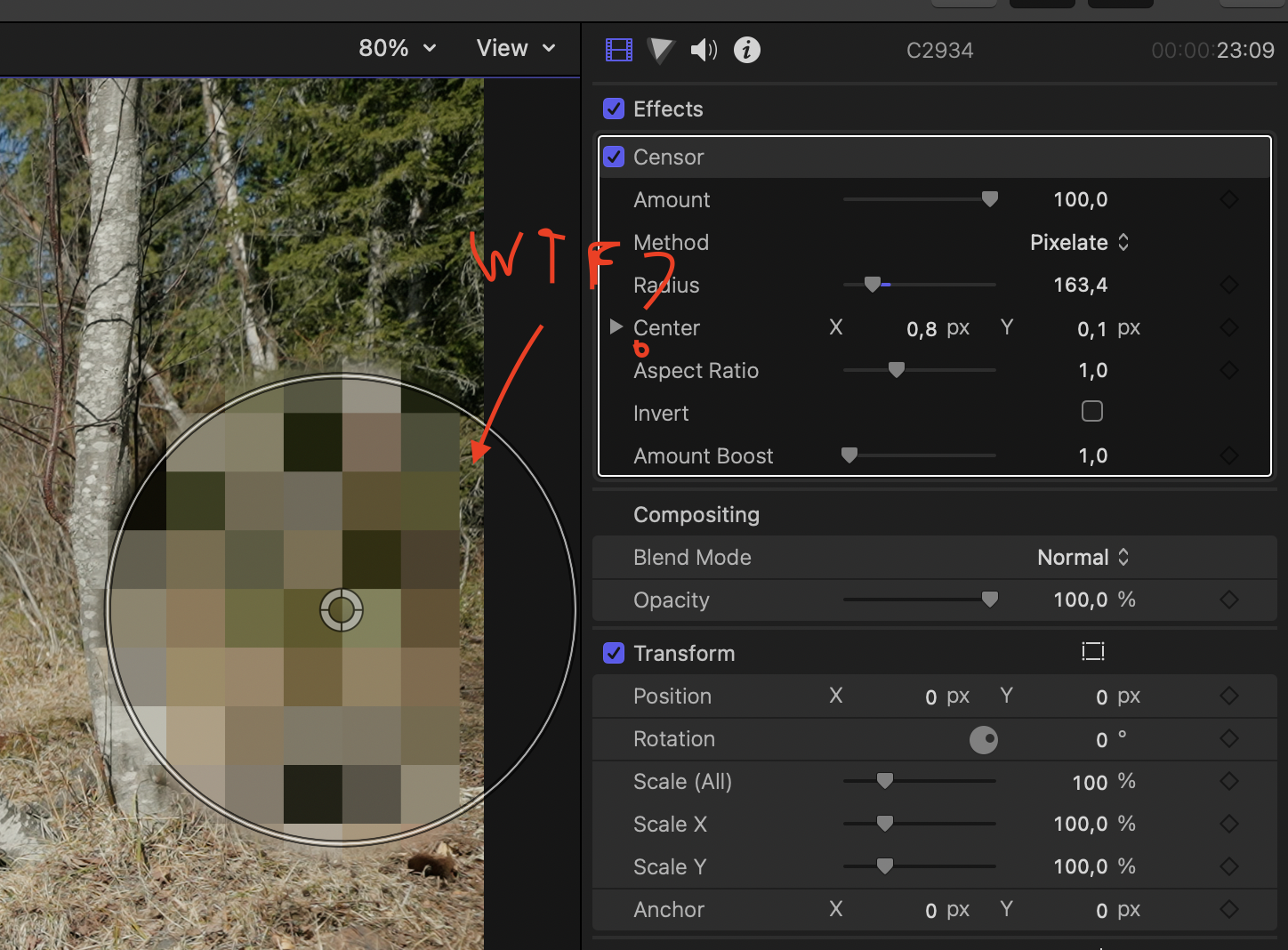
So I am trying to ad the censor effect, but for some reasons there is a clear boarder along the side edges where it does not work. Anyone have any idea what is happening here?
So the aspect ratio of this project is 2:1, so I tried to make a whole new project with standard aspect ratio, if that hade to do with anything, but the same thing happened.
Check the attachment for image
So the aspect ratio of this project is 2:1, so I tried to make a whole new project with standard aspect ratio, if that hade to do with anything, but the same thing happened.
Check the attachment for image
Please Log in to join the conversation.
- Tom Wolsky
-

- Offline
- Moderator
-

30 Apr 2022 14:45 #120319
by Tom Wolsky
Replied by Tom Wolsky on topic Effect does not go all the way to the edge
What's the media?
Please Log in to join the conversation.
30 Apr 2022 21:46 #120328
by Javrri
What do you mean?
Replied by Javrri on topic Effect does not go all the way to the edge
What's the media?
What do you mean?
Please Log in to join the conversation.
- Tom Wolsky
-
- Offline
- Moderator
-
01 May 2022 01:18 #120329
by Tom Wolsky
Replied by Tom Wolsky on topic Effect does not go all the way to the edge
You have video files or stills images in your project? What are the specifications of the media?
Please Log in to join the conversation.
01 May 2022 04:55 #120333
by Javrri
Replied by Javrri on topic Effect does not go all the way to the edge
It is video files shot with a Sony A7sIII
Please Log in to join the conversation.
- Tom Wolsky
-
- Offline
- Moderator
-
01 May 2022 12:23 #120337
by Tom Wolsky
Replied by Tom Wolsky on topic Effect does not go all the way to the edge
The camera shoots quite a number of different formats, so not certain I have what you have. The media I have from that camera in a 4K project with the current OS and FCP doesnt show that problem.
Please Log in to join the conversation.

01 May 2022 15:01 - 01 May 2022 15:02 #120340
by cseeman
Replied by cseeman on topic Effect does not go all the way to the edge
@Javrri
Perhaps include project pixel dimensions vs clip pixel dimensions so we know how they might differ.
Two things to think about:
Is the clip set to Fit, Fill, or, None? Perhaps that's having an impact even if it shouldn't.
Does putting the clip in a Compound Clip and then adding the censor effect then work to the edges?
Perhaps include project pixel dimensions vs clip pixel dimensions so we know how they might differ.
Two things to think about:
Is the clip set to Fit, Fill, or, None? Perhaps that's having an impact even if it shouldn't.
Does putting the clip in a Compound Clip and then adding the censor effect then work to the edges?
Last edit: 01 May 2022 15:02 by cseeman.
Please Log in to join the conversation.

02 May 2022 07:35 #120351
by anickt
Replied by anickt on topic Effect does not go all the way to the edge
I have noticed this issue in some fx with 4k footage in a 1080 project and Spacial Conform set to Fit. Setting SC to fill corrected the issue.
Please Log in to join the conversation.
- Andreas Kiel
-

- Offline
- Platinum Member
-

Less
More
- Posts: 1077
- Thank you received: 189
02 May 2022 08:53 #120353
by Andreas Kiel
Replied by Andreas Kiel on topic Effect does not go all the way to the edge
Probably it’s the "pixel block" size.
Unfortunately I’m not at a computer and it’s difficult to describe without pictures.
The pixelate effect takes a region of x by x pixels, calculates the average color and fills the region with that color.
If the region needed for calculations is smaller the process will be skipped.
You can create a compound clip which is a bit bigger, but then the effect will take the "black" outside into the calculations.
You also could mirror the clip at all edges and sides - but I‘ve no idea about performance.
Unfortunately I’m not at a computer and it’s difficult to describe without pictures.
The pixelate effect takes a region of x by x pixels, calculates the average color and fills the region with that color.
If the region needed for calculations is smaller the process will be skipped.
You can create a compound clip which is a bit bigger, but then the effect will take the "black" outside into the calculations.
You also could mirror the clip at all edges and sides - but I‘ve no idea about performance.
Please Log in to join the conversation.
06 May 2022 20:16 - 06 May 2022 20:19 #120432
by Javrri
Replied by Javrri on topic Effect does not go all the way to the edge
Since my project is 4k 2:1 I change fit to fill under spacial conform. I have tried both and the problem remains. I was able to solve this in this project by changing the edit so I did not need to censor the edge. But the problem is still very annoying.
The files are shot in 4k with an A7sIII and the project dimensions are 3840x1920
The files are shot in 4k with an A7sIII and the project dimensions are 3840x1920
Last edit: 06 May 2022 20:19 by Javrri.
Please Log in to join the conversation.
