


- Posts: 335
- Thank you received: 62
3 Post Moderation Rule for New Boarders (25 Jan 2021)
New boarders will have their posts moderated - Don't worry if you cannot see your post immediately.
Need app to strip out QuickTime title info
- Oliver Peters
-
 Topic Author
- Offline
- Platinum Member
-

Less
More
23 Apr 2022 15:09 #120165
by Oliver Peters
Need app to strip out QuickTime title info was created by Oliver Peters
When you export a QuickTime master file from FCP it embeds the project title and description. If you change the file name later, it does not update the embedded title. So when you open the file, the QT Player displays the original title in the header bar and not the altered name. Is there an app to alter and/or strip out this embedded info in the QuickTime file without requiring re-encoding or using some sort of Terminal hack?
Please Log in to join the conversation.

23 Apr 2022 15:21 - 23 Apr 2022 15:52 #120167
by DaveM
Replied by DaveM on topic Need app to strip out QuickTime title info
Jon Chappell / Digital Rebellion make "QT Edit" which is part of the "Pro Media Tools" package. QT Edit allows you to change metadata and a bunch of other stuff...
www.digitalrebellion.com/promedia/
While QT Edit is a very nice tool, it may be overkill (in terms of price) for what you want.
ffWorks can pass through audio and video and let you delete/edit metadata.
Other than using ffmpeg in the Terminal, there may be some other cheaper/free tools that can remove/edit metadata. I tried Shutter Encoder but couldn't get it to work (or it may not do what you want).
Cheers.
www.digitalrebellion.com/promedia/
While QT Edit is a very nice tool, it may be overkill (in terms of price) for what you want.
ffWorks can pass through audio and video and let you delete/edit metadata.
Other than using ffmpeg in the Terminal, there may be some other cheaper/free tools that can remove/edit metadata. I tried Shutter Encoder but couldn't get it to work (or it may not do what you want).
Cheers.
Last edit: 23 Apr 2022 15:52 by DaveM.
Please Log in to join the conversation.

23 Apr 2022 22:02 - 23 Apr 2022 22:45 #120179
by VTC
Replied by VTC on topic Need app to strip out QuickTime title info
The beauty that's QT Player 7. Add fields. Edit fields. I do this daily.
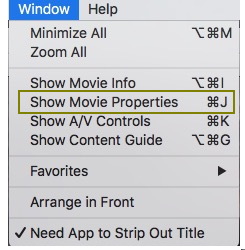
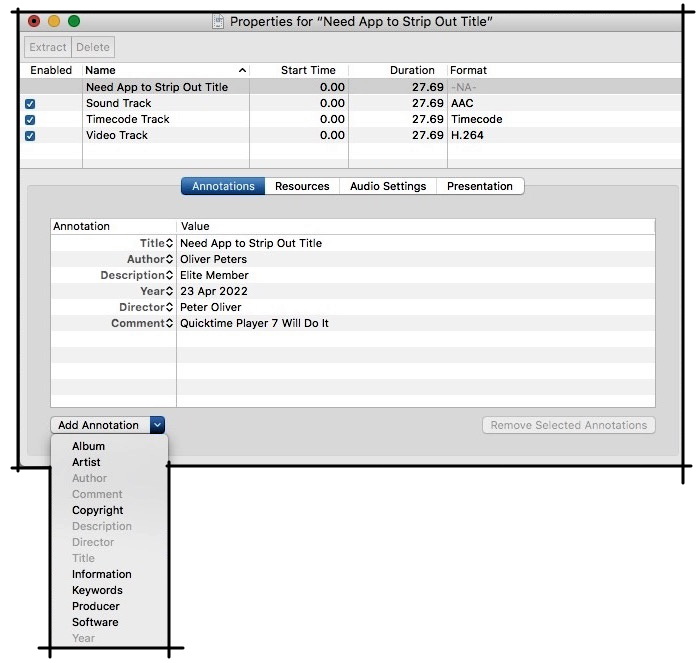
The quirk about the title header bar not updating is remedied by selecting the title annotation, rolling it down to another annotation (say 'artist'), letting that stick, then choose TITLE once again.
-
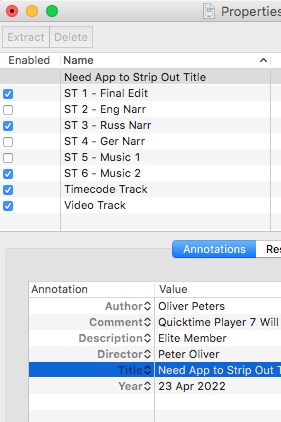
Also note the ability to disable or delete or extract individual audio / video / chapter tracks. One video can contain multiple tracks selectable depending upon the delivery target. QT7 is an overlooked gem of an application.
The quirk about the title header bar not updating is remedied by selecting the title annotation, rolling it down to another annotation (say 'artist'), letting that stick, then choose TITLE once again.
-
Also note the ability to disable or delete or extract individual audio / video / chapter tracks. One video can contain multiple tracks selectable depending upon the delivery target. QT7 is an overlooked gem of an application.
Last edit: 23 Apr 2022 22:45 by VTC.
Please Log in to join the conversation.
- Oliver Peters
-
Topic Author
- Offline
- Platinum Member
-
Less
More
- Posts: 335
- Thank you received: 62
24 Apr 2022 00:41 #120180
by Oliver Peters
Replied by Oliver Peters on topic Need app to strip out QuickTime title info
"The quirk about the title header bar not updating is remedied by selecting the title annotation, rolling it down to another annotation (say 'artist'), letting that stick, then choose TITLE once again."
Thanks. That may actually fix the issue, because I have another app that's supposed to do what QT7 does, but it didn't stick.
Thanks. That may actually fix the issue, because I have another app that's supposed to do what QT7 does, but it didn't stick.
Please Log in to join the conversation.
24 Apr 2022 01:26 #120182
by VTC
Replied by VTC on topic Need app to strip out QuickTime title info
Assign the awkward 'title' as something else, make a new 'title', then delete that 'something else'. It always needs to have a title so you need to dance around a bit. Esentially a lot of avenues available leading to the same destination.
Please Log in to join the conversation.
