


- Posts: 78
- Thank you received: 6
3 Post Moderation Rule for New Boarders (25 Jan 2021)
New boarders will have their posts moderated - Don't worry if you cannot see your post immediately.
MultiCam Question.. Syncing with master audio??
- desilva_oz
-
 Topic Author
- Offline
- Senior Member
-

Less
More
01 Feb 2012 11:26 #3671
by desilva_oz
MultiCam Question.. Syncing with master audio?? was created by desilva_oz
Hi people,
Been using multicam in the 10.0.3 update, and its amazing.
I can easily select 3 clips and sync them with no trouble - it works.
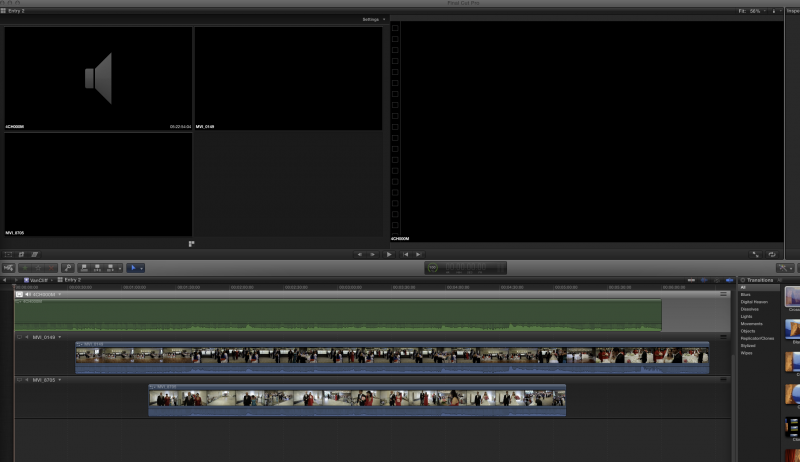
I want to now add my master audio from my h4n, and when I do so I cant find a way to select it as the main audio source. I can get it to sync up in the Angle viewer and it looks perfect, but in the live edit it appears only when selected which is not what i want. I know im doing something wrong!
Any suggestions?
Been using multicam in the 10.0.3 update, and its amazing.
I can easily select 3 clips and sync them with no trouble - it works.
I want to now add my master audio from my h4n, and when I do so I cant find a way to select it as the main audio source. I can get it to sync up in the Angle viewer and it looks perfect, but in the live edit it appears only when selected which is not what i want. I know im doing something wrong!
Any suggestions?
Please Log in to join the conversation.
- jeffkirkland
-
- Offline
- New Member
-

Less
More
- Posts: 7
- Thank you received: 1
01 Feb 2012 12:59 #3673
by jeffkirkland
Replied by jeffkirkland on topic Re: MultiCam Question.. Syncing with master audio??
I played with a couple of ways of doing this that worked.
When you add the multi cam clip to the timeline, you should get the icons on the top left of the multi cam viewer letting you select whether to cut audio, video or both. I set it to select both, clicked on my H4n clip, which set it as the primary clip. i then set it to just switch video and selected one of the other clips. From memory I had trouble selecting the audio clip until I set it to switch both audio and video.
Another way was to sync the H4n audio with one of the video clips then edit the synced compound clip to turn of the non H4n audio. Then you can use the compound clip you just created as one of the clips in the multi-cam clip.
The third approach was to edit the multi-clip using the camera scratch sound and then sync the H4n audio at the end, creating a new synced compound clip.
All of the above worked for me.
When you add the multi cam clip to the timeline, you should get the icons on the top left of the multi cam viewer letting you select whether to cut audio, video or both. I set it to select both, clicked on my H4n clip, which set it as the primary clip. i then set it to just switch video and selected one of the other clips. From memory I had trouble selecting the audio clip until I set it to switch both audio and video.
Another way was to sync the H4n audio with one of the video clips then edit the synced compound clip to turn of the non H4n audio. Then you can use the compound clip you just created as one of the clips in the multi-cam clip.
The third approach was to edit the multi-clip using the camera scratch sound and then sync the H4n audio at the end, creating a new synced compound clip.
All of the above worked for me.
Please Log in to join the conversation.
- desilva_oz
-
Topic Author
- Offline
- Senior Member
-
Less
More
- Posts: 78
- Thank you received: 6
01 Feb 2012 14:00 #3674
by desilva_oz
Replied by desilva_oz on topic Re: MultiCam Question.. Syncing with master audio??
First option works perfectly. Thanks for sharing this method.
I have one other Question.
Is there a way to select multiple clips from the A camera and sync them with multiple clips from the B camera. For example a wedding ceremony shot on DSLR with upto 5x12min clips from each camera?? So we have the same scenario as above, but now with cam A + B with consecutive clips that need syncing.
Thanks in Advance
I have one other Question.
Is there a way to select multiple clips from the A camera and sync them with multiple clips from the B camera. For example a wedding ceremony shot on DSLR with upto 5x12min clips from each camera?? So we have the same scenario as above, but now with cam A + B with consecutive clips that need syncing.
Thanks in Advance
Please Log in to join the conversation.
- jeffkirkland
-
- Offline
- New Member
-
Less
More
- Posts: 7
- Thank you received: 1
01 Feb 2012 16:25 #3681
by jeffkirkland
Replied by jeffkirkland on topic Re: MultiCam Question.. Syncing with master audio??
I haven't tried where both cameras were multiple clips but I had no problem syncing a bunch of clips from an Atomos Ninja with two other camera angles. Can't see why it wouldn't work though. Just give all of the clips from the same camera the same angle name.
Please Log in to join the conversation.
- desilva_oz
-
Topic Author
- Offline
- Senior Member
-
Less
More
- Posts: 78
- Thank you received: 6
01 Feb 2012 17:01 - 01 Feb 2012 17:06 #3682
by desilva_oz
Replied by desilva_oz on topic Re: MultiCam Question.. Syncing with master audio??
Okay, I get what your saying. Im a tad confused with the angle name tho, I tried renaming my clips that are from the same camera, the same name? That didn't work out for me, Although it did line everything up, but each clip had its own camera angle, instead of just 2 camera angles (so i ended up with over 10 tracks / angles..
Where do you "name the camera angle exactly" and what settings do u use in the multicam sync options?
Cheers
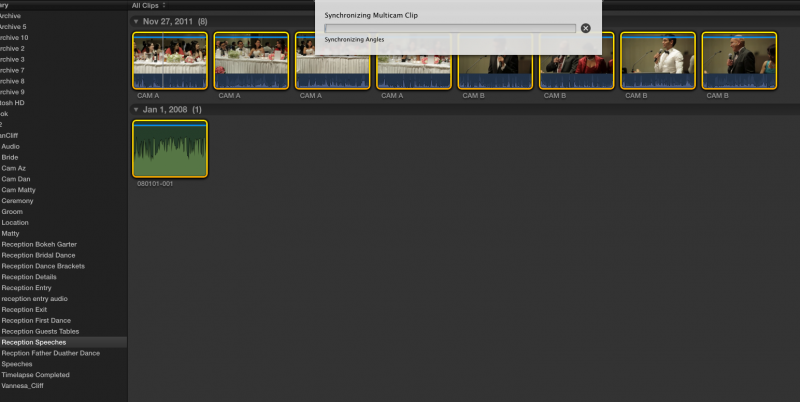
Where do you "name the camera angle exactly" and what settings do u use in the multicam sync options?
Cheers
Last edit: 01 Feb 2012 17:06 by desilva_oz. Reason: add thumbnail image
Please Log in to join the conversation.
- desilva_oz
-
Topic Author
- Offline
- Senior Member
-
Less
More
- Posts: 78
- Thank you received: 6
01 Feb 2012 17:22 #3683
by desilva_oz
Replied by desilva_oz on topic Re: MultiCam Question.. Syncing with master audio??
It Pays to read the help file!
I see what you mean with the angle names here (needed to change the event default view to list)
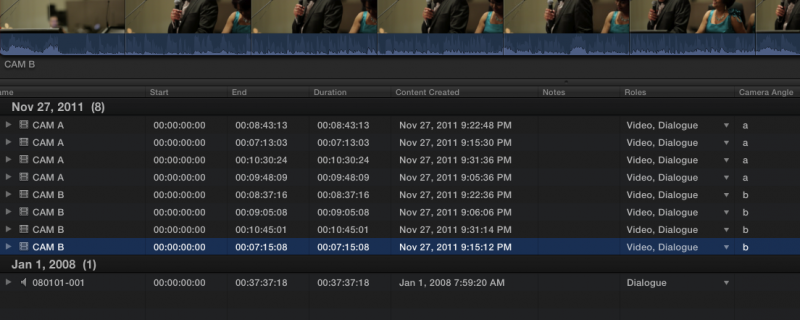
And then select the "angle" option under multicam sync settings
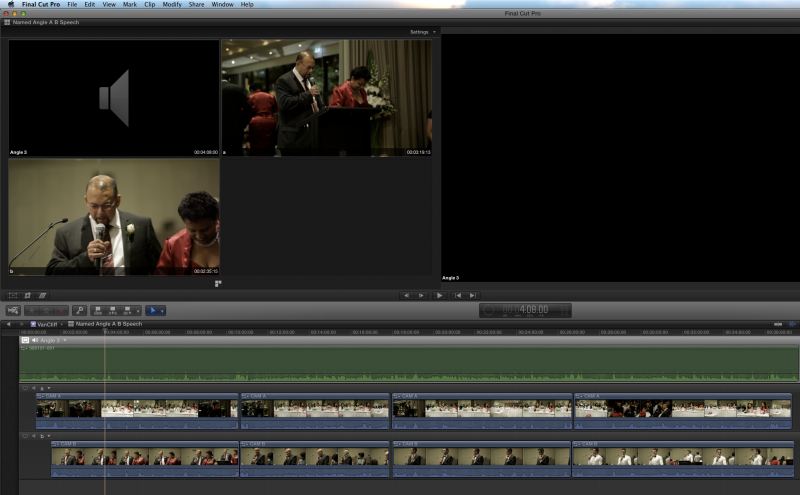
And I now get this! YaY! Thanks again!
I see what you mean with the angle names here (needed to change the event default view to list)
And then select the "angle" option under multicam sync settings
And I now get this! YaY! Thanks again!
Please Log in to join the conversation.
- jeffkirkland
-
- Offline
- New Member
-
Less
More
- Posts: 7
- Thank you received: 1
01 Feb 2012 17:38 - 01 Feb 2012 17:42 #3684
by jeffkirkland
Replied by jeffkirkland on topic Re: MultiCam Question.. Syncing with master audio??
No worries. Just for anyone reading along...
You select all the clips in the angle, go to the info panel, choose one of the extended views that includes the Camera Angle field (or create your own metadata view under add new...) and give the angle a name. it doesn't have to be a number. I've been using names like "Z7 CU", "7D WS" or whatever makes sense to me when I'm looking at the angle viewer. All the selected clips now have the new angle name.
You select all the clips in the angle, go to the info panel, choose one of the extended views that includes the Camera Angle field (or create your own metadata view under add new...) and give the angle a name. it doesn't have to be a number. I've been using names like "Z7 CU", "7D WS" or whatever makes sense to me when I'm looking at the angle viewer. All the selected clips now have the new angle name.
Last edit: 01 Feb 2012 17:42 by jeffkirkland.
Please Log in to join the conversation.
02 Feb 2012 01:36 #3708
by funkpost
Replied by funkpost on topic Re: MultiCam Question.. Syncing with master audio??
Im reading along - great advice, thanks!
Please Log in to join the conversation.

02 Feb 2012 04:54 #3714
by BenB
Replied by BenB on topic Re: MultiCam Question.. Syncing with master audio??
Camera Name and Angle Number are vital to know about. Read the multicam section of the user manual, there's way more to this than meets the eye.
Please Log in to join the conversation.
- desilva_oz
-
Topic Author
- Offline
- Senior Member
-
Less
More
- Posts: 78
- Thank you received: 6
02 Feb 2012 05:28 #3719
by desilva_oz
Replied by desilva_oz on topic Re: MultiCam Question.. Syncing with master audio??
Yes your right, I just read the "name angle" section of the help file. It suggests a method to select multiple clips for naming, which is a huge time saver.
My question is when I select all the clips
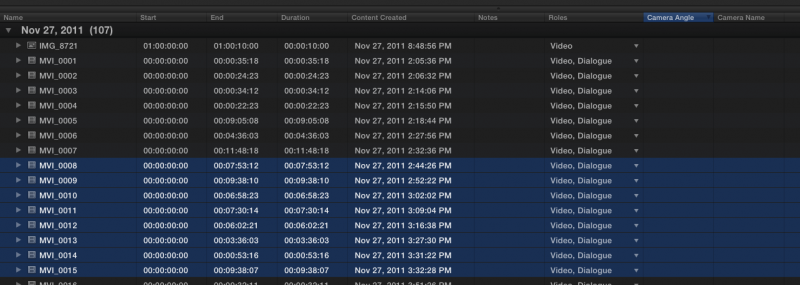
(just mov files) and go to info inspector, I get this message: Nothing to inspect
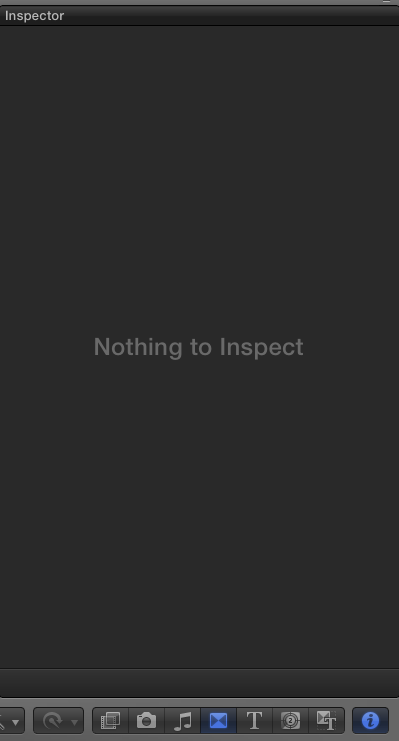
Any tips here as to what im doing incorrect? The help file also suggests I can color correct a bunch of clips with the same angle / camera name.. Would love to know how this is done.
My question is when I select all the clips
(just mov files) and go to info inspector, I get this message: Nothing to inspect
Any tips here as to what im doing incorrect? The help file also suggests I can color correct a bunch of clips with the same angle / camera name.. Would love to know how this is done.
Please Log in to join the conversation.
02 Feb 2012 07:08 - 02 Feb 2012 07:10 #3730
by BenB
Replied by BenB on topic Re: MultiCam Question.. Syncing with master audio??
Yes, there's a bug we've had for awhile. Try selecting just one asset in the Browser to get it's info in the Inspector, then shift click the last one in the group to highlight them all. You should be able to change that Angle metadata and Camera metadata at one time. BUT, don't give every asset the same Angle name/number, if you want them to be in separate lanes. If you give them all the same Camera Angle name/number, you can actually arrange them to be in the same lane.
Last edit: 02 Feb 2012 07:10 by BenB.
Please Log in to join the conversation.
- desilva_oz
-
Topic Author
- Offline
- Senior Member
-
Less
More
- Posts: 78
- Thank you received: 6
02 Feb 2012 09:45 #3740
by desilva_oz
Replied by desilva_oz on topic Re: MultiCam Question.. Syncing with master audio??
Thanks, your tips all worked.
This is groundbreaking for me, I am able to now go into my event browser highlight the 3 cameras clips and my h4n audio and press a button to sync it all ready for multicam edit. When were talking over 2hrs of footage, and one roaming camera that only gets small clips here and there, this is a huge time saver. I found the sync to be 98% accurate, I only had to shift a few clips to get them lined up perfectly. This is great for the DSLR wedding guys!
This is groundbreaking for me, I am able to now go into my event browser highlight the 3 cameras clips and my h4n audio and press a button to sync it all ready for multicam edit. When were talking over 2hrs of footage, and one roaming camera that only gets small clips here and there, this is a huge time saver. I found the sync to be 98% accurate, I only had to shift a few clips to get them lined up perfectly. This is great for the DSLR wedding guys!
Please Log in to join the conversation.
- jeffkirkland
-
- Offline
- New Member
-
Less
More
- Posts: 7
- Thank you received: 1
02 Feb 2012 10:34 #3741
by jeffkirkland
Replied by jeffkirkland on topic Re: MultiCam Question.. Syncing with master audio??
I really can't think of another NLE with the sort of multi-cam flexibility and ease of use that FCPX has now.
Please Log in to join the conversation.
