


- Posts: 53
- Thank you received: 1
3 Post Moderation Rule for New Boarders (25 Jan 2021)
New boarders will have their posts moderated - Don't worry if you cannot see your post immediately.
10.6.2 and Custom Sounds
- Struggling_Editor
-
 Topic Author
- Offline
- Senior Member
-

Less
More
12 Apr 2022 21:58 - 14 Apr 2022 04:44 #119967
by Struggling_Editor
10.6.2 and Custom Sounds was created by Struggling_Editor
In previous versions of FCP I was able to add folders or an alias to /Library/Apple..../Final Cut Pro Sound Effects ..
This would allow me to access my own custom sounds in the Sound Effects browser. Now after upgrading to 10.6.2 I am no longer able to do this.
UPDATE: The problem is that only .CAF files are displaying in the browser. None of my .WAV files display anymore.
This would allow me to access my own custom sounds in the Sound Effects browser. Now after upgrading to 10.6.2 I am no longer able to do this.
UPDATE: The problem is that only .CAF files are displaying in the browser. None of my .WAV files display anymore.
Last edit: 14 Apr 2022 04:44 by Struggling_Editor.
Please Log in to join the conversation.


13 Apr 2022 02:49 #119974
by Redifer
Replied by Redifer on topic 10.6.2 and Custom Sounds
What I've always done is have a dedicated Library with sound effects (and a few other commonly used things) that I call "Elements". I have my sound effects in an Event and it's all categorized by folders (keyword collections) and it's easily searchable as well. If I need a sound, I find it and just drag it into the Project I'm working on. I've never tried adding sound effects to Apple's folder.
Please Log in to join the conversation.
- Struggling_Editor
-
Topic Author
- Offline
- Senior Member
-
Less
More
- Posts: 53
- Thank you received: 1
13 Apr 2022 03:02 #119975
by Struggling_Editor
Replied by Struggling_Editor on topic 10.6.2 and Custom Sounds
I've always added my sound effects to Apple's folder..
So it turns out that in the previous versions(s) you could add your own custom sounds in .WAV format.. Now, only .CAF files are recognized - so all I needed to do was rename all of my .WAV to .CAF - no conversion even needed..
So it turns out that in the previous versions(s) you could add your own custom sounds in .WAV format.. Now, only .CAF files are recognized - so all I needed to do was rename all of my .WAV to .CAF - no conversion even needed..
Please Log in to join the conversation.

13 Apr 2022 03:39 - 13 Apr 2022 03:40 #119976
by dgwvideo
This still works as always. I'll bet you need to delete your preferences when launching FCP. Hold down Option and Command when starting FCP and choose to delete preferences when asked. This is always a good idea (and likely mandatory) whenever launching a new release of FCP for the first time to correct odd issues that sometimes appear.
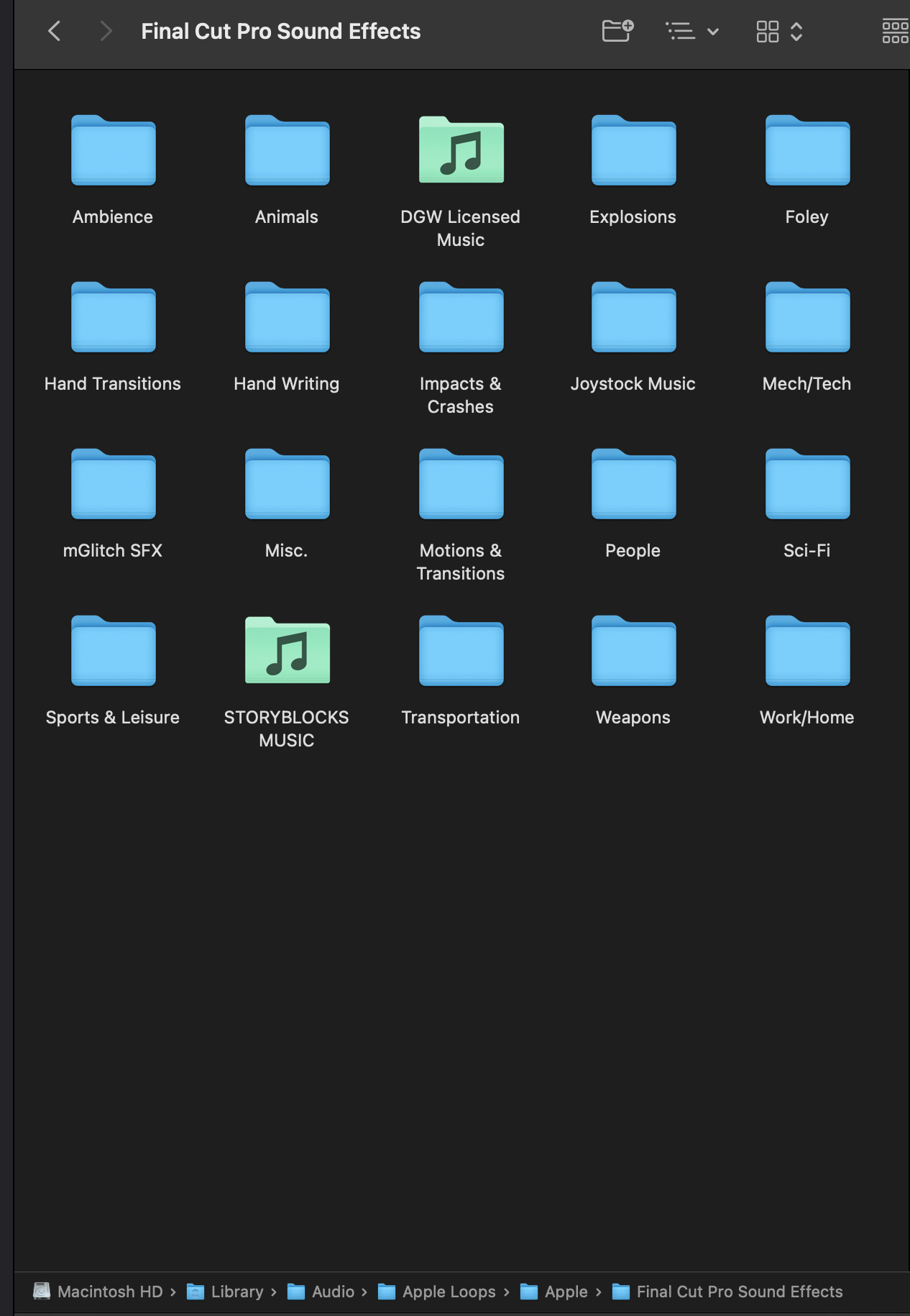
The correct path just for information to add your own music to the FCP audio browser is : Macintosh HD/Library/Audio/Apple Loops/Apple/Final Cut Pro Sound Effects. It accepts the most common audio file types of .wav, .mp3, .aif, .aiff, and more.
Creating history....one edit at a time !
Replied by dgwvideo on topic 10.6.2 and Custom Sounds
Does anyone have a work-around/way to get my own custom sounds into the Sound Effects Browser?
This still works as always. I'll bet you need to delete your preferences when launching FCP. Hold down Option and Command when starting FCP and choose to delete preferences when asked. This is always a good idea (and likely mandatory) whenever launching a new release of FCP for the first time to correct odd issues that sometimes appear.
The correct path just for information to add your own music to the FCP audio browser is : Macintosh HD/Library/Audio/Apple Loops/Apple/Final Cut Pro Sound Effects. It accepts the most common audio file types of .wav, .mp3, .aif, .aiff, and more.
Creating history....one edit at a time !
Last edit: 13 Apr 2022 03:40 by dgwvideo.
Please Log in to join the conversation.

13 Apr 2022 11:35 #119980
by Albo
Replied by Albo on topic 10.6.2 and Custom Sounds
I use my own sound folders in FC but they always appear completely out of alphabetical order.
It would be better to just fix this so we can use .wav
Because of my alphabetical order problem I just use my sound library and drag the files into FC.
BTW, this problem I have is most probably local. Tried fixing it but nothing has worked up to now.
I use my sounds with different applications. I presume that if I rename my files with .caf then I can't use them with other software?I've always added my sound effects to Apple's folder..
So it turns out that in the previous versions(s) you could add your own custom sounds in .WAV format.. Now, only .CAF files are recognized - so all I needed to do was rename all of my .WAV to .CAF - no conversion even needed.
It would be better to just fix this so we can use .wav
Because of my alphabetical order problem I just use my sound library and drag the files into FC.
BTW, this problem I have is most probably local. Tried fixing it but nothing has worked up to now.
Please Log in to join the conversation.
13 Apr 2022 19:49 #119990
by dgwvideo
What are you referring to? FCP works with WAV and most audio formats.
Creating history....one edit at a time !
Replied by dgwvideo on topic 10.6.2 and Custom Sounds
It would be better to just fix this so we can use .wav
What are you referring to? FCP works with WAV and most audio formats.
Creating history....one edit at a time !
Please Log in to join the conversation.
- Struggling_Editor
-
Topic Author
- Offline
- Senior Member
-
Less
More
- Posts: 53
- Thank you received: 1
13 Apr 2022 19:52 - 13 Apr 2022 19:56 #119991
by Struggling_Editor
Replied by Struggling_Editor on topic 10.6.2 and Custom Sounds
After the 10.6.2 update, my FCP no longer recognized my custom .WAV files in the Audio Browser.
After updating to 10.6.2 does your recognize .WAV files in the FCP audio/sound effects browser?
FCP can still use .WAV files, but they are no longer recognized in the audio/effects browser -thats what this entire thread is about.
After updating to 10.6.2 does your recognize .WAV files in the FCP audio/sound effects browser?
FCP can still use .WAV files, but they are no longer recognized in the audio/effects browser -thats what this entire thread is about.
Last edit: 13 Apr 2022 19:56 by Struggling_Editor.
Please Log in to join the conversation.
13 Apr 2022 19:58 #119992
by Albo
Replied by Albo on topic 10.6.2 and Custom Sounds
I am referring to custom folders.
I can drag .WAV in FC. I can't use custom folders.
If I need to change from .WAV to .CAF
It is not very usefull...for me at least.
I haven't received my MaC Studio as it is stuck at the canadian border!
I can't test it. I'm working with Catalina but the folder issue remains.
Sorry for any confusion.
I can drag .WAV in FC. I can't use custom folders.
If I need to change from .WAV to .CAF
It is not very usefull...for me at least.
I haven't received my MaC Studio as it is stuck at the canadian border!
I can't test it. I'm working with Catalina but the folder issue remains.
Sorry for any confusion.
Please Log in to join the conversation.
13 Apr 2022 20:06 - 13 Apr 2022 20:06 #119993
by dgwvideo
Creating history....one edit at a time !
Replied by dgwvideo on topic 10.6.2 and Custom Sounds
If you mean the FCP Sound Library when you say audio/effects browser - yes, the latest version of FCP shows all my custom folders and sound effects within those folders....wav, aif, m4a, mp3, etc. See my post above in this thread and see if clearing the prefs as mentioned helps. If you are not talking about the FCP sound library, then I guess I do not understand.
Creating history....one edit at a time !
Last edit: 13 Apr 2022 20:06 by dgwvideo.
Please Log in to join the conversation.
13 Apr 2022 20:12 #119995
by Albo
Replied by Albo on topic 10.6.2 and Custom Sounds
Clearing prefs doesn't work. I rarely have issues but this one is just there and not going away.
Fo now I simply open my sound folder which is fine and alphabetical and drag from there.
I am not losing sleep over this. I prersume that once I install the latest version on Mac Studio everything will be back to normal.
Thanks.
Fo now I simply open my sound folder which is fine and alphabetical and drag from there.
I am not losing sleep over this. I prersume that once I install the latest version on Mac Studio everything will be back to normal.
Thanks.
Please Log in to join the conversation.
- Struggling_Editor
-
Topic Author
- Offline
- Senior Member
-
Less
More
- Posts: 53
- Thank you received: 1
13 Apr 2022 20:25 #119996
by Struggling_Editor
Replied by Struggling_Editor on topic 10.6.2 and Custom Sounds
My FCP sound library will no longer recognize/show/display anything but .CAF files. Clearing prefs doesn't work/fix/change anything.
Its not a big deal as changing all of my custom audio files from .WAV to .CAF only took a few seconds, but it was a PITA to figure out
Its not a big deal as changing all of my custom audio files from .WAV to .CAF only took a few seconds, but it was a PITA to figure out
Please Log in to join the conversation.
13 Apr 2022 20:41 - 13 Apr 2022 20:47 #119998
by dgwvideo
Creating history....one edit at a time !
Replied by dgwvideo on topic 10.6.2 and Custom Sounds
Wow, not sure why that's happening. Working fine on FCP 10.6.2 and Monterey 12.3.1 on our Intel iMac pro.
Creating history....one edit at a time !
Last edit: 13 Apr 2022 20:47 by dgwvideo.
Please Log in to join the conversation.


13 Apr 2022 22:12 #120000
by CMessineo
I just want to confirm we're having the same problem at our school on all our computers and laptops (so, it's not a machine specific thing). We always linked all our sound libraries by putting those links in this folder:
Library - Audio - Apple - Final Cut Pro Sound Effects
This worked great for years, but now those links aren't showing up or if they are, it's only showing a partial list of the sound files inside them.
I wish there was a better way to manage large sound libraries inside FCP that worked as intended.
Chris
p.s. Not to be negative, I love all the other changes in 10.6.2, just frustrated by this new bug.
Replied by CMessineo on topic 10.6.2 and Custom Sounds
In previous versions of FCP I was able to add folders or an alias to /Library/Apple..../Final Cut Pro Sound Effects ..
This would allow me to access my own custom sounds in the Sound Effects browser. Now after upgrading to 10.6.2 I am no longer able to do this.
Does anyone have a work-around/way to get my own custom sounds into the Sound Effects Browser?
I just want to confirm we're having the same problem at our school on all our computers and laptops (so, it's not a machine specific thing). We always linked all our sound libraries by putting those links in this folder:
Library - Audio - Apple - Final Cut Pro Sound Effects
This worked great for years, but now those links aren't showing up or if they are, it's only showing a partial list of the sound files inside them.
I wish there was a better way to manage large sound libraries inside FCP that worked as intended.
Chris
p.s. Not to be negative, I love all the other changes in 10.6.2, just frustrated by this new bug.
Please Log in to join the conversation.
- Tom Wolsky
-

- Offline
- Moderator
-

13 Apr 2022 22:16 #120001
by Tom Wolsky
Replied by Tom Wolsky on topic 10.6.2 and Custom Sounds
Library - Audio - Apple - Final Cut Pro Sound Effects
This doesn’t sound like the correct file path.
This doesn’t sound like the correct file path.
Please Log in to join the conversation.
13 Apr 2022 22:27 - 13 Apr 2022 22:31 #120002
by dmetz
Interesting. So those folders show up inside FC, in the browser? I'm having the same issue - have several aliases that simply don't show up now. Just tried a test where I copied a folder into that location (no alias) and it doesn't show up either... nothing but the defaults show up here, in spite of the other folders that live in there via Finder.
macHD / Library / Audio / Apple Loops / Apple / Final Cut Pro Sound Effects

Replied by dmetz on topic 10.6.2 and Custom Sounds
Wow, not sure why that's happening. Working fine on FCP 10.6.2 and Monterey 12.3.1 on our Intel iMac pro.
Interesting. So those folders show up inside FC, in the browser? I'm having the same issue - have several aliases that simply don't show up now. Just tried a test where I copied a folder into that location (no alias) and it doesn't show up either... nothing but the defaults show up here, in spite of the other folders that live in there via Finder.
macHD / Library / Audio / Apple Loops / Apple / Final Cut Pro Sound Effects
Last edit: 13 Apr 2022 22:31 by dmetz.
Please Log in to join the conversation.


13 Apr 2022 23:14 #120004
by thinkfilm
Replied by thinkfilm on topic 10.6.2 and Custom Sounds
FWIW, just chiming in with my experience: I am running FCP 10.6.2 under MacOS 12.3.1 on a 2017 iMac Pro. I created an alias to a folder with 17.3 GB of sound files residing on an external SSD (Samsung X5). I placed the alias in the appropriate Final Cut Sound Effects folder on my system drive. All the files show up in the FCP browser. The files are in a variety of formats .wav. aif .mp3 .caf, etc. So, normal behavior as expected.
Please Log in to join the conversation.
13 Apr 2022 23:30 #120007
by dgwvideo
Creating history....one edit at a time !
Replied by dgwvideo on topic 10.6.2 and Custom Sounds
It's not... the correct one is Macintosh HD/Library/Audio/Apple Loops/Apple/Final Cut Pro Sound Effects.
Creating history....one edit at a time !
Please Log in to join the conversation.
- Struggling_Editor
-
Topic Author
- Offline
- Senior Member
-
Less
More
- Posts: 53
- Thank you received: 1
13 Apr 2022 23:31 #120008
by Struggling_Editor
Replied by Struggling_Editor on topic 10.6.2 and Custom Sounds
Unless i missed something, it seems like those with Intel machines are not reporting any problem.
I have an M1, and can no longer see/access anything other than .CAF in the Sound Effects Browser inside FCP..
I have an M1, and can no longer see/access anything other than .CAF in the Sound Effects Browser inside FCP..
Please Log in to join the conversation.
13 Apr 2022 23:35 #120009
by CMessineo
Sorry, yes, I forgot to type the "Apple Loops" folder in there.
Also, as others have mentioned, I am on an M1 Mac Laptop. But our classroom iMacs are Intel models. All of them are experiencing issues accessing sound effects, through the Sound window in FCP with the new update. Hopefully, enough people report this to Apple and hopefully, this is an easy fix.
Replied by CMessineo on topic 10.6.2 and Custom Sounds
Library - Audio - Apple - Final Cut Pro Sound Effects
This doesn’t sound like the correct file path.
Sorry, yes, I forgot to type the "Apple Loops" folder in there.
Also, as others have mentioned, I am on an M1 Mac Laptop. But our classroom iMacs are Intel models. All of them are experiencing issues accessing sound effects, through the Sound window in FCP with the new update. Hopefully, enough people report this to Apple and hopefully, this is an easy fix.
Please Log in to join the conversation.
13 Apr 2022 23:37 - 13 Apr 2022 23:40 #120010
by dgwvideo
Creating history....one edit at a time !
Replied by dgwvideo on topic 10.6.2 and Custom Sounds
OK, so now I am seeing the problem, but not exactly as some. We have about 200 GB of sound files in our library and mostly WAV or AIFF and a few mp3 and CAF. All of the CAF, MP3 and some of the WAV and AIFF files are showing up in the FCP sound browser. All of our custom folders show up (although not alphabetical which has been the case forever), but they are there. If the folders contain a mix of wav and mp3, then sometimes they show individual tracks (even some wav files) but not always. This is definitely a BUG and Kudos to Struggling Editor for first pointing it out. I've tried with the complete 200 GB production music folder in the path (same one it's been in for years) and also tried placing the production folder elsewhere on the system drive with an alias placed in the Final Cut Pro Sound Effects folder. Same result, but it was hard to tell at first without going through a large amount of subfolders to find the offending files.
Creating history....one edit at a time !
Last edit: 13 Apr 2022 23:40 by dgwvideo.
Please Log in to join the conversation.
