


- Posts: 730
- Thank you received: 26
3 Post Moderation Rule for New Boarders (25 Jan 2021)
New boarders will have their posts moderated - Don't worry if you cannot see your post immediately.
Replace/Relink files
- DmitriZigany
-
 Topic Author
- Offline
- Platinum Member
-

Less
More
07 Apr 2022 12:04 #119846
by DmitriZigany
Replace/Relink files was created by DmitriZigany
Hey!
So... I exported some low res files to send to a collaborator. I thought he was just gonna watch them but was careful to make them just as long as the original files anyway.
He ended up doing some preliminary edits in Premiere and sends me XMLs back.
Using SendToX there's no problem getting the project into FCP, but when I try to relink to the high res files FCP won't have it and I can only relink to to the low res file.
Is there any way to force FCP use the original high res file???
I tried to "hack" the XML by changing the file names but that didn't work...
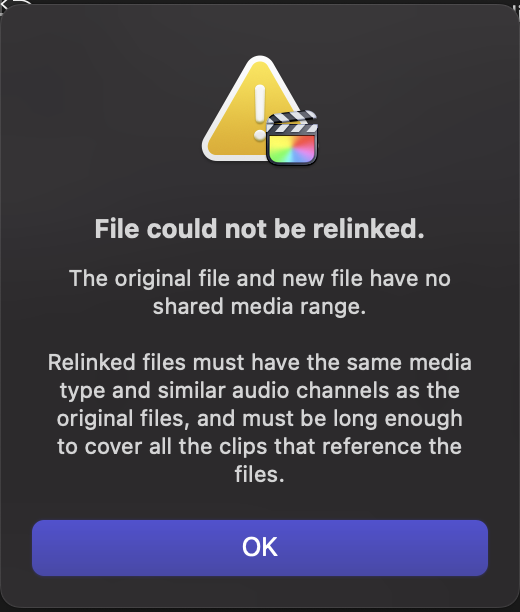
So... I exported some low res files to send to a collaborator. I thought he was just gonna watch them but was careful to make them just as long as the original files anyway.
He ended up doing some preliminary edits in Premiere and sends me XMLs back.
Using SendToX there's no problem getting the project into FCP, but when I try to relink to the high res files FCP won't have it and I can only relink to to the low res file.
Is there any way to force FCP use the original high res file???
I tried to "hack" the XML by changing the file names but that didn't work...
Please Log in to join the conversation.
- Oliver Peters
-

- Offline
- Platinum Member
-
Less
More
- Posts: 335
- Thank you received: 62
07 Apr 2022 12:59 #119847
by Oliver Peters
Replied by Oliver Peters on topic Replace/Relink files
Try relinking to the high-res files in Premiere or Resolve first and then export a new FCPXML and bring that into FCP. This way you are bringing in a file that is already linked to the high-res media.
Please Log in to join the conversation.
- DmitriZigany
-
Topic Author
- Offline
- Platinum Member
-
Less
More
- Posts: 730
- Thank you received: 26
07 Apr 2022 13:56 - 07 Apr 2022 13:57 #119850
by DmitriZigany
Replied by DmitriZigany on topic Replace/Relink files
The one with Premiere doesn't have access to the high res files and I don't have Premiere or Resolve (guess I could download the free version of Resolve though).
Can you open XMLs exported from Premiere as FCP XML in Resolve?
Can you open XMLs exported from Premiere as FCP XML in Resolve?
Last edit: 07 Apr 2022 13:57 by DmitriZigany.
Please Log in to join the conversation.
- Oliver Peters
-
- Offline
- Platinum Member
-
Less
More
- Posts: 335
- Thank you received: 62
07 Apr 2022 14:18 #119852
by Oliver Peters
Replied by Oliver Peters on topic Replace/Relink files
I would say, sure, download and install the free version of Resolve. Even if you don't use it much, it's a good "Swiss Army knife" to have. Resolve will open FCPXMLs from FCP and "regular" XMLs from Premiere. Likewise, it can also export both flavors. You could also download the Premiere Pro trial version if that would be helpful, but then you'll need to convert the XML again.
You may already know this, but FCPXML and XML are not the same thing. The XML that Premiere uses is a variation of the FCP7 "legacy" XML format that's been tweaked for Premiere Pro.
You may already know this, but FCPXML and XML are not the same thing. The XML that Premiere uses is a variation of the FCP7 "legacy" XML format that's been tweaked for Premiere Pro.
Please Log in to join the conversation.
- DmitriZigany
-
Topic Author
- Offline
- Platinum Member
-
Less
More
- Posts: 730
- Thank you received: 26
07 Apr 2022 15:06 #119857
by DmitriZigany
Replied by DmitriZigany on topic Replace/Relink files
Damn. Seems like Resolve can't open the XML...
I don't have acess to the Premiere project/files so can't really go that route either...
Ideally I would also like to use a multicam clip I've made in FCP instead of the file that was used in the edit. Gah...
I don't have acess to the Premiere project/files so can't really go that route either...
Ideally I would also like to use a multicam clip I've made in FCP instead of the file that was used in the edit. Gah...
Please Log in to join the conversation.

08 Apr 2022 14:30 #119873
by VTC
Replied by VTC on topic Replace/Relink files
The relink files is so flaky that it won't often connect the files again.
Me, I drag the very same clips into the media pool then drag / replace the clips in the timeline. A pain, yes, but it's faster than navigating the relink madness and getting the 'not same frame rate or audio as the original clip' idiocy.
Me, I drag the very same clips into the media pool then drag / replace the clips in the timeline. A pain, yes, but it's faster than navigating the relink madness and getting the 'not same frame rate or audio as the original clip' idiocy.
Please Log in to join the conversation.
- DmitriZigany
-
Topic Author
- Offline
- Platinum Member
-
Less
More
- Posts: 730
- Thank you received: 26
08 Apr 2022 16:09 #119876
by DmitriZigany
Replied by DmitriZigany on topic Replace/Relink files
Problem here is that there were edits done that mixed 3 different files and thrown thing in different orderes etc, so doing it manually would have been very time consuming.
I ended up exporting high res versions of the low res I sent and relinking to those... worked except I now have an extra 100gb of files 🤷🏻♂️
I ended up exporting high res versions of the low res I sent and relinking to those... worked except I now have an extra 100gb of files 🤷🏻♂️
Please Log in to join the conversation.
