


- Posts: 3
- Thank you received: 0
3 Post Moderation Rule for New Boarders (25 Jan 2021)
New boarders will have their posts moderated - Don't worry if you cannot see your post immediately.
Shortcut for repetitive tasks in FCPX
- linusmorris
-
 Topic Author
- Offline
- New Member
-

Less
More
04 Apr 2022 00:00 #119768
by linusmorris
Shortcut for repetitive tasks in FCPX was created by linusmorris
Hi all,
I record and edit football matches and I find myself having to repeat the same tasks over and over again. I am sure there is a shortcut for this but I do not know how to do it.
One example is that once a goal is scored, I add a short logo video in which is speed up x 4, I then add the goal slowed down 50% and then add the goalscorers name. I have to do this every time there is a goal.
Here is a video example of this process > streamable.com/asjbgk
Is there some way in which I store these so I can drag them onto my timeline? Instead of having to go back and find a previous goal and copy and paste. Any help would be fantastic.
I record and edit football matches and I find myself having to repeat the same tasks over and over again. I am sure there is a shortcut for this but I do not know how to do it.
One example is that once a goal is scored, I add a short logo video in which is speed up x 4, I then add the goal slowed down 50% and then add the goalscorers name. I have to do this every time there is a goal.
Here is a video example of this process > streamable.com/asjbgk
Is there some way in which I store these so I can drag them onto my timeline? Instead of having to go back and find a previous goal and copy and paste. Any help would be fantastic.
Please Log in to join the conversation.


04 Apr 2022 04:04 #119774
by Larrie
Replied by Larrie on topic Shortcut for repetitive tasks in FCPX
I have a similar situation. My solution was to create a master Library that only has clips, graphics, and music that are reused in my videos. I addition it has my standardized Event list. All new video projects use the master Library as the base starting point.
Please Log in to join the conversation.
- Carsten Orlt
-

- Offline
- Platinum Member
-

Less
More
- Posts: 422
- Thank you received: 82
05 Apr 2022 22:02 #119814
by Carsten Orlt
Replied by Carsten Orlt on topic Shortcut for repetitive tasks in FCPX
You probably have 2 options to make it a bit more streamlined.
A. Create a Compound clip of the logo, slomo, score graphic. Call it xxtemplate. Next time you need it drag the Compound template onto your timeline and then break apart the Compound by selecting it and press shit-command-G. This will reveal your 3 elements and now you can replace the slomo and edit the score graphic. You have to break apart the compound everytime as otherwise the compound would be changed wherever it has been used.
B. (a bit more involved) is to create a Motion Generator where you use a Dropzone for the part of the slomo. Problem here would be that the length of the slomo Dropzone will be fixed unlike the method A were ones you break apart the Compound you can change the length of each of the 3 elements.
Hope that gives you some ideas.
A. Create a Compound clip of the logo, slomo, score graphic. Call it xxtemplate. Next time you need it drag the Compound template onto your timeline and then break apart the Compound by selecting it and press shit-command-G. This will reveal your 3 elements and now you can replace the slomo and edit the score graphic. You have to break apart the compound everytime as otherwise the compound would be changed wherever it has been used.
B. (a bit more involved) is to create a Motion Generator where you use a Dropzone for the part of the slomo. Problem here would be that the length of the slomo Dropzone will be fixed unlike the method A were ones you break apart the Compound you can change the length of each of the 3 elements.
Hope that gives you some ideas.
Please Log in to join the conversation.

- realworldmedia
-

- Offline
- Junior Member
-

Less
More
- Posts: 36
- Thank you received: 0
13 Apr 2022 23:22 #120006
by realworldmedia
Not the OP, but thanks for this! Has it always existed in FCPX?
Replied by realworldmedia on topic Shortcut for repetitive tasks in FCPX
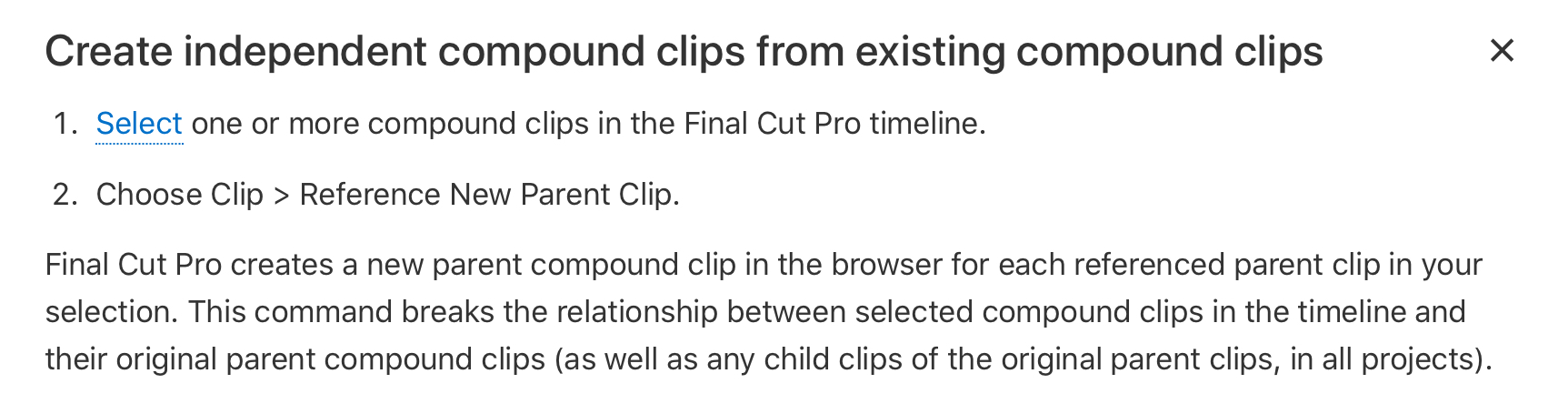
You do not have to break apart the new compound clip. See attached.
Not the OP, but thanks for this! Has it always existed in FCPX?
Please Log in to join the conversation.
14 Apr 2022 04:27 - 14 Apr 2022 04:29 #120017
by anickt
Replied by anickt on topic Shortcut for repetitive tasks in FCPX
Yes or at least as long as I can remember. 😆 It’s nothing new.
This why I recommend a proper training course presented by somebody who uses FCP/Motion in a professional environment. I’m a fan of Ripple - no connection.
A haphazard trip through YouTubeLand will often give you incomplete or incorrect information. That might be OK for casual users but if you seriously want to be good at editing with FCP/Motion it’s the wrong path to take. And if you want to earn your living with it, you’re losing time and money by not doing it.
I had a guy working for me who INSISTED Premiere was better. We sat down and did a comparison. He saw the light. Sorry for the rant! 😎👍🏼
This why I recommend a proper training course presented by somebody who uses FCP/Motion in a professional environment. I’m a fan of Ripple - no connection.
A haphazard trip through YouTubeLand will often give you incomplete or incorrect information. That might be OK for casual users but if you seriously want to be good at editing with FCP/Motion it’s the wrong path to take. And if you want to earn your living with it, you’re losing time and money by not doing it.
I had a guy working for me who INSISTED Premiere was better. We sat down and did a comparison. He saw the light. Sorry for the rant! 😎👍🏼
Last edit: 14 Apr 2022 04:29 by anickt.
Please Log in to join the conversation.
