


- Posts: 2
- Thank you received: 0
3 Post Moderation Rule for New Boarders (25 Jan 2021)
New boarders will have their posts moderated - Don't worry if you cannot see your post immediately.
Retiming Editor: segment blocked?
- frankreiff
-
 Topic Author
- Offline
- New Member
-

Less
More
10 Mar 2022 17:05 - 10 Mar 2022 21:00 #119397
by frankreiff
Retiming Editor: segment blocked? was created by frankreiff
Hi,
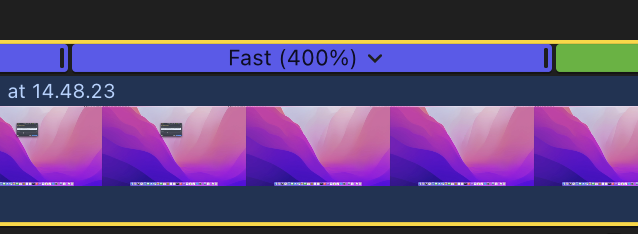
I keep running into a weird UI problem in the Retime Editor. When I click and drag on the 400% segment for instance, it refuses to budge. When I move my mouse to the other side of the screen I get 399% or 401%, but I can't just compress or expand the time normally!?
I've tried the help book, youtube and google.. but no luck.
I'm sure this is a newbie problem, and I would really appreciate it if somebody could explain it to me.
Thanks in advance,
Frank
I keep running into a weird UI problem in the Retime Editor. When I click and drag on the 400% segment for instance, it refuses to budge. When I move my mouse to the other side of the screen I get 399% or 401%, but I can't just compress or expand the time normally!?
I've tried the help book, youtube and google.. but no luck.
I'm sure this is a newbie problem, and I would really appreciate it if somebody could explain it to me.
Thanks in advance,
Frank
Last edit: 10 Mar 2022 21:00 by frankreiff. Reason: Adding video.
Please Log in to join the conversation.


10 Mar 2022 20:16 #119402
by dgwvideo
Creating history....one edit at a time !
Replied by dgwvideo on topic Retiming Editor: segment blocked?
Not sure I understand exactly how you're trying to move it. The disclosure triangle to the right of the Fast 400% when clicked will bring up a contextual menu with options. If you want to simply speed up or slow down from the 400% you click and drag the area at the end (where the purple and green meet ) to shorten (speed up) or lengthen (slow down) the clip. The purple section will expand or be reduced and the % shown will change as you drag.
Creating history....one edit at a time !
Please Log in to join the conversation.
- frankreiff
-
Topic Author
- Offline
- New Member
-
Less
More
- Posts: 2
- Thank you received: 0
10 Mar 2022 20:56 #119404
by frankreiff
Replied by frankreiff on topic Retiming Editor: segment blocked?
That's just it. The retime handle (the bit on the right that you mention) refuses to move by more than 1%.
I click on it, and usually it will just let me drag it anywhere.. but in this particular situation (and several times before on other clips) it lets me grab the handle, but the handle does not move. It's like it's blocked.
If I move the mouse a long way to the right, the 400% finally changes to 401%, but that's it. It won't "compress" either, i.e. I can't move the handle to the left by more than the same 1%.
I click on it, and usually it will just let me drag it anywhere.. but in this particular situation (and several times before on other clips) it lets me grab the handle, but the handle does not move. It's like it's blocked.
If I move the mouse a long way to the right, the 400% finally changes to 401%, but that's it. It won't "compress" either, i.e. I can't move the handle to the left by more than the same 1%.
Please Log in to join the conversation.
