- Posts: 87
- Thank you received: 3
3 Post Moderation Rule for New Boarders (25 Jan 2021)
New boarders will have their posts moderated - Don't worry if you cannot see your post immediately.
Disabling the "sort by date" function in a keyword collection?
06 Mar 2022 16:31 #119327
by BobKrist
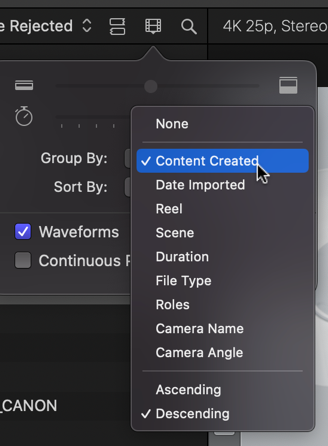
I have a project where I'm using a large collection of public domain images from Wiki Commons. I guess they're tagged with the date they were uploaded to that site, because within the collection, the organization is by day and the resultant window is huge and often has just one picture per row, which makes it awkward to look and choose.
Is there a way to disable the date organized view within a keyword collection, so that all the images just line up in an organized grid? Thanks in advance for any help!
Is there a way to disable the date organized view within a keyword collection, so that all the images just line up in an organized grid? Thanks in advance for any help!
Please Log in to join the conversation.
- Tom Wolsky
-

- Offline
- Moderator
-

06 Mar 2022 16:39 - 06 Mar 2022 16:39 #119328
by Tom Wolsky
Replied by Tom Wolsky on topic Disabling the "sort by date" function in a keyword collection?
I think this is what you want. Set it to None.
Last edit: 06 Mar 2022 16:39 by Tom Wolsky.
Please Log in to join the conversation.
06 Mar 2022 16:48 #119330
by BobKrist
Replied by BobKrist on topic Disabling the "sort by date" function in a keyword collection?
Thank you, that did the trick!
Please Log in to join the conversation.


06 Mar 2022 17:10 #119331
by VTC
Replied by VTC on topic Disabling the "sort by date" function in a keyword collection?
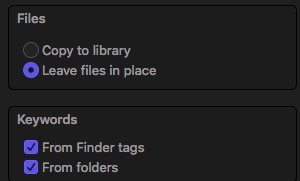
Another option is tagging before import giving greater control over any embedded metadata. Tagging in Finder after import doesn't update keywords in FCP. You'll need to reimport then delete the previous non-finder tagged ones. (Throw all bird pics in a 'bird' tagged folder & that folder populates everything with 'bird'.)
Please Log in to join the conversation.