


- Posts: 86
- Thank you received: 1
3 Post Moderation Rule for New Boarders (25 Jan 2021)
New boarders will have their posts moderated - Don't worry if you cannot see your post immediately.
Can somebody explain this library screenshot
- ETdroneHome
-
 Topic Author
- Offline
- Premium Member
-

Less
More
21 Feb 2022 02:19 - 21 Feb 2022 02:21 #119113
by ETdroneHome
Can somebody explain this library screenshot was created by ETdroneHome
I am working on a project that is around 30 minutes long and it is primarily photo images, email images and text title and paragraphs. So sometimes it is hard to keep track where I am at in the project. Sometimes when I open the project it seems like I am working on a version that I did awhile back if that makes sense.
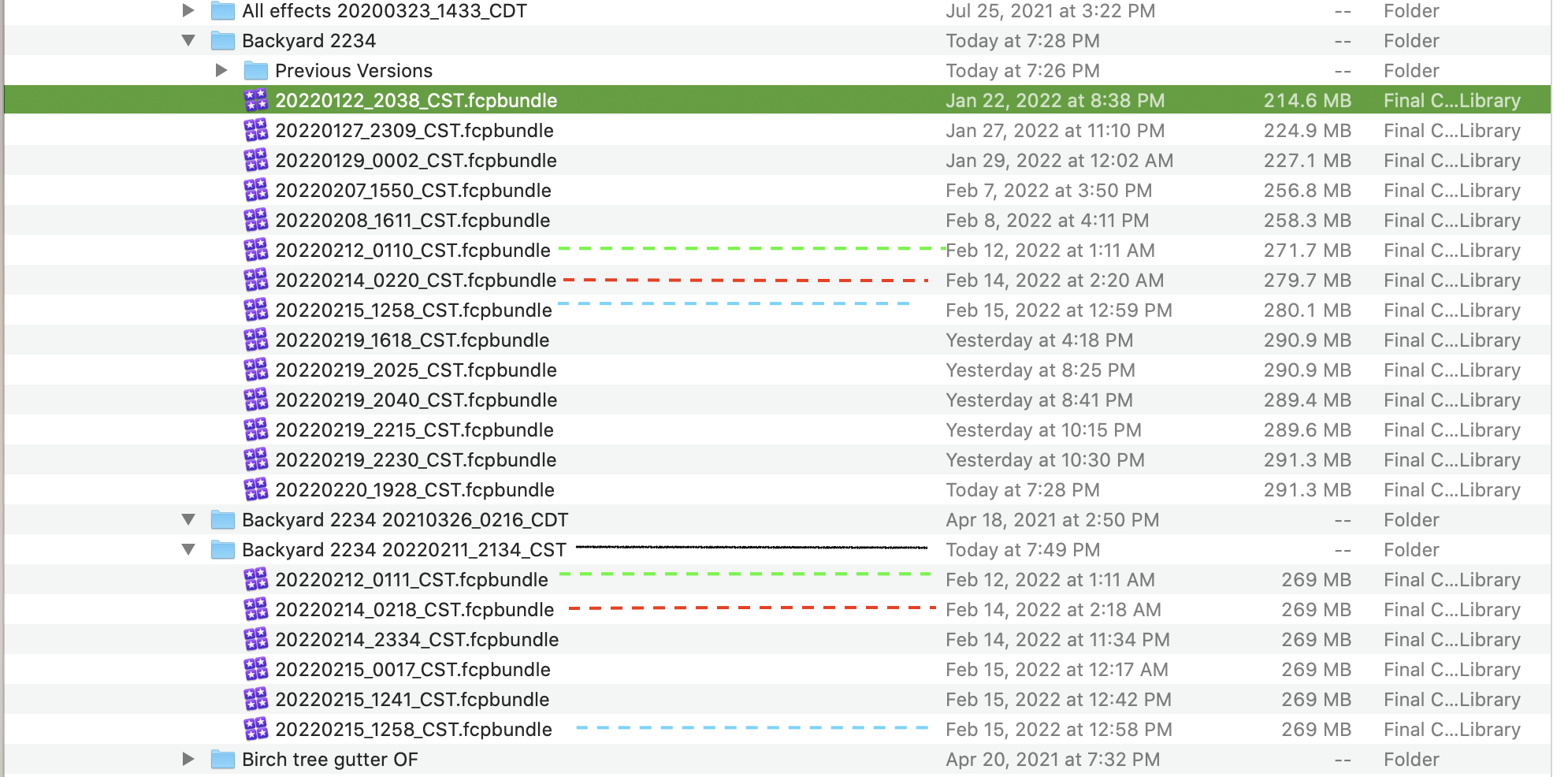
The screen shot shows red, green and blue lines with same name of the project in different folders. There is only one library Backyard 2234 in FCP.
The green line is listed in two different folders at the same time.
The red line two minutes apart in different folders.
The blue line a minute apart in different folders.
The black line shows a CST zone. We change time in 2022 on March 13th.
The time set on this Mac is correct. I am not sure what that means.
I am not sure why the different folders? Any help would be appreciated.
I am on 10.5.4.
Rich
The screen shot shows red, green and blue lines with same name of the project in different folders. There is only one library Backyard 2234 in FCP.
The green line is listed in two different folders at the same time.
The red line two minutes apart in different folders.
The blue line a minute apart in different folders.
The black line shows a CST zone. We change time in 2022 on March 13th.
The time set on this Mac is correct. I am not sure what that means.
I am not sure why the different folders? Any help would be appreciated.
I am on 10.5.4.
Rich
Last edit: 21 Feb 2022 02:21 by ETdroneHome.
Please Log in to join the conversation.


21 Feb 2022 02:47 #119115
by anickt
Replied by anickt on topic Can somebody explain this library screenshot
That looks like your FCP Backup folder. You should not be working from that folder. You should have created a Libraries folder and created all of your working libraries there.
Please Log in to join the conversation.

21 Feb 2022 02:51 #119116
by VTC
Replied by VTC on topic Can somebody explain this library screenshot
Those are all your backup versions. Should be working in the BACKYARD library and shouldn't find anything numbered like that in your 'recents' FCPX tree unless you actively elected to go back to an earlier (backed up 'CST') version.
Please Log in to join the conversation.
