



- Posts: 272
- Thank you received: 2
3 Post Moderation Rule for New Boarders (25 Jan 2021)
New boarders will have their posts moderated - Don't worry if you cannot see your post immediately.
How do we stop FCPX claiming "Problems Detected" in audio when audio is fine?
20 Feb 2022 03:46 #119097
by Slaughter
How do we stop FCPX claiming "Problems Detected" in audio when audio is fine? was created by Slaughter
Have searched entire forum for "Problems Detected" in title, and none found (which surprised me...unless my browser is not playing nicely with fcp.co)
I've noticed that FCPX seems to think there are "problems" in my audio, but the audio is 100% fine.
It seems the exclamation point and yellow alert text cannot be clicked on and manually managed.
Are we stuck with this false claim of problems and do we have to just let this annoying error message remain on the audio details screen? A real shame if so. Well, for those of us who are driven nuts by these kinds of glitches, anyway...
The audio, BTW is plain old 16/44 WAV...
I discovered the prob when one day, FCPX magically decided to switch on the automatic function for "fixing" audio problems. My audio suddenly sounded terrible (squelchy and hollow) - I went into my audio details and discovered noise "removal" (ah, yeah, that ... works... well....) was turned on. It was then that I saw these irritating yellow error alerts which *can't be corrected*. Now, even with audio error correction ("correction") turned off, these yellow blights are still there. It's pretty annoying being told there is a problem when there isn't one.
not the end of the world but it's blinking irritating.
_______________
imac pro 2019
Mojave 10.14.6 (can't upgrade as Pro Tools is too expensive to upgrade)
FCPX 10.4.10 (can't upgrade as can't upgrade past Mojave for above stated reason)
and I am perfectly happy sticking with Mojave in any case
please don't suggest I upgrade to a later version (requiring expensive upgrade to Pro Tools) unless yr offering to cover my mortgage repayments for a couple months
I've noticed that FCPX seems to think there are "problems" in my audio, but the audio is 100% fine.
It seems the exclamation point and yellow alert text cannot be clicked on and manually managed.
Are we stuck with this false claim of problems and do we have to just let this annoying error message remain on the audio details screen? A real shame if so. Well, for those of us who are driven nuts by these kinds of glitches, anyway...
The audio, BTW is plain old 16/44 WAV...
I discovered the prob when one day, FCPX magically decided to switch on the automatic function for "fixing" audio problems. My audio suddenly sounded terrible (squelchy and hollow) - I went into my audio details and discovered noise "removal" (ah, yeah, that ... works... well....) was turned on. It was then that I saw these irritating yellow error alerts which *can't be corrected*. Now, even with audio error correction ("correction") turned off, these yellow blights are still there. It's pretty annoying being told there is a problem when there isn't one.
not the end of the world but it's blinking irritating.
_______________
imac pro 2019
Mojave 10.14.6 (can't upgrade as Pro Tools is too expensive to upgrade)
FCPX 10.4.10 (can't upgrade as can't upgrade past Mojave for above stated reason)
and I am perfectly happy sticking with Mojave in any case
please don't suggest I upgrade to a later version (requiring expensive upgrade to Pro Tools) unless yr offering to cover my mortgage repayments for a couple months
Please Log in to join the conversation.


20 Feb 2022 06:11 - 20 Feb 2022 06:16 #119098
by anickt
Replied by anickt on topic How do we stop FCPX claiming "Problems Detected" in audio when audio is fine?
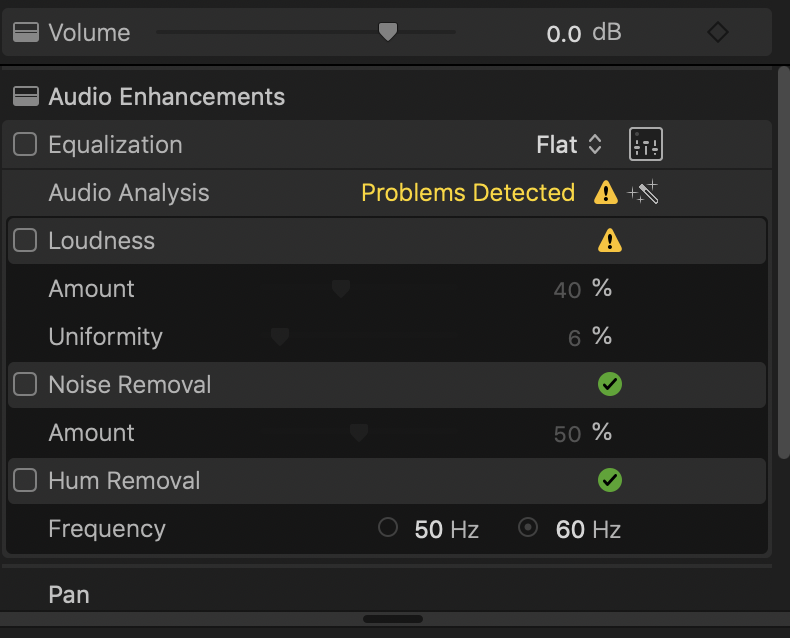
If you have Audio Analysis turned on in your import prefs (or if you have clicked on Analyze Audio) then, from what your attachment is showing, there is an issue with your audio level that is showing up in the audio analysis. Enable the Loudness parameter by clicking the check box on the left and see if that corrects it. Don’t be so quick to assume it’s an “issue with FCP”. I’ve been using it professionally since FCPX was released and have had very few issues with it in that time.
Last edit: 20 Feb 2022 06:16 by anickt. Reason: Info
Please Log in to join the conversation.
21 Feb 2022 05:22 #119117
by Slaughter
Replied by Slaughter on topic How do we stop FCPX claiming "Problems Detected" in audio when audio is fine?
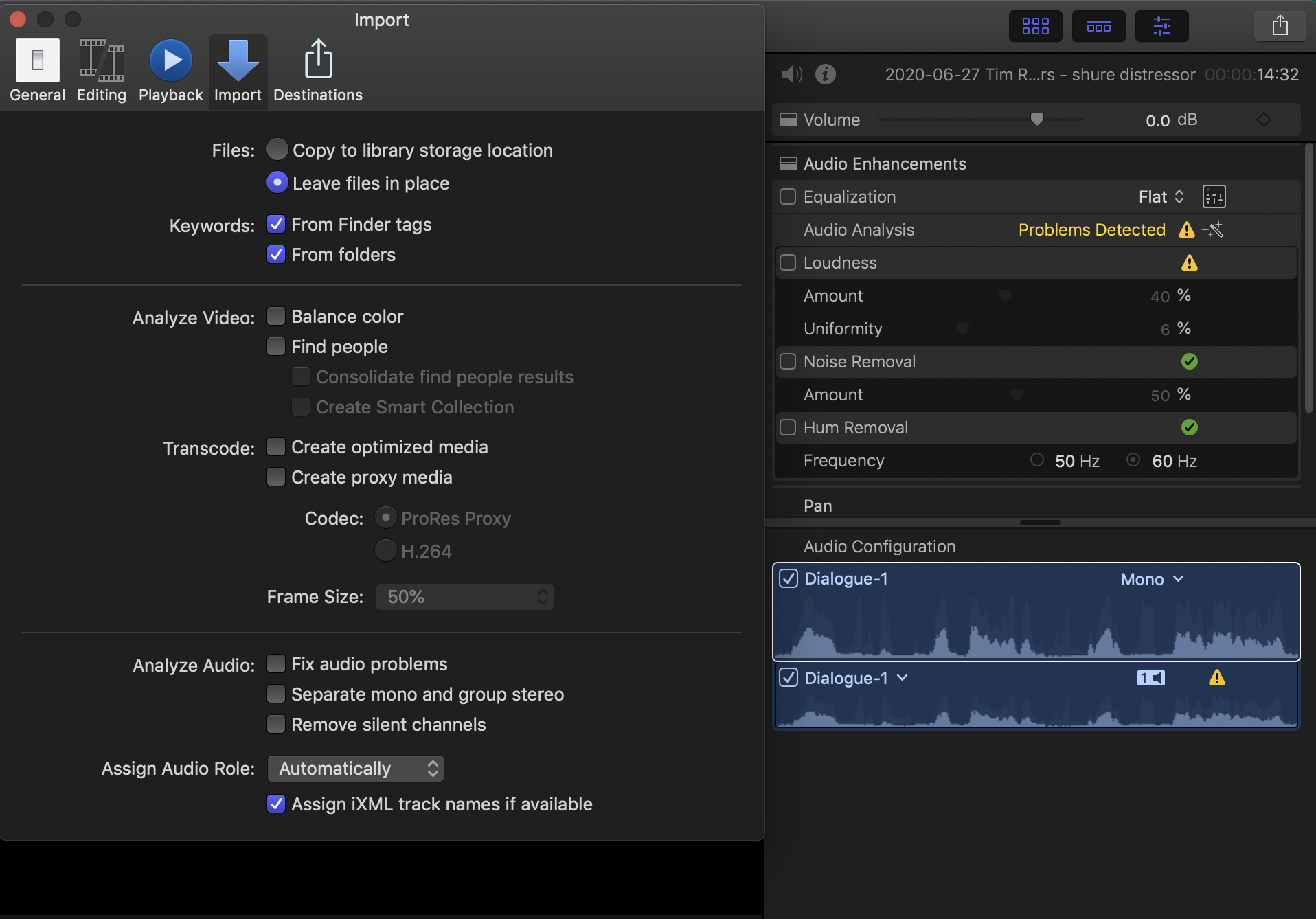
Thanks. As per attachment, I have disabled automatic audio analysis / "fixing" - yet FCPX is forcing incorrect file information upon me.
The audio is not distorted - and the level I have it set at otherwise should not be something FCPX ever presumes is "not loud enough". The user should have complete control over this.
Irritatingly, neither the glaring yellow error message or the exclamation point can be clicked on to provide details. FCPX is saying "hey, there's a problem with this audio, but I'm not gonna tell you what I think it is, and I've made this decision despite your directive that I shouldn't be analysing audio for problems to begin with".
So yeah, FCPX definitely isn't perfect. Something else that drives me nuts is the fact that even with workspace prefs saved, FCPX makes random decisions about your browser view options upon startup - order of files presented, clip icon size and length in window etc. But that's a thoroughly enthralling story for another day.
The audio is not distorted - and the level I have it set at otherwise should not be something FCPX ever presumes is "not loud enough". The user should have complete control over this.
Irritatingly, neither the glaring yellow error message or the exclamation point can be clicked on to provide details. FCPX is saying "hey, there's a problem with this audio, but I'm not gonna tell you what I think it is, and I've made this decision despite your directive that I shouldn't be analysing audio for problems to begin with".
So yeah, FCPX definitely isn't perfect. Something else that drives me nuts is the fact that even with workspace prefs saved, FCPX makes random decisions about your browser view options upon startup - order of files presented, clip icon size and length in window etc. But that's a thoroughly enthralling story for another day.
Please Log in to join the conversation.
21 Feb 2022 16:30 #119123
by anickt
Replied by anickt on topic How do we stop FCPX claiming "Problems Detected" in audio when audio is fine?
Actually, as I said before, FCP is telling you 1. that analysis found an issue (the first warning marker and 2. that the issue is with your audio level (the second warning marker). You can think whatever you want but analysis has done its job. Did you put a check in the box to the left of loudness as I suggested? Also, once a clip is analyzed changing the Import prefs will not change a file already imported. If you play that clip back with no adjustments what level is it peaking at? I’ll bet it’s low. And you do have complete control over your audio levels so that’s really not an issue. I believe the latest update to FCP addresses your second issue.
Please Log in to join the conversation.
23 Feb 2022 07:15 - 23 Feb 2022 07:16 #119155
by Slaughter
Replied by Slaughter on topic How do we stop FCPX claiming "Problems Detected" in audio when audio is fine?
> FCP is telling you .... 2. that the issue is with your audio level (the second warning marker). Did you put a check in the box to the left of loudness as I suggested?
Thanks for the reminder - I missed this. Ok, so yes I did. It makes no difference, no matter what level loudness adjustment I choose. Also, those green ticks are not uncheckable / clickable - which seems odd. A green tick indicates "yes" or "correct" or "sorted". Yet I have made no manual loudness or hum removal adjustments.
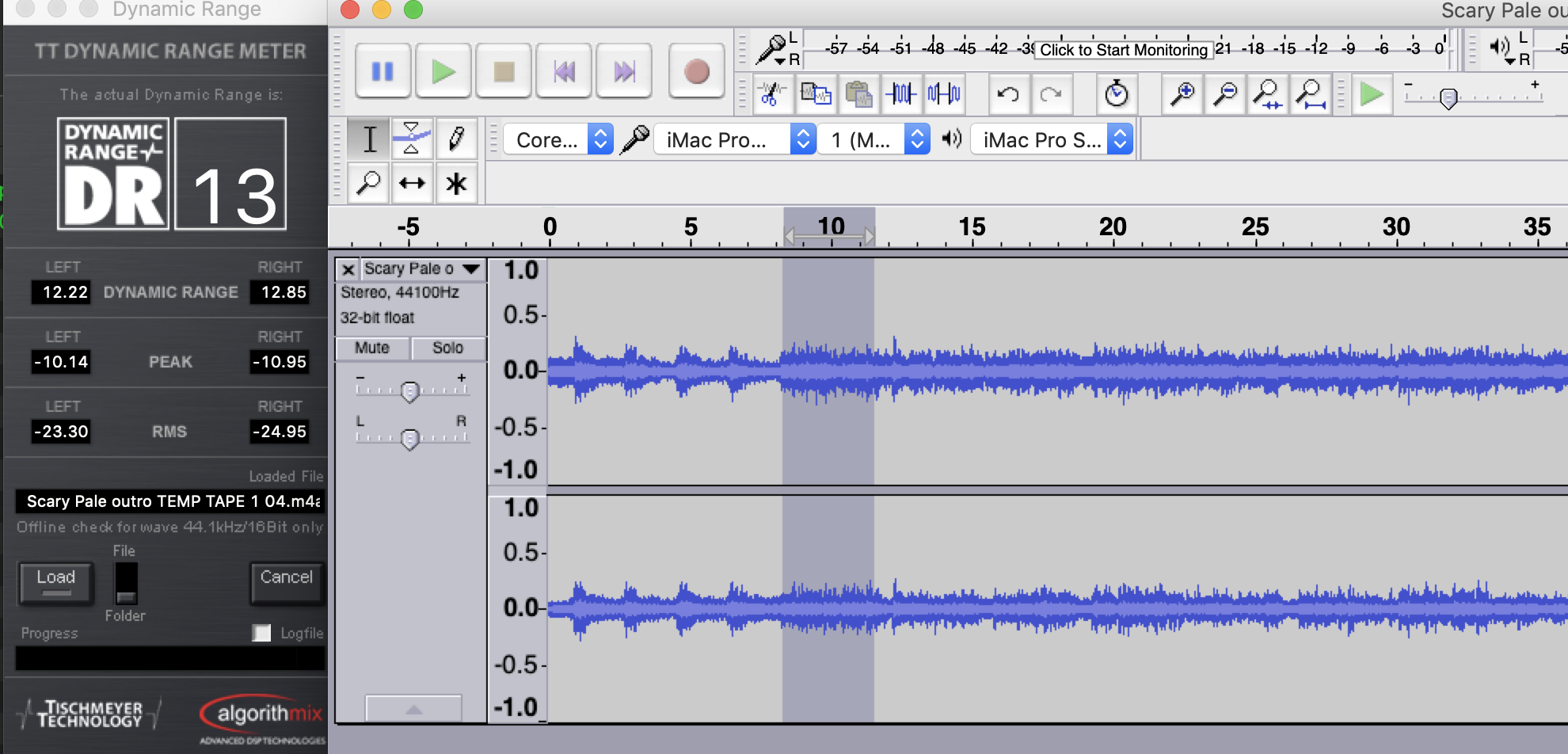
> If you play that clip back with no adjustments what level is it peaking at? I’ll bet it’s low.
It's not massively loud, but it's fine. See attached.
In any case, FCPX should not be deciding that a file has problems because it thinks its volume level is too low. That's a faulty assertion.
> once a clip is analyzed changing the Import prefs will not change a file already imported
Thanks, this makes sense
Thanks for the reminder - I missed this. Ok, so yes I did. It makes no difference, no matter what level loudness adjustment I choose. Also, those green ticks are not uncheckable / clickable - which seems odd. A green tick indicates "yes" or "correct" or "sorted". Yet I have made no manual loudness or hum removal adjustments.
> If you play that clip back with no adjustments what level is it peaking at? I’ll bet it’s low.
It's not massively loud, but it's fine. See attached.
In any case, FCPX should not be deciding that a file has problems because it thinks its volume level is too low. That's a faulty assertion.
> once a clip is analyzed changing the Import prefs will not change a file already imported
Thanks, this makes sense
Last edit: 23 Feb 2022 07:16 by Slaughter.
Please Log in to join the conversation.
23 Feb 2022 07:37 #119156
by anickt
Replied by anickt on topic How do we stop FCPX claiming "Problems Detected" in audio when audio is fine?
I would like to see where the audio is peaking on FCP meters. In the timeline, FCP audio is typically about -6 db relative to level in Audacity. I don’t want to get into why but that’s been true for a long time. I don’t typically use AA these days but in the past I have used it quite a bit and it always did what I expected.
This video might help you understand some of how Audio Analysis works:
This video might help you understand some of how Audio Analysis works:
Please Log in to join the conversation.
24 Feb 2022 12:10 #119176
by Slaughter
Replied by Slaughter on topic How do we stop FCPX claiming "Problems Detected" in audio when audio is fine?
Thanks, will take a look.
As I stated, though, low volume should never be assumed to be a problem to be fixed. It appears that this whole thing emerged due to the audio analysis function having been enabled at some point. It's not a function that is helpful to me and the solution has been to manually turn it off (hoping it stays off), delete the audio file being analysed and then reimport. So as long as FCPX *does what I tell it to* it should be fine from here. So your advice has been helpful - thanks very much!
As I stated, though, low volume should never be assumed to be a problem to be fixed. It appears that this whole thing emerged due to the audio analysis function having been enabled at some point. It's not a function that is helpful to me and the solution has been to manually turn it off (hoping it stays off), delete the audio file being analysed and then reimport. So as long as FCPX *does what I tell it to* it should be fine from here. So your advice has been helpful - thanks very much!
Please Log in to join the conversation.
24 Feb 2022 21:24 #119184
by anickt
Replied by anickt on topic How do we stop FCPX claiming "Problems Detected" in audio when audio is fine?
Glad to help. The only thing I will add is that audio should not be purposefully recorded at low levels. The hotter the better short of distortion is a pretty standard approach because it will give you a better signal-to-noise ratio. You can always turn audio down but turning quiet audio up can cause many problems not the least of which is bringing up unwanted noise along with the signal you do want. That is why Audio Analysis sees a low signal as an issue. Good luck!
Please Log in to join the conversation.

24 Feb 2022 23:48 #119185
by Redifer
Replied by Redifer on topic How do we stop FCPX claiming "Problems Detected" in audio when audio is fine?
I'm glad you turned off the analysis of the audio. I did that almost right away if I recall. It's really only helpful for people who know nothing about audio. Sadly that's probably 90% of editors.
Please Log in to join the conversation.
25 Feb 2022 01:04 #119190
by anickt
Replied by anickt on topic How do we stop FCPX claiming "Problems Detected" in audio when audio is fine?
I have found the noise reduction applied subtly to be helpful on occasion. It actually saved me a lot of time on a couple of projects. It was not my footage of course but from another source. 😆 All the import options on my system have been shut off pretty much since I started using FCP. I tried them all out and decided “don’t need that”.
Please Log in to join the conversation.
