


- Posts: 3
- Thank you received: 0
3 Post Moderation Rule for New Boarders (25 Jan 2021)
New boarders will have their posts moderated - Don't worry if you cannot see your post immediately.
small black bar in top of clips in fcpx timeline - unable to move clips around
- webuxer@gmail.com
-
 Topic Author
- Offline
- New Member
-

Less
More
08 Feb 2022 05:01 #118870
by webuxer@gmail.com
small black bar in top of clips in fcpx timeline - unable to move clips around was created by webuxer@gmail.com
Hi, I need help with the following.
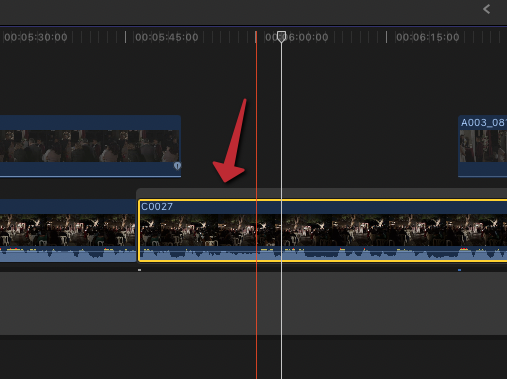
Some of the video clips on my timeline have a black bar in top and im not able to cut parts of the clips and move them around. Please see the screenshot attached. What is this black bar and how can I remove it? Please see in the screenshot the clip on the right (which doesnt have this bar on top) vs the clip on the left (which has the bar on top) Thanks
Some of the video clips on my timeline have a black bar in top and im not able to cut parts of the clips and move them around. Please see the screenshot attached. What is this black bar and how can I remove it? Please see in the screenshot the clip on the right (which doesnt have this bar on top) vs the clip on the left (which has the bar on top) Thanks
Please Log in to join the conversation.
- Tom Wolsky
-

- Offline
- Moderator
-

08 Feb 2022 12:08 #118875
by Tom Wolsky
Replied by Tom Wolsky on topic small black bar in top of clips in fcpx timeline - unable to move clips around
That’s the shelf of a secondary storyline. There might be a transition at the other end of the clip that created it to link the clips together. You can move the storyline by dragging the shelf. You can also drag a clip out of the storyline. I might suggest looking at basic tutorials on FCP like the izzyvideo free tutorials.
Please Log in to join the conversation.


11 Feb 2022 23:32 #118980
by VTC
Replied by VTC on topic small black bar in top of clips in fcpx timeline - unable to move clips around
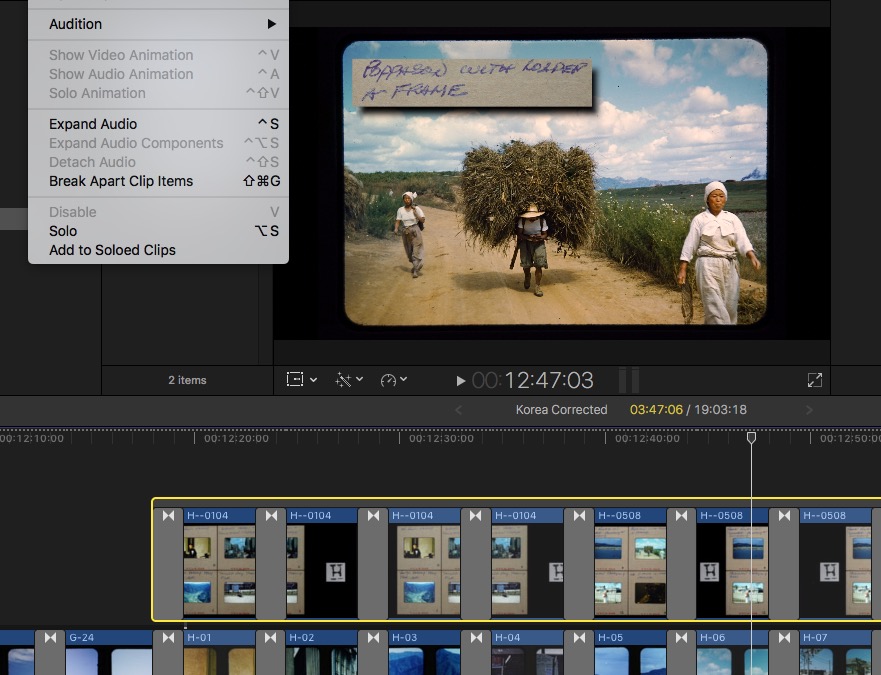
Highlight then to Clip Menu for Break Apart Clip Items (Command+Shift+G). Or highlight then Command+Option+down arrow (WARNING) drops it to primary storyline and displaces anything beneath it.
Please Log in to join the conversation.
