


- Posts: 13
- Thank you received: 0
3 Post Moderation Rule for New Boarders (25 Jan 2021)
New boarders will have their posts moderated - Don't worry if you cannot see your post immediately.
FCPX - Import audio from a lavalier and boom on separate channels by default?
- ShootersFilmProduction
-
 Topic Author
- Offline
- New Member
-

Less
More
07 Feb 2022 02:51 #118845
by ShootersFilmProduction
FCPX - Import audio from a lavalier and boom on separate channels by default? was created by ShootersFilmProduction
Can I import audio from a lavalier and boom on separate channels by default in FCPX? Premiere does this, but I have only found a post-import
workaround in FCPX.
workaround in FCPX.
Please Log in to join the conversation.


07 Feb 2022 11:30 #118852
by Stu Wart
Replied by Stu Wart on topic FCPX - Import audio from a lavalier and boom on separate channels by default?
Actually that's FcpX does... "Expand Audio Components" and you'll see
Please Log in to join the conversation.


07 Feb 2022 11:47 - 07 Feb 2022 11:51 #118853
by JoeEditor
Replied by JoeEditor on topic FCPX - Import audio from a lavalier and boom on separate channels by default?
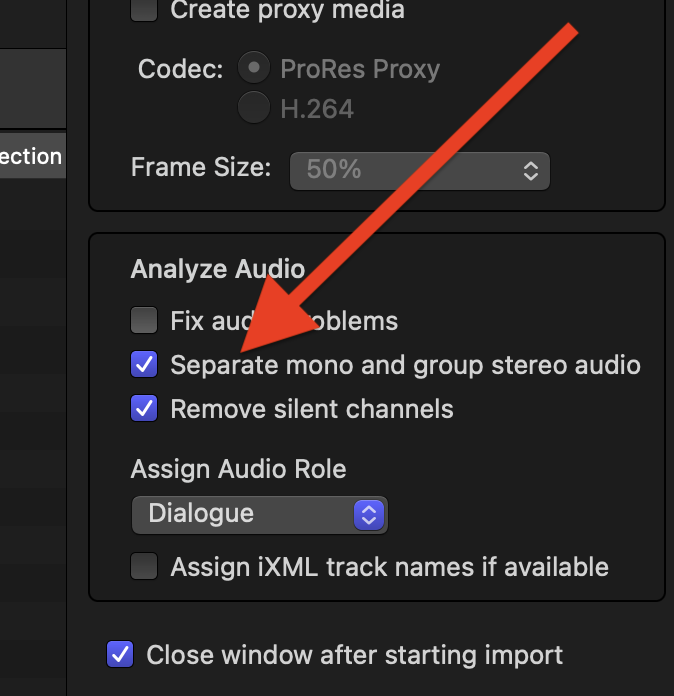
You meant does it configure the channels as two independent mono channels, as opposed to two stereo channels married together, at import, not manually configuring them afterwards? Yes, there is a configuration for that in the Import settings. FCP looks to see if both channels have the same content, or different content. Speaking of which, be aware the the import settings in Preferences only effect drag-and-drop importing, where the Import window has its own separate settings.
Last edit: 07 Feb 2022 11:51 by JoeEditor.
Please Log in to join the conversation.
- ShootersFilmProduction
-
Topic Author
- Offline
- New Member
-
Less
More
- Posts: 13
- Thank you received: 0
07 Feb 2022 18:23 #118859
by ShootersFilmProduction
Replied by ShootersFilmProduction on topic FCPX - Import audio from a lavalier and boom on separate channels by default?
Thanks, I did try re-importing the audio as you suggested (before I read your reply), but can't remember if I did it using drag-and-drop. I'll try again.
Please Log in to join the conversation.
- ShootersFilmProduction
-
Topic Author
- Offline
- New Member
-
Less
More
- Posts: 13
- Thank you received: 0
07 Feb 2022 18:33 #118863
by ShootersFilmProduction
Replied by ShootersFilmProduction on topic FCPX - Import audio from a lavalier and boom on separate channels by default?
Thanks for your reply. Expand audio components separates the audio from the video but doesn't show the multiple track. I believe the only way to do that is to then open the audio inspector.
Please Log in to join the conversation.
08 Feb 2022 04:45 #118869
by JoeEditor
Replied by JoeEditor on topic FCPX - Import audio from a lavalier and boom on separate channels by default?
Yes, after the fact, the audio inspector at the bottom is where you configure the audio channels. The Expand Audio Components only displays in the timeline pane what has been configured in the inspector
Please Log in to join the conversation.
08 Feb 2022 11:17 #118871
by Stu Wart
no, wrong, you confuse "Detach Audio" or "Expand Audio" and "Expand Audio Components"
Replied by Stu Wart on topic FCPX - Import audio from a lavalier and boom on separate channels by default?
Thanks for your reply. Expand audio components separates the audio from the video but doesn't show the multiple track. I believe the only way to do that is to then open the audio inspector.
no, wrong, you confuse "Detach Audio" or "Expand Audio" and "Expand Audio Components"
Please Log in to join the conversation.
08 Feb 2022 11:36 - 10 Feb 2022 09:30 #118872
by Stu Wart
this is wrong because if you check it on "Preference" if will change it on the "Import Window" and vice versa, so you can change on Import Window and Drag&Drop. As a matter of fact any distinct audio "but the same" (like Boom ald Lavalliere) will falsely considered as Stereo by Fcp if checked.
Replied by Stu Wart on topic FCPX - Import audio from a lavalier and boom on separate channels by default?
be aware the the import settings in Preferences only effect drag-and-drop importing, where the Import window has its own separate settings.
this is wrong because if you check it on "Preference" if will change it on the "Import Window" and vice versa, so you can change on Import Window and Drag&Drop. As a matter of fact any distinct audio "but the same" (like Boom ald Lavalliere) will falsely considered as Stereo by Fcp if checked.
Last edit: 10 Feb 2022 09:30 by Stu Wart.
Please Log in to join the conversation.
08 Feb 2022 11:42 #118873
by Stu Wart
Confusing... I said "Expand Audio" so you can see what you've done importing... And yes the action is in the panel but you are better off to import properly
Replied by Stu Wart on topic FCPX - Import audio from a lavalier and boom on separate channels by default?
Yes, after the fact, the audio inspector at the bottom is where you configure the audio channels. The Expand Audio Components only displays in the timeline pane what has been configured in the inspector
Confusing... I said "Expand Audio" so you can see what you've done importing... And yes the action is in the panel but you are better off to import properly
Please Log in to join the conversation.
09 Feb 2022 01:49 #118892
by JoeEditor
Replied by JoeEditor on topic FCPX - Import audio from a lavalier and boom on separate channels by default?
"if you check on "Preference" if will change it on the "Import Window" and vice versa"
This has recently changed, then, because it used to not be that way. But I did check, and they are now tied together, when they used to not be.
This has recently changed, then, because it used to not be that way. But I did check, and they are now tied together, when they used to not be.
Please Log in to join the conversation.
- ShootersFilmProduction
-
Topic Author
- Offline
- New Member
-
Less
More
- Posts: 13
- Thank you received: 0
09 Feb 2022 19:19 #118902
by ShootersFilmProduction
Replied by ShootersFilmProduction on topic FCPX - Import audio from a lavalier and boom on separate channels by default?
It'd still way more convenient if there was a way to display the multiple tracks of audio right on the timeline instead of in a separate window like Premiere and AVID can do. Expand Audio tracks doesn't seem to do the trick.
Please Log in to join the conversation.
09 Feb 2022 22:59 #118914
by JoeEditor
Replied by JoeEditor on topic FCPX - Import audio from a lavalier and boom on separate channels by default?
"Expand Audio Components" is what you want to use. That separates out all active channels in the manner you have them configured in the Inspector.
Please Log in to join the conversation.
- ShootersFilmProduction
-
Topic Author
- Offline
- New Member
-
Less
More
- Posts: 13
- Thank you received: 0
09 Feb 2022 23:48 #118915
by ShootersFilmProduction
Replied by ShootersFilmProduction on topic FCPX - Import audio from a lavalier and boom on separate channels by default?
Thanks, that works. I appreciate it.
Please Log in to join the conversation.
- Tom Wolsky
-

- Offline
- Moderator
-

10 Feb 2022 12:49 #118934
by Tom Wolsky
Replied by Tom Wolsky on topic FCPX - Import audio from a lavalier and boom on separate channels by default?
They're sort of linked, but not really. The Import Window uses the last used setting rather than the Import preference. Of course if you trash prefs the both revert to copy to library.
Please Log in to join the conversation.
