


- Posts: 24
- Thank you received: 3
3 Post Moderation Rule for New Boarders (25 Jan 2021)
New boarders will have their posts moderated - Don't worry if you cannot see your post immediately.
Best codec to shoot for long form documentary
04 Feb 2022 13:25 #118793
by MidNorth
Best codec to shoot for long form documentary was created by MidNorth
Thanks in advance for your advice.
I have experience shooting and editing several short docs. Now I am planning for my first long form documentary and want to shoot in the best codec for Final Cut Pro workflow as well as for long-term archiving.
Leaving aside post and storage capacity considerations (I have plenty of fast storage and am working with the latest M1 MacBook Pros), the flavors of codecs I have at my disposal include H264 and H265 both long-GOP and intraframe in LOG , ProRes up to HQ, and ProRes RAW. What would be the best or industry standard codec for my camera originals?
I will be happy to provide more context if needed.
I have experience shooting and editing several short docs. Now I am planning for my first long form documentary and want to shoot in the best codec for Final Cut Pro workflow as well as for long-term archiving.
Leaving aside post and storage capacity considerations (I have plenty of fast storage and am working with the latest M1 MacBook Pros), the flavors of codecs I have at my disposal include H264 and H265 both long-GOP and intraframe in LOG , ProRes up to HQ, and ProRes RAW. What would be the best or industry standard codec for my camera originals?
I will be happy to provide more context if needed.
Please Log in to join the conversation.


04 Feb 2022 15:02 #118794
by JoeEditor
Replied by JoeEditor on topic Best codec to shoot for long form documentary
H.264 or ProRes 422 are pretty standard, depending on how much storage you have available. M1 should handle both just fine.
Please Log in to join the conversation.

04 Feb 2022 17:53 #118799
by joema
If your cameras can do intraframe 10-bit 4:22, I would not shoot ProRes RAW. If they are Sony FS7, FX6 or FX9, the XAVC-I (MXF) 10-bit 4:2:2 codec is excellent, smooth to edit, about 1/2 the size of ProRes 422 and roughly equal in quality.
Re M1, in general they handle Long GOP formats well, but there's a lot of variation. Before you commit to a certain codec, I'd suggest doing some editing performance tests, including multicam. If you can avoid transcoding and proxies, that helps a lot.
Certain newer codecs will not display thumbnails in Mac Finder, or won't play in Quick Look or Quicktime, but they will play in FCP after ingest. If you plan on significant file-level media organization before ingest to FCP that can be an issue.
For each shooting day, make certain that all cameras and recorders are set to the correct time of day. If you end up with a bunch of files without correct date/time that's a problem on a large documentary.
Make sure all camera operators know the procedure for white balancing their cameras. If possible white balance all interview shots and set exposure based on the mfg-recommended threshold for a white or grey card. If possible shoot a few sec of a color card, e.g:
www.bhphotovideo.com/c/product/1649346-R..._passport_video.html
www.bhphotovideo.com/c/product/1649352-R...orchecker_video.html
If possible monitor all audio and use audio recorders with 32-bit floating point recording such as the Sound Devices MixPre Mk II series. That helps avoid level and clipping issues, although you can still clip if gain staging is set wrong on a wireless lav before reaching the recorder.
Similarly, decide ahead of time what the final product's frame rate will be. Then each production day, verify all cameras are set to that.
If you plan on using a certain color/gamma profile, make sure all cameras are set to that, and all shooters know how to expose for that. E.g, Sony SLog3 should be exposed at 61% IRE on a 90% reflective white target. Each camera and each gamma profile is different.
If they are using any other tree-oriented format, I recommend rewrapping all files before import with EditReady2, then bulk renaming files so they are globally unique, then importing with "leave files in place". This avoids many problems: hedge.video/editready
If your cameras and audio recorders have timecode terminals, I recommend setting all devices to free run timecode and jam-syncing them. All NLEs can sync based on timecode which is more reliable than audio.
If you will be using some mirrorless cameras without timecode input, in some cases it's possible to jam sync them via menu, button or IR remote. Dave Dugdale discusses this here:
Ideally duplicate all material on site and do not keep it in the same bag or vehicle.
Plan ahead for obtaining model releases and somehow tie those to the clips and cameras involved. Below are some examples. Our production assistants handle this so I don't have first hand experience: expertphotography.com/best-model-release-apps/
Replied by joema on topic Best codec to shoot for long form documentary
....planning for my first long form documentary and want to shoot in the best codec for Final Cut Pro workflow as well as for long-term archiving....I have at my disposal include H264 and H265 both long-GOP and intraframe in LOG , ProRes up to HQ, and ProRes RAW. What would be the best or industry standard codec for my camera originals?...
If your cameras can do intraframe 10-bit 4:22, I would not shoot ProRes RAW. If they are Sony FS7, FX6 or FX9, the XAVC-I (MXF) 10-bit 4:2:2 codec is excellent, smooth to edit, about 1/2 the size of ProRes 422 and roughly equal in quality.
Re M1, in general they handle Long GOP formats well, but there's a lot of variation. Before you commit to a certain codec, I'd suggest doing some editing performance tests, including multicam. If you can avoid transcoding and proxies, that helps a lot.
Certain newer codecs will not display thumbnails in Mac Finder, or won't play in Quick Look or Quicktime, but they will play in FCP after ingest. If you plan on significant file-level media organization before ingest to FCP that can be an issue.
For each shooting day, make certain that all cameras and recorders are set to the correct time of day. If you end up with a bunch of files without correct date/time that's a problem on a large documentary.
Make sure all camera operators know the procedure for white balancing their cameras. If possible white balance all interview shots and set exposure based on the mfg-recommended threshold for a white or grey card. If possible shoot a few sec of a color card, e.g:
www.bhphotovideo.com/c/product/1649346-R..._passport_video.html
www.bhphotovideo.com/c/product/1649352-R...orchecker_video.html
If possible monitor all audio and use audio recorders with 32-bit floating point recording such as the Sound Devices MixPre Mk II series. That helps avoid level and clipping issues, although you can still clip if gain staging is set wrong on a wireless lav before reaching the recorder.
Similarly, decide ahead of time what the final product's frame rate will be. Then each production day, verify all cameras are set to that.
If you plan on using a certain color/gamma profile, make sure all cameras are set to that, and all shooters know how to expose for that. E.g, Sony SLog3 should be exposed at 61% IRE on a 90% reflective white target. Each camera and each gamma profile is different.
If they are using any other tree-oriented format, I recommend rewrapping all files before import with EditReady2, then bulk renaming files so they are globally unique, then importing with "leave files in place". This avoids many problems: hedge.video/editready
If your cameras and audio recorders have timecode terminals, I recommend setting all devices to free run timecode and jam-syncing them. All NLEs can sync based on timecode which is more reliable than audio.
If you will be using some mirrorless cameras without timecode input, in some cases it's possible to jam sync them via menu, button or IR remote. Dave Dugdale discusses this here:
Ideally duplicate all material on site and do not keep it in the same bag or vehicle.
Plan ahead for obtaining model releases and somehow tie those to the clips and cameras involved. Below are some examples. Our production assistants handle this so I don't have first hand experience: expertphotography.com/best-model-release-apps/
Please Log in to join the conversation.
04 Feb 2022 19:03 - 04 Feb 2022 19:22 #118800
by MidNorth
Replied by MidNorth on topic Best codec to shoot for long form documentary
Thank you for your detailed response. May I ask why no ProRes RAW? We plan to avoid transcoding, as the MacBook Pro M1's are quite powerful.
The cameras will be FX6's and A7SIII's. Mixing cameras means that we have to decide about 24 fps vs 23.98. Ideally, we would like to shoot in true 24 fps, but the A7SIII has no true 24 fps. Any suggestion how we can deal with this? Would mixing frame rates present problems later in post? Should we just shoot in 23.98 on all cameras?
The cameras will be FX6's and A7SIII's. Mixing cameras means that we have to decide about 24 fps vs 23.98. Ideally, we would like to shoot in true 24 fps, but the A7SIII has no true 24 fps. Any suggestion how we can deal with this? Would mixing frame rates present problems later in post? Should we just shoot in 23.98 on all cameras?
Last edit: 04 Feb 2022 19:22 by MidNorth.
Please Log in to join the conversation.
04 Feb 2022 19:49 #118801
by JoeEditor
Replied by JoeEditor on topic Best codec to shoot for long form documentary
What is your final delivery?
Please Log in to join the conversation.
04 Feb 2022 19:51 #118802
by MidNorth
Festivals/digital projection and streaming in 4K.
Replied by MidNorth on topic Best codec to shoot for long form documentary
What is your final delivery?
Festivals/digital projection and streaming in 4K.
Please Log in to join the conversation.
04 Feb 2022 20:16 #118804
by joema
ProRes RAW is a nice option but IMO the cost vs benefit isn't that good if compared to XAVC-I. The data rate is high (although often no higher than ProRes 422 HQ), however it's generally noisier, there's no benefit to dynamic range, and you lose lens profile corrections and Active Steadyshot on the A7SIII. There is more luma/chroma data so (assuming you've denoised with Neat Video and export/import the clip to lock that in) an HSL mask may give more precision. Without a denoise pass the noise inteferes with HSL masks.
Some combinations of camera and recorder allow full white balance adjustment in post. The A7SIII to Ninja V via HDMI does, the FX6 to Ninja V via HDMI does but FX6 to Shogun via SDI does not.
In general my team shoots 4k/23.98 ProRes 422 from the FX6 and A7SIII via HDMI to the Ninja V or SDI to the Shogun 7. That isn't due to quality but post production workflow. However for shoulder mount use, we just use the internal 4k 10-bit 4:2:2 XAVC-I which works well. We transcode that to ProRes to mesh with the existing workflow.
The FX6 won't shoot UHD 4k (3841 x 2160) at 24.0, just DCI 4k, so we only use 23.98 on all cameras to have a consistent 16:9 aspect ratio. That also solves the frame rate difference. If your deliverable requires 24.0, I think FCP will conform that via a rate change, but I've never tested it. My concern would be audio sync with mixed material at 23.98, 24.0 plus audio only files.
For timecode we have many Tentacle Sync E units, but for only using FX6s we jam sync those and use "file timecode". Tentacle works well but it's a hassle since (unlike Resolve) FCP cannot handle audio LTC timecode and requires the Tentacle Desktop Studio software to generate an XML sync file. I think the next time we do a big multicam shoot with mixed Alpha and FX6 cameras, I'll try jam-syncing the recorders, slate and FX6s, then use Dave Dugdale's IR remote technique to try and roughly jam sync the Alpha cameras to the others.
Even if you've shot with an FS5 or FS7, the FX6 is complex and IMO requires significant study and practice. I recommend Doug Jensen's master class on the FX6, it is well worth the small price:
Replied by joema on topic Best codec to shoot for long form documentary
...May I ask why no ProRes RAW? We plan to avoid transcoding, as the MacBook Pro M1's are quite powerful....The cameras will be FX6's and A7SIII's. Mixing cameras means that we have to decide about 24 fps vs 23.98. Ideally, we would like to shoot in true 24 fps, but the A7SIII has no true 24 fps. Any suggestion how we can deal with this?....
ProRes RAW is a nice option but IMO the cost vs benefit isn't that good if compared to XAVC-I. The data rate is high (although often no higher than ProRes 422 HQ), however it's generally noisier, there's no benefit to dynamic range, and you lose lens profile corrections and Active Steadyshot on the A7SIII. There is more luma/chroma data so (assuming you've denoised with Neat Video and export/import the clip to lock that in) an HSL mask may give more precision. Without a denoise pass the noise inteferes with HSL masks.
Some combinations of camera and recorder allow full white balance adjustment in post. The A7SIII to Ninja V via HDMI does, the FX6 to Ninja V via HDMI does but FX6 to Shogun via SDI does not.
In general my team shoots 4k/23.98 ProRes 422 from the FX6 and A7SIII via HDMI to the Ninja V or SDI to the Shogun 7. That isn't due to quality but post production workflow. However for shoulder mount use, we just use the internal 4k 10-bit 4:2:2 XAVC-I which works well. We transcode that to ProRes to mesh with the existing workflow.
The FX6 won't shoot UHD 4k (3841 x 2160) at 24.0, just DCI 4k, so we only use 23.98 on all cameras to have a consistent 16:9 aspect ratio. That also solves the frame rate difference. If your deliverable requires 24.0, I think FCP will conform that via a rate change, but I've never tested it. My concern would be audio sync with mixed material at 23.98, 24.0 plus audio only files.
For timecode we have many Tentacle Sync E units, but for only using FX6s we jam sync those and use "file timecode". Tentacle works well but it's a hassle since (unlike Resolve) FCP cannot handle audio LTC timecode and requires the Tentacle Desktop Studio software to generate an XML sync file. I think the next time we do a big multicam shoot with mixed Alpha and FX6 cameras, I'll try jam-syncing the recorders, slate and FX6s, then use Dave Dugdale's IR remote technique to try and roughly jam sync the Alpha cameras to the others.
Even if you've shot with an FS5 or FS7, the FX6 is complex and IMO requires significant study and practice. I recommend Doug Jensen's master class on the FX6, it is well worth the small price:
Please Log in to join the conversation.

06 Feb 2022 01:24 #118815
by VTC
Replied by VTC on topic Best codec to shoot for long form documentary
The drawback of resetting the timecode back to zero again after a few hours (a la Dave) if worried about a frame or two out of sync is that you'll have a mess of video stacked atop each other resembling bricks since there'll be duplicate and overlapping time codes. (Good luck straightening that multilayered mess out.)
If I get worried about sync issues I'll roll on the 'stepping' seconds (non sweeping) hand of an analog clock face on my phone with all the cameras. Phone clocks are always being pinged for time accuracy - that's how the individual packets know the assembly order when sent from different cell towers.
(Had a Sony 7Sii camera date/time reset every time I swapped battery. Suffered with it for a year until the select wheel went wonky and got everything repaired. But after a batt swap I'd shoot the clock face and batch adjust the file creation / modification dates later on.)
www.publicspace.net/ABetterFinderAttributes/index.html
If I get worried about sync issues I'll roll on the 'stepping' seconds (non sweeping) hand of an analog clock face on my phone with all the cameras. Phone clocks are always being pinged for time accuracy - that's how the individual packets know the assembly order when sent from different cell towers.
(Had a Sony 7Sii camera date/time reset every time I swapped battery. Suffered with it for a year until the select wheel went wonky and got everything repaired. But after a batt swap I'd shoot the clock face and batch adjust the file creation / modification dates later on.)
www.publicspace.net/ABetterFinderAttributes/index.html
Please Log in to join the conversation.
06 Feb 2022 03:09 #118816
by MidNorth
Replied by MidNorth on topic Best codec to shoot for long form documentary
Thanks all. Looks like we will go with 10-bit 4:2:2 XAVC-I and ProRes 422 in 23.98. These codecs seem to be a good balance for a mixed-camera production. Shouldn't present any complication in a FCPX post workflow and for future-proof archiving.
Please Log in to join the conversation.
06 Feb 2022 14:08 #118823
by joema
Good point. You are correct that is a concern. Dave showed jam sync to 00:00 TC, but a better procedure would be first adjust TC preset of each camera to the time of day (say) 5 min in the future, then when that time arrives jam sync all Alpha cameras via IR command to that.
I don't remember how durable and drift-free the older Alpha cameras were after power off, card change or battery change. However my A7SIII cameras are relatively stable. You can change cards and batteries, and the internal clock battery maintains the free-run timecode.
This procedure would also work in a mixed environment with mirrorless and pro cameras. In that case you'd jam-sync FX6, FX9, audio recorders, production slate, etc. via cable, then preset TC on the Alpha cameras to a few min in the future. Then you'd watch the free-run TC on the FX6 and hit IR reset on the remote to initialize the Alpha cameras to that at the top of the minute. You could probably get it within about 1/8th of a sec which is not bad considering it bypasses any need for external timecode hardware.
I need to do a long-term measurement of the A7SIII time base stability because my team has 5-7 A7SIIIs and several FX6s. Previously we'd use Tentacle, which works well but it adds a procedure in post. The time base stability on our FX6s is very good. After jam syncing I've done 10-hour tests with the cameras shut down for long periods, batteries changed, etc. and they stayed within about 1 or 2 frames.
Replied by joema on topic Best codec to shoot for long form documentary
The drawback of resetting the timecode back to zero again after a few hours (a la Dave) if worried about a frame or two out of sync is that you'll have a mess of video stacked atop each other resembling bricks since there'll be duplicate and overlapping time codes. (Good luck straightening that multilayered mess out.)....
Good point. You are correct that is a concern. Dave showed jam sync to 00:00 TC, but a better procedure would be first adjust TC preset of each camera to the time of day (say) 5 min in the future, then when that time arrives jam sync all Alpha cameras via IR command to that.
I don't remember how durable and drift-free the older Alpha cameras were after power off, card change or battery change. However my A7SIII cameras are relatively stable. You can change cards and batteries, and the internal clock battery maintains the free-run timecode.
This procedure would also work in a mixed environment with mirrorless and pro cameras. In that case you'd jam-sync FX6, FX9, audio recorders, production slate, etc. via cable, then preset TC on the Alpha cameras to a few min in the future. Then you'd watch the free-run TC on the FX6 and hit IR reset on the remote to initialize the Alpha cameras to that at the top of the minute. You could probably get it within about 1/8th of a sec which is not bad considering it bypasses any need for external timecode hardware.
I need to do a long-term measurement of the A7SIII time base stability because my team has 5-7 A7SIIIs and several FX6s. Previously we'd use Tentacle, which works well but it adds a procedure in post. The time base stability on our FX6s is very good. After jam syncing I've done 10-hour tests with the cameras shut down for long periods, batteries changed, etc. and they stayed within about 1 or 2 frames.
Please Log in to join the conversation.
06 Feb 2022 14:18 #118824
by joema
If you are using SLog3 there is an issue with how FCP handles data levels vs video levels. The Sony spec says SLog3 is data levels, or luma is 0-255 as expressed in 8-bit encoding. However ProRes is often interpreted as video levels or 16-235. Background info: www.thepostprocess.com/2019/09/24/how-to...evels-full-vs-video/
On the current version of FCP, if you import an SLog3 clip from an A7SIII or FX3, then import an SLog3 clip from an FX6 which is exposed identically, they will show different contrast and the luma waveform will be different. It's not a huge difference but it requires extra steps in post to fix. Resolve does not do that.
There are also differing behaviors whether the SLog3 material uses the internal XAVC-I codec or is captured as ProRes 422 in an Atomos recorder or is captured as ProRes RAW in Atomos. It also varies based on whether Atomos is set to SLog3 input or Rec709 with the "legalize" option if recording ProRes 422. I am currently investigating how to smooth that workflow.
Replied by joema on topic Best codec to shoot for long form documentary
Thanks all. Looks like we will go with 10-bit 4:2:2 XAVC-I and ProRes 422 in 23.98. These codecs seem to be a good balance for a mixed-camera production. Shouldn't present any complication in a FCPX post workflow and for future-proof archiving.
If you are using SLog3 there is an issue with how FCP handles data levels vs video levels. The Sony spec says SLog3 is data levels, or luma is 0-255 as expressed in 8-bit encoding. However ProRes is often interpreted as video levels or 16-235. Background info: www.thepostprocess.com/2019/09/24/how-to...evels-full-vs-video/
On the current version of FCP, if you import an SLog3 clip from an A7SIII or FX3, then import an SLog3 clip from an FX6 which is exposed identically, they will show different contrast and the luma waveform will be different. It's not a huge difference but it requires extra steps in post to fix. Resolve does not do that.
There are also differing behaviors whether the SLog3 material uses the internal XAVC-I codec or is captured as ProRes 422 in an Atomos recorder or is captured as ProRes RAW in Atomos. It also varies based on whether Atomos is set to SLog3 input or Rec709 with the "legalize" option if recording ProRes 422. I am currently investigating how to smooth that workflow.
Please Log in to join the conversation.
06 Feb 2022 15:29 #118825
by MidNorth
Thanks. I wasn't aware of this. Our FX6 is on order. I may not recall correctly, but I remember reading Alister Chapman saying S-LOG3 exposes the same on the FX3/A7SIII as on the FX6. So the issue you refer to is an FCPX-only problem, a bug?
Replied by MidNorth on topic Best codec to shoot for long form documentary
On the current version of FCP, if you import an SLog3 clip from an A7SIII or FX3, then import an SLog3 clip from an FX6 which is exposed identically, they will show different contrast and the luma waveform will be different. It's not a huge difference but it requires extra steps in post to fix. Resolve does not do that.
Thanks. I wasn't aware of this. Our FX6 is on order. I may not recall correctly, but I remember reading Alister Chapman saying S-LOG3 exposes the same on the FX3/A7SIII as on the FX6. So the issue you refer to is an FCPX-only problem, a bug?
Please Log in to join the conversation.
06 Feb 2022 16:55 - 06 Feb 2022 16:55 #118827
by joema
Yes, it's likely an FCP issue. If properly exposed and white balanced, SLog3 from the A7SIII and FX6 are almost identical, excepting the FCP behavior of not interpreting data vs video levels consistently. The FCP behavior is quite complex because it varies if using in-camera codec vs external recording, which model of recorder, which version of ProRes and how the Atomos inputs are configured. I will post more details when I'm finished investigating that. It's conceivable there could be some ambiguity in how luma range metadata is defined for ProRes or how that metadata field is populated by certain cameras or recorders. However the Sony spec says SLog3 should be interpreted as data levels not video levels. Resolve does that consistently but FCP does not.
By "white balanced" I mean the same white or grey target is shot with both cameras, and proper care is taken to avoid reflections, glare, color splash from someone holding the target, etc. Also the FX6 requires the target mostly fill the screen whereas the A7SIII/FX3 has a steerable reticle. If done properly the waveform and vector scope diagram from a color card are almost identical between A7SIII and FX6 (in Resolve, or in FCP if using certain recording configurations which I am still studying).
If you instead try to dial in a K number, that only affects the warm/cool axis, not the magenta/green (or tint) axis. That may not achieve as good a multicam match as shooting the target.
The FX6 and A7SIII will at least zero out the magenta/green (or tint) setting when dialing in the K number. However on the FX6 if you forget and leave the left-side WB switch in memory 1 or memory 2 then dial in a K number, it will use the *previous* tint setting from the last WB shot. If dialing in a K number on the FX6, only do that with the left-side switch in the P (preset) position.
The A7SIII uses non-defeatable internal noise reduction which varies by ISO. The FX6 has adjustable in-camera noise reduction: off/on/low/med/high (and which is quite mild even on "high"). Both cameras have dual native base sensitivities, which for SLog3 is 800 and 12,800 on the FX6 and 640 and 12,800 on the A7SIII. The A7SIII/FX3 will auto-switch to high base sensitivity at 12,800 but the FX6 requires manual switching. You can easily program a button for that. In general it's best to use Cine EI mode on the FX6 which automatically selects SLog3 and constrains ISO to either 800 or 12,800, plus other optimal settings.
Both cameras have 4k 10-bit 4:2:2 All Intra XAVC-I at about 230 mbps, and quality is overall about the same. However from an NLE standpoint the MP4 container used by the A7SIII/FX3 seems a little more sluggish to edit than the MXF container used by the FX6, even if both use the same codec.
Another FCP issue is both of those are tree-oriented formats and in general they should be imported using "copy to library", not "leave files in place". If not done, it may cause certain problems such as jam-synced clip timecode not reading correctly (apparently limited to MP4 format). A workaround is rewrap them with EditReady before import.
Replied by joema on topic Best codec to shoot for long form documentary
...I remember reading Alister Chapman saying S-LOG3 exposes the same on the FX3/A7SIII as on the FX6. So the issue you refer to is an FCPX-only problem, a bug?
Yes, it's likely an FCP issue. If properly exposed and white balanced, SLog3 from the A7SIII and FX6 are almost identical, excepting the FCP behavior of not interpreting data vs video levels consistently. The FCP behavior is quite complex because it varies if using in-camera codec vs external recording, which model of recorder, which version of ProRes and how the Atomos inputs are configured. I will post more details when I'm finished investigating that. It's conceivable there could be some ambiguity in how luma range metadata is defined for ProRes or how that metadata field is populated by certain cameras or recorders. However the Sony spec says SLog3 should be interpreted as data levels not video levels. Resolve does that consistently but FCP does not.
By "white balanced" I mean the same white or grey target is shot with both cameras, and proper care is taken to avoid reflections, glare, color splash from someone holding the target, etc. Also the FX6 requires the target mostly fill the screen whereas the A7SIII/FX3 has a steerable reticle. If done properly the waveform and vector scope diagram from a color card are almost identical between A7SIII and FX6 (in Resolve, or in FCP if using certain recording configurations which I am still studying).
If you instead try to dial in a K number, that only affects the warm/cool axis, not the magenta/green (or tint) axis. That may not achieve as good a multicam match as shooting the target.
The FX6 and A7SIII will at least zero out the magenta/green (or tint) setting when dialing in the K number. However on the FX6 if you forget and leave the left-side WB switch in memory 1 or memory 2 then dial in a K number, it will use the *previous* tint setting from the last WB shot. If dialing in a K number on the FX6, only do that with the left-side switch in the P (preset) position.
The A7SIII uses non-defeatable internal noise reduction which varies by ISO. The FX6 has adjustable in-camera noise reduction: off/on/low/med/high (and which is quite mild even on "high"). Both cameras have dual native base sensitivities, which for SLog3 is 800 and 12,800 on the FX6 and 640 and 12,800 on the A7SIII. The A7SIII/FX3 will auto-switch to high base sensitivity at 12,800 but the FX6 requires manual switching. You can easily program a button for that. In general it's best to use Cine EI mode on the FX6 which automatically selects SLog3 and constrains ISO to either 800 or 12,800, plus other optimal settings.
Both cameras have 4k 10-bit 4:2:2 All Intra XAVC-I at about 230 mbps, and quality is overall about the same. However from an NLE standpoint the MP4 container used by the A7SIII/FX3 seems a little more sluggish to edit than the MXF container used by the FX6, even if both use the same codec.
Another FCP issue is both of those are tree-oriented formats and in general they should be imported using "copy to library", not "leave files in place". If not done, it may cause certain problems such as jam-synced clip timecode not reading correctly (apparently limited to MP4 format). A workaround is rewrap them with EditReady before import.
Last edit: 06 Feb 2022 16:55 by joema.
Please Log in to join the conversation.

07 Feb 2022 01:25 #118839
by bjrE
Some great info joema. What other issues have you noticed with 'Leave files in place' between the a7siii and fx6? I'm on my second project with the two cameras, not using timecode so haven't noticed issues yet but leave in place has always been my workflow.
Replied by bjrE on topic Best codec to shoot for long form documentary
Another FCP issue is both of those are tree-oriented formats and in general they should be imported using "copy to library", not "leave files in place". If not done, it may cause certain problems such as jam-synced clip timecode not reading correctly (apparently limited to MP4 format). A workaround is rewrap them with EditReady before import.
Some great info joema. What other issues have you noticed with 'Leave files in place' between the a7siii and fx6? I'm on my second project with the two cameras, not using timecode so haven't noticed issues yet but leave in place has always been my workflow.
Please Log in to join the conversation.
07 Feb 2022 01:31 #118841
by bjrE
That is really interesting. How did you even discover this? What is the extra step needed to fix it? I dont know which one I imported first now, is there a way to check if the FX6 footage is showing different to how it was shot?
Replied by bjrE on topic Best codec to shoot for long form documentary
On the current version of FCP, if you import an SLog3 clip from an A7SIII or FX3, then import an SLog3 clip from an FX6 which is exposed identically, they will show different contrast and the luma waveform will be different. It's not a huge difference but it requires extra steps in post to fix. Resolve does not do that.
That is really interesting. How did you even discover this? What is the extra step needed to fix it? I dont know which one I imported first now, is there a way to check if the FX6 footage is showing different to how it was shot?
Please Log in to join the conversation.
07 Feb 2022 22:03 #118866
by joema
No comprehensive answer available. In general there are two potential issues:
(1) Tree-oriented formats store metadata in the sidecar files and if imported using "leave files in place" that metadata is generally unavailable. It could be needed for timecode or clip spanning or color profiles, etc. You might not see the problem until much later. However people (inc'l me) have imported lots of "bare" video files and you often get away with it.
(2) Certain layers of FCP software are apparently written to expect media in Quicktime containers, so that material may require re-wrapping. The way FCP is currently written, that requires copy to library. If it is not re-wrapped, it could adversely impact performance. Formerly the most extreme example was AVCHD, where MTS files imported "in place" could hugely degrade performance of the entire library. I think that has been improved or fixed but for years it was a big problem.
The safest procedure is externally re-wrap that kind of material with EditReady before importing in place.
Replied by joema on topic Best codec to shoot for long form documentary
...What other issues have you noticed with 'Leave files in place' between the a7siii and fx6? I'm on my second project with the two cameras, not using timecode so haven't noticed issues yet but leave in place has always been my workflow.
No comprehensive answer available. In general there are two potential issues:
(1) Tree-oriented formats store metadata in the sidecar files and if imported using "leave files in place" that metadata is generally unavailable. It could be needed for timecode or clip spanning or color profiles, etc. You might not see the problem until much later. However people (inc'l me) have imported lots of "bare" video files and you often get away with it.
(2) Certain layers of FCP software are apparently written to expect media in Quicktime containers, so that material may require re-wrapping. The way FCP is currently written, that requires copy to library. If it is not re-wrapped, it could adversely impact performance. Formerly the most extreme example was AVCHD, where MTS files imported "in place" could hugely degrade performance of the entire library. I think that has been improved or fixed but for years it was a big problem.
The safest procedure is externally re-wrap that kind of material with EditReady before importing in place.
Please Log in to join the conversation.
07 Feb 2022 22:49 #118868
by joema
I didn't discover this, it is a widely known problem.
You can check FX6 MXF material in Sony's Catalyst Browse, which shows extensive acquisition metadata. However it will always say SLog3 is data levels or "luminance code range: full scaled code". For ProRes, that metadata is not shown in Catalyst, FCP or Resolve.
However I just checked a ProRes 422 HQ file from the FX6 to Shogun 7 and using the command-line utility ffprobe, and it showed this metadata: com.atomos.hdr.range: Legal
That could imply either the Shogun 7 was configured wrong or it's an Atomos bug. I will try to study this more tomorrow. Unfortunately it's a large test matrix: A7SIII, FX6, HDMI to Ninja V, SDI to Ninja V, HDMI to Shogun 7, SDI to Shogun 7, the input menu of both recorders can be configured for SLog3, Rec 709, and if Rec 709 there's a "legalize" switch. That doesn't even include ProRes RAW.
In one sense it's not a big deal -- the colorist just spends more time matching shots. However it is unnecessary work. If you set up the A7SIII/FX3 and FX6 properly, white balance them properly and if the NLE works properly, the shots are virtually identical -- a multicam interview will not require extensive tweaking to match the shots.
Replied by joema on topic Best codec to shoot for long form documentary
...That is really interesting. How did you even discover this? What is the extra step needed to fix it? I dont know which one I imported first now, is there a way to check if the FX6 footage is showing different to how it was shot?
I didn't discover this, it is a widely known problem.
You can check FX6 MXF material in Sony's Catalyst Browse, which shows extensive acquisition metadata. However it will always say SLog3 is data levels or "luminance code range: full scaled code". For ProRes, that metadata is not shown in Catalyst, FCP or Resolve.
However I just checked a ProRes 422 HQ file from the FX6 to Shogun 7 and using the command-line utility ffprobe, and it showed this metadata: com.atomos.hdr.range: Legal
That could imply either the Shogun 7 was configured wrong or it's an Atomos bug. I will try to study this more tomorrow. Unfortunately it's a large test matrix: A7SIII, FX6, HDMI to Ninja V, SDI to Ninja V, HDMI to Shogun 7, SDI to Shogun 7, the input menu of both recorders can be configured for SLog3, Rec 709, and if Rec 709 there's a "legalize" switch. That doesn't even include ProRes RAW.
In one sense it's not a big deal -- the colorist just spends more time matching shots. However it is unnecessary work. If you set up the A7SIII/FX3 and FX6 properly, white balance them properly and if the NLE works properly, the shots are virtually identical -- a multicam interview will not require extensive tweaking to match the shots.
Please Log in to join the conversation.

09 Feb 2022 21:09 #118908
by enno
Replied by enno on topic Best codec to shoot for long form documentary
I'd try to avoid mixing frame rates (even 23.98 and 24fps). Not sure what other users on the forum think.
Also, coordinate the gamma space of the two cameras. One thing to remember with the new Sony Cinetone gamma curve is that you'll lose latitude. If you'll be doing a grade in post, I don't really see the upside of the codec over their other Slogs. Again, curious what others think.
RAW: You're right, the transcoding on the M1 is practically a non issue. I've just gotten a ton of footage from those exact two cameras for a project. Transcoded 24 hours of footage overnight with the M1 Max and was able to squeeze it into a <400GB 1080 Proxy library.
One thing to remember with RAW, and being out in the field is that it creates a lot more data when shooting, so requires more cards, more data wrangling etc.
Also, coordinate the gamma space of the two cameras. One thing to remember with the new Sony Cinetone gamma curve is that you'll lose latitude. If you'll be doing a grade in post, I don't really see the upside of the codec over their other Slogs. Again, curious what others think.
RAW: You're right, the transcoding on the M1 is practically a non issue. I've just gotten a ton of footage from those exact two cameras for a project. Transcoded 24 hours of footage overnight with the M1 Max and was able to squeeze it into a <400GB 1080 Proxy library.
One thing to remember with RAW, and being out in the field is that it creates a lot more data when shooting, so requires more cards, more data wrangling etc.
Please Log in to join the conversation.
10 Feb 2022 16:27 - 10 Feb 2022 16:31 #118936
by MidNorth
Besides the issue of more storage needed for ProRes RAW, do you prefer one over the other? The versatility of ProRes RAW in a FCP post workflow is really attractive for us. But the convenience of S-Log 3 without external recorders during production is also attractive. Weighing the advantages of both, we are leaning toward S-Log3. What has been your experience with ProRes RAW vs S-log3? If ProRes RAW is not a must, we can do without the Atomos Ninja V's.
Replied by MidNorth on topic Best codec to shoot for long form documentary
RAW: You're right, the transcoding on the M1 is practically a non issue. I've just gotten a ton of footage from those exact two cameras for a project. Transcoded 24 hours of footage overnight with the M1 Max and was able to squeeze it into a <400GB 1080 Proxy library.
Besides the issue of more storage needed for ProRes RAW, do you prefer one over the other? The versatility of ProRes RAW in a FCP post workflow is really attractive for us. But the convenience of S-Log 3 without external recorders during production is also attractive. Weighing the advantages of both, we are leaning toward S-Log3. What has been your experience with ProRes RAW vs S-log3? If ProRes RAW is not a must, we can do without the Atomos Ninja V's.
Last edit: 10 Feb 2022 16:31 by MidNorth.
Please Log in to join the conversation.
10 Feb 2022 19:01 #118940
by joema
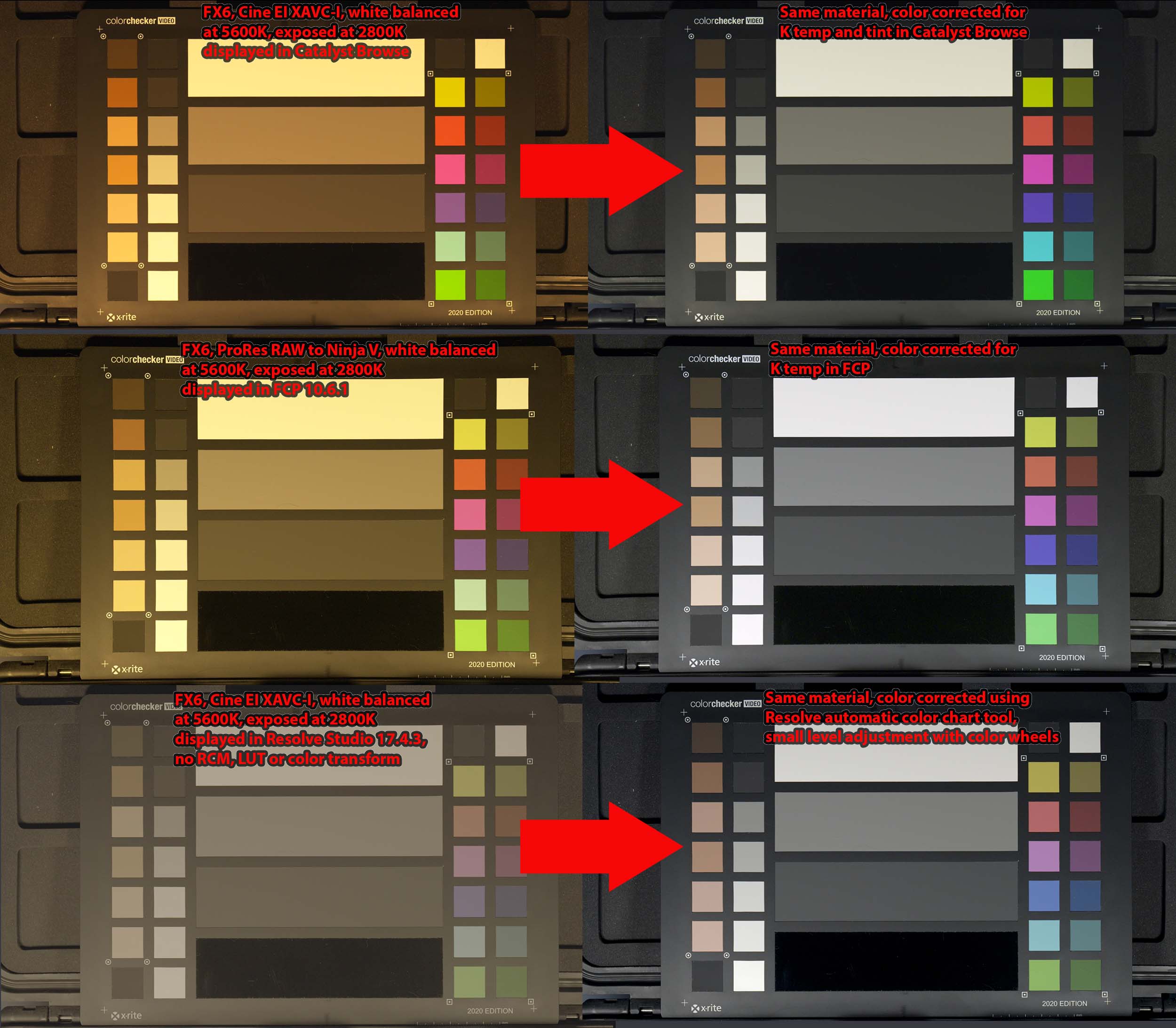
Attached is an FX6 white balance correction test I did comparing XAVC-I to ProRes RAW, white balanced at 5600K and exposed at 2800K. I corrected the XAVC-I footage using Sony's Catalyst Browse and Resolve Studio 17.4.3's automatic color chart tool, and ProRes RAW from Ninja V using FCP 10.6.1 RAW color temp correction. Normally you wouldn't shoot material 3000K off, so this was an extreme test. In general the 10-bit 4:2:2 XAVC-I material could be corrected for color temp almost equal to ProRes RAW, although it was easier on the RAW material.
If you didn't have a color chart, e.g, run and gun b-roll in varying conditions, it might be a bit more difficult. However it's standard practice to carry and periodically shoot a small color card. The FX6 will not even permit auto white balance when in the preferred Cine IE mode, so you have to shoot a WB target or manually dial in a K number.
If you ever shoot a mix of multicam XAVC-I vs external ProRes 422 or ProRes RAW material, it's important to verify how data range vs legal range luma is handled. There is some ambiguity in this area, and I'm investigating that now.
There's an issue with free run or preset timecode on A7SIII material. Since there is no industry standard on timecode metadata for MP4 container format, if that material is ever imported via "leave files in place" FCP will not show clip aka source timecode. The workaround is externally re-wrap the A7SIII files with EditReady before import, or shoot ProRes 422 (not RAW) externally to an Atomos Ninja V.
Replied by joema on topic Best codec to shoot for long form documentary
...Besides the issue of more storage needed for ProRes RAW, do you prefer one over the other? The versatility of ProRes RAW in a FCP post workflow is really attractive for us. But the convenience of S-Log 3 without external recorders during production is also attractive....
Attached is an FX6 white balance correction test I did comparing XAVC-I to ProRes RAW, white balanced at 5600K and exposed at 2800K. I corrected the XAVC-I footage using Sony's Catalyst Browse and Resolve Studio 17.4.3's automatic color chart tool, and ProRes RAW from Ninja V using FCP 10.6.1 RAW color temp correction. Normally you wouldn't shoot material 3000K off, so this was an extreme test. In general the 10-bit 4:2:2 XAVC-I material could be corrected for color temp almost equal to ProRes RAW, although it was easier on the RAW material.
If you didn't have a color chart, e.g, run and gun b-roll in varying conditions, it might be a bit more difficult. However it's standard practice to carry and periodically shoot a small color card. The FX6 will not even permit auto white balance when in the preferred Cine IE mode, so you have to shoot a WB target or manually dial in a K number.
If you ever shoot a mix of multicam XAVC-I vs external ProRes 422 or ProRes RAW material, it's important to verify how data range vs legal range luma is handled. There is some ambiguity in this area, and I'm investigating that now.
There's an issue with free run or preset timecode on A7SIII material. Since there is no industry standard on timecode metadata for MP4 container format, if that material is ever imported via "leave files in place" FCP will not show clip aka source timecode. The workaround is externally re-wrap the A7SIII files with EditReady before import, or shoot ProRes 422 (not RAW) externally to an Atomos Ninja V.
Please Log in to join the conversation.
