




- Posts: 23
- Thank you received: 0
3 Post Moderation Rule for New Boarders (25 Jan 2021)
New boarders will have their posts moderated - Don't worry if you cannot see your post immediately.
Audio questions related to broadcast requirements....
02 Feb 2022 20:24 #118745
by Srfr4Life
Audio questions related to broadcast requirements.... was created by Srfr4Life
Our operations are jumping from one network to a new one. I was only 1 year into submitting content for broadcast when our group decided to switch networks. 1 year meaning I'm a rookie and haven't done this much. Have a few audio questions I'm hoping to get answered.
1. "Stereo audio must be fully mono compatible." - this requirement is followed by this notation: "Full Mono compatibility means that when the left and right stereo channels are actively combined to mono, there is no discernible change in audio level or fidelity."
-Not sure how I achieve this. My audio is recorded through Lavs onto the camera. Files are imported into FCPX and I usually click to make the audio track stereo L/R. I did notice that if I put the audio track Pan back to 'NONE' it's levels are raised a few dbs. Anything special I need to do here?
2. "Audio must be mixed on two channels in stereo. Stereo audio must be fully mono compatible. The audio channels must be in proper phase."
- I know there's a physics explanation for this... but audio channels in proper phase.... is that something I would hear and fix?
Appreciate the help!
1. "Stereo audio must be fully mono compatible." - this requirement is followed by this notation: "Full Mono compatibility means that when the left and right stereo channels are actively combined to mono, there is no discernible change in audio level or fidelity."
-Not sure how I achieve this. My audio is recorded through Lavs onto the camera. Files are imported into FCPX and I usually click to make the audio track stereo L/R. I did notice that if I put the audio track Pan back to 'NONE' it's levels are raised a few dbs. Anything special I need to do here?
2. "Audio must be mixed on two channels in stereo. Stereo audio must be fully mono compatible. The audio channels must be in proper phase."
- I know there's a physics explanation for this... but audio channels in proper phase.... is that something I would hear and fix?
Appreciate the help!
Please Log in to join the conversation.
- Carsten Orlt
-

- Offline
- Platinum Member
-

Less
More
- Posts: 422
- Thank you received: 82
03 Feb 2022 00:06 #118749
by Carsten Orlt
Replied by Carsten Orlt on topic Audio questions related to broadcast requirements....
Good questions but very hard to answer with 'press button and you're done'. Other then Google yourself through the questions and watch as many videos as you can to get a sense of how audio works I would suggest to maybe seek local knowledge from other video or audio post places. The reason being is that you need to hear and properly measure stuff to understand them. Also you need the proper gear and listening environment to be able to judge results. Sorry wish there would be an easy answer. It's not rocket science though 
Please Log in to join the conversation.
- Cameron Jake
-

- Offline
- Premium Member
-

Less
More
- Posts: 144
- Thank you received: 3
03 Feb 2022 14:23 #118763
by Cameron Jake
Replied by Cameron Jake on topic Audio questions related to broadcast requirements....
What a hilarious unusual request from them.
If you are using pro tools? Or Adobe Audition, none of this stuff is an issue.
You need to ask them what you are mixing out to and what their broadcast mastering settings are - in the UK TV is mastered to -12 before transmitter. Radio is -6 to -3 but varies. They are obviously newb themselves a bit maybe. They are assuming that when your edits are put on a mono TV that it will still be audible.
That is down to their broadcast / transmitter settings.
But if they are wanting you to handle it then you can run it through a waves plugin - here is something wealthysound.com/posts/7-tips-for-mono-c...y-that-actually-work
When you master down a single video from mono or stereo. You will get that which is the original. If they are concerned about 5.1 then that is a different mastering technique.
If you are using pro tools? Or Adobe Audition, none of this stuff is an issue.
You need to ask them what you are mixing out to and what their broadcast mastering settings are - in the UK TV is mastered to -12 before transmitter. Radio is -6 to -3 but varies. They are obviously newb themselves a bit maybe. They are assuming that when your edits are put on a mono TV that it will still be audible.
That is down to their broadcast / transmitter settings.
But if they are wanting you to handle it then you can run it through a waves plugin - here is something wealthysound.com/posts/7-tips-for-mono-c...y-that-actually-work
When you master down a single video from mono or stereo. You will get that which is the original. If they are concerned about 5.1 then that is a different mastering technique.
Please Log in to join the conversation.

03 Feb 2022 22:19 #118773
by JoeEditor
Replied by JoeEditor on topic Audio questions related to broadcast requirements....
Actually a pretty normal request, I see it all the time. Some TV sets are heard in mono, they want to be sure all listeners have the same quality audio experience. I had to do this when I was running production for a TV station. With FCP lacking pro level audio tools, it's a PITA. I set up a custom Destination using Compressor that gave me an audio only mono file. If it sounds good in mono, you have a good, clean mix. We do this in recording studios constantly, too.
Please Log in to join the conversation.
31 May 2022 14:27 #120778
by Srfr4Life
Replied by Srfr4Life on topic Audio questions related to broadcast requirements....
Thanks for the reply JoeEditor. I'm still a little confused on some of the specifics... PITA (not familiar with the acronym)?
I'm recording content on a camera with 4 mono tracks of audio. That file is then transferred/imported into FCP. The end mix is 2 stereo track..... so my question.... am I leaving those mono tracks as mono in the signal flow until all is exported stereo?
Or do I need to export those mono tracks into, say Logic, then mix them down as stereo. Exporting them out of Logic and importing back into FCP as a Stereo track.
I was hoping we could start from that description and maybe you can help me better understanding what's ahead?
Thank you so much for your time everyone 🙏🏻
I'm recording content on a camera with 4 mono tracks of audio. That file is then transferred/imported into FCP. The end mix is 2 stereo track..... so my question.... am I leaving those mono tracks as mono in the signal flow until all is exported stereo?
Or do I need to export those mono tracks into, say Logic, then mix them down as stereo. Exporting them out of Logic and importing back into FCP as a Stereo track.
I was hoping we could start from that description and maybe you can help me better understanding what's ahead?
Thank you so much for your time everyone 🙏🏻
Please Log in to join the conversation.

31 May 2022 19:04 #120780
by dmetz
Replied by dmetz on topic Audio questions related to broadcast requirements....
PITA = Difficult (pain in the ***)
You mention that you're recording lavs (plural) to camera. How is this achieved? Are you going single lav direct into camera, or is there a mixer involved somewhere? Trying to determine if you're recording several mics through a mixer and if so, whether you're panning them in the mix prior output to camera.
If the camera is writing 4 audio tracks to the clips, how many of those tracks are empty? Depending on the camera, you can set how it'll record a mono vs. stereo input.
I typically don't need to touch the mono/stereo setting on my imported video clips, but I do disable empty tracks and do whatever processing of EQ / compression / levels / etc. that's necessary in the timeline.
Sometimes when you mono-sum a stereo signal, the two channels partially cancel each other out, causing a thin nasally sound or odd phasing which doesn't sound good. This would be due to the L/R channels being out of phase with each other - you'll definitely know it if / when you hear it.
You mention that you're recording lavs (plural) to camera. How is this achieved? Are you going single lav direct into camera, or is there a mixer involved somewhere? Trying to determine if you're recording several mics through a mixer and if so, whether you're panning them in the mix prior output to camera.
If the camera is writing 4 audio tracks to the clips, how many of those tracks are empty? Depending on the camera, you can set how it'll record a mono vs. stereo input.
I typically don't need to touch the mono/stereo setting on my imported video clips, but I do disable empty tracks and do whatever processing of EQ / compression / levels / etc. that's necessary in the timeline.
Sometimes when you mono-sum a stereo signal, the two channels partially cancel each other out, causing a thin nasally sound or odd phasing which doesn't sound good. This would be due to the L/R channels being out of phase with each other - you'll definitely know it if / when you hear it.
Please Log in to join the conversation.
31 May 2022 22:47 #120788
by Srfr4Life
Replied by Srfr4Life on topic Audio questions related to broadcast requirements....
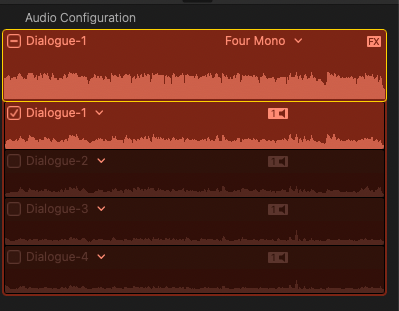
The Sony Lavs we use have two inputs on the receiving side. That's two of the four. The other two are the camera's built in mic/s. Scratch tracks for us. Not sure if it's just one or two internal Mic's or not. But the imported video file with 4 mono tracks are definitely there. Track 1 Lav 1.... Track 2 Lav 2 (both received by one receiver of a lav kit)... 2 Scratch tracks. I attached a screen shot. All tracks in use. 3 & 4 are usually wind for us with faint voices. Not completely sure, but I do think the camera records in both mono and stereo.
Please Log in to join the conversation.
