


- Posts: 87
- Thank you received: 3
3 Post Moderation Rule for New Boarders (25 Jan 2021)
New boarders will have their posts moderated - Don't worry if you cannot see your post immediately.
Every clip dragged to timeline has audio separated, don't know why.
09 Jan 2022 15:12 #118324
by BobKrist
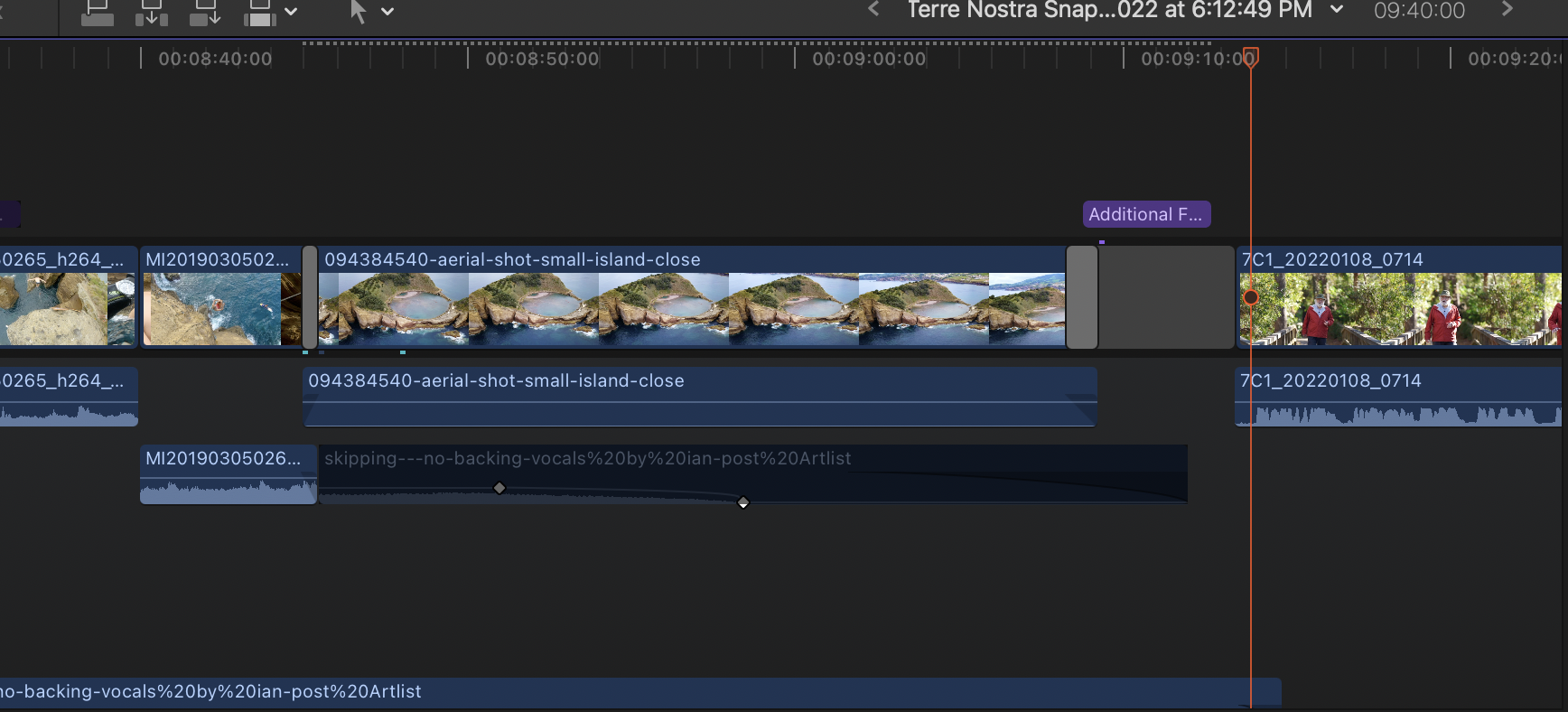
I'm sure this is probably just a setting that got changed somewhere, but I'll be darned if I can figure out why, in a project, every clip I drag into the timeline automatically separates the audio into a connected clip underneath the video. I can't figure out why it happened or how to change it back. Thanks for any guidance in how to fix this!
Please Log in to join the conversation.
- Tom Wolsky
-

- Offline
- Moderator
-

09 Jan 2022 15:14 #118325
by Tom Wolsky
Replied by Tom Wolsky on topic Every clip dragged to timeline has audio separated, don't know why.
Are you sure you’re editing into a project and not another clip? Please post a screenshot.
Please Log in to join the conversation.
09 Jan 2022 15:17 #118327
by BobKrist
Replied by BobKrist on topic Every clip dragged to timeline has audio separated, don't know why.
Hi Tom: Yes, I'm pretty certain it's a project. Here is a screenshot...I don't know if it shows what you need it to show. Thanks! Bob
Please Log in to join the conversation.
- Tom Wolsky
-
- Offline
- Moderator
-
09 Jan 2022 15:50 #118328
by Tom Wolsky
Replied by Tom Wolsky on topic Every clip dragged to timeline has audio separated, don't know why.
Try trashing your preferences. Some clips show connection points and others don’t. There may be a software conflict with some other application. Do you have Chrome installed?
Please Log in to join the conversation.
09 Jan 2022 16:28 #118329
by BobKrist
Replied by BobKrist on topic Every clip dragged to timeline has audio separated, don't know why.
Tom: I do have Chrome installed, but I hardly ever use it. I'll try trashing the prefs and uninstalling Chrome. Thanks!
Please Log in to join the conversation.
- Tom Wolsky
-
- Offline
- Moderator
-
09 Jan 2022 16:33 #118330
by Tom Wolsky
Replied by Tom Wolsky on topic Every clip dragged to timeline has audio separated, don't know why.
Check out
www.chromeisbad.com
fir details on how best to remove Chrome.
Please Log in to join the conversation.
09 Jan 2022 16:44 #118331
by BobKrist
Replied by BobKrist on topic Every clip dragged to timeline has audio separated, don't know why.
Tom: Restarted the computer, restarted FCPX and trashed prefs...haven't tossed Chrome yet, but out of curiousity, opened a different library and a different project and clips dragged into that one behave normally. It just seems to be this project that divides the audio and video the minute you drag a clip in or try to do an append edit via keyboard. It's not the end of the world, and I'm just fine tuning the project, most of the work has been done. I'm going to try starting a new project in that library and see what happens. If it continues, I go in and trash Chrome, I hardly use it anyway.
Please Log in to join the conversation.
09 Jan 2022 16:48 #118332
by BobKrist
Replied by BobKrist on topic Every clip dragged to timeline has audio separated, don't know why.
New project in same library behaving normally. I don't know what weird setting or anomaly happened in that one project, but so far, it seems to be the only thing affected.
Please Log in to join the conversation.


10 Jan 2022 04:22 #118338
by VTC
Replied by VTC on topic Every clip dragged to timeline has audio separated, don't know why.
The solution I found for wonky times like this is to export an XML, create a new library, import the XML. Often the cooties of the library plagued with strangeness get blindsided by the XML sleight of hand and get left behind.
Please Log in to join the conversation.

10 Jan 2022 10:43 #118343
by JoeEditor
Replied by JoeEditor on topic Every clip dragged to timeline has audio separated, don't know why.
" this project that divides the audio and video"
First place I'd look is the Roles section of the Timeline Index, cause that's what it looks like when I show lanes and stuff there for a Project.
First place I'd look is the Roles section of the Timeline Index, cause that's what it looks like when I show lanes and stuff there for a Project.
Please Log in to join the conversation.
