


- Posts: 6
- Thank you received: 0
3 Post Moderation Rule for New Boarders (25 Jan 2021)
New boarders will have their posts moderated - Don't worry if you cannot see your post immediately.
What is the best way to regain control of the skimmer while using transform tool
- Undertaker01
-
 Topic Author
- Offline
- New Member
-

Less
More
28 Dec 2021 22:36 #118166
by Undertaker01
What is the best way to regain control of the skimmer while using transform tool was created by Undertaker01
What is the best way to regain control of the skimmer while using transform tool?
Is there a way to temporarily enable skimmer while using the transform tool? Or do I have to click where I want to go on the timeline while using the tool?
Is there a way to temporarily enable skimmer while using the transform tool? Or do I have to click where I want to go on the timeline while using the tool?
Please Log in to join the conversation.


29 Dec 2021 22:27 #118174
by JoeEditor
Replied by JoeEditor on topic What is the best way to regain control of the skimmer while using transform tool
How do you use the transform tool (Viewer window) and the skimmer (timeline/browser windows) at the same time? I'd learn the S short-cut for the skimmer. Fast, easy.
Please Log in to join the conversation.
- Undertaker01
-
Topic Author
- Offline
- New Member
-
Less
More
- Posts: 6
- Thank you received: 0
31 Dec 2021 02:18 #118184
by Undertaker01
Replied by Undertaker01 on topic What is the best way to regain control of the skimmer while using transform tool
I just want to skim the clip to see the keyframing I'm doing without having to deactivate the transform tool.
Please Log in to join the conversation.
- Tom Wolsky
-

- Offline
- Moderator
-

31 Dec 2021 11:01 #118198
by Tom Wolsky
Replied by Tom Wolsky on topic What is the best way to regain control of the skimmer while using transform tool
If the skimmer is active it doesn’t matter what tool you’re using the skimmer will skim in the timeline. Could you post some screenshots of what you’re doing where that include the tool you’re using. ⇧ ⌘ 3 will take a full screenshot that includes the pointer.
Please Log in to join the conversation.
31 Dec 2021 11:59 - 31 Dec 2021 12:00 #118201
by JoeEditor
Those are two tools that work in two different windows and do not effect each other. You should not have to turn either off to use the other.
Replied by JoeEditor on topic What is the best way to regain control of the skimmer while using transform tool
I just want to skim the clip to see the keyframing I'm doing without having to deactivate the transform tool.
Those are two tools that work in two different windows and do not effect each other. You should not have to turn either off to use the other.
Last edit: 31 Dec 2021 12:00 by JoeEditor.
Please Log in to join the conversation.
- Undertaker01
-
Topic Author
- Offline
- New Member
-
Less
More
- Posts: 6
- Thank you received: 0
31 Dec 2021 12:53 #118202
by Undertaker01
Replied by Undertaker01 on topic What is the best way to regain control of the skimmer while using transform tool
I'm not sure I know what you mean, I only have one viewer window?
Yes, you can "skim" the clip with the transform tool activated but I can't seem to do it without clicking and dragging. And I don't want to have to click + drag. And I'm not talking about the browser here, I am talking about the clip skimming on the timeline. Sorry for confusion! Thanks for the help!
Yes, you can "skim" the clip with the transform tool activated but I can't seem to do it without clicking and dragging. And I don't want to have to click + drag. And I'm not talking about the browser here, I am talking about the clip skimming on the timeline. Sorry for confusion! Thanks for the help!
Please Log in to join the conversation.
- Tom Wolsky
-
- Offline
- Moderator
-
31 Dec 2021 13:21 #118203
by Tom Wolsky
Replied by Tom Wolsky on topic What is the best way to regain control of the skimmer while using transform tool
Please post screenshots. The skimmer is a red line. You do NOT have to click and drag to move the skimmer. Make sure the skimmer is active with the S key.
Please Log in to join the conversation.
- Tom Wolsky
-
- Offline
- Moderator
-
31 Dec 2021 13:21 #118204
by Tom Wolsky
Replied by Tom Wolsky on topic What is the best way to regain control of the skimmer while using transform tool
Please post screenshots. The skimmer is a red line. You do NOT have to click and drag to move the skimmer. Make sure the skimmer is active with the S key.
Please Log in to join the conversation.
- Undertaker01
-
Topic Author
- Offline
- New Member
-
Less
More
- Posts: 6
- Thank you received: 0
31 Dec 2021 13:44 #118205
by Undertaker01
Replied by Undertaker01 on topic What is the best way to regain control of the skimmer while using transform tool
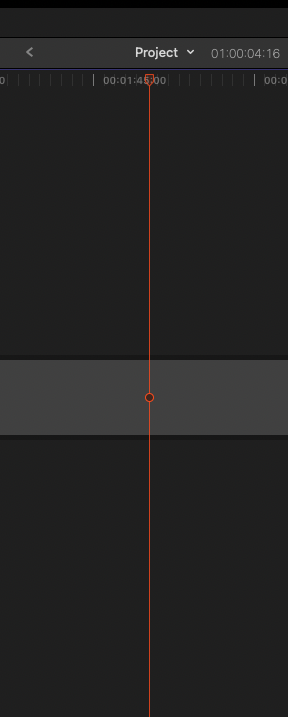
With the transform tool enabled navigating to the timeline does not allow you to skim the clip. To move the skimmer I have to click on the timeline. Enabling/disabling the skimmer does absolutely nothing. I am not new to FCP & this has always bothered me.

Please Log in to join the conversation.
- Undertaker01
-
Topic Author
- Offline
- New Member
-
Less
More
- Posts: 6
- Thank you received: 0
31 Dec 2021 13:47 #118206
by Undertaker01
Replied by Undertaker01 on topic What is the best way to regain control of the skimmer while using transform tool
Am I using the wrong terminology? The transform tool is [Shift + T] the viewer is what lets you preview the clip & the skimmer is the red line that moves with your mouse as you "skim" the timeline. What I am saying is "skimming" the timeline doesn't work with the transform tool enabled even though I am hovering over the timeline. If I click the timeline that simply moves the playhead (which has turned red with the transform tool, the color of the skimmer) - And still that does not allow you to skim. I have to exit the transform tool and skim the clip/play it back to preview my edit then go back into the transform tool (Shift + T) and make adjustments. This just seems like an extra step. How can I better explain this? What further screenshots do you want me to provide?
Thanks!
Thanks!
Please Log in to join the conversation.
31 Dec 2021 16:02 #118207
by JoeEditor
Replied by JoeEditor on topic What is the best way to regain control of the skimmer while using transform tool
OK, you found a BUG!
I just confirmed that since the last update, the skimmer won't work in the Timeline (but works in the Browser) while the Transform is enable in the Viewer. It never was like this before, I've worked with both before. But since the last update, you have to disable Transform in the Viewer before you can use the Skimmer in the Timeline. B-U-G!
I just confirmed that since the last update, the skimmer won't work in the Timeline (but works in the Browser) while the Transform is enable in the Viewer. It never was like this before, I've worked with both before. But since the last update, you have to disable Transform in the Viewer before you can use the Skimmer in the Timeline. B-U-G!
Please Log in to join the conversation.
- Undertaker01
-
Topic Author
- Offline
- New Member
-
Less
More
- Posts: 6
- Thank you received: 0
01 Jan 2022 06:03 #118209
by Undertaker01
Replied by Undertaker01 on topic What is the best way to regain control of the skimmer while using transform tool
Oh that makes sense... This was frustrating me because I do a lot of back and fourth between transform/viewer + the timeline. Hopefully they fix it in the next update!
Please Log in to join the conversation.
- flaminghick
-

- Offline
- Senior Member
-

Less
More
- Posts: 54
- Thank you received: 0
08 Nov 2022 17:25 #122803
by flaminghick
Replied by flaminghick on topic What is the best way to regain control of the skimmer while using transform tool
It's crazy that this bug still persists after YEARS of this being the case. I have provided feedback before and just did again. I have no idea why it's still happening. As far as bugs go this should be a priority.
Please Log in to join the conversation.
