


- Posts: 96
- Thank you received: 2
3 Post Moderation Rule for New Boarders (25 Jan 2021)
New boarders will have their posts moderated - Don't worry if you cannot see your post immediately.
Remote Editing - Is it possible to easily & quickly share Source Timecode?
21 Dec 2021 09:25 #118081
by Finbo
With Omicron gain pace everywhere, it seems as though remote editing is going to be prevalent again.
The biggest problem I have is finding interview clips easily & quickly with remote producers, etc via Skype/Zoom, etc. It seems to take up a lot of time.
Often they use a transcription service for the interviews, but these never include the source/camera timecode. So, we always end up having to go through the whole or the majority of the interview(s) each time and sometimes several times to find the relevant clips.
I know FCPX can burn in timecode, but by the time this is done, then exported and then transferred to the person who then also has to be able to download before starting to look through it, also means it can take a long time.
Is there a way of exporting source timecode via an audio only file? I suspect the answer is no as I can't seem to find a way of doing this.
Is there some subscription software that can work with source timecode?
Ideally I'm looking for a free or cheap app as it's something that I won't use all the time as my main role is as a camera operator.
Any thoughts or insights are welcome.
Thanks
The biggest problem I have is finding interview clips easily & quickly with remote producers, etc via Skype/Zoom, etc. It seems to take up a lot of time.
Often they use a transcription service for the interviews, but these never include the source/camera timecode. So, we always end up having to go through the whole or the majority of the interview(s) each time and sometimes several times to find the relevant clips.
I know FCPX can burn in timecode, but by the time this is done, then exported and then transferred to the person who then also has to be able to download before starting to look through it, also means it can take a long time.
Is there a way of exporting source timecode via an audio only file? I suspect the answer is no as I can't seem to find a way of doing this.
Is there some subscription software that can work with source timecode?
Ideally I'm looking for a free or cheap app as it's something that I won't use all the time as my main role is as a camera operator.
Any thoughts or insights are welcome.
Thanks
Please Log in to join the conversation.


21 Dec 2021 15:15 #118083
by JoeEditor
Replied by JoeEditor on topic Remote Editing - Is it possible to easily & quickly share Source Timecode?
I use Frame.io and swear by it.
Please Log in to join the conversation.
21 Dec 2021 20:20 #118089
by Finbo
Replied by Finbo on topic Remote Editing - Is it possible to easily & quickly share Source Timecode?
Ok, thanks. I'll take a closer look. It probably has more features than I would use.
My editing is mainly on the day or occasionally for the next day for news and current affairs broadcasters.
So, others will be connected via Skype or Zoom and with me sharing my screen we collaborate on the go and mainly in the field/on location.
Sometimes it's a pretty swift turn around too.
That's why if they can use the source/camera timecode when they transcribe interviews, etc it cuts down on wasted time trying to find the clips.
With more remote editing likely, I'm just looking at what options there are to try to improve the workflow.
Thanks.
My editing is mainly on the day or occasionally for the next day for news and current affairs broadcasters.
So, others will be connected via Skype or Zoom and with me sharing my screen we collaborate on the go and mainly in the field/on location.
Sometimes it's a pretty swift turn around too.
That's why if they can use the source/camera timecode when they transcribe interviews, etc it cuts down on wasted time trying to find the clips.
With more remote editing likely, I'm just looking at what options there are to try to improve the workflow.
Thanks.
Please Log in to join the conversation.
21 Dec 2021 20:25 #118091
by JoeEditor
Replied by JoeEditor on topic Remote Editing - Is it possible to easily & quickly share Source Timecode?
There's an FCP plugin for Frame.io that is really great. Your "others" just go to your Frame.io "review" page you send them a link to. They make notes, it updates in real-time inside of FCPX while you work. You can have a Skype call going at the same time. They make a note, it pops up instantly on the timeline and you have your Frame.io playhead and FCP playhead synced, to you jump to a note, you're at that exact spot in FCP. Way more accurate than timecode overlays. I'd recommend contacting Frame.io and asking for a demo.
Please Log in to join the conversation.
22 Dec 2021 15:01 #118099
by Finbo
Replied by Finbo on topic Remote Editing - Is it possible to easily & quickly share Source Timecode?
I've had a look at Frame.io and it doesn't appear that source/camera timecode is transferred when you upload clips/interviews for remote viewing.
I can upload a clip with burnt in timecode, but I can do that for free from FCPX and send via say We Transfer or similar.
There are a lot of nice looking features with Frame.io, but not sure it's ideal for my use which would only be on an occasional basis.
But I will delve into it a bit further too.
Thanks
I can upload a clip with burnt in timecode, but I can do that for free from FCPX and send via say We Transfer or similar.
There are a lot of nice looking features with Frame.io, but not sure it's ideal for my use which would only be on an occasional basis.
But I will delve into it a bit further too.
Thanks
Please Log in to join the conversation.
23 Dec 2021 00:32 - 23 Dec 2021 00:51 #118111
by JoeEditor
Replied by JoeEditor on topic Remote Editing - Is it possible to easily & quickly share Source Timecode?
Timecode is there, bottom center. And yes, use what works for you.
Last edit: 23 Dec 2021 00:51 by JoeEditor.
Please Log in to join the conversation.
01 Jan 2022 20:03 #118211
by Finbo
Replied by Finbo on topic Remote Editing - Is it possible to easily & quickly share Source Timecode?
I downloaded Frame.io but the upload time of any material was terribly slow and of no use to me in the real world.
I’m on FCPX 10.5.2 which is rock solid for me and was told to update to the latest version which slightly surprised me as I’m only a couple of updates behind.
But the latest version means updating to Monterey as well.
This wouldn’t work for me as some of my card readers aren’t supported, etc.
So, the search continues…
I’m on FCPX 10.5.2 which is rock solid for me and was told to update to the latest version which slightly surprised me as I’m only a couple of updates behind.
But the latest version means updating to Monterey as well.
This wouldn’t work for me as some of my card readers aren’t supported, etc.
So, the search continues…
Please Log in to join the conversation.
- Tom Wolsky
-

- Offline
- Moderator
-

01 Jan 2022 20:24 #118213
by Tom Wolsky
Replied by Tom Wolsky on topic Remote Editing - Is it possible to easily & quickly share Source Timecode?
The current version will run on Big Sur. Monterey is not required.
Please Log in to join the conversation.
01 Jan 2022 22:07 #118214
by Finbo
Replied by Finbo on topic Remote Editing - Is it possible to easily & quickly share Source Timecode?
How solid is Big Sur? Any problems to worry about…
Please Log in to join the conversation.
01 Jan 2022 22:53 - 01 Jan 2022 22:54 #118215
by JoeEditor
Replied by JoeEditor on topic Remote Editing - Is it possible to easily & quickly share Source Timecode?
Been running Big Sur for a year, no problems.
Fastest upload/download times of any server for me.
Fastest upload/download times of any server for me.
Last edit: 01 Jan 2022 22:54 by JoeEditor.
Please Log in to join the conversation.
- Tom Wolsky
-
- Offline
- Moderator
-
01 Jan 2022 22:56 #118216
by Tom Wolsky
Replied by Tom Wolsky on topic Remote Editing - Is it possible to easily & quickly share Source Timecode?
It seems to be fine, but how any system works depends pretty much entirely on what software you install on it.
Please Log in to join the conversation.


02 Jan 2022 04:54 #118217
by RGPphotog
I've created a "timecode" Compressor preset that can be used to batch process clips into timecode versions. You can create a droplet or watch folder to speed up the process. Then of course, it's as fast as your slowest piece of the hardware chain.
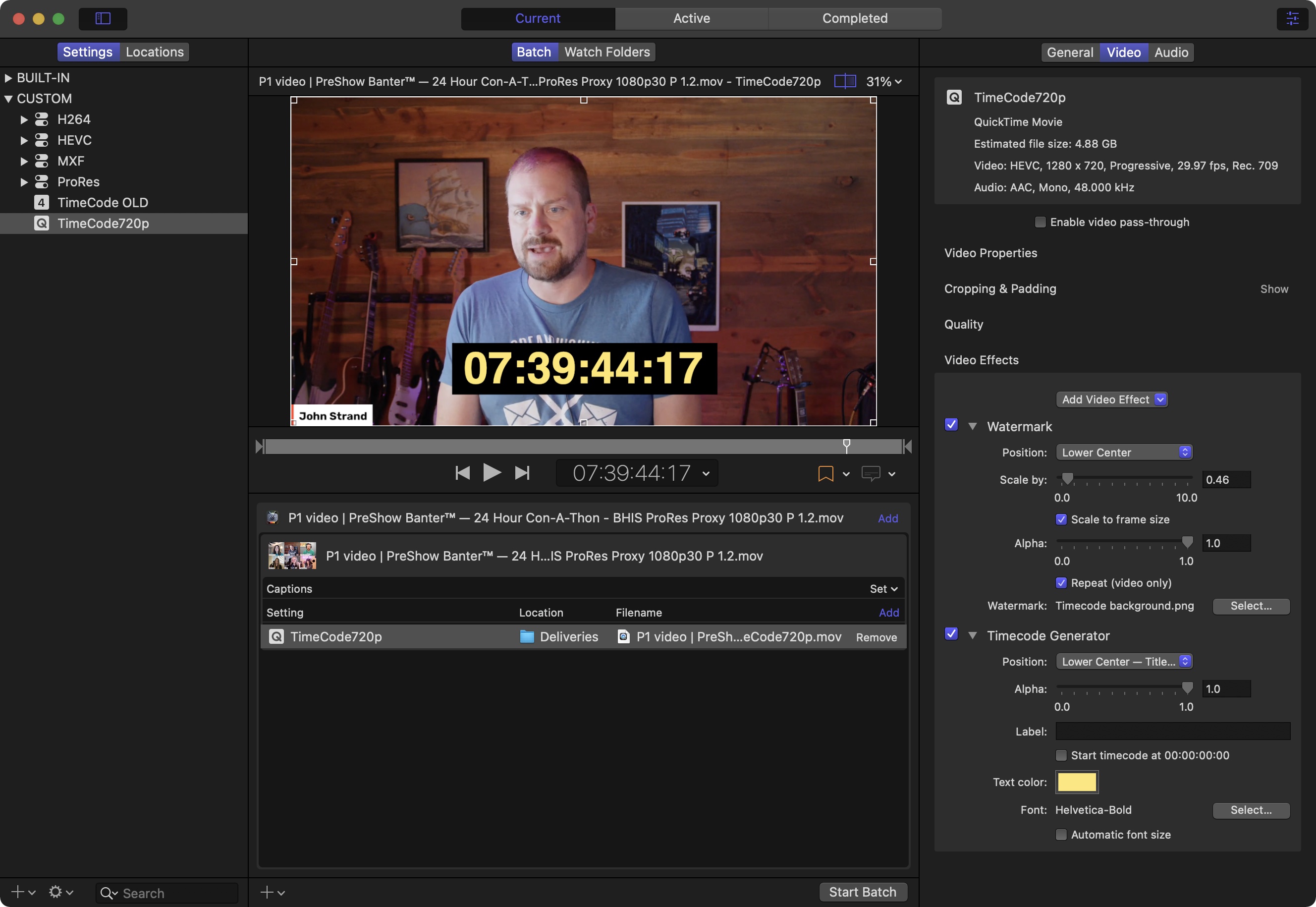
This preset can be created via duplicating any of the HEVC or h264 built-in presets, modifying as needed, and adding Timecode Generator video effect. Don't forget to Rename the preset.
"_timecode" is added to the end of every clip, as I've configured it, which is the preset name. And I've set exports no larger than 540p, to make the upload/download process faster, to get them to the client quickly. HEVC files and mono audio tracks can make them even smaller, still. Which also means faster. FWIW, you could make an entire range of timecode presets, in case you have picky clients who want no less than 1080p or whatever. Such as "_timecode540p" or "_timecode1080p."
I recommend "Star Wars subtitle yellow" as an easily readable timecode color against most video content. In the lower center - title safe area of the frame. Font size does need to be fiddled with for each export resolution. The auto size checkbox result is too small.
Another Pro Tip: I created a graphic in photoshop to add a black background under the timecode. used a 1920x1080 canvas and placed a black rectangle where the timecode will be rendered. Drop this into the compressor preset via the "watermark" video effect. Took me a couple trial & error adjustments to get it placed right under the timecode correctly, but once done it makes a huge readability difference. And once this is saved in the preset, you got perfect timecode transcodes every time; batch processed.
Replied by RGPphotog on topic Remote Editing - Is it possible to easily & quickly share Source Timecode?
I know FCPX can burn in timecode, but by the time this is done, then exported and then transferred to the person who then also has to be able to download before starting to look through it, also means it can take a long time.
I've created a "timecode" Compressor preset that can be used to batch process clips into timecode versions. You can create a droplet or watch folder to speed up the process. Then of course, it's as fast as your slowest piece of the hardware chain.
This preset can be created via duplicating any of the HEVC or h264 built-in presets, modifying as needed, and adding Timecode Generator video effect. Don't forget to Rename the preset.
"_timecode" is added to the end of every clip, as I've configured it, which is the preset name. And I've set exports no larger than 540p, to make the upload/download process faster, to get them to the client quickly. HEVC files and mono audio tracks can make them even smaller, still. Which also means faster. FWIW, you could make an entire range of timecode presets, in case you have picky clients who want no less than 1080p or whatever. Such as "_timecode540p" or "_timecode1080p."
I recommend "Star Wars subtitle yellow" as an easily readable timecode color against most video content. In the lower center - title safe area of the frame. Font size does need to be fiddled with for each export resolution. The auto size checkbox result is too small.
Another Pro Tip: I created a graphic in photoshop to add a black background under the timecode. used a 1920x1080 canvas and placed a black rectangle where the timecode will be rendered. Drop this into the compressor preset via the "watermark" video effect. Took me a couple trial & error adjustments to get it placed right under the timecode correctly, but once done it makes a huge readability difference. And once this is saved in the preset, you got perfect timecode transcodes every time; batch processed.
Please Log in to join the conversation.
02 Jan 2022 13:17 #118219
by Finbo
Replied by Finbo on topic Remote Editing - Is it possible to easily & quickly share Source Timecode?
Thanks for this information. I've been having a look at Compressor and what can be achieved.
From my perspective, the quality of the image is fairly unimportant at this stage. I'm just looking for the quickest method to export an interview or interviews with source timecode to someone remotely so when they choose what clips they want we are both on the same page as it were.
Timing wise, Compressor is quicker than exporting direct from FCPX with the burnt in timecode with the smallest file size I can find.
But, as Compressor has so many different settings available, it's trying to find the optimum setting that will export the quickest, etc.
So far, a Quicktime movie of 640 x 480 with a custom data setting of between 100-500 kbps seems to be the quickest but I'm still looking at options.
If anyone knows of a very quick setting, then I'd be happy to try this.
As an aside, Frame.io has said they'll double check things re: Catalina when more people are back from holiday. They do have a good support service and have been helpful so far.
From my perspective, the quality of the image is fairly unimportant at this stage. I'm just looking for the quickest method to export an interview or interviews with source timecode to someone remotely so when they choose what clips they want we are both on the same page as it were.
Timing wise, Compressor is quicker than exporting direct from FCPX with the burnt in timecode with the smallest file size I can find.
But, as Compressor has so many different settings available, it's trying to find the optimum setting that will export the quickest, etc.
So far, a Quicktime movie of 640 x 480 with a custom data setting of between 100-500 kbps seems to be the quickest but I'm still looking at options.
If anyone knows of a very quick setting, then I'd be happy to try this.
As an aside, Frame.io has said they'll double check things re: Catalina when more people are back from holiday. They do have a good support service and have been helpful so far.
Please Log in to join the conversation.
02 Jan 2022 15:59 #118220
by RGPphotog
Replied by RGPphotog on topic Remote Editing - Is it possible to easily & quickly share Source Timecode?
The quickest settings may be dependent on hardware you're using. So much so, that investing into an M1 or M1 Pro/Max chipset based Mac would yield dramatically quick results when exporting to HEVC codec. The M1 Max being the fastest due to it's dual hardware HEVC encoders (and dual ProRes hardware acceleration chips). Next to Apple silicon, intel Macs with a T2 chipset also support HEVC hardware encoding acceleration. However, I can't recall if it's Catalina or Big Sur which is required to enable T2 HEVC encoding acceleration.
With hardware acceleration, HEVC exporting is faster than H264, at least on Apple Silicon. And smaller in file size too. Be sure to test with HEVC in your presets against H264.
So if you're going to be doing "enough" of this transcoding, a base M1 Mac mini is not too expensive to use as a dedicated transcoding Mac.
With hardware acceleration, HEVC exporting is faster than H264, at least on Apple Silicon. And smaller in file size too. Be sure to test with HEVC in your presets against H264.
So if you're going to be doing "enough" of this transcoding, a base M1 Mac mini is not too expensive to use as a dedicated transcoding Mac.
Please Log in to join the conversation.

02 Jan 2022 16:59 #118221
by VTC
Replied by VTC on topic Remote Editing - Is it possible to easily & quickly share Source Timecode?
It's downright silly to send out something for review in 4k timecoded no matter how fast like a bunny your system is. I'll punt mine out 320x240 to minimize render and upload times, often B/W so there's no mistake it's only a reference cut. My approach is to consider it's the 1st day of rehearsal. No props on the stage with everyone in T-shirts and flip flops because even dress rehearsal is still weeks away.
Please Log in to join the conversation.
02 Jan 2022 17:10 #118222
by RGPphotog
Replied by RGPphotog on topic Remote Editing - Is it possible to easily & quickly share Source Timecode?
I agree, 4k timecode is indeed silly. That's my wild imagination assuming that there might actually be "that person" somewhere in the world who demands as such. But I do cringe at 240p. That would cross my personal threshold in the direction of being so low resolution it's distracting. But perhaps not so bad in B/W. I do love the idea of converting to B/W!
Please Log in to join the conversation.
02 Jan 2022 17:27 #118223
by Finbo
Replied by Finbo on topic Remote Editing - Is it possible to easily & quickly share Source Timecode?
Did anyone mention sending out 4K material for review?
It wasn't me!
I'm looking for the smallest and quickest file size instead...
It wasn't me!
I'm looking for the smallest and quickest file size instead...
Please Log in to join the conversation.
02 Jan 2022 20:11 - 03 Jan 2022 02:28 #118224
by VTC
I don't know where some people find the time but I review EVERYTHING 1.5x speed minimum. It helps me pay closer attention and even 2x speed is often sufficient enough to establish cut points and relevant content. At the initial stage I'm not interested in resolution or color acuity and being fixated on such matters two steps into a project isn't time spent well.
- - - - - EDIT - - - - -
Here's a good example.
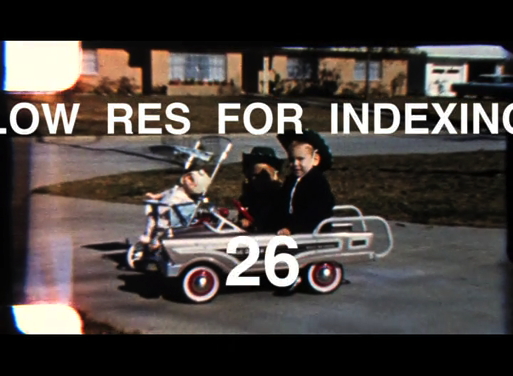
140 minutes of 1080 HD ProRes footage created a 152GB file. Created a 512x376 review file so they could index some 43 separate 8mm film reels chronologically. Retimed twice speed to playback in 70 minutes. File size 540MB. Chapter markers made jumping from reel to reel effortless. This technique cut render time, playing time, upload time, and file size drastically while not omitting anything that'd keep them from making the decisions that needed to be made. Properly encoded low res files (the image presented here was from a Compressor encode kicked to 19531 kbps, thus the reason image & letters are still crisp) aren't distracting unless you try to bloat them to full screen. (Astute readers will notice that my approach on film transfers captures upwards of 17% more image area than the typical station having a 4x3 ratio film gate crops away.)
Replied by VTC on topic Remote Editing - Is it possible to easily & quickly share Source Timecode?
That's the beauty of 240. It's fast. It's light. It can't be used for anything, even as an inset to a much larger canvas and, because it's so junky, no one will seriously take it to be the final product....But I do cringe at 240p. That would cross my personal threshold in the direction of being so low resolution it's distracting.
I don't know where some people find the time but I review EVERYTHING 1.5x speed minimum. It helps me pay closer attention and even 2x speed is often sufficient enough to establish cut points and relevant content. At the initial stage I'm not interested in resolution or color acuity and being fixated on such matters two steps into a project isn't time spent well.
- - - - - EDIT - - - - -
Here's a good example.
140 minutes of 1080 HD ProRes footage created a 152GB file. Created a 512x376 review file so they could index some 43 separate 8mm film reels chronologically. Retimed twice speed to playback in 70 minutes. File size 540MB. Chapter markers made jumping from reel to reel effortless. This technique cut render time, playing time, upload time, and file size drastically while not omitting anything that'd keep them from making the decisions that needed to be made. Properly encoded low res files (the image presented here was from a Compressor encode kicked to 19531 kbps, thus the reason image & letters are still crisp) aren't distracting unless you try to bloat them to full screen. (Astute readers will notice that my approach on film transfers captures upwards of 17% more image area than the typical station having a 4x3 ratio film gate crops away.)
Last edit: 03 Jan 2022 02:28 by VTC.
Please Log in to join the conversation.
06 Jan 2022 13:11 #118255
by Finbo
Replied by Finbo on topic Remote Editing - Is it possible to easily & quickly share Source Timecode?
I upgraded to Big Sur over the weekend and now Frame.io works properly but I wouldn't say it's particularly quick.
This maybe down to my MacBook Pro as it's a few years old but it still works well for my needs.
So, for my occasional need and use of sending a file/interview with source timecode, then I think I'll try the Compressor low resolution pre sets that I've now set up after help here.
Thanks for everyone's input.
This maybe down to my MacBook Pro as it's a few years old but it still works well for my needs.
So, for my occasional need and use of sending a file/interview with source timecode, then I think I'll try the Compressor low resolution pre sets that I've now set up after help here.
Thanks for everyone's input.
Please Log in to join the conversation.
06 Jan 2022 15:16 #118258
by JoeEditor
Replied by JoeEditor on topic Remote Editing - Is it possible to easily & quickly share Source Timecode?
I'm just curious, how much time do y'all spend creating that low res version with timecode overlaid on it?
Please Log in to join the conversation.
