


- Posts: 3
- Thank you received: 0
3 Post Moderation Rule for New Boarders (25 Jan 2021)
New boarders will have their posts moderated - Don't worry if you cannot see your post immediately.
export multitrack Quicktime file to play all audio tracks at same time in VLC
- Cooper5657
-
 Topic Author
- Offline
- New Member
-

Less
More
19 Dec 2021 15:08 #118059
by Cooper5657
export multitrack Quicktime file to play all audio tracks at same time in VLC was created by Cooper5657
Do I need to do something before exporting a multitrack Quicktime file (for broadcast Apple Pro Res 422 HQ) to get my 8 audio tracks to play at the same time in VLC? When I open it in VLC the 8 audio tracks are there, but it plays only one at a time, defaulting to the first one (Left stereo). The distribution company says my project is 'left only audio' so it was sent back to me. Thank you in advance for any suggestions, as this is my first time making a broadcast Quicktime file.
Please Log in to join the conversation.


20 Dec 2021 16:03 - 20 Dec 2021 16:07 #118077
by JoeEditor
Replied by JoeEditor on topic export multitrack Quicktime file to play all audio tracks at same time in VLC
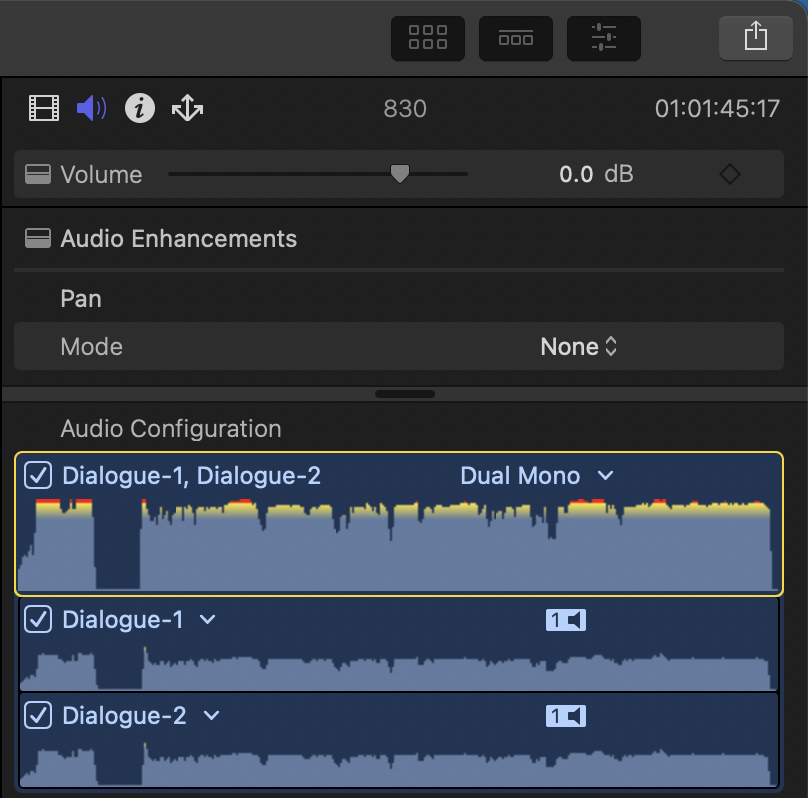
How are your channels and roles set up? The tracks that export of course are determined by roles. But the levels and panning are determined in the audio configuration (Inspector). Unless they want a stereo pair, or any panning, configure them all to be mono and panned center. As in the screen shot I attached, if Pan Mode is set to none, mono channels are all centered properly, without need for any further action on your part.
Last edit: 20 Dec 2021 16:07 by JoeEditor.
Please Log in to join the conversation.
