


- Posts: 321
- Thank you received: 6
3 Post Moderation Rule for New Boarders (25 Jan 2021)
New boarders will have their posts moderated - Don't worry if you cannot see your post immediately.
View Original File Name in FCPX!
15 Dec 2021 08:23 - 15 Dec 2021 08:25 #118003
by AppleGuru
View Original File Name in FCPX! was created by AppleGuru
This has been driving me nuts for few projects now.
Is there away to display the "Original File Name" of the media in the inspector?
Not the name that can be adjust in FCPX but the "Original File Name"! This can be very useful especial when Batch renaming the clips by its Metadata.
This field in the Inspector seems not work.

THX
Is there away to display the "Original File Name" of the media in the inspector?
Not the name that can be adjust in FCPX but the "Original File Name"! This can be very useful especial when Batch renaming the clips by its Metadata.
This field in the Inspector seems not work.
THX
Last edit: 15 Dec 2021 08:25 by AppleGuru.
Please Log in to join the conversation.
- Scrubelicious
-

- Offline
- Platinum Member
-

Less
More
- Posts: 1228
- Thank you received: 114
15 Dec 2021 14:29 #118006
by Scrubelicious
Replied by Scrubelicious on topic View Original File Name in FCPX!
Yes I hear your frustration.
You will have to choose Display Name under Origin “Spotlight”.
This will show the Finder name in FCPX.
You will have to choose Display Name under Origin “Spotlight”.
This will show the Finder name in FCPX.
Please Log in to join the conversation.

15 Dec 2021 16:33 #118009
by JoeEditor
Replied by JoeEditor on topic View Original File Name in FCPX!
Yeah, you'd think that was the default, right?
Please Log in to join the conversation.

15 Dec 2021 23:51 #118012
by Redifer
Replied by Redifer on topic View Original File Name in FCPX!
I always just highlight the clip in the browser, right click and Reveal in Finder.
Please Log in to join the conversation.

16 Dec 2021 04:03 #118013
by dgwvideo
Creating history....one edit at a time !
Replied by dgwvideo on topic View Original File Name in FCPX!
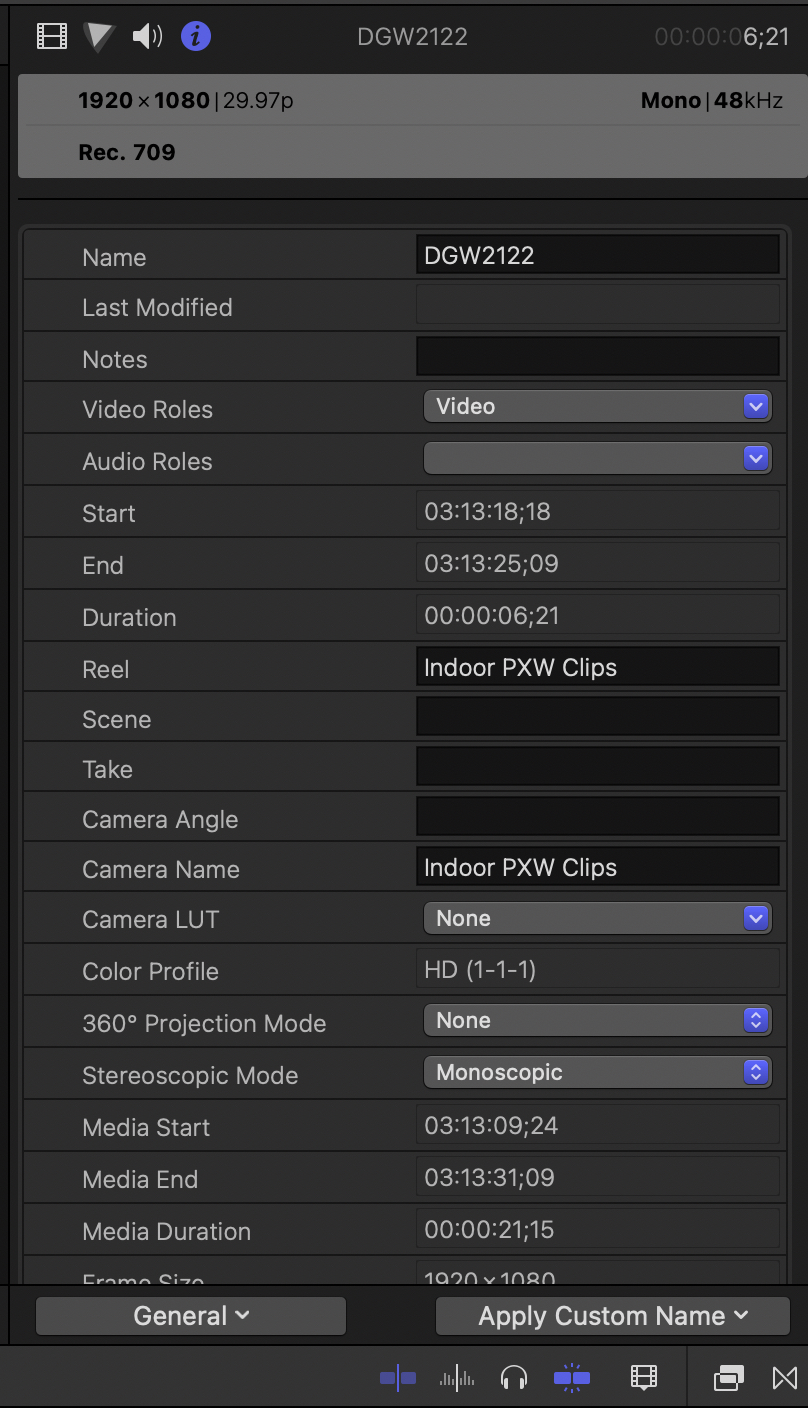
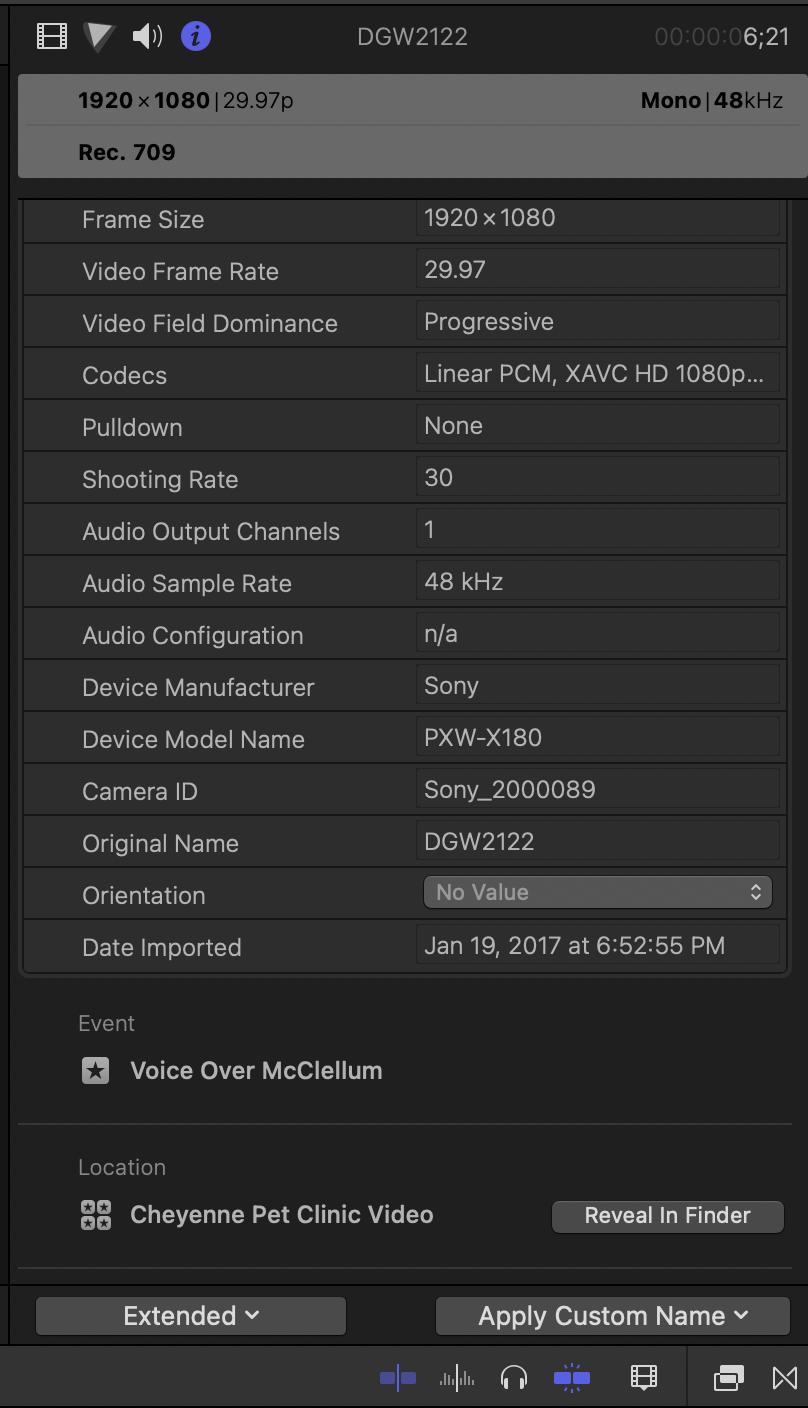
This is available in the inspector but I think it may depend on the codec used. For all of our Sony cameras using XAVC-I 200 to 600 mbps codecs the info appears. Screenshots show the General view and the Extended view. The original name (in Extended view) and the name (in General view) are the exact names we assign in camera for a given shoot.
Creating history....one edit at a time !
Please Log in to join the conversation.


16 Dec 2021 10:19 - 16 Dec 2021 18:39 #118016
by Stu Wart
I don't get it...
You have an "Display Name under Origin “Spotlight” option in Fcp ? Where that ? Can't see... (FcpX 10.5.4)
(for me Extended / "Original Name" always shows finder's name
Lumix clips
Replied by Stu Wart on topic View Original File Name in FCPX!
.
You will have to choose Display Name under Origin “Spotlight”.
This will show the Finder name in FCPX.
I don't get it...
You have an "Display Name under Origin “Spotlight” option in Fcp ? Where that ? Can't see... (FcpX 10.5.4)
(for me Extended / "Original Name" always shows finder's name
Lumix clips
Last edit: 16 Dec 2021 18:39 by Stu Wart.
Please Log in to join the conversation.
16 Dec 2021 10:26 #118017
by AppleGuru
Replied by AppleGuru on topic View Original File Name in FCPX!
Thanks this helps!Yes I hear your frustration.
You will have to choose Display Name under Origin “Spotlight”.
This will show the Finder name in FCPX.
Please Log in to join the conversation.
16 Dec 2021 18:42 #118026
by Stu Wart
ok but ... where is it ? thanks
Replied by Stu Wart on topic View Original File Name in FCPX!
Thanks this helps!Yes I hear your frustration.
You will have to choose Display Name under Origin “Spotlight”.
This will show the Finder name in FCPX.
ok but ... where is it ? thanks
Please Log in to join the conversation.
- Scrubelicious
-
- Offline
- Platinum Member
-
Less
More
- Posts: 1228
- Thank you received: 114
19 Dec 2021 20:05 #118062
by Scrubelicious
Replied by Scrubelicious on topic View Original File Name in FCPX!
You have to add the field to your Inspector layout.
I am assuming you know how right?
If not I can send you tomorrow a screenshot.
I am assuming you know how right?
If not I can send you tomorrow a screenshot.
Please Log in to join the conversation.
