


- Posts: 37
- Thank you received: 5
3 Post Moderation Rule for New Boarders (25 Jan 2021)
New boarders will have their posts moderated - Don't worry if you cannot see your post immediately.
Working with text...changing color progressively
- Frank Lancaster
-
 Topic Author
- Offline
- Junior Member
-

Less
More
09 Dec 2021 22:57 - 27 Mar 2022 18:04 #117897
by Frank Lancaster
Working with text...changing color progressively was created by Frank Lancaster
Seeking some "how to" tips. Let's say I have a line of black text. Over the next 10 seconds, I wish to change the text color to blue, one letter at a time, BUT not one full letter at a time. Starting from the left, I'd like to have the color blue sweep across the letters from left to right, as outlined in the illustration. Can this animation be done in FCPX, and if so how do I do it?
PS: I tried a basic method with the text as Stencil Alpha and then animating a white then blue object underneath, and that does work, except outside the text the background is blocked off of course...and that is not what I want. Also discovered a text plugin I am using doesn't respond to Stencil Alpha anyway. But right now, bringing it into the process only makes things even more complicated. Still trying to figure out how to have the text change as described, but not block the back ground image in the process.
EDIT: Ah ha, got the basic text working. All I had to do, so it didn't block the background, was turn it into a Compound Clip. No success yet with the plugin text yet, but will leave that for another day.
PS: I tried a basic method with the text as Stencil Alpha and then animating a white then blue object underneath, and that does work, except outside the text the background is blocked off of course...and that is not what I want. Also discovered a text plugin I am using doesn't respond to Stencil Alpha anyway. But right now, bringing it into the process only makes things even more complicated. Still trying to figure out how to have the text change as described, but not block the back ground image in the process.
EDIT: Ah ha, got the basic text working. All I had to do, so it didn't block the background, was turn it into a Compound Clip. No success yet with the plugin text yet, but will leave that for another day.
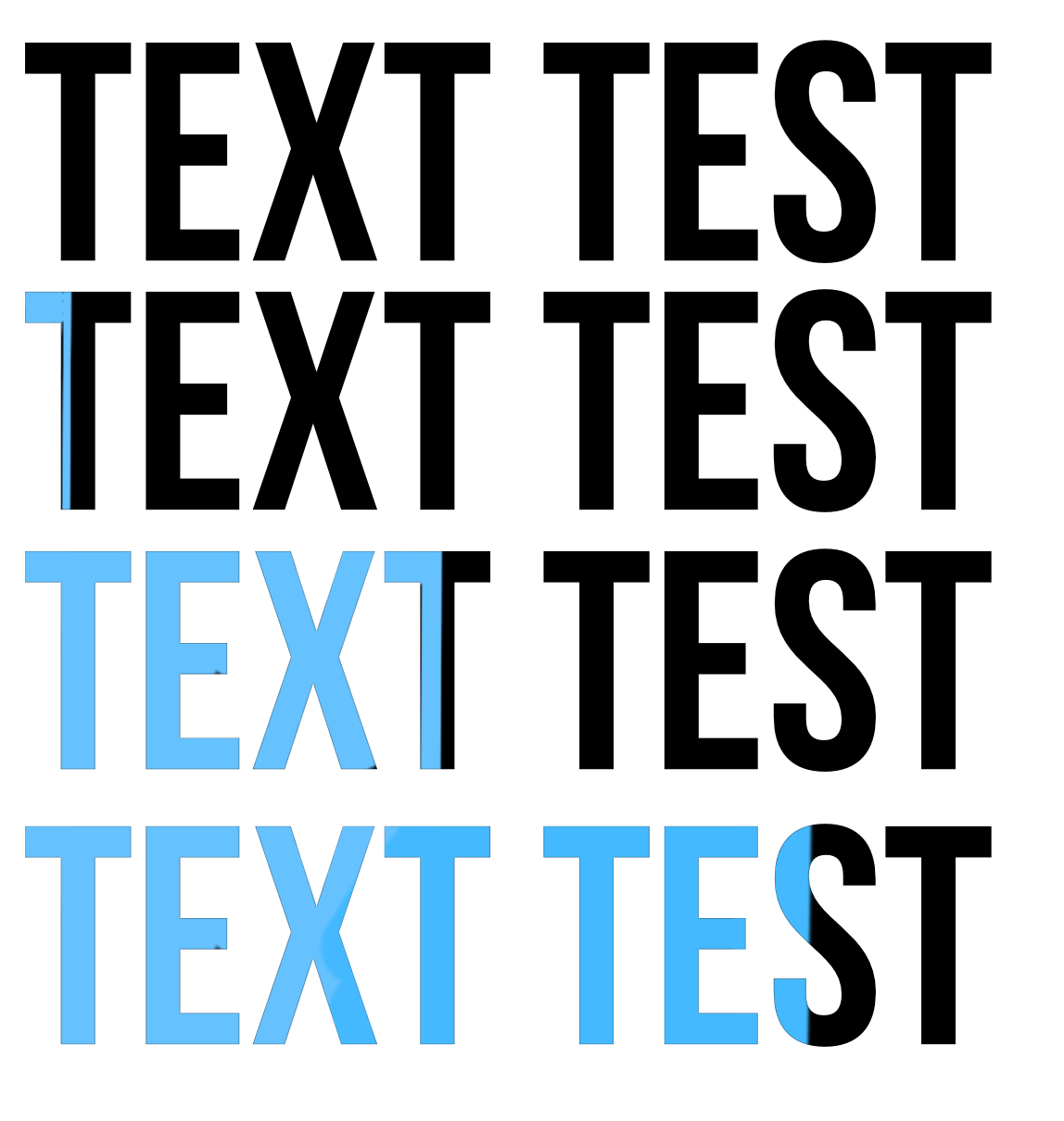
Last edit: 27 Mar 2022 18:04 by Frank Lancaster.
Please Log in to join the conversation.

10 Dec 2021 00:50 #117898
by bjrE
Replied by bjrE on topic Working with text...changing color progeressively
One method that could work is to create two versions of the text. One black, and one blue. Place the blue one on top. Use the crop sliders to crop out the blue text entirely, leaving the black one visible. Then using the crop keyframes, reveal the blue text over the next 10 seconds. You could also do this with a mask and feather the mask so that it is not a hard line but a more organic soft edge.
Please Log in to join the conversation.
- Frank Lancaster
-
Topic Author
- Offline
- Junior Member
-
Less
More
- Posts: 37
- Thank you received: 5
10 Dec 2021 01:06 #117899
by Frank Lancaster
Replied by Frank Lancaster on topic Working with text...changing color progeressively
Thank you! Two useful suggestions and I will try them as well. Much will depend on how they behave in a compound clip after masking or cropping, but theoretically they should work. Obviously now, more than one way to achieve this. Cheers!One method that could work is to create two versions of the text. One black, and one blue. Place the blue one on top. Use the crop sliders to crop out the blue text entirely, leaving the black one visible. Then using the crop keyframes, reveal the blue text over the next 10 seconds. You could also do this with a mask and feather the mask so that it is not a hard line but a more organic soft edge.
Please Log in to join the conversation.


10 Dec 2021 02:42 #117905
by dgwvideo
Creating history....one edit at a time !
Replied by dgwvideo on topic Working with text...changing color progeressively
The suggestion by bjrE is a good one. In fact, many commercial animated titles that are designed in Motion make us of this technique. We developed several Patriotic title and background templates for a client using exactly these methods.
Creating history....one edit at a time !
Please Log in to join the conversation.
- Frank Lancaster
-
Topic Author
- Offline
- Junior Member
-
Less
More
- Posts: 37
- Thank you received: 5
10 Dec 2021 03:07 #117910
by Frank Lancaster
Replied by Frank Lancaster on topic Working with text...changing color progeressively
Thanks for your input; good to know. Actually I thought of using Motion, but wanted to see what I could do in FCPX. Cheers!The suggestion by bjrE is a good one. In fact, many commercial animated titles that are designed in Motion make us of this technique. We developed several Patriotic title and background templates for a client using exactly these methods.
Please Log in to join the conversation.
