


- Posts: 1080
- Thank you received: 106
3 Post Moderation Rule for New Boarders (25 Jan 2021)
New boarders will have their posts moderated - Don't worry if you cannot see your post immediately.
Mac OS / Final Cut Pro colors are wrong!
21 Nov 2021 03:35 - 21 Nov 2021 06:50 #117575
by Redifer
Mac OS / Final Cut Pro colors are wrong! was created by Redifer
OK this is a weird one and hopefully someone here can help out. I do a lot of videogame captures from the real consoles. I use RGB and it doesn't matter if I capture in h.264, h.265, or even ProRes. Mac OS and Final Cut Pro interprets the colors wrongly. Check out this example:
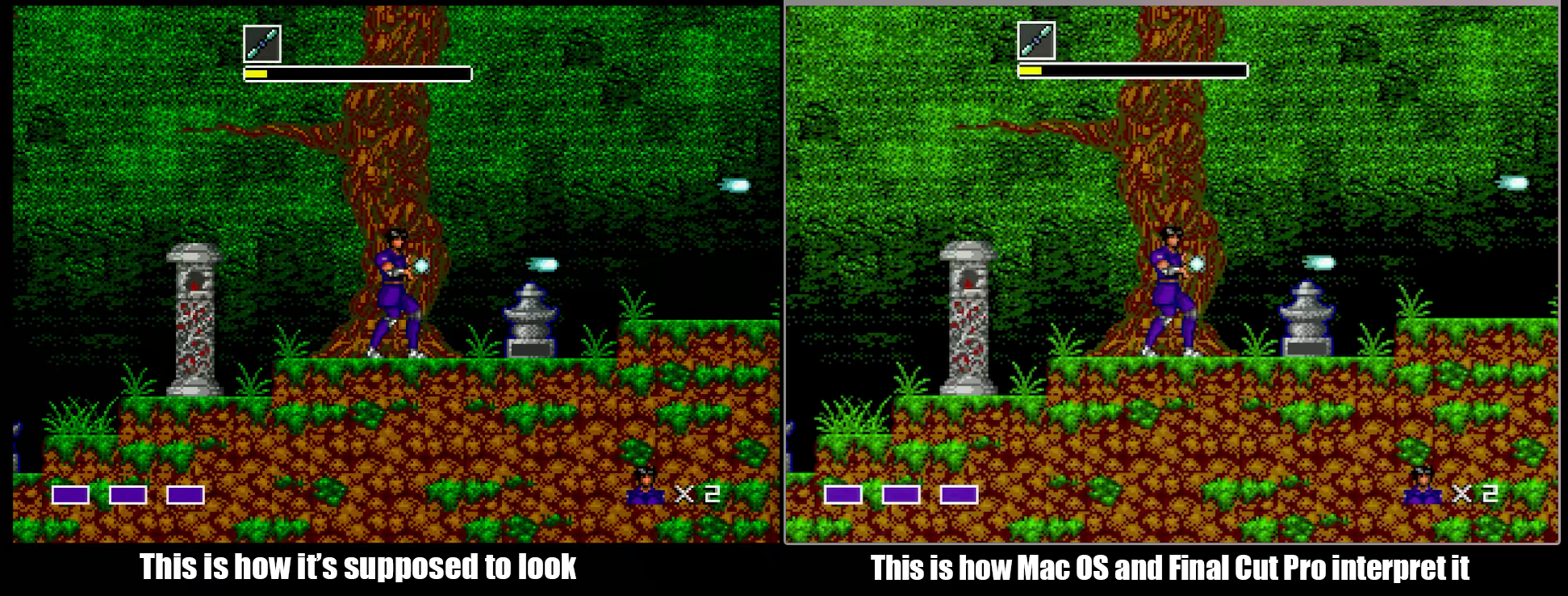
The image on the left is the video file being played in VLC. The image on the right is the same exact video file being played on the same Mac in Final Cut Pro. How do I know the colors should be like the one on the left? Because software emulators have the exact color tables these consoles use. It's not up for debate, Final Cut Pro as well as Quicklook and Quicktime are misinterpresting the colors. You can imagine how difficult this would make grading not only videogames, but anything at all. The good news is that if I don't touch it, FCP will export video which retains the true colors, though I can only see the true colors in VLC.
So to recap:
#1 - It's NOT the video file itself. VLC interprets the file color correctly. FCP does not.
#2 - Is there something somewhere I may have set incorrectly which can help out my situation, or is FCP just gimped?
UPDATE: Davinci Resolve also interprets the colors correctly. The problem is whatever the MacOS itself is doing that Final Cut uses. Is there a fix?
The image on the left is the video file being played in VLC. The image on the right is the same exact video file being played on the same Mac in Final Cut Pro. How do I know the colors should be like the one on the left? Because software emulators have the exact color tables these consoles use. It's not up for debate, Final Cut Pro as well as Quicklook and Quicktime are misinterpresting the colors. You can imagine how difficult this would make grading not only videogames, but anything at all. The good news is that if I don't touch it, FCP will export video which retains the true colors, though I can only see the true colors in VLC.
So to recap:
#1 - It's NOT the video file itself. VLC interprets the file color correctly. FCP does not.
#2 - Is there something somewhere I may have set incorrectly which can help out my situation, or is FCP just gimped?
UPDATE: Davinci Resolve also interprets the colors correctly. The problem is whatever the MacOS itself is doing that Final Cut uses. Is there a fix?
Last edit: 21 Nov 2021 06:50 by Redifer.
Please Log in to join the conversation.


21 Nov 2021 05:23 #117576
by Larrie
Replied by Larrie on topic Mac OS / Final Cut Pro colors are wrong!
It looks to me like a luma issue. The reason I say this is that that there is more color more color information showing in the dark areas in the FCP capture than in the other. Also the purple rectangles appear to be the same color with the FCP rectangles being brighter.
Have you tried using the Digital Color Meter App in the Utilities folder to check if they are really different colors?
Have you tried using the Digital Color Meter App in the Utilities folder to check if they are really different colors?
Please Log in to join the conversation.
21 Nov 2021 05:25 - 21 Nov 2021 06:51 #117577
by Redifer
Replied by Redifer on topic Mac OS / Final Cut Pro colors are wrong!
I thought forcing it to REC 709 helped but I was wrong. It made it a little better but still too bright and green compared to what it should be. What is FCP doing?
Last edit: 21 Nov 2021 06:51 by Redifer.
Please Log in to join the conversation.
- Tom Wolsky
-

- Offline
- Moderator
-

21 Nov 2021 09:08 #117580
by Tom Wolsky
Replied by Tom Wolsky on topic Mac OS / Final Cut Pro colors are wrong!
What computer are you using, and what Display settings for color in System Preferences?
Please Log in to join the conversation.
21 Nov 2021 09:49 - 21 Nov 2021 09:50 #117581
by Redifer
Replied by Redifer on topic Mac OS / Final Cut Pro colors are wrong!
Mac Pro Late 2013. Mac OS Mojave. I have an Apple Thunderbolt display and have tried switching between the "Thunderbolt Display" color profile and the "REC 709 Gamma 2.4" color profile, but either way there is still a difference.
Last edit: 21 Nov 2021 09:50 by Redifer.
Please Log in to join the conversation.
- Tom Wolsky
-
- Offline
- Moderator
-
21 Nov 2021 10:44 #117582
by Tom Wolsky
Replied by Tom Wolsky on topic Mac OS / Final Cut Pro colors are wrong!
Try Setting the Color display to the default at the top of the list, whatever that is? What FCP version are you using?
Please Log in to join the conversation.
21 Nov 2021 23:29 #117589
by Redifer
Replied by Redifer on topic Mac OS / Final Cut Pro colors are wrong!
That would be the Thunderbolt Display. FCP still misinterprets the video with it set to that. Final Cut Pro 10.4.10.
Please Log in to join the conversation.

22 Nov 2021 01:28 #117590
by dgwvideo
Creating history....one edit at a time !
Replied by dgwvideo on topic Mac OS / Final Cut Pro colors are wrong!
Using the ColorSync Utility in the applications/utilities folder you can verify and repair all of the color profiles that exist on your computer. This looks like a gamma issue and an incorrect or corrupt profile can certainly cause that. In some earlier versions of FCP I occasionally noticed that saving a still frame created the file with a completely different gamma range than the FCP viewer showed. I deleted a couple computer display profiles and that problem was solved. There may be something similar going on in your case.
Creating history....one edit at a time !
Please Log in to join the conversation.
22 Nov 2021 01:46 - 22 Nov 2021 01:47 #117592
by Redifer
Replied by Redifer on topic Mac OS / Final Cut Pro colors are wrong!
I launched the ColorSync Utility and give it a whirl. There's a lot I don't understand about it and don't wanna mess much up, but I did the Verify and then the repair. It found 27 bad profiles (!) and the repair was able to fix just one of them. I went into the DISPLAY preferences under color and deleted a few that I know I'd never use. For some reason there were color profiles for my Denon AVR (probably when I hook it up in the big room for sound mixing, though I never purposely created those profiles) as well as the Ninja V, which is odd. I deleted some other random ones as well. I restarted FCP and it seems a little better now but I still need to force it to REC 709 to get it close, whereas VLC and Resolve already recognize it as REC 709. What's weird is that FCP reports it as REC 709 as well, but when I force REC 709 the color changes anyway. Weird!
Last edit: 22 Nov 2021 01:47 by Redifer.
Please Log in to join the conversation.

22 Nov 2021 21:48 #117605
by JoeEditor
Replied by JoeEditor on topic Mac OS / Final Cut Pro colors are wrong!
How do you know which app is showing the correct colors?
Please Log in to join the conversation.
22 Nov 2021 22:46 #117608
by Redifer
Replied by Redifer on topic Mac OS / Final Cut Pro colors are wrong!
Because I can take a screen grab from an emulator which has the correct colors. There are also several screen grabs online from different emulators and they all have the same color. VLC and Resolve ignore whatever Mac OS/FCP is doing regarding the color. For example opening a file in VLC and Quicktime simultaneously can result in two different looks. If it's identical, then congrats, no issues found!
Please Log in to join the conversation.
