


- Posts: 27
- Thank you received: 0
3 Post Moderation Rule for New Boarders (25 Jan 2021)
New boarders will have their posts moderated - Don't worry if you cannot see your post immediately.
Which drone video settings should I choose for my Mac?
- timmiles1989
-
 Topic Author
- Offline
- Junior Member
-

Less
More
11 Nov 2021 06:43 #117456
by timmiles1989
Hello everyone,
I am fairly new to both video and editing, and I wanted to reach out for some guidance. I have a new DJI Mavic 3 drone that I have just purchased. I flew it for the first time today and took some quick footage that I could playback. The footage it recorded was unusable on my Mac and extremely choppy (it was recorded in 5.2k at 50 FPS, MP4, CBR, and H.264).
It became a little better when transcoded to ProRes, but still not what I would expect. I think this is an issue with both the video settings on my drone and also probably my Macbook not being powerful enough? I wondered if I gave you all some specs and options for each, you might spare some time to help me choose the best settings for me to use on my drone that would get me the best, most compatible footage possible on my Macbook. I would hate to be out and about recording only to get home and find all of the footage unusable. Any help would be appreciated!
The Specs of both the drone and Mac are:
My Macbook Pro:
MacBook Pro (13-inch, 2020, Four Thunderbolt 3 ports)
2.3 GHz Quad-Core Intel Core i7
32 GB 3733 MHz LPDDR4X
Intel Iris Plus Graphics 1536 MB
Mavic 3 Video Options:
The choice between MP4 or MOV (MPEG-4 AVC/H.264, HEVC/H.265)
The choice between H.264/H.265 Bitrate: 200 Mbps
Resolutions available:
5.1K: 5120×2700@24/25/30/48/50fps
DCI 4K: 4096×2160@24/25/30/48/50/60/120*fps
4K: 3840×2160@24/25/30/48/50/60/120*fps
FHD: 1920×1080p@24/25/30/48/50/60/120*/200*fps
Color: Normal or D-Log
Video Bitrate: CBR or VBR
Thanks so much!
I am fairly new to both video and editing, and I wanted to reach out for some guidance. I have a new DJI Mavic 3 drone that I have just purchased. I flew it for the first time today and took some quick footage that I could playback. The footage it recorded was unusable on my Mac and extremely choppy (it was recorded in 5.2k at 50 FPS, MP4, CBR, and H.264).
It became a little better when transcoded to ProRes, but still not what I would expect. I think this is an issue with both the video settings on my drone and also probably my Macbook not being powerful enough? I wondered if I gave you all some specs and options for each, you might spare some time to help me choose the best settings for me to use on my drone that would get me the best, most compatible footage possible on my Macbook. I would hate to be out and about recording only to get home and find all of the footage unusable. Any help would be appreciated!
The Specs of both the drone and Mac are:
My Macbook Pro:
MacBook Pro (13-inch, 2020, Four Thunderbolt 3 ports)
2.3 GHz Quad-Core Intel Core i7
32 GB 3733 MHz LPDDR4X
Intel Iris Plus Graphics 1536 MB
Mavic 3 Video Options:
The choice between MP4 or MOV (MPEG-4 AVC/H.264, HEVC/H.265)
The choice between H.264/H.265 Bitrate: 200 Mbps
Resolutions available:
5.1K: 5120×2700@24/25/30/48/50fps
DCI 4K: 4096×2160@24/25/30/48/50/60/120*fps
4K: 3840×2160@24/25/30/48/50/60/120*fps
FHD: 1920×1080p@24/25/30/48/50/60/120*/200*fps
Color: Normal or D-Log
Video Bitrate: CBR or VBR
Thanks so much!
Please Log in to join the conversation.


11 Nov 2021 12:21 #117462
by JoeEditor
Replied by JoeEditor on topic Which drone video settings should I choose for my Mac?
I never use Log or anything fancy with my drone shots, I've never found that useful in post, just shoot normal. 30fps does fine for me. Be sure you're drone shots are slow and steady, but not too slow. If you get too fast on some drones they get choppy, not familiar with your specific model. Try shooting 4K and HD first, do some tests, see how that works out. I've never had issues with my DJI drone H.264 clips, but test it out with .mov clips, see if you notice any difference between the two. Experiment, experiment, experiment. Finally, create Projects that match the frame rate of your shots. Your MBP should handle them fine, except for the 5K, it may struggle with 5K from any camera. Most laptops would. In which case you'd make proxies if you had to.
Please Log in to join the conversation.

11 Nov 2021 21:27 #117466
by joema
DJI footage is highly compressed and the new drones record 10-bit H264 and HEVC, I think 4:2:2. That is extremely difficult to decode and play smoothly. If you have an option for 4k 10bit 4:2:0, maybe that could help. You can also set the FCP viewer to "better performance" instead of "better quality", and put the footage on a 1080p timeline not a 4k timeline. When finished editing the timeline can be changed to 4k for final export.
Each person's definition of "choppy" and "smooth" varies. To me if I cannot rapidly issue JKL commands and switch from 4x forward speed to 4x reverse without any lag, it's slow. To other people, pushing around the playhead with the mouse and waiting a second here and there is OK.
Also the FCP code path for the skimmer is highly optimized, esp. in the Event Browser. Oftentimes people new to FCP orient all they do around the timeline, when instead the best approach is skim the clips in the event browser and mark favorites, rejects and keywords, then filter on that to include the selects in the timeline. Since the software code path for the skimmer is more responsive than timeline playback, that can help the perception of performance.
However it's possible only an M1 Mac can rapidly play some of those difficult 4k codecs smoothly. It depends on the internal composition of the encoding format and the specific Mac hardware. In general a 2017 or later x86 Mac has the Intel "Kaby Lake" CPU which has an updated Quick Sync accelerator vs 2016 and earlier. In many cases 2017 and newer x86 Macs do OK on most of those codecs. However -- there are many variants of H264 and HEVC, each with different GOP lengths, different # of reference frames, etc. They are all handled differently by hardware accelerators and NLE software. Some are more sluggish than others, even some from the same camera or drone manufacturer.
Replied by joema on topic Which drone video settings should I choose for my Mac?
...new DJI Mavic 3 drone...The footage it recorded was unusable on my Mac and extremely choppy (it was recorded in 5.2k at 50 FPS, MP4, CBR, and H.264).
It became a little better when transcoded to ProRes, but still not what I would expect. I think this is an issue with both the video settings on my drone and also probably my Macbook not being powerful enough?...MacBook Pro (13-inch, 2020, Four Thunderbolt 3 ports)...
DJI footage is highly compressed and the new drones record 10-bit H264 and HEVC, I think 4:2:2. That is extremely difficult to decode and play smoothly. If you have an option for 4k 10bit 4:2:0, maybe that could help. You can also set the FCP viewer to "better performance" instead of "better quality", and put the footage on a 1080p timeline not a 4k timeline. When finished editing the timeline can be changed to 4k for final export.
Each person's definition of "choppy" and "smooth" varies. To me if I cannot rapidly issue JKL commands and switch from 4x forward speed to 4x reverse without any lag, it's slow. To other people, pushing around the playhead with the mouse and waiting a second here and there is OK.
Also the FCP code path for the skimmer is highly optimized, esp. in the Event Browser. Oftentimes people new to FCP orient all they do around the timeline, when instead the best approach is skim the clips in the event browser and mark favorites, rejects and keywords, then filter on that to include the selects in the timeline. Since the software code path for the skimmer is more responsive than timeline playback, that can help the perception of performance.
However it's possible only an M1 Mac can rapidly play some of those difficult 4k codecs smoothly. It depends on the internal composition of the encoding format and the specific Mac hardware. In general a 2017 or later x86 Mac has the Intel "Kaby Lake" CPU which has an updated Quick Sync accelerator vs 2016 and earlier. In many cases 2017 and newer x86 Macs do OK on most of those codecs. However -- there are many variants of H264 and HEVC, each with different GOP lengths, different # of reference frames, etc. They are all handled differently by hardware accelerators and NLE software. Some are more sluggish than others, even some from the same camera or drone manufacturer.
Please Log in to join the conversation.
- timmiles1989
-
Topic Author
- Offline
- Junior Member
-
Less
More
- Posts: 27
- Thank you received: 0
13 Nov 2021 06:58 #117473
by timmiles1989
Replied by timmiles1989 on topic Which drone video settings should I choose for my Mac?
Thank you! I ran some tests today on the drone and what is interesting is my Mac seems to struggle with the H264 Codec in 5k with the normal color profile setting. It seems to process 5k at H265 much more smoothly, which is odd, as I thought H265 was the more difficult of the two to process?
Also, D-LOG 5k at H264 is fine and 4K at H264 also seem fine. Does this seem odd?
Starting to wish I held out and bought the M1 Mac.
Thanks again!
Also, D-LOG 5k at H264 is fine and 4K at H264 also seem fine. Does this seem odd?
Starting to wish I held out and bought the M1 Mac.
Thanks again!
Please Log in to join the conversation.
13 Nov 2021 13:13 - 13 Nov 2021 13:15 #117475
by joema
H265/HEVC is computationally much more difficult than H264. This implies that the Kaby Lake version of Intel's Quick Sync accelerator is working well for 5K H265 but not for one version of 5K H264.
That general situation is not unexpected. Quick Sync and similar accelerators like AMD's UVD/VCE are not like CPUs or GPUs. They area not general-purpose programmable devices. They are *fixed function* hardware. IOW circuitry which is designed to accelerate narrow specific cases.
E.g, there is no such thing as a decode/encode accelerator that broadly handles H264 or H265. Rather they handle some precise, well-defined variants of those -- specific frame sizes, bit rates, GOP lengths, # of reference frames per GOP, etc. If the codec wanders off that path, suddenly you have no acceleration.
The situation has been exacerbated by Intel's sluggish support of Quick Sync -- note it is not on any version of their Xeon CPU > 4 cores. Apple has been much more responsive at adding updated video acceleration to their new M1 CPUs.
Why it seems related to color profile, I don't know. In theory that should have no effect on video decode/encode performance. It's possible when you select D-LOG the DJI camera is somehow modifying the encoding parameters which causes video acceleration to degrade. E.g, if it also selects 4:2:2 chroma encoding when D-LOG is selected, that could explain it. You could use the Invisor comparison utility to examine the normal color profile and D-LOG versions side-by-side and see if there's something obvious: apps.apple.com/us/app/invisor-media-file...or/id442947586?mt=12
Until then your options are don't use 5k D-LOG H264 or get a M1 Mac, preferably an M1 Pro MacBook Pro.
Replied by joema on topic Which drone video settings should I choose for my Mac?
...my Mac seems to struggle with the H264 Codec in 5k with the normal color profile setting. It seems to process 5k at H265 much more smoothly, which is odd, as I thought H265 was the more difficult of the two to process?..Also, D-LOG 5k at H264 is fine and 4K at H264 also seem fine. Does this seem odd?...
H265/HEVC is computationally much more difficult than H264. This implies that the Kaby Lake version of Intel's Quick Sync accelerator is working well for 5K H265 but not for one version of 5K H264.
That general situation is not unexpected. Quick Sync and similar accelerators like AMD's UVD/VCE are not like CPUs or GPUs. They area not general-purpose programmable devices. They are *fixed function* hardware. IOW circuitry which is designed to accelerate narrow specific cases.
E.g, there is no such thing as a decode/encode accelerator that broadly handles H264 or H265. Rather they handle some precise, well-defined variants of those -- specific frame sizes, bit rates, GOP lengths, # of reference frames per GOP, etc. If the codec wanders off that path, suddenly you have no acceleration.
The situation has been exacerbated by Intel's sluggish support of Quick Sync -- note it is not on any version of their Xeon CPU > 4 cores. Apple has been much more responsive at adding updated video acceleration to their new M1 CPUs.
Why it seems related to color profile, I don't know. In theory that should have no effect on video decode/encode performance. It's possible when you select D-LOG the DJI camera is somehow modifying the encoding parameters which causes video acceleration to degrade. E.g, if it also selects 4:2:2 chroma encoding when D-LOG is selected, that could explain it. You could use the Invisor comparison utility to examine the normal color profile and D-LOG versions side-by-side and see if there's something obvious: apps.apple.com/us/app/invisor-media-file...or/id442947586?mt=12
Until then your options are don't use 5k D-LOG H264 or get a M1 Mac, preferably an M1 Pro MacBook Pro.
Last edit: 13 Nov 2021 13:15 by joema.
Please Log in to join the conversation.
- timmiles1989
-
Topic Author
- Offline
- Junior Member
-
Less
More
- Posts: 27
- Thank you received: 0
13 Nov 2021 16:39 #117476
by timmiles1989
Replied by timmiles1989 on topic Which drone video settings should I choose for my Mac?
Thanks so much for your quick response. The mystery continues. The h264 5k footage is choppy in Quicktime, but it plays smoother in something like VLC. It still isn't perfect but I would say 85% better. I downloaded the tool you suggested and viewed the two side by side. I viewed my H264 5K 50FPS.mp4 file which is choppy in Quicktime and the Log footage that won't even play in Quicktime for some reason (it tells me it isn't supported) and I have attached the comparison. I am beginning to think this might be a QuickTime playback problem...
For best quality on the drone, would you suggest 5K at 50FPS and use a .MOV file type with H265? My research says that these settings should in theory render the best quality?
Thanks again for your help and detailed responses. I very much appreciate it.
For best quality on the drone, would you suggest 5K at 50FPS and use a .MOV file type with H265? My research says that these settings should in theory render the best quality?
Thanks again for your help and detailed responses. I very much appreciate it.

Please Log in to join the conversation.
13 Nov 2021 18:52 #117477
by joema
It's common that some new camera formats will not play in Quicktime. Several of the Sony A7SIII formats will not play but after import to FCP they can be viewed. The relative editing performance varies based codec variant, machine and NLE.
Thanks for uploading the Invisor info. Interesting case...it shows the D-Log clip is 10-bit 4:2:0, 5120 x 2700 @ 50 fps, which seems to play smoothly. The "bad" clip is 8-bit 4:2:0, 5120 x 2700 @ 50fps. Both have the same GOP characteristics: 1 reference frame per GOP, n=GOP size 15, m=1 intraframe for each 15 predicted frames, and both were 200 megabit/sec.
From that alone I can't tell why the 8-bit file is smooth to edit and the 10-bit file is laggy. In general 10-bit and esp. 10-bit 4:2:2 can be sluggish to edit but that is a generalization. Within each basic encoding format there are many variations. Before Apple Silicon, the available hardware acceleration and NLE leveraging of that tended to be "peaky" and quite finicky about how various formats were handled.
Both hardware and NLE must support acceleration for that exact format or it will be slow. In general FCP does well but there are a few cases where Resolve handles some formats better -- at least on x86.
Unfortunately these areas are not well documented and in some cases they are totally undocumented. To illustrate this, custom PC builder Puget Systems had to resort to exhaustive testing to try and document how Resolve 17 handles certain acceleration case. This was required because the documentation from the hardware and NLE vendors is so poor: www.pugetsystems.com/labs/articles/What-...2ZradavThayUwA9r__oY
This area is interesting because my documentary team may be getting several Mavic 3 Cine drones to replace or supplement the Inspire 2s we have. Of course the Cine can do ProRes but we might get some non-Cine versions. But until we get those I don't have any material to test. I will have an M1 Max machine to test next week, and I have several x86 Macs.
Sometime next week if you could upload a "good" and "bad" sample clip to DropBox, etc, I could test it on several NLEs and Mac machines, including the new M1 Max.
Replied by joema on topic Which drone video settings should I choose for my Mac?
... I viewed my H264 5K 50FPS.mp4 file which is choppy in Quicktime and the Log footage that won't even play in Quicktime for some reason (it tells me it isn't supported) and I have attached the comparison. I am beginning to think this might be a QuickTime playback problem...For best quality on the drone, would you suggest 5K at 50FPS and use a .MOV file type with H265? My research says that these settings should in theory render the best quality?
It's common that some new camera formats will not play in Quicktime. Several of the Sony A7SIII formats will not play but after import to FCP they can be viewed. The relative editing performance varies based codec variant, machine and NLE.
Thanks for uploading the Invisor info. Interesting case...it shows the D-Log clip is 10-bit 4:2:0, 5120 x 2700 @ 50 fps, which seems to play smoothly. The "bad" clip is 8-bit 4:2:0, 5120 x 2700 @ 50fps. Both have the same GOP characteristics: 1 reference frame per GOP, n=GOP size 15, m=1 intraframe for each 15 predicted frames, and both were 200 megabit/sec.
From that alone I can't tell why the 8-bit file is smooth to edit and the 10-bit file is laggy. In general 10-bit and esp. 10-bit 4:2:2 can be sluggish to edit but that is a generalization. Within each basic encoding format there are many variations. Before Apple Silicon, the available hardware acceleration and NLE leveraging of that tended to be "peaky" and quite finicky about how various formats were handled.
Both hardware and NLE must support acceleration for that exact format or it will be slow. In general FCP does well but there are a few cases where Resolve handles some formats better -- at least on x86.
Unfortunately these areas are not well documented and in some cases they are totally undocumented. To illustrate this, custom PC builder Puget Systems had to resort to exhaustive testing to try and document how Resolve 17 handles certain acceleration case. This was required because the documentation from the hardware and NLE vendors is so poor: www.pugetsystems.com/labs/articles/What-...2ZradavThayUwA9r__oY
This area is interesting because my documentary team may be getting several Mavic 3 Cine drones to replace or supplement the Inspire 2s we have. Of course the Cine can do ProRes but we might get some non-Cine versions. But until we get those I don't have any material to test. I will have an M1 Max machine to test next week, and I have several x86 Macs.
Sometime next week if you could upload a "good" and "bad" sample clip to DropBox, etc, I could test it on several NLEs and Mac machines, including the new M1 Max.
Please Log in to join the conversation.

14 Nov 2021 15:00 - 14 Nov 2021 15:31 #117480
by Hgb
Replied by Hgb on topic Which drone video settings should I choose for my Mac?
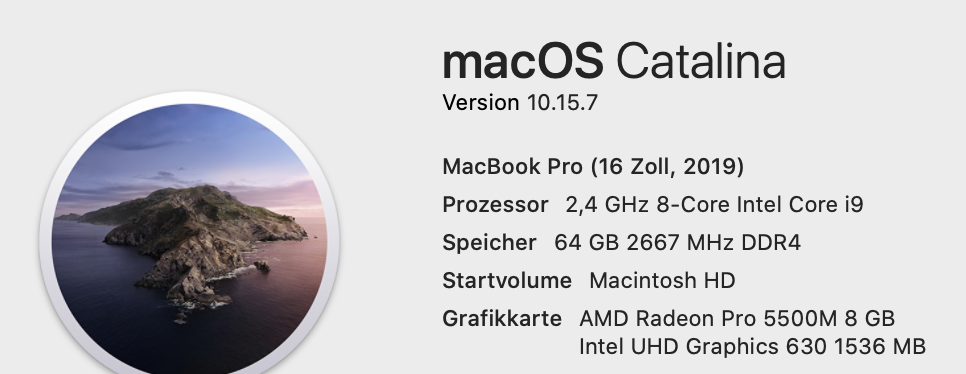
I have the same issue with the mavic 3 drone when I use 4K/120fps. The video struggles in fcpx 10.6 - I did the update to Big Sur but still the same issue. It works when I render the clip in proxy. With clips in 4K /60fps it works fine and I don‘t need to render.
any idea ?
I think my MacBook ( see attached ) should be fast enough , or ?
Hans-Günther Brosius
any idea ?
I think my MacBook ( see attached ) should be fast enough , or ?
Hans-Günther Brosius
Last edit: 14 Nov 2021 15:31 by Hgb.
Please Log in to join the conversation.
14 Nov 2021 20:18 #117484
by joema
As stated above, it is not an issue of how fast your laptop is from a CPU or GPU standpoint. Normal CPU or GPU methods cannot greatly accelerate high-performance decoding of difficult "Long GOP" codecs like H264 and HEVC.
This is because the core decoding algorithm is inherently sequential -- the results of one frame must be processed before processing another frame. There is no way to greatly parallelize this, except that a separate CPU thread can process each GOP (Group of Pictures), but that is already leveraged. The hundreds of lightweight threads a GPU can muster don't work in this case. Only a single thread can be manipulating a GOP at one time, so the GPU threads are too slow. The only way to greatly accelerate Long GOP decoding is run that core algorithm in pure hardware. That is what Quick Sync and other acceleration methods do.
However since that is pure "fixed function" hardware, the exact behavior if *fixed*, IOW after the circuitry is designed and the chip fabricated it cannot be changed. It's possible a given version of the fixed function hardware can accelerate 8-bit 4:2:0 4k/60 but not 10-bit 4:2:2 4k/120, etc. There is nothing you can do except transcode it.
Apple has been much more agile at improving the fixed function video acceleration on M1 CPUs -- that is why they generally work better over a wider variety of cases.
For M1 Max another advantage is there are multiple hardware decode/encode units. By comparison there is only a single Quick Sync hardware accelerator per CPU, not one per core. On an 8-core or 16-core Intel CPU, all cores must time share that one Quick Sync unit. On an M1 Max CPU there are currently dual accelerators for some codecs, and future versions will likely have double or quadruple the number of decode/encode units. That avoids a single pool of worker threads getting bottlenecked on a single video accelerator.
Replied by joema on topic Which drone video settings should I choose for my Mac?
I have the same issue with the mavic 3 drone when I use 4K/120fps. The video struggles in fcpx 10.6 - I did the update to Big Sur but still the same issue. It works when I render the clip in proxy. With clips in 4K /60fps it works fine and I don‘t need to render.
any idea ?
I think my MacBook ( see attached ) should be fast enough , or ?...
As stated above, it is not an issue of how fast your laptop is from a CPU or GPU standpoint. Normal CPU or GPU methods cannot greatly accelerate high-performance decoding of difficult "Long GOP" codecs like H264 and HEVC.
This is because the core decoding algorithm is inherently sequential -- the results of one frame must be processed before processing another frame. There is no way to greatly parallelize this, except that a separate CPU thread can process each GOP (Group of Pictures), but that is already leveraged. The hundreds of lightweight threads a GPU can muster don't work in this case. Only a single thread can be manipulating a GOP at one time, so the GPU threads are too slow. The only way to greatly accelerate Long GOP decoding is run that core algorithm in pure hardware. That is what Quick Sync and other acceleration methods do.
However since that is pure "fixed function" hardware, the exact behavior if *fixed*, IOW after the circuitry is designed and the chip fabricated it cannot be changed. It's possible a given version of the fixed function hardware can accelerate 8-bit 4:2:0 4k/60 but not 10-bit 4:2:2 4k/120, etc. There is nothing you can do except transcode it.
Apple has been much more agile at improving the fixed function video acceleration on M1 CPUs -- that is why they generally work better over a wider variety of cases.
For M1 Max another advantage is there are multiple hardware decode/encode units. By comparison there is only a single Quick Sync hardware accelerator per CPU, not one per core. On an 8-core or 16-core Intel CPU, all cores must time share that one Quick Sync unit. On an M1 Max CPU there are currently dual accelerators for some codecs, and future versions will likely have double or quadruple the number of decode/encode units. That avoids a single pool of worker threads getting bottlenecked on a single video accelerator.
Please Log in to join the conversation.
14 Nov 2021 20:45 #117485
by Hgb
Replied by Hgb on topic Which drone video settings should I choose for my Mac?
Many thanks for your quick answer.
could you explain why the same clip runs with the VLC Video Player for Mac great and all others clip‘s as well ( 5.1K/60fps )
thanks
could you explain why the same clip runs with the VLC Video Player for Mac great and all others clip‘s as well ( 5.1K/60fps )
thanks
Please Log in to join the conversation.
15 Nov 2021 13:16 - 15 Nov 2021 13:17 #117500
by joema
Firstly, the same problem exists on Windows. Many codecs (such as several from the Sony A7SIII) will not play on Windows Media Player, etc, but they will play on VLC for Windows.
VLC is a self-contained open source player which uses reverse-engineering to process video. The developers of VLC and constituent components like FFMPEG are volunteers with no corporate assets to sue, yet they are under frequent threat of lawsuit for software patent infringement.
By contrast Quicktime Player, Windows Media Player, etc are commercial products made by big companies which are ripe targets for litigation.
Your next question might be: "If FCP can play the footage, why cannot Quicktime Player?". This might be a licensing issue. If there is licensed or patented intellectual property required to decode certain formats, the licensing terms may require paying a fee for each copy sold, whether that is used or not. Imagine the difference if that license fee was paid for every Mac vs just those who purchased FCP. It's possible Apple licensed the IP for FCP, not for every single Mac sold.
This is likely why HEVC encoding is bundled with Compressor, not FCP and not MacOS. It is also likely why the evaluation version of Premiere Pro has no HEVC decoding, only the paid version. Otherwise those companies would have to pay the licensing fee for every copy sold, even if most of those copies were never used.
Your next question might be "Apple is rich, why don't they just bulk license the IP from the patent holders?" In some cases that is apparently not possible or not sufficient.
I don't know about the exact IP situation with the DJI 5k/120 format, but there have been major disputes over licensing, royalties and intellectual property of HEVC. At one point the patent holders were demanding a % of gross revenue from *each* individual end user who encodes HEVC content. A bulk license by Apple, Microsoft, etc would not protect end users if the patent holders demanded money from each end user. It seems incredible that was planned but that's reality.
That is one reason Google developed the open source VP9 codec -- partially as a negotiating tactic. The HEVC patent holders later retreated from their more egregious demands, but that negatively tainted HEVC and delayed deployment.
Your next question might be "That's not fair, codecs are not like mechanical widgets, they are a product of nature like mathematical equations and should be freely usable by all mankind without cost". That reasoning is why Apple litigated with RED for the basic concept of compressing RAW video, which had been likened to patenting the act of walking. Apple lost.
Replied by joema on topic Which drone video settings should I choose for my Mac?
Many thanks for your quick answer.
could you explain why the same clip runs with the VLC Video Player for Mac great and all others clip‘s as well ( 5.1K/60fps )...
Firstly, the same problem exists on Windows. Many codecs (such as several from the Sony A7SIII) will not play on Windows Media Player, etc, but they will play on VLC for Windows.
VLC is a self-contained open source player which uses reverse-engineering to process video. The developers of VLC and constituent components like FFMPEG are volunteers with no corporate assets to sue, yet they are under frequent threat of lawsuit for software patent infringement.
By contrast Quicktime Player, Windows Media Player, etc are commercial products made by big companies which are ripe targets for litigation.
Your next question might be: "If FCP can play the footage, why cannot Quicktime Player?". This might be a licensing issue. If there is licensed or patented intellectual property required to decode certain formats, the licensing terms may require paying a fee for each copy sold, whether that is used or not. Imagine the difference if that license fee was paid for every Mac vs just those who purchased FCP. It's possible Apple licensed the IP for FCP, not for every single Mac sold.
This is likely why HEVC encoding is bundled with Compressor, not FCP and not MacOS. It is also likely why the evaluation version of Premiere Pro has no HEVC decoding, only the paid version. Otherwise those companies would have to pay the licensing fee for every copy sold, even if most of those copies were never used.
Your next question might be "Apple is rich, why don't they just bulk license the IP from the patent holders?" In some cases that is apparently not possible or not sufficient.
I don't know about the exact IP situation with the DJI 5k/120 format, but there have been major disputes over licensing, royalties and intellectual property of HEVC. At one point the patent holders were demanding a % of gross revenue from *each* individual end user who encodes HEVC content. A bulk license by Apple, Microsoft, etc would not protect end users if the patent holders demanded money from each end user. It seems incredible that was planned but that's reality.
That is one reason Google developed the open source VP9 codec -- partially as a negotiating tactic. The HEVC patent holders later retreated from their more egregious demands, but that negatively tainted HEVC and delayed deployment.
Your next question might be "That's not fair, codecs are not like mechanical widgets, they are a product of nature like mathematical equations and should be freely usable by all mankind without cost". That reasoning is why Apple litigated with RED for the basic concept of compressing RAW video, which had been likened to patenting the act of walking. Apple lost.
Last edit: 15 Nov 2021 13:17 by joema.
Please Log in to join the conversation.
15 Nov 2021 13:49 #117501
by Hgb
Replied by Hgb on topic Which drone video settings should I choose for my Mac?
many thanks for the explanation - now is all clear for me.
Today I have made some additional test with Mavic 3. I use the format H265 ( HEVC ) and all clips >( 4k/120fps , 5.1k/60fps .... ) works fine with FCP X 10.6 and BigSur OS - no additional rendering is needed anymore. As well the D-LOG clip in H265 works fine as well.
Today I have made some additional test with Mavic 3. I use the format H265 ( HEVC ) and all clips >( 4k/120fps , 5.1k/60fps .... ) works fine
with FCP X 10.6 and BigSur OS - no additional rendering is needed anymore. As well the D-LOG clip in H265 works fine as well. Please Log in to join the conversation.
- timmiles1989
-
Topic Author
- Offline
- Junior Member
-
Less
More
- Posts: 27
- Thank you received: 0
16 Nov 2021 06:01 #117530
by timmiles1989
Replied by timmiles1989 on topic Which drone video settings should I choose for my Mac?
Many thanks for your help Joema, you have been a lifesaver in regards to answering these questions. It is forum users like yourself that help us newbies learn!
Apologies for taking some time to get back to you. I have been away for a few days. I got around to filming some videos as tests in my local area and have attached a dropbox link to one of the shots that were particularly problematic for me:
www.dropbox.com/s/xzqqc55r95oevjv/DJI_0028.MP4?dl=0
The moral of the story with my drone is 4K standard color profile & DLog work fine in both H.264 AND H.265. But 5.1K only works on my Laptop when H.265 is selected in either standard color profile or D-Log.
My Laptop dislikes 5.1K and H.264 as a codec together in either color profile, but especially the normal one. Even more so when using Quicktime and sometimes even VLC to view the footage. The linked clip, for example, will not play for me on my Laptop without freezing and crashing and was filmed in H264, 5K.
I am thinking the best settings for my drone are either:
5.1K, Normal Color Profile (or D-log), 50 FPS, and H265 in a . MOV file
OR
4K, 60FPS, Normal Color Profile (or D-Log), and H265 in a . MOV file
I believe .MOV files AND h265 codec tend to produce better quality anyway, is that correct?
Thanks again for all of your help.
Apologies for taking some time to get back to you. I have been away for a few days. I got around to filming some videos as tests in my local area and have attached a dropbox link to one of the shots that were particularly problematic for me:
www.dropbox.com/s/xzqqc55r95oevjv/DJI_0028.MP4?dl=0
The moral of the story with my drone is 4K standard color profile & DLog work fine in both H.264 AND H.265. But 5.1K only works on my Laptop when H.265 is selected in either standard color profile or D-Log.
My Laptop dislikes 5.1K and H.264 as a codec together in either color profile, but especially the normal one. Even more so when using Quicktime and sometimes even VLC to view the footage. The linked clip, for example, will not play for me on my Laptop without freezing and crashing and was filmed in H264, 5K.
I am thinking the best settings for my drone are either:
5.1K, Normal Color Profile (or D-log), 50 FPS, and H265 in a . MOV file
OR
4K, 60FPS, Normal Color Profile (or D-Log), and H265 in a . MOV file
I believe .MOV files AND h265 codec tend to produce better quality anyway, is that correct?
Thanks again for all of your help.
Please Log in to join the conversation.
16 Nov 2021 14:59 #117534
by joema
The file you uploaded was 5120 x 2700, 29.97 fps, H264, 8-bit 4:2:0, GOP length=15, with reference frame per GOP, bit rate = 180 megabit/sec.
It was very sluggish in FCP 10.6.1 and 10.5.2 on the three machines I tested 10-core Vega 64 iMac Pro, top-spec 2017 iMac 27, and a top-spec 2019 MacBook Pro 16. On the iMac Pro perf. was about the same in Resolve Studio 17.4.1. Premiere Pro 22.0.0 was even slower (as usual).
If I created 50% ProRes proxies in FCP then set the viewer to "proxy only" it was lightning fast on all Macs.
There is nothing wrong with your x86 2020 MacBook Pro 13, no hardware or config change you can make to fix the performance issue. It is not an I/O problem and technically not a CPU or GPU compute problem. It is a decoding problem which only specialized hardware like Intel's Quick Sync can handle. If Quick Sync isn't capable of handling that codec smoothly, you have no options but transcoding to proxy or optimized media.
For years this situation has been common with newer 4k or higher cameras which record in very compressed codecs. Available hardware accelerators such as Quick Sync, nVidia's NVDEC/NVENC and AMD's UVD/VCE exist in many versions and tend to be narrow and "peaky" in how they handle codecs. The hardware accelerators in the new Apple Silicon CPUs, esp M1 Pro and M1 Max are much better.
Traditionally video editing has often required transcoding to a "mezzanine" or editing codec for reasons of performance or compatibility with the NLE. Before the 4k era some NLEs and hardware combinations had become fast enough to edit DV (720 x 480), 720p and some 1080p without transcoding. However increasingly complex compression schemes were making this more difficult and with the advent of 4k it mostly broke down, at least for Long GOP aka "interframe" codecs.
Besides transcoding to proxies or optimized media there is little you can do. Any of the Mavic 3 codecs should be fast if using proxies. Proxies generate faster and take up less space. With 5k originals, 50% proxies are still good resolution for editing decisions.
Your main concern should not be which codec is smoother without transcoding, since creating proxies will likely be required. Rather it should be what codec provides the best quality, esp. during color grading. There is no simple answer to that but in general a 10-bit codec is better than 8-bit. If the Mavic 3 also has the option for 4:2:2 chroma that might further help for certain color grading steps but 10-bit is the most important.
Whether H264 or HEVC/H265 is better cannot be stated without testing. On my team's Inspire 2, we tested both H264 and HEVC versions of 4k/24 8-bit 4:2:0, both at 100 mbps. The HEVC in theory should have been better since it has an approx. 2:1 efficiency advantage but it was much worse. Since then we upgraded the Inspire 2 drones to use ProRes 422 which was a big improvement. I think since then the newest DJI drones have better versions of 10-bit HEVC but I haven't tested that material.
My M1 Max has been delayed so I can't test your 5k material on that until later next week.
Replied by joema on topic Which drone video settings should I choose for my Mac?
...My Laptop dislikes 5.1K and H.264 as a codec together in either color profile, but especially the normal one. Even more so when using Quicktime and sometimes even VLC to view the footage. The linked clip, for example, will not play for me on my Laptop without freezing and crashing and was filmed in H264, 5K....I believe .MOV files AND h265 codec tend to produce better quality anyway, is that correct?...
The file you uploaded was 5120 x 2700, 29.97 fps, H264, 8-bit 4:2:0, GOP length=15, with reference frame per GOP, bit rate = 180 megabit/sec.
It was very sluggish in FCP 10.6.1 and 10.5.2 on the three machines I tested 10-core Vega 64 iMac Pro, top-spec 2017 iMac 27, and a top-spec 2019 MacBook Pro 16. On the iMac Pro perf. was about the same in Resolve Studio 17.4.1. Premiere Pro 22.0.0 was even slower (as usual).
If I created 50% ProRes proxies in FCP then set the viewer to "proxy only" it was lightning fast on all Macs.
There is nothing wrong with your x86 2020 MacBook Pro 13, no hardware or config change you can make to fix the performance issue. It is not an I/O problem and technically not a CPU or GPU compute problem. It is a decoding problem which only specialized hardware like Intel's Quick Sync can handle. If Quick Sync isn't capable of handling that codec smoothly, you have no options but transcoding to proxy or optimized media.
For years this situation has been common with newer 4k or higher cameras which record in very compressed codecs. Available hardware accelerators such as Quick Sync, nVidia's NVDEC/NVENC and AMD's UVD/VCE exist in many versions and tend to be narrow and "peaky" in how they handle codecs. The hardware accelerators in the new Apple Silicon CPUs, esp M1 Pro and M1 Max are much better.
Traditionally video editing has often required transcoding to a "mezzanine" or editing codec for reasons of performance or compatibility with the NLE. Before the 4k era some NLEs and hardware combinations had become fast enough to edit DV (720 x 480), 720p and some 1080p without transcoding. However increasingly complex compression schemes were making this more difficult and with the advent of 4k it mostly broke down, at least for Long GOP aka "interframe" codecs.
Besides transcoding to proxies or optimized media there is little you can do. Any of the Mavic 3 codecs should be fast if using proxies. Proxies generate faster and take up less space. With 5k originals, 50% proxies are still good resolution for editing decisions.
Your main concern should not be which codec is smoother without transcoding, since creating proxies will likely be required. Rather it should be what codec provides the best quality, esp. during color grading. There is no simple answer to that but in general a 10-bit codec is better than 8-bit. If the Mavic 3 also has the option for 4:2:2 chroma that might further help for certain color grading steps but 10-bit is the most important.
Whether H264 or HEVC/H265 is better cannot be stated without testing. On my team's Inspire 2, we tested both H264 and HEVC versions of 4k/24 8-bit 4:2:0, both at 100 mbps. The HEVC in theory should have been better since it has an approx. 2:1 efficiency advantage but it was much worse. Since then we upgraded the Inspire 2 drones to use ProRes 422 which was a big improvement. I think since then the newest DJI drones have better versions of 10-bit HEVC but I haven't tested that material.
My M1 Max has been delayed so I can't test your 5k material on that until later next week.
Please Log in to join the conversation.
- timmiles1989
-
Topic Author
- Offline
- Junior Member
-
Less
More
- Posts: 27
- Thank you received: 0
17 Nov 2021 04:04 #117539
by timmiles1989
Replied by timmiles1989 on topic Which drone video settings should I choose for my Mac?
Joema, thank you very much.
So it looks as though DJI does not do 10 bit at 4.2.2. I compared the D-Log footage in invisor and looks like the 10-bit D-Log footage is 4.2.0. The only way to get 10bit is to use the Log footage on the drone also, otherwise, it is all 8bit from what I see.
Since I am new to video editing and have zero experience and also zero friends with knowledge of it also, I was hoping I might pick your brain with a follow-up question. In respect of the Apple Pro Res, my first question is why would someone need a device like the Mavic 3 Cine that records in ProRes, if you can just record in an H264 or H265 Codec and convert to ProRes on an Apple machine? What is the difference?
The second part of the question is when I have my H265 footage on my laptop from the drone, do you suggest converting it to Apple ProRes prior to putting it into FCP? I see my laptop gives an option to Encode media as "Apple ProRes" and "Preserve Transparency." I am not sure if the preserve transparency option is something I should check, or if there is a better way of doing this? like using Apple Compressor or simply allowing FCP to do it? Any pro tips you have to get me started and streamline it would be great. I am not even familiar with the 50% ProRes proxies you mentioned.
Thank you again for taking the time to answer my questions. I look forward to hearing about the performance results of my clip on the M1 Max Chip Macbook. Those machines look incredible!
So it looks as though DJI does not do 10 bit at 4.2.2. I compared the D-Log footage in invisor and looks like the 10-bit D-Log footage is 4.2.0. The only way to get 10bit is to use the Log footage on the drone also, otherwise, it is all 8bit from what I see.
Since I am new to video editing and have zero experience and also zero friends with knowledge of it also, I was hoping I might pick your brain with a follow-up question. In respect of the Apple Pro Res, my first question is why would someone need a device like the Mavic 3 Cine that records in ProRes, if you can just record in an H264 or H265 Codec and convert to ProRes on an Apple machine? What is the difference?
The second part of the question is when I have my H265 footage on my laptop from the drone, do you suggest converting it to Apple ProRes prior to putting it into FCP? I see my laptop gives an option to Encode media as "Apple ProRes" and "Preserve Transparency." I am not sure if the preserve transparency option is something I should check, or if there is a better way of doing this? like using Apple Compressor or simply allowing FCP to do it? Any pro tips you have to get me started and streamline it would be great. I am not even familiar with the 50% ProRes proxies you mentioned.
Thank you again for taking the time to answer my questions. I look forward to hearing about the performance results of my clip on the M1 Max Chip Macbook. Those machines look incredible!
Please Log in to join the conversation.
17 Nov 2021 15:18 #117543
by joema
I think the Mavic 3 Cine records ProRes 422 HQ and it's probably 10-bit 4:2:2. This is very smooth to edit on any NLE and almost any hardware, assuming sufficient I/O rate. Post production teams often standardize on ProRes because it's handed off to colorists, graphics, etc. They know ProRes works and they don't have to deal with the uneven performance and encoding quality of the many high-compression formats.
Whether you can see a quality difference between ProRes 422 vs 10-bit 4:2:0 is difficult to say. It depends on the exact internal encoding parameters of that codec combined with scene type. E.g, how many megabits/sec, how many frames per GOP, how many reference frames, etc. A "difficult" scene might include a gradient grey sky or blue sky, or rapid motion with ripples on a lake. It also depends on how much color grading will be used. If using lots of color masks, esp. HSL masks or other types of selective correction, it's more common to see a difference.
Another reason why ProRes is often preferred is many compressed formats use a tree-like folder structure, e.g, Sony Alpha. Various metadata is stored in that tree and you never know which is vital. It's a hassle for a post production team to manage various tree-oriented formats. E.g, what if they want to rename a video file, and what if that filename is encoded within some of the "sidecar" files in the tree. The behavior can be unpredictable (and worse) may not be discovered until weeks or months later.
"Preserve Transparency" -- I don't recollect that dialog in FCP but it's referring to alpha channel info. Proxies do not have alpha channel data but unless you are compositing various overlays you may not need that.
You don't need to transcode to ProRes before importing or as part of the import process. In FCP preferences I would turn off those options plus turn off background render, turn off "create optimized media for multicam", and set "leave files in place", not "copy to library storage location".
As a general practice do not import from the camera card. Copy all files from the card to a local hard drive then import from there. Import with "leave files in place", not "copy to library". If possible have the library on a separate SSD, since it involves many small random IOs.
To address the performance issue you can create normal 50% ProRes proxies, then set the viewer to "proxy only" or "proxy preferred".
Replied by joema on topic Which drone video settings should I choose for my Mac?
...why would someone need a device like the Mavic 3 Cine that records in ProRes, if you can just record in an H264 or H265 Codec and convert to ProRes on an Apple machine? What is the difference?
I think the Mavic 3 Cine records ProRes 422 HQ and it's probably 10-bit 4:2:2. This is very smooth to edit on any NLE and almost any hardware, assuming sufficient I/O rate. Post production teams often standardize on ProRes because it's handed off to colorists, graphics, etc. They know ProRes works and they don't have to deal with the uneven performance and encoding quality of the many high-compression formats.
Whether you can see a quality difference between ProRes 422 vs 10-bit 4:2:0 is difficult to say. It depends on the exact internal encoding parameters of that codec combined with scene type. E.g, how many megabits/sec, how many frames per GOP, how many reference frames, etc. A "difficult" scene might include a gradient grey sky or blue sky, or rapid motion with ripples on a lake. It also depends on how much color grading will be used. If using lots of color masks, esp. HSL masks or other types of selective correction, it's more common to see a difference.
Another reason why ProRes is often preferred is many compressed formats use a tree-like folder structure, e.g, Sony Alpha. Various metadata is stored in that tree and you never know which is vital. It's a hassle for a post production team to manage various tree-oriented formats. E.g, what if they want to rename a video file, and what if that filename is encoded within some of the "sidecar" files in the tree. The behavior can be unpredictable (and worse) may not be discovered until weeks or months later.
...The second part of the question is when I have my H265 footage on my laptop from the drone, do you suggest converting it to Apple ProRes prior to putting it into FCP? I see my laptop gives an option to Encode media as "Apple ProRes" and "Preserve Transparency." I am not sure if the preserve transparency option is something I should check, or if there is a better way of doing this? like using Apple Compressor or simply allowing FCP to do it? Any pro tips you have to get me started and streamline it would be great. I am not even familiar with the 50% ProRes proxies you mentioned...
"Preserve Transparency" -- I don't recollect that dialog in FCP but it's referring to alpha channel info. Proxies do not have alpha channel data but unless you are compositing various overlays you may not need that.
You don't need to transcode to ProRes before importing or as part of the import process. In FCP preferences I would turn off those options plus turn off background render, turn off "create optimized media for multicam", and set "leave files in place", not "copy to library storage location".
As a general practice do not import from the camera card. Copy all files from the card to a local hard drive then import from there. Import with "leave files in place", not "copy to library". If possible have the library on a separate SSD, since it involves many small random IOs.
To address the performance issue you can create normal 50% ProRes proxies, then set the viewer to "proxy only" or "proxy preferred".
Please Log in to join the conversation.
- timmiles1989
-
Topic Author
- Offline
- Junior Member
-
Less
More
- Posts: 27
- Thank you received: 0
18 Nov 2021 05:38 - 18 Nov 2021 05:54 #117550
by timmiles1989
Replied by timmiles1989 on topic Which drone video settings should I choose for my Mac?
Thanks so much! Really appreciate your help and guidance.
Sadly, looks like my M3 has to be exchanged. I have noticed this evening while playing around with the video in a fairly dark room that it has two prominent stuck/hot pixels. One seems more prominent during light and the other more prominent when it is dark. Nonetheless, they are obvious and for a $3k drone, it is not acceptable. Though, the concerning thing is that I have seen several posts this evening on Reddit with the same problem! I attached a photo of the issue in case you were interested. There is one on the left side and the other is on the right.
Deadpixel showing on silver part of lamp:
One dead pixel on left side and another on right side, slightly higher up
One dead pixel on left side and another on right side, slightly higher up
Sadly, looks like my M3 has to be exchanged. I have noticed this evening while playing around with the video in a fairly dark room that it has two prominent stuck/hot pixels. One seems more prominent during light and the other more prominent when it is dark. Nonetheless, they are obvious and for a $3k drone, it is not acceptable. Though, the concerning thing is that I have seen several posts this evening on Reddit with the same problem! I attached a photo of the issue in case you were interested. There is one on the left side and the other is on the right.
Deadpixel showing on silver part of lamp:
One dead pixel on left side and another on right side, slightly higher up
One dead pixel on left side and another on right side, slightly higher up
Last edit: 18 Nov 2021 05:54 by timmiles1989.
Please Log in to join the conversation.
19 Nov 2021 11:21 #117565
by joema
I tested your clip on my top-spec M1 Max MacBook Pro 16 in FCP 10.6.1 and Monterey 12.0.1. Compared to all my other Macs, including my 10-core Vega 64 iMac Pro, it is vastly faster on that DJI Mavic 3 codec, which is 5120 x 2700, 29.97 fps, H264, 8-bit 4:2:0.
As with other Macs, there is a difference in fluidity between skimmer playback in the event browser vs timeline playback, esp if using JKL keys at 2x, 4x or higher playback rates. On the M1 Max and FCP 10.6.1, it is so fast when skimming in the event browser at first I thought I'd accidentally created optimized media (I had not).
In timeline playback it is also very fast but if you want absolutely zero lag, or if you use JKL a lot and demand an instantaneously fluid experience at 2x or 4x playback, there are some tiny "micro lags" on that difficult codec. However I think most people would probably not even notice it.
I also tested all the common Sony 10-bit codecs from the A7SIII, and it's likewise vastly faster and smoother than any other Mac I've used, but on the most difficult 4/120 10-bit 4:2:2 HEVC codecs, there are some tiny delays visible at 4x playback. Again I don't think most people would notice that.
Another benefit of the new M1 Max (and likely Pro) machines is they transcode to optimized media and proxy much faster. IOW it's less likely you'll ever need optimized media or proxies, but IF you do, it produces those much faster. Example:
On your test clip my iMac Pro transcoded that to full-res optimized or 50% ProRes proxy media in 1 min 33 sec. The M1 Max MBP 16 took only 12 seconds. It was so fast I thought it might be an error so I rebooted the machine, deleted the library, re-imported the material, and it was still that fast -- 7.75 times faster than the 10-core iMac Pro.
Fast as the M1 Max is, not all software and plugins are as efficient as FCP. E.g, the current version of Neat Video (which is supposedly optimized and native for Apple Silicon) is slower than on my iMac Pro. This is due to it not leveraging the M1 Max GPU -- rendering is CPU only. Hopefully the developers of that plugin will fix that.
Replied by joema on topic Which drone video settings should I choose for my Mac?
...I look forward to hearing about the performance results of my clip on the M1 Max Chip Macbook. Those machines look incredible!
I tested your clip on my top-spec M1 Max MacBook Pro 16 in FCP 10.6.1 and Monterey 12.0.1. Compared to all my other Macs, including my 10-core Vega 64 iMac Pro, it is vastly faster on that DJI Mavic 3 codec, which is 5120 x 2700, 29.97 fps, H264, 8-bit 4:2:0.
As with other Macs, there is a difference in fluidity between skimmer playback in the event browser vs timeline playback, esp if using JKL keys at 2x, 4x or higher playback rates. On the M1 Max and FCP 10.6.1, it is so fast when skimming in the event browser at first I thought I'd accidentally created optimized media (I had not).
In timeline playback it is also very fast but if you want absolutely zero lag, or if you use JKL a lot and demand an instantaneously fluid experience at 2x or 4x playback, there are some tiny "micro lags" on that difficult codec. However I think most people would probably not even notice it.
I also tested all the common Sony 10-bit codecs from the A7SIII, and it's likewise vastly faster and smoother than any other Mac I've used, but on the most difficult 4/120 10-bit 4:2:2 HEVC codecs, there are some tiny delays visible at 4x playback. Again I don't think most people would notice that.
Another benefit of the new M1 Max (and likely Pro) machines is they transcode to optimized media and proxy much faster. IOW it's less likely you'll ever need optimized media or proxies, but IF you do, it produces those much faster. Example:
On your test clip my iMac Pro transcoded that to full-res optimized or 50% ProRes proxy media in 1 min 33 sec. The M1 Max MBP 16 took only 12 seconds. It was so fast I thought it might be an error so I rebooted the machine, deleted the library, re-imported the material, and it was still that fast -- 7.75 times faster than the 10-core iMac Pro.
Fast as the M1 Max is, not all software and plugins are as efficient as FCP. E.g, the current version of Neat Video (which is supposedly optimized and native for Apple Silicon) is slower than on my iMac Pro. This is due to it not leveraging the M1 Max GPU -- rendering is CPU only. Hopefully the developers of that plugin will fix that.
Please Log in to join the conversation.
