




- Posts: 8
- Thank you received: 0
3 Post Moderation Rule for New Boarders (25 Jan 2021)
New boarders will have their posts moderated - Don't worry if you cannot see your post immediately.
Problem with exporting 360 video - new member
10 Nov 2021 18:51 #117435
by myessian
Problem with exporting 360 video - new member was created by myessian
Hello, I am new here and really frustrated with exporting 360 video. It seems as though this forum might be able to help me out. I have imported 360 files, insured they are equirectangular, and when I go to export, it is NOT recognized as a 360 file or export. AFter I click export file, then settings, the "projection type" is not listed nor does it say equirectangular. Essentially it is not able to export as a 360 video. Any suggestions?
I am simply editing (stitching) two 360 videos back to back. Nothing special. Any help would be greatly appreciated.
I am simply editing (stitching) two 360 videos back to back. Nothing special. Any help would be greatly appreciated.
Please Log in to join the conversation.


10 Nov 2021 20:55 - 10 Nov 2021 20:57 #117436
by zzchu
Replied by zzchu on topic Problem with exporting 360 video - new member
360 video is just regular video with metadata (Use Google's 360 spatial media metadata injector tool) added to the video telling YouTube that the video is 360 and process it that way for display.
Try playing the exported file with the VLC Player? If the metadata is there it should display in 360.
If not, you will need to add the proper metadata.
Try playing the exported file with the VLC Player? If the metadata is there it should display in 360.
If not, you will need to add the proper metadata.
Last edit: 10 Nov 2021 20:57 by zzchu.
Please Log in to join the conversation.
10 Nov 2021 22:48 #117437
by myessian
Replied by myessian on topic Problem with exporting 360 video - new member
Thanks for the message. I should have articulated that this is going to be exported to be played on a Pico. Both files separately have been played accurately on a Pico. I have the mp4s for them. Then imported the 2 mp4s into FCPX. Then tried to export and the export tool does not recognize the file as 360. Not sure if that helps explain more?
Please Log in to join the conversation.
- Tom Wolsky
-

- Offline
- Moderator
-

10 Nov 2021 22:52 #117438
by Tom Wolsky
Replied by Tom Wolsky on topic Problem with exporting 360 video - new member
Can you post the details of the properties of the project you’re exporting?
Please Log in to join the conversation.
10 Nov 2021 22:52 #117439
by myessian
Replied by myessian on topic Problem with exporting 360 video - new member
OK. I think I need explain better. My intent is to export to a file on my computer. From there then sideload to a Pico. The 2 original files play perfectly sideloaded onto the Pico. I imported them into FCPX and they were accurately categorized as 360 vides (equirectangular). Then when exporting the actual export function doesn't recognize it as equirectangular or 360. Not sure if that helps provide more texture? Every Youtube video I have seen about 360 file export from FCPX includes that recognition. Just seems odd.
Please Log in to join the conversation.
10 Nov 2021 22:56 #117440
by myessian
Replied by myessian on topic Problem with exporting 360 video - new member
Yes. they are 2 mp4 files that are in 360 already. When they are imported they are registered as equirectangular.
Please Log in to join the conversation.
10 Nov 2021 22:59 #117441
by myessian
Replied by myessian on topic Problem with exporting 360 video - new member
They are existing 360 content provided to me by the creators. MP4 files in 360. when they are imported they are treated as 360 files.
Please Log in to join the conversation.
- Tom Wolsky
-
- Offline
- Moderator
-
10 Nov 2021 22:59 - 10 Nov 2021 23:00 #117442
by Tom Wolsky
Replied by Tom Wolsky on topic Problem with exporting 360 video - new member
Select the project. Press Cmd-J. Click the Modify button and post a screenshot of the project properties you see.
Last edit: 10 Nov 2021 23:00 by Tom Wolsky.
Please Log in to join the conversation.
10 Nov 2021 23:05 #117448
by myessian
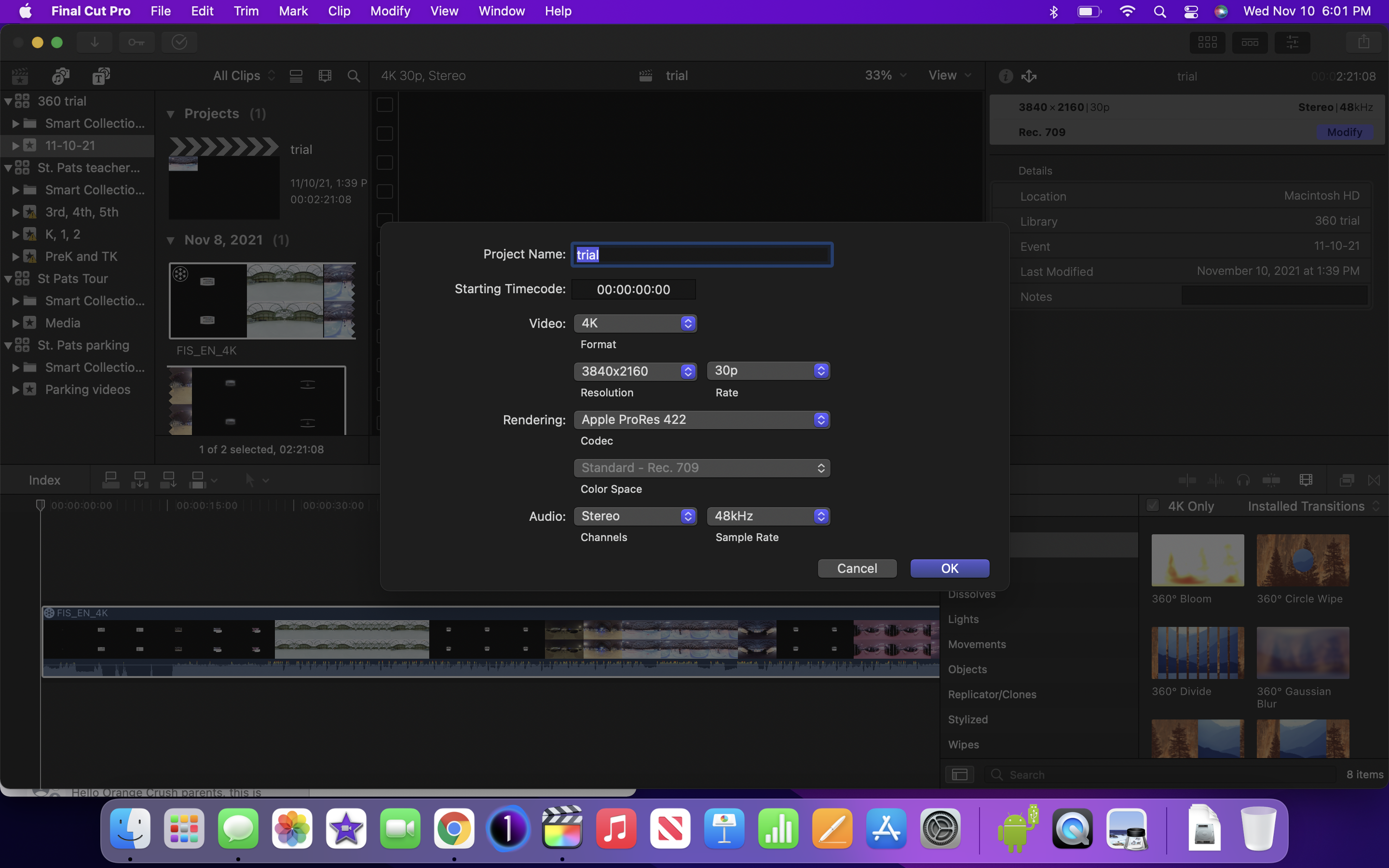 They are existing 360 content provided to me by the creators. MP4 files in 360. when they are imported they are treated as 360 files.
Replied by myessian on topic Problem with exporting 360 video - new member
Please Log in to join the conversation.
10 Nov 2021 23:05 #117450
by myessian
They are existing 360 content provided to me by the creators. MP4 files in 360. when they are imported they are treated as 360 files.
Replied by myessian on topic Problem with exporting 360 video - new member
Please Log in to join the conversation.
10 Nov 2021 23:16 - 10 Nov 2021 23:20 #117451
by zzchu
Replied by zzchu on topic Problem with exporting 360 video - new member
Ahhh.
Make sure you are specifying that you are doing a 360 project. (And not just using 360 clips in a regular flat video).
Forgot FCPX will automatically add the metadata for 360 projects.
Note: However, I think you should still be able to add metadata to the file you exported earlier and have it work correctly.

support.apple.com/guide/final-cut-pro/36...ngs-ver79532309c/mac
Make sure you are specifying that you are doing a 360 project. (And not just using 360 clips in a regular flat video).
Forgot FCPX will automatically add the metadata for 360 projects.
Note: However, I think you should still be able to add metadata to the file you exported earlier and have it work correctly.
support.apple.com/guide/final-cut-pro/36...ngs-ver79532309c/mac
Last edit: 10 Nov 2021 23:20 by zzchu.
Please Log in to join the conversation.
11 Nov 2021 00:29 #117453
by myessian
Replied by myessian on topic Problem with exporting 360 video - new member
Thank you! that fixed the export formatting problem but on to a new problem. When I add a title frames or a logo, when looking at it in the Pico it gets messed up. In particular it's either the logo that looks good and then the following 360 action clip is over/under view, rt/left view or completely messed up. I have to change the mode in the glasses. But there is never consistency in viewing experience between the title/logo I inserted and the imported video. Make sense? Any to help?
Please Log in to join the conversation.
- Tom Wolsky
-
- Offline
- Moderator
-
11 Nov 2021 06:20 #117455
by Tom Wolsky
Replied by Tom Wolsky on topic Problem with exporting 360 video - new member
Are you using a 360 title?
Please Log in to join the conversation.
