


- Posts: 119
- Thank you received: 2
3 Post Moderation Rule for New Boarders (25 Jan 2021)
New boarders will have their posts moderated - Don't worry if you cannot see your post immediately.
Smart Conform Disappeared
- Videopixels
-
 Topic Author
- Offline
- Premium Member
-

Less
More
10 Nov 2021 10:27 - 10 Nov 2021 10:49 #117417
by Videopixels
Smart Conform Disappeared was created by Videopixels
Hi there.
Running FCPX 10.6 on Monterey.
2 strange issues. When I right click to Duplicate Project As, no dialogue box appears which means I can't choose Smart Conform when changing Project parameters for vertical video.
I've always just used command-d which still works fine but even in the duplicated project when I want to modify settings from the inspector to vertical video the smart conform dialogue box is not there.
Also just realised, I Project sitting on my local machine does not have any problems, so must be a Library thing on the project that's acting weird.
Any ideas?
Running FCPX 10.6 on Monterey.
2 strange issues. When I right click to Duplicate Project As, no dialogue box appears which means I can't choose Smart Conform when changing Project parameters for vertical video.
I've always just used command-d which still works fine but even in the duplicated project when I want to modify settings from the inspector to vertical video the smart conform dialogue box is not there.
Also just realised, I Project sitting on my local machine does not have any problems, so must be a Library thing on the project that's acting weird.
Any ideas?
Last edit: 10 Nov 2021 10:49 by Videopixels.
Please Log in to join the conversation.
- Tom Wolsky
-

- Offline
- Moderator
-

10 Nov 2021 11:25 #117418
by Tom Wolsky
Replied by Tom Wolsky on topic Smart Conform Disappeared
Have you changed the parameter? That has to be done first before Smart Conform is active.
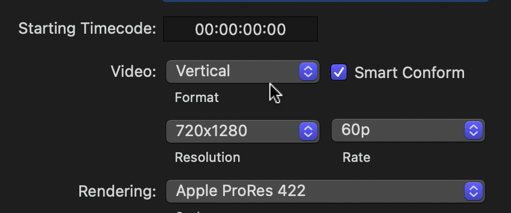
What are the original project dimensions?
Cmd-D is duplicate project and is a straight copy. It never had a Smart Conform option.
If it's a drive problem it would be strange. Wjhat's the drive, how's it connected and formatted?
What are the original project dimensions?
Cmd-D is duplicate project and is a straight copy. It never had a Smart Conform option.
If it's a drive problem it would be strange. Wjhat's the drive, how's it connected and formatted?
Please Log in to join the conversation.
- Videopixels
-
Topic Author
- Offline
- Premium Member
-
Less
More
- Posts: 119
- Thank you received: 2
10 Nov 2021 15:38 #117428
by Videopixels
Replied by Videopixels on topic Smart Conform Disappeared
Hi Tom
It seems to be a Library problem. A dialogue box does not appear for me to be able to set the parameters. I'm thinking of exporting an XML and pulling it into my laptop which is my portable machine to see if it still translates.
Just very strange that with this Library it refuses to present me with the option.
It seems to be a Library problem. A dialogue box does not appear for me to be able to set the parameters. I'm thinking of exporting an XML and pulling it into my laptop which is my portable machine to see if it still translates.
Just very strange that with this Library it refuses to present me with the option.
Please Log in to join the conversation.
- nobbystylus
-
- Offline
- Premium Member
-
Less
More
- Posts: 92
- Thank you received: 12
10 Nov 2021 18:47 #117434
by nobbystylus
Replied by nobbystylus on topic Smart Conform Disappeared
Yes - duplicate 'AS' is broken as far as I can tell - for me it just automatically creates a _1 version and then that new project has no waveforms or thumbnails and refuses to playback, then I have to force quit......
Please Log in to join the conversation.
- Videopixels
-
Topic Author
- Offline
- Premium Member
-
Less
More
- Posts: 119
- Thank you received: 2
11 Nov 2021 10:11 #117459
by Videopixels
Replied by Videopixels on topic Smart Conform Disappeared
Yeah. Going to have to create a new library and move the edit across.
Please Log in to join the conversation.


11 Nov 2021 12:15 #117461
by JoeEditor
Replied by JoeEditor on topic Smart Conform Disappeared
Have y'all tried deleting preferences and all renders first, then doing a reboot? Just wondering as I've read some issues with 10.6 and 12.0 are solved that way.
Please Log in to join the conversation.
