


- Posts: 131
- Thank you received: 15
3 Post Moderation Rule for New Boarders (25 Jan 2021)
New boarders will have their posts moderated - Don't worry if you cannot see your post immediately.
Better way to roll an edit?
30 Jan 2012 18:16 - 30 Jan 2012 18:32 #3592
by Jimmyfinn
Better way to roll an edit? was created by Jimmyfinn
Getting my FCP X chops on some dialogue scenes and was wondering if anyone could
suggest an alternative to a very common edit. The most effective way I have found seems
a little long winded.
Here is the edit in it's 3 steps
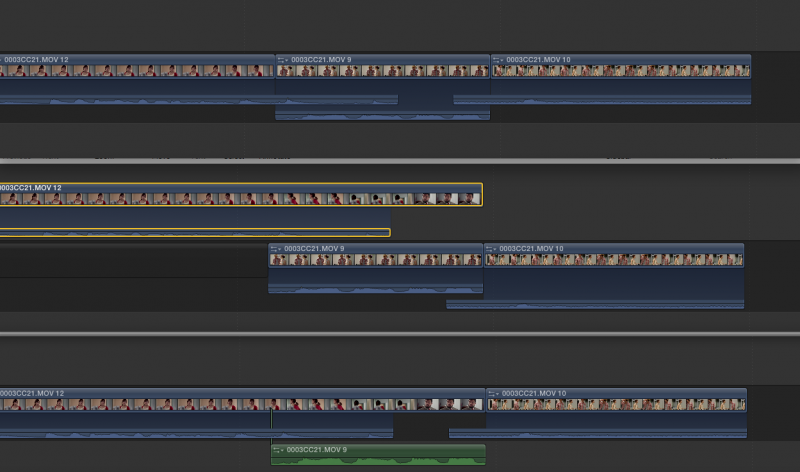
I need to extend the video only from shot 1 to Shot 3.
Any attempts to do this in the Primary result in a frame of black between
shot 1 & 3 after the roll or extend edit. This is what is hampering my edit. It will only work if I detach the audio from Shot 1 & 2.
Quickest way I've found is to move up shot 1 to secondary, extend video only (fig 2) and drop back down (fig 3)
Any other suggestions?
suggest an alternative to a very common edit. The most effective way I have found seems
a little long winded.
Here is the edit in it's 3 steps
I need to extend the video only from shot 1 to Shot 3.
Any attempts to do this in the Primary result in a frame of black between
shot 1 & 3 after the roll or extend edit. This is what is hampering my edit. It will only work if I detach the audio from Shot 1 & 2.
Quickest way I've found is to move up shot 1 to secondary, extend video only (fig 2) and drop back down (fig 3)
Any other suggestions?
Last edit: 30 Jan 2012 18:32 by Jimmyfinn.
Please Log in to join the conversation.
30 Jan 2012 18:33 - 30 Jan 2012 18:36 #3593
by Dawar
Replied by Dawar on topic Re: Better way to roll an edit?
I had the same problem, here's what I've found :
1 - detach audio from shot 1, then shift-delete the video clip. You've got a gap instead.
2 - Use position tool to roll shot 1 over the gap to shot 3. This prevents from obtaining the frame of black you were talking about.
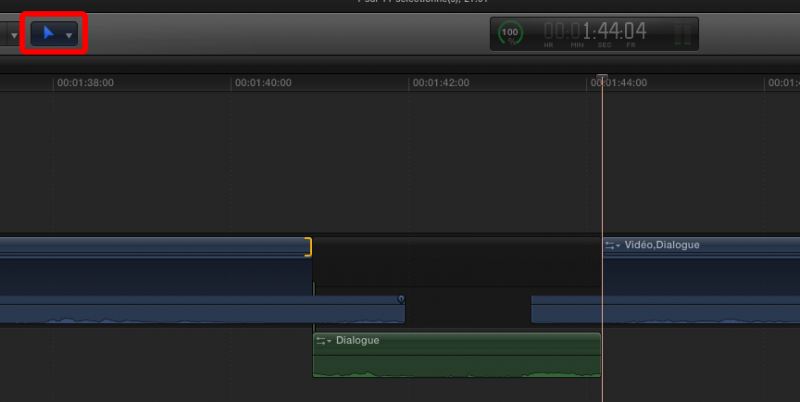
But I don't know if my way is really faster than yours...
1 - detach audio from shot 1, then shift-delete the video clip. You've got a gap instead.
2 - Use position tool to roll shot 1 over the gap to shot 3. This prevents from obtaining the frame of black you were talking about.
But I don't know if my way is really faster than yours...
Last edit: 30 Jan 2012 18:36 by Dawar.
Please Log in to join the conversation.
30 Jan 2012 18:40 #3594
by Jimmyfinn
Replied by Jimmyfinn on topic Re: Better way to roll an edit?
Perfect!! Good spot! Never thought of changing to Position for a trim!
I can now use extend edit (Shift + X) rather than dragging.
Thanks again
I can now use extend edit (Shift + X) rather than dragging.
Thanks again
Please Log in to join the conversation.

30 Jan 2012 21:40 #3597
by NocoDave
Replied by NocoDave on topic Re: Better way to roll an edit?
I had noticed this was a bit strange, I also discovered something to be aware of, it doesn't work if your trying to edit during playback.
If you do the extend edit everything looks kind of ok, there is no 1 frame gap clip, but a very thin sliver, maybe it's a 1/80 subframe issue? Then if you change back to the trim tool and try to select for a roll edit there are problems.
If you do the extend edit everything looks kind of ok, there is no 1 frame gap clip, but a very thin sliver, maybe it's a 1/80 subframe issue? Then if you change back to the trim tool and try to select for a roll edit there are problems.
Please Log in to join the conversation.

30 Jan 2012 21:55 - 30 Jan 2012 21:59 #3599
by BenB
Replied by BenB on topic Re: Better way to roll an edit?
I'd never put any of shot 2's video into the Timeline in the first place if all you need is the audio. It's like you're trying to erase it eventually anyway, why even introduce it?
If you need it for visual sync purposes, use Markers. Better yet, make Shot 2 a connected clip BELOW the Primary Storyline, not inside of it. That would solve everything from the start. I mean, it IS an cutaway shot after all, so treat it as one.
No, you can't ripple/roll a clip into oblivion in a Storyline. And I don't see why you'd ever want to, since that clip should be connected to start with.
If you need it for visual sync purposes, use Markers. Better yet, make Shot 2 a connected clip BELOW the Primary Storyline, not inside of it. That would solve everything from the start. I mean, it IS an cutaway shot after all, so treat it as one.
No, you can't ripple/roll a clip into oblivion in a Storyline. And I don't see why you'd ever want to, since that clip should be connected to start with.
Last edit: 30 Jan 2012 21:59 by BenB.
Please Log in to join the conversation.
30 Jan 2012 21:55 #3600
by Jimmyfinn
Replied by Jimmyfinn on topic Re: Better way to roll an edit?
Yeah, looks like FCP X really doesn't want to let go of that Gap.
Tell tale sign is the 'double thickness' edit point. Impossible to
roll an edit then. Strange!
Tell tale sign is the 'double thickness' edit point. Impossible to
roll an edit then. Strange!
Please Log in to join the conversation.
30 Jan 2012 22:00 #3602
by NocoDave
Replied by NocoDave on topic Re: Better way to roll an edit?
It's not just with audio Ben, I discovered it with a timeline full of video only edits.
Please Log in to join the conversation.
30 Jan 2012 22:10 - 30 Jan 2012 22:11 #3603
by BenB
Replied by BenB on topic Re: Better way to roll an edit?
I didn't say anything about audio only clips only doing this. Any clip can't be ripple/rolled out of existence. And if that is the goal, that clip should be a connected clip to start with. In the example the OP gave, Shot 2 should really never be in the Storyline, but a connected clip below it, even if the video portion is retained.
Last edit: 30 Jan 2012 22:11 by BenB.
Please Log in to join the conversation.
30 Jan 2012 22:15 #3604
by Jimmyfinn
Replied by Jimmyfinn on topic Re: Better way to roll an edit?
How do you know it's a cutaway at that point of edit process?
I don't know what part of the edit I want to keep/discard until
I fine tune the sequence. Putting a dialogue sequence together
in the primary storyline without markers, connected clips or black frames seems
reasonable to me.
I don't know what part of the edit I want to keep/discard until
I fine tune the sequence. Putting a dialogue sequence together
in the primary storyline without markers, connected clips or black frames seems
reasonable to me.
Please Log in to join the conversation.
30 Jan 2012 22:22 #3605
by NocoDave
Replied by NocoDave on topic Re: Better way to roll an edit?
For sure Jimmy. It's a workflow thing and if someones workflow doesn't require the need for this it doesn't mean that someone else's shouldn't.
Please Log in to join the conversation.
30 Jan 2012 22:50 - 30 Jan 2012 22:51 #3607
by BenB
I know what's a cutaway when I'm laying down my rough cut. But if you figure out it should be a cutaway after that, it's easy to lift the clip out of the Storyline and treat is as one. Pretty easy to do, rather than detach audio, etc, etc, etc. One step.
Replied by BenB on topic Re: Better way to roll an edit?
Jimmyfinn wrote: How do you know it's a cutaway at that point of edit process?
I know what's a cutaway when I'm laying down my rough cut. But if you figure out it should be a cutaway after that, it's easy to lift the clip out of the Storyline and treat is as one. Pretty easy to do, rather than detach audio, etc, etc, etc. One step.
Last edit: 30 Jan 2012 22:51 by BenB.
Please Log in to join the conversation.
31 Jan 2012 00:59 - 31 Jan 2012 00:59 #3613
by Dawar
Therefore this tip avoids detaching audio, but we still have this gap problem when trimming shot 1. (In the case we have decided to lift the shot 2 out of the storyline)
But personally I've encountered a similar problem not only with "cutaways that you should know that these are cutaway so treat them like connected clips".
Let's say two shots, and I've got a J-Cut on Shot 2.
I want to shorten the dialogue on the audio part of the incoming shot 2.
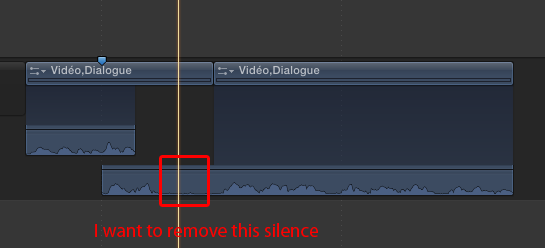
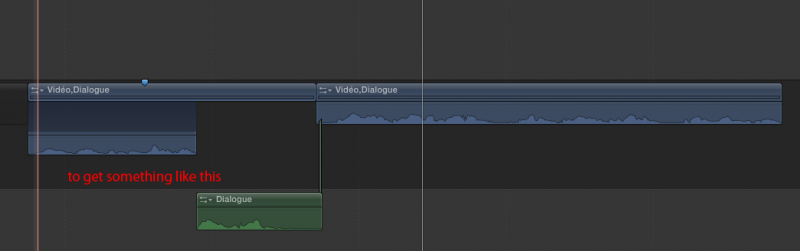
I can't use blade tool on the audio-only part of my developed clip.
And I can't figure a simple way to do this. I lift shot 2 out of the storyline, trim the video, blade it, detach audio, delete video...etc, etc, etc.
Replied by Dawar on topic Re: Better way to roll an edit?
That's true, I still forget we can place video clips below primary storyline.BenB wrote: But if you figure out it should be a cutaway after that, it's easy to lift the clip out of the Storyline and treat is as one. Pretty easy to do, rather than detach audio, etc, etc, etc. One step.
Therefore this tip avoids detaching audio, but we still have this gap problem when trimming shot 1. (In the case we have decided to lift the shot 2 out of the storyline)
But personally I've encountered a similar problem not only with "cutaways that you should know that these are cutaway so treat them like connected clips".
Let's say two shots, and I've got a J-Cut on Shot 2.
I want to shorten the dialogue on the audio part of the incoming shot 2.
I can't use blade tool on the audio-only part of my developed clip.
And I can't figure a simple way to do this. I lift shot 2 out of the storyline, trim the video, blade it, detach audio, delete video...etc, etc, etc.
Last edit: 31 Jan 2012 00:59 by Dawar.
Please Log in to join the conversation.
31 Jan 2012 01:10 #3614
by BenB
Replied by BenB on topic Re: Better way to roll an edit?
In that specific case, yes, separate the audio from the video, trim the audio. But I still don't see how it's a super involved, long process. I'm duplicating the situation now, and it's pretty fast. I may be missing the point, though.
Please Log in to join the conversation.
- Tom Wolsky
-

- Offline
- Moderator
-

31 Jan 2012 01:11 #3615
by Tom Wolsky
Replied by Tom Wolsky on topic Re: Better way to roll an edit?
Trim the first part of the audio so it's inline with the connected audio. Find the clip in the browser and make an audio only edit inserting just the sound you need.
Please Log in to join the conversation.
- Tom Wolsky
-
- Offline
- Moderator
-
31 Jan 2012 01:12 #3616
by Tom Wolsky
Replied by Tom Wolsky on topic Re: Better way to roll an edit?
Or roll out the split edit so it's all inline, blade the clip, and throw away the bits you don't want.
Please Log in to join the conversation.
31 Jan 2012 01:16 #3617
by NocoDave
excellent, that works beautifully.
Replied by NocoDave on topic Re: Better way to roll an edit?
Or roll out the split edit so it's all inline, blade the clip, and throw away the bits you don't want.
excellent, that works beautifully.
Please Log in to join the conversation.
31 Jan 2012 01:19 #3618
by Dawar
Replied by Dawar on topic Re: Better way to roll an edit?
That's what I do, thanks. Still I don't find it super efficient. But it's really part of a few case i feel some pain with trackless timeline. Otherwise I'm quite used to and appreciate it.Tom Wolsky wrote: Or roll out the split edit so it's all inline, blade the clip, and throw away the bits you don't want.
That's where I'd like a "reattach" function. I sent a feedback about this.BenB wrote: In that specific case, yes, separate the audio from the video, trim the audio.
Please Log in to join the conversation.
31 Jan 2012 01:39 - 31 Jan 2012 03:19 #3620
by Dawar
Replied by Dawar on topic Re: Better way to roll an edit?
@Tom Wolsky : I also sometimes do a match frame to insert audio-only, which is the most elegant way I think. And pretty fast. But I need to go in event browser, even if I've got all I need under my eyes, in the timeline. Just to say.
If we could be able to blade the audio-only part so that it transforms into a detached audio clip, that would be perfect.
If we could be able to blade the audio-only part so that it transforms into a detached audio clip, that would be perfect.
Last edit: 31 Jan 2012 03:19 by Dawar.
Please Log in to join the conversation.
31 Jan 2012 14:59 - 31 Jan 2012 15:10 #3630
by NocoDave
This actually still leaves the issue unless unlinking the cut off section of audio. So the issue still exists.
Here's a way round it.
Before doing the J-Cut, blade and remove the unwanted section only (video and audio), create a compound clip from the 2 desired bits of the clip, expand the audio on the compound clip and edit as normal.
Apple are going to need to fix this. I'm curious, this alone still wouldn't fix this problem, but couldn't you overwrite a clip by extending/roling an edit point in legacy versions of FCP?
Replied by NocoDave on topic Re: Better way to roll an edit?
Or roll out the split edit so it's all inline, blade the clip, and throw away the bits you don't want.
This actually still leaves the issue unless unlinking the cut off section of audio. So the issue still exists.
Here's a way round it.
Before doing the J-Cut, blade and remove the unwanted section only (video and audio), create a compound clip from the 2 desired bits of the clip, expand the audio on the compound clip and edit as normal.
Apple are going to need to fix this. I'm curious, this alone still wouldn't fix this problem, but couldn't you overwrite a clip by extending/roling an edit point in legacy versions of FCP?
Last edit: 31 Jan 2012 15:10 by NocoDave. Reason: clarity
Please Log in to join the conversation.
31 Jan 2012 15:49 #3633
by Jimmyfinn
Replied by Jimmyfinn on topic Re: Better way to roll an edit?
Yes NocoDave, you could, and you should be able to in any NLE.
I think FCP X is making us jump thru hoops for a very basic, everyday trim.
and it does need to be addressed. Feedback sent of course!
I think FCP X is making us jump thru hoops for a very basic, everyday trim.
and it does need to be addressed. Feedback sent of course!
Please Log in to join the conversation.
