


- Posts: 61
- Thank you received: 0
3 Post Moderation Rule for New Boarders (25 Jan 2021)
New boarders will have their posts moderated - Don't worry if you cannot see your post immediately.
heavy use of keywords + notes for doc editing is really slowing FCP?
01 Nov 2021 01:18 #117103
by marconoe
Hi all,
I've slowed my FCP library to an unworkable crawl and I'm wondering if it's because I've overloaded it with notes...does this make sense or do I have a different issue? For more info read on:
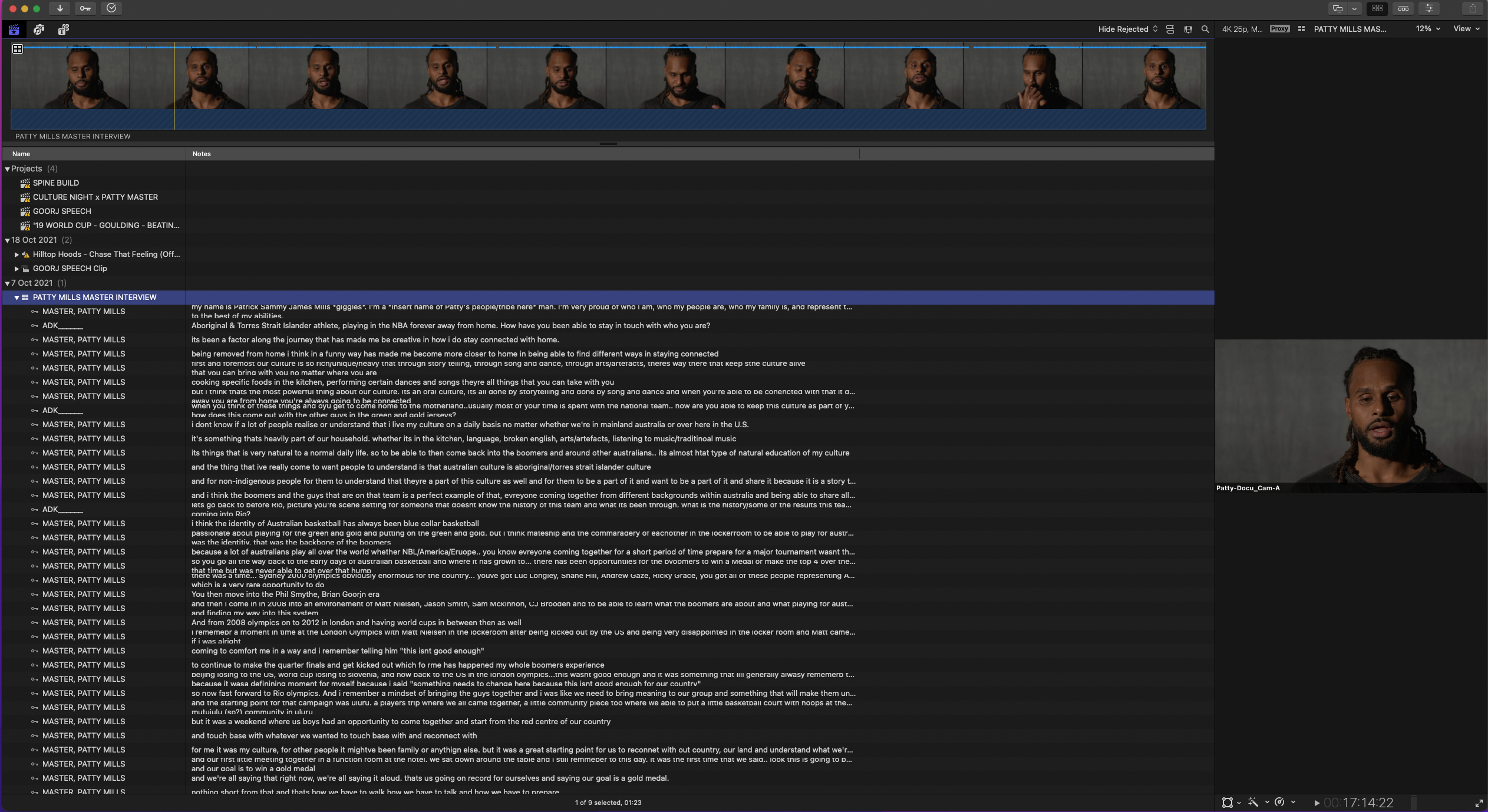
I'm editing a documentary where for my master interviews (2 x 90min) I've transcribed them using keywords+ notes inside fcp. My workflow has been:
1. create multicam clip
2. pick a keyword for the interview (e.g. PATTY MASTER)
3. set in and out points around the sentence I want to transcribe
4. assign PATTY MASTER keyword
5. in the notes column type word for word what Patty has said
6. continue until done
Now that I've done this I'm finding final cut to be working frustratingly slowly. To the point where I can't really edit because switching between events or timelines takes 5ish minutes at a time. I don't think I've done anything complex here as notes and keywords are nothing fancy or new.... but perhaps I'm pushing the limits with the volume of notes I've put in? I'm using proxies and I'm working on a MacBook Pro 15 inch 2017 2.9 GHz quad core intel i7
I've tried the following to speed up my system: clean installed my MacBook Pro and I've moved the project from the SSD I was working off of onto my laptop. Total proxied project size atm is about 250GB. I've got a month until my beefy new Mac book pro arrives and I'm desperate to find a way to keep working until then...
Any thoughts/suggestions really welcomed thank you
Marco
I've slowed my FCP library to an unworkable crawl and I'm wondering if it's because I've overloaded it with notes...does this make sense or do I have a different issue? For more info read on:
I'm editing a documentary where for my master interviews (2 x 90min) I've transcribed them using keywords+ notes inside fcp. My workflow has been:
1. create multicam clip
2. pick a keyword for the interview (e.g. PATTY MASTER)
3. set in and out points around the sentence I want to transcribe
4. assign PATTY MASTER keyword
5. in the notes column type word for word what Patty has said
6. continue until done
Now that I've done this I'm finding final cut to be working frustratingly slowly. To the point where I can't really edit because switching between events or timelines takes 5ish minutes at a time. I don't think I've done anything complex here as notes and keywords are nothing fancy or new.... but perhaps I'm pushing the limits with the volume of notes I've put in? I'm using proxies and I'm working on a MacBook Pro 15 inch 2017 2.9 GHz quad core intel i7
I've tried the following to speed up my system: clean installed my MacBook Pro and I've moved the project from the SSD I was working off of onto my laptop. Total proxied project size atm is about 250GB. I've got a month until my beefy new Mac book pro arrives and I'm desperate to find a way to keep working until then...
Any thoughts/suggestions really welcomed thank you
Marco
Please Log in to join the conversation.

01 Nov 2021 03:56 #117104
by JoeEditor
Replied by JoeEditor on topic heavy use of keywords + notes for doc editing is really slowing FCP?
You may want to look at something like Scribomatic from CoreMelt or Simon Says, these could save you a ton of time.
Notes shouldn't do that. But there is an issue with audio waveforms drawing out slowing things down a lot. Could that be it?
Notes shouldn't do that. But there is an issue with audio waveforms drawing out slowing things down a lot. Could that be it?
Please Log in to join the conversation.

01 Nov 2021 14:37 #117111
by Stu Wart
Replied by Stu Wart on topic heavy use of keywords + notes for doc editing is really slowing FCP?
Strange ... I do almost the same but writing down the text in ... Markers ! and absolutely no slow down.
(I like to do that because with a double click on the Marker I can write without stoping Playing the ITW)
(I like to do that because with a double click on the Marker I can write without stoping Playing the ITW)
Please Log in to join the conversation.
- Carsten Orlt
-

- Offline
- Platinum Member
-

Less
More
- Posts: 422
- Thank you received: 82
01 Nov 2021 19:29 #117116
by Carsten Orlt
Replied by Carsten Orlt on topic heavy use of keywords + notes for doc editing is really slowing FCP?
Don’t think that amount of data should slow down your edit. I’m working with way larger projects.
Are you by any chance using H264 proxies? As Ben said there is something strange gong on with redrawing waveforms on H264 clips. I see in your screenshot that the waveform is not displaying yet.
If you’re using H264 proxies you should switch to Prores proxies until Apple fixes the problem.
Are you by any chance using H264 proxies? As Ben said there is something strange gong on with redrawing waveforms on H264 clips. I see in your screenshot that the waveform is not displaying yet.
If you’re using H264 proxies you should switch to Prores proxies until Apple fixes the problem.
Please Log in to join the conversation.
02 Nov 2021 02:51 #117122
by marconoe
Replied by marconoe on topic heavy use of keywords + notes for doc editing is really slowing FCP?
Hi Ben thanks for your reply and suggestion. After reading your comment I went and tried Simon Says - looks good although I'm currently working on debugging the XML that has been created after the transcription.
Amazing how cost effective the solution is though! The tradeoff is I don't learn my interview as thoroughly by transcribing it myself but can probably just watch it a few more times instead of typing it out
THanks again
Amazing how cost effective the solution is though! The tradeoff is I don't learn my interview as thoroughly by transcribing it myself but can probably just watch it a few more times instead of typing it out
THanks again
Please Log in to join the conversation.
02 Nov 2021 02:53 #117123
by marconoe
Replied by marconoe on topic heavy use of keywords + notes for doc editing is really slowing FCP?
Hi Stu, good to know that it's not my workflow that is the issue then! thanks
Please Log in to join the conversation.
02 Nov 2021 02:56 #117124
by marconoe
Hi Carsten,
I think I am using H264 proxies..maybe you're both onto something. I'll have a think about how to switch... If i go ahead and generate prores proxies will FCP use those instead or will I have to back track on my work?
THanks!
Replied by marconoe on topic heavy use of keywords + notes for doc editing is really slowing FCP?
Don’t think that amount of data should slow down your edit. I’m working with way larger projects.
Are you by any chance using H264 proxies? As Ben said there is something strange gong on with redrawing waveforms on H264 clips. I see in your screenshot that the waveform is not displaying yet.
If you’re using H264 proxies you should switch to Prores proxies until Apple fixes the problem.
Hi Carsten,
I think I am using H264 proxies..maybe you're both onto something. I'll have a think about how to switch... If i go ahead and generate prores proxies will FCP use those instead or will I have to back track on my work?
THanks!
Please Log in to join the conversation.
- Carsten Orlt
-
- Offline
- Platinum Member
-
Less
More
- Posts: 422
- Thank you received: 82
02 Nov 2021 03:04 #117125
by Carsten Orlt
Replied by Carsten Orlt on topic heavy use of keywords + notes for doc editing is really slowing FCP?
Hi Marconoe,
First you would delete your current proxies via File>Delete Generated (Clip/Event/Library) files. You can do this for a clip, selection of clips, an event or selection of events, or the whole library.
You can have both Prores proxies and H264 proxies at the same time (for diff clips, not the same one).
Maybe try a few clips where you think they might slow down the edit and if it improves delete all proxies by selecting the Library in the browser and then using the command from above. After that you select all your clips and create the prores proxies.
Be aware that Prores proxies will use more storage space. Don't know the ratio to H264 but make sure you have enough disk space handy.
First you would delete your current proxies via File>Delete Generated (Clip/Event/Library) files. You can do this for a clip, selection of clips, an event or selection of events, or the whole library.
You can have both Prores proxies and H264 proxies at the same time (for diff clips, not the same one).
Maybe try a few clips where you think they might slow down the edit and if it improves delete all proxies by selecting the Library in the browser and then using the command from above. After that you select all your clips and create the prores proxies.
Be aware that Prores proxies will use more storage space. Don't know the ratio to H264 but make sure you have enough disk space handy.
Please Log in to join the conversation.
02 Nov 2021 03:59 #117126
by marconoe
Replied by marconoe on topic heavy use of keywords + notes for doc editing is really slowing FCP?
Thanks Carsten!
Please Log in to join the conversation.
02 Nov 2021 10:16 #117129
by marconoe
Replied by marconoe on topic heavy use of keywords + notes for doc editing is really slowing FCP?
Hey @Ben or @Carsten,
Have either of you ever seen an issue where a proxy file has its audio and video slowly go out of sync?
Have either of you ever seen an issue where a proxy file has its audio and video slowly go out of sync?
Please Log in to join the conversation.
02 Nov 2021 12:56 #117132
by JoeEditor
Replied by JoeEditor on topic heavy use of keywords + notes for doc editing is really slowing FCP?
Not specific to a proxy file, but that is typical for a clip who’s audio sample rate differs from that of the Project settings.
Please Log in to join the conversation.
02 Nov 2021 12:59 - 02 Nov 2021 13:00 #117133
by marconoe
Replied by marconoe on topic heavy use of keywords + notes for doc editing is really slowing FCP?
Right ok maybe that's the issue I'm having... I feel really dumb asking this question given how many years I've actually been working with FCPX but what exactly do you mean by Project Settings? As in the library? The event? The timeline?
Last edit: 02 Nov 2021 13:00 by marconoe.
Please Log in to join the conversation.
02 Nov 2021 15:30 #117140
by JoeEditor
Replied by JoeEditor on topic heavy use of keywords + notes for doc editing is really slowing FCP?
A Project is an item in the Browser. You open it up into the Timeline pane to perform your edits. Select the Project in the Browser, go to the Inspect to change or verify its settings.
Please Log in to join the conversation.
- Carsten Orlt
-
- Offline
- Platinum Member
-
Less
More
- Posts: 422
- Thank you received: 82
02 Nov 2021 19:45 #117143
by Carsten Orlt
Replied by Carsten Orlt on topic heavy use of keywords + notes for doc editing is really slowing FCP?
Never had a proxy file go out of sync. I would say it’s impossible unless the original file has the same problem. Not sure what’s going on there if you have it happening? One clip or many?
Please Log in to join the conversation.
02 Nov 2021 22:51 #117152
by JoeEditor
Replied by JoeEditor on topic heavy use of keywords + notes for doc editing is really slowing FCP?
Maybe it's a playback issue, that it's not really out of sync, but playback lags the video or audio and it just seems that way? I've seen that happen once before. I dunno...
Please Log in to join the conversation.
02 Nov 2021 22:57 #117154
by marconoe
Thanks Ben! I'm not sure this is applicable given that the clip is out of sync when I'm playing it in the media browser not in any project.
Hmm, it's not a lag issue I don't think. When I switch from proxy to original it plays back in sync. It's only when I switch the media to proxy that there's this issue. Interesting to note that this is the only proxy I've created since FCP 10.6 + Monterey...?
Marco
Replied by marconoe on topic heavy use of keywords + notes for doc editing is really slowing FCP?
A Project is an item in the Browser. You open it up into the Timeline pane to perform your edits. Select the Project in the Browser, go to the Inspect to change or verify its settings.
Thanks Ben! I'm not sure this is applicable given that the clip is out of sync when I'm playing it in the media browser not in any project.
Hmm, it's not a lag issue I don't think. When I switch from proxy to original it plays back in sync. It's only when I switch the media to proxy that there's this issue. Interesting to note that this is the only proxy I've created since FCP 10.6 + Monterey...?
Marco
Please Log in to join the conversation.
- Carsten Orlt
-
- Offline
- Platinum Member
-
Less
More
- Posts: 422
- Thank you received: 82
02 Nov 2021 23:04 #117155
by Carsten Orlt
Replied by Carsten Orlt on topic heavy use of keywords + notes for doc editing is really slowing FCP?
Haven't moved to Monterey yet so you might have discovered a bug?
Maybe create a new empty library, import the clip where it happens and create the proxy again so see if the problem persists. If yes most likely a bug. Otherwise it could be some gremlins in the OS
Does the proxy clip play out of sync in the Quicktime player?
Maybe create a new empty library, import the clip where it happens and create the proxy again so see if the problem persists. If yes most likely a bug. Otherwise it could be some gremlins in the OS
Does the proxy clip play out of sync in the Quicktime player?
Please Log in to join the conversation.
02 Nov 2021 23:09 #117158
by marconoe
Replied by marconoe on topic heavy use of keywords + notes for doc editing is really slowing FCP?
yep it plays out of sync in quicktime! so weird and frustrating.
i've got my colleague proxying it out on his fcp and sending over today...hopefully that's a work around...might test proxying in a new library tonight! thanks!
i've got my colleague proxying it out on his fcp and sending over today...hopefully that's a work around...might test proxying in a new library tonight! thanks!
Please Log in to join the conversation.
