


- Posts: 187
- Thank you received: 10
3 Post Moderation Rule for New Boarders (25 Jan 2021)
New boarders will have their posts moderated - Don't worry if you cannot see your post immediately.
no "Save Current Frame" in Shortcuts
11 Oct 2021 13:57 - 11 Oct 2021 13:58 #116668
by Stu Wart
no "Save Current Frame" in Shortcuts was created by Stu Wart
I used, (besides cmd E for Video export as "default") to have a shortcut for still export. It was "Save Frame" on the command palette shortcuts, but it doesn't work anymore. No answer
in File/Save menu I have "Save Current Frame", it works... but nowhere to be found on the command palette shortcuts
any trick ?
in File/Save menu I have "Save Current Frame", it works... but nowhere to be found on the command palette shortcuts
any trick ?
Last edit: 11 Oct 2021 13:58 by Stu Wart.
Please Log in to join the conversation.


11 Oct 2021 14:30 #116670
by VTC
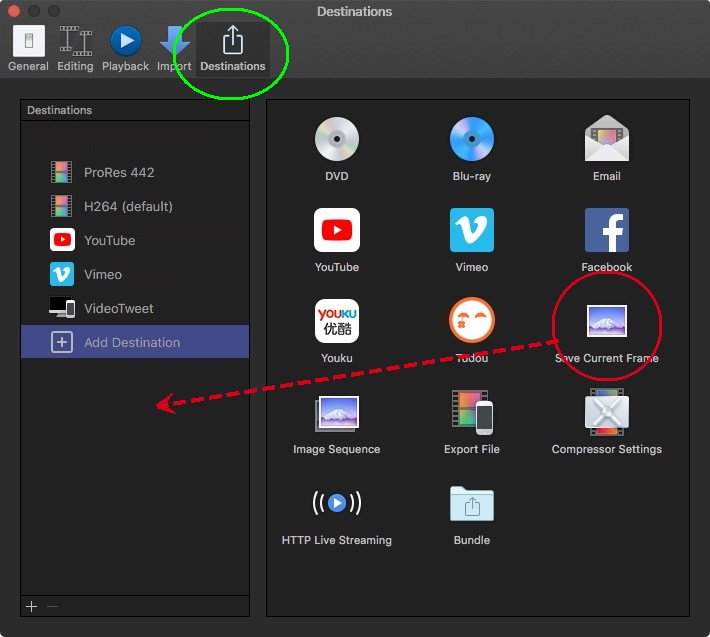
Replied by VTC on topic no "Save Current Frame" in Shortcuts
Please Log in to join the conversation.
- Tom Wolsky
-

- Offline
- Moderator
-

11 Oct 2021 14:56 #116671
by Tom Wolsky
Replied by Tom Wolsky on topic no "Save Current Frame" in Shortcuts
There is no shortcut for it in the Command Editor. If you want to set Cmd-E, in Destination preferences you can right click on it on the sidebar and set it as the default. That will set the Cmd-E shortcut.
Please Log in to join the conversation.
11 Oct 2021 15:08 - 11 Oct 2021 15:10 #116672
by VTC
So very true but first it needs to be brought from the right side panel into the left side panel to be accessible. Anything can be set as default but if the left well isn't populated with it and viewable directly from SHARE then it can't be set.
I suspect it was there at one point but went missing and OP couldn't couldn't noodle how to get it back. Similar things have happened to me.
Replied by VTC on topic no "Save Current Frame" in Shortcuts
If you want to set it as the default...
So very true but first it needs to be brought from the right side panel into the left side panel to be accessible. Anything can be set as default but if the left well isn't populated with it and viewable directly from SHARE then it can't be set.
I suspect it was there at one point but went missing and OP couldn't couldn't noodle how to get it back. Similar things have happened to me.
Last edit: 11 Oct 2021 15:10 by VTC.
Please Log in to join the conversation.
11 Oct 2021 17:42 #116673
by Stu Wart
thanks for the advice but... been there ! done that ! (a long time ago)
nothing to do with the problem, that will only be of answer if I made it "default"
but thanks anyway
Replied by Stu Wart on topic no "Save Current Frame" in Shortcuts
thanks for the advice but... been there ! done that ! (a long time ago)
nothing to do with the problem, that will only be of answer if I made it "default"
but thanks anyway
Please Log in to join the conversation.
11 Oct 2021 17:48 #116674
by Stu Wart
Yes, Tom it was definitely possible some versions ago.
And there is a "Save Frame" in the Command Editor, but useless.
( Not "Save Current Frame" "Just Save Frame" , I suspect the problem is coming from that. Change was incomplete...
Replied by Stu Wart on topic no "Save Current Frame" in Shortcuts
If you want to set it as the default...
So very true but first it needs to be brought from the right side panel into the left side panel to be accessible. Anything can be set as default but if the left well isn't populated with it and viewable directly from SHARE then it can't be set.
I suspect it was there at one point but went missing and OP couldn't couldn't noodle how to get it back. Similar things have happened to me.
Yes, Tom it was definitely possible some versions ago.
And there is a "Save Frame" in the Command Editor, but useless.
( Not "Save Current Frame" "Just Save Frame" , I suspect the problem is coming from that. Change was incomplete...
Please Log in to join the conversation.
- Tom Wolsky
-
- Offline
- Moderator
-
11 Oct 2021 18:07 #116675
by Tom Wolsky
Replied by Tom Wolsky on topic no "Save Current Frame" in Shortcuts
Save Frame to hold a comparison frame for color correction. The only other still shortcuts are for freezes and hold frames.
Please Log in to join the conversation.
11 Oct 2021 20:35 - 12 Oct 2021 13:41 #116677
by Stu Wart
yep ! That "Save Frame" is for Comparison Viewer indeed
I think this change comes from it's implementation
Replied by Stu Wart on topic no "Save Current Frame" in Shortcuts
Save Frame to hold a comparison frame for color correction. The only other still shortcuts are for freezes and hold frames.
yep ! That "Save Frame" is for Comparison Viewer indeed
I think this change comes from it's implementation
Last edit: 12 Oct 2021 13:41 by Stu Wart.
Please Log in to join the conversation.
