




- Posts: 9
- Thank you received: 0
3 Post Moderation Rule for New Boarders (25 Jan 2021)
New boarders will have their posts moderated - Don't worry if you cannot see your post immediately.
Final rendered video audio is distorted
29 Sep 2021 12:18 #116470
by jaybanks
Final rendered video audio is distorted was created by jaybanks
I use Logic Pro X to create an audio (music). When I play it in FCPX it sounds fine but when I render the final video, the audio is distorted. I've looked at all related posts and nothing resolves it. I have:-- iMac (24-inch, M1, 2021)-- 16 GB-- Final Cut Pro 10.5.4-- Logic Pro 10.6.3 Rosetta-- Big Sur 11.6Thanks.
Please Log in to join the conversation.
- Tom Wolsky
-

- Offline
- Moderator
-

29 Sep 2021 12:37 #116474
by Tom Wolsky
Replied by Tom Wolsky on topic Final rendered video audio is distorted
Could you post those Dropbox links. They won’t be delete here.
Please Log in to join the conversation.
29 Sep 2021 12:40 #116475
by jaybanks
Replied by jaybanks on topic Final rendered video audio is distorted
Here they are!
Before render -- www.dropbox.com/s/o5msziw8qw4skkl/Before%20Render.aif?dl=0
After render -- www.dropbox.com/s/9aoah9po1fbuwil/After%20Render.aiff?dl=0
Before render -- www.dropbox.com/s/o5msziw8qw4skkl/Before%20Render.aif?dl=0
After render -- www.dropbox.com/s/9aoah9po1fbuwil/After%20Render.aiff?dl=0
Please Log in to join the conversation.
30 Sep 2021 10:01 #116489
by jaybanks
Replied by jaybanks on topic Final rendered video audio is distorted
I assume you were able to listen to the before and after rendered audio. Any suggestions?
Please Log in to join the conversation.
- Tom Wolsky
-
- Offline
- Moderator
-
30 Sep 2021 11:00 #116490
by Tom Wolsky
Replied by Tom Wolsky on topic Final rendered video audio is distorted
I was hoping some audiophile would step in with some answers. I’m afraid my ears aren’t good enough to hear the problem.
Please Log in to join the conversation.
30 Sep 2021 12:26 #116491
by jaybanks
Replied by jaybanks on topic Final rendered video audio is distorted
So, what's next if no one trumps in? Is there a contact/forum at FCPX? Apple? Bob's Lawn Mower & Income Taxes?!!
Please Log in to join the conversation.

30 Sep 2021 13:53 - 01 Oct 2021 00:55 #116494
by JoeEditor
Replied by JoeEditor on topic Final rendered video audio is distorted
I've been doing audio recording/mixing for music for decades, I only hear a very slight difference in EQ, which could be accounted for by change in bit rate or sample rate somewhere in the workflow. I do not hear "distortion" at all anywhere, in the technical definition of audio distortion. I doubt most folks will hear any difference between your two posted audio files.
Be sure you are exporting an AIFF at 48kHz and 16 bit depth from Logic Pro X. That's the video standard FCP will conform it too. LPX likes 44.1kHz by default, change that.
What specifics are you choosing when exporting from FCP?
Be sure you are exporting an AIFF at 48kHz and 16 bit depth from Logic Pro X. That's the video standard FCP will conform it too. LPX likes 44.1kHz by default, change that.
What specifics are you choosing when exporting from FCP?
Last edit: 01 Oct 2021 00:55 by JoeEditor.
Please Log in to join the conversation.
- Tom Wolsky
-
- Offline
- Moderator
-
30 Sep 2021 14:00 #116497
by Tom Wolsky
Replied by Tom Wolsky on topic Final rendered video audio is distorted
48K from Logic I’m sure you meant.
Please Log in to join the conversation.
01 Oct 2021 00:55 #116506
by JoeEditor
Replied by JoeEditor on topic Final rendered video audio is distorted
You're correct Tom, fixed it, thanks!
Please Log in to join the conversation.

01 Oct 2021 09:33 #116508
by Redifer
Replied by Redifer on topic Final rendered video audio is distorted
Oh man I hear a HUGE difference. Unfortunately I'm not familiar with Logic. I have it but I never use it for Final Cut stuffs. But yeah it sounds like it got crushed. I feel your pain.
So... what are you doing to it in Logic? Can you just import the "before render" into Final Cut Pro? LOL I know that doesn't answer your question, but the "before render" file sounds fine. Use that!
So... what are you doing to it in Logic? Can you just import the "before render" into Final Cut Pro? LOL I know that doesn't answer your question, but the "before render" file sounds fine. Use that!
Please Log in to join the conversation.
01 Oct 2021 10:35 #116509
by jaybanks
Replied by jaybanks on topic Final rendered video audio is distorted
Yeah it's obvious, not only on a pretty good computer but a set of pro studio monitors as well.
The "Before Render" file is the audio that comes from Logic but the problem is when the file is rendered with the video in Final Cut Pro (FCPX) -- something in FCPX's rendering process is messing with it. I was hoping someone was familiar with the problem. So far, no one.
I'm meeting with one of my buddies from a studio in the Greater Nashville, TN area who has worked full-time in studio work to help diagnosis the issue (if we can). I'll let you know how that goes. It could be a Logic Pro issue but if it was, it would show up before the final render (as evidenced in the "Before Render"). I still think there's something in FCPX that will resolve this. I'm hoping if we can't fix it here, I can find a FCPX engineer or techie to figure this out.
Meanwhile, we throw this iron back in the fire and grab another...THANKS!
The "Before Render" file is the audio that comes from Logic but the problem is when the file is rendered with the video in Final Cut Pro (FCPX) -- something in FCPX's rendering process is messing with it. I was hoping someone was familiar with the problem. So far, no one.
I'm meeting with one of my buddies from a studio in the Greater Nashville, TN area who has worked full-time in studio work to help diagnosis the issue (if we can). I'll let you know how that goes. It could be a Logic Pro issue but if it was, it would show up before the final render (as evidenced in the "Before Render"). I still think there's something in FCPX that will resolve this. I'm hoping if we can't fix it here, I can find a FCPX engineer or techie to figure this out.
Meanwhile, we throw this iron back in the fire and grab another...THANKS!
Please Log in to join the conversation.

01 Oct 2021 10:55 #116510
by joema
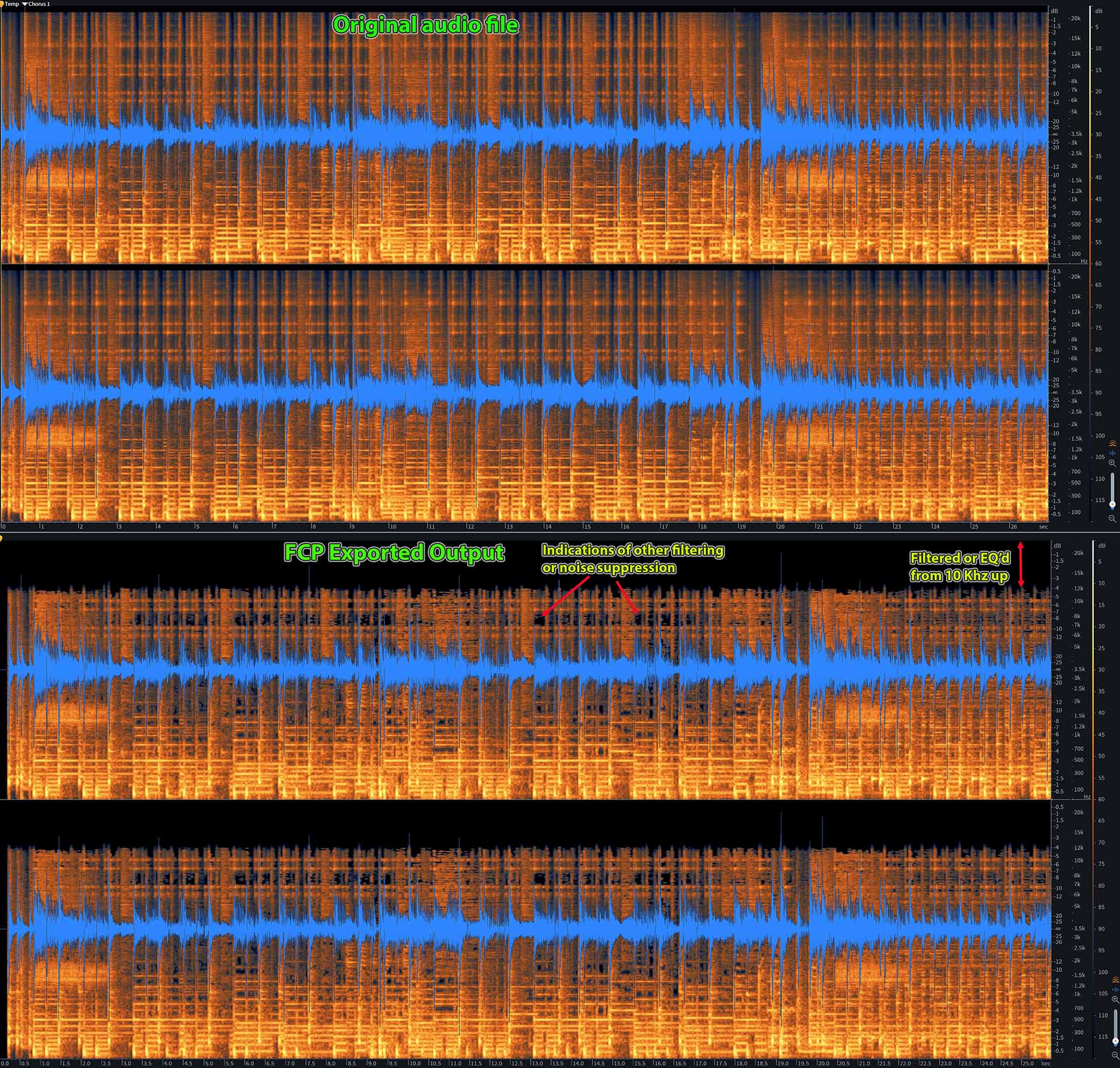
It appears some filtering has been applied. See attached spectrogram showing from about 10 Khz and up has been eliminated and various "holes" in the spectral chart imply some noise reduction or other processing has happened. Are you certain that all FCP audio processing is turned off? Select the clip then in the Inspector audio tab, make sure all check boxes are disabled. In the effects stack make sure no audio effects are applied.
Replied by joema on topic Final rendered video audio is distorted
I use Logic Pro X to create an audio (music). When I play it in FCPX it sounds fine but when I render the final video, the audio is distorted...
It appears some filtering has been applied. See attached spectrogram showing from about 10 Khz and up has been eliminated and various "holes" in the spectral chart imply some noise reduction or other processing has happened. Are you certain that all FCP audio processing is turned off? Select the clip then in the Inspector audio tab, make sure all check boxes are disabled. In the effects stack make sure no audio effects are applied.
Please Log in to join the conversation.
01 Oct 2021 11:57 #116511
by jaybanks
Replied by jaybanks on topic Final rendered video audio is distorted
No audio processing has been added (see screenshot).
Please Log in to join the conversation.
01 Oct 2021 13:18 #116512
by joema
Replied by joema on topic Final rendered video audio is distorted
I don't see a screenshot, but I just tested a 32-bit floating point WAV file from a Tentacle Track E recorder, and exported from FCP as Master File>Computer>H264. The audio metadata shows 48 Khz AAC, and the spectrogram is slightly degraded vs the original 32-bit file -- but not like your case.
I then exported it as ProRes 422 which uses 24 bit PCM and it looks like the original. I also tested Premiere Pro H264 export and it behaved similar to FCP.
If you intentionally select a video output format which has a limited audio codec, it's natural it will be a bit degraded. However in your case it appears more severe from a spectrogram standpoint.
I suggest two tests:
(1) Export the timeline (or a section of it using the Range tool) as ProRes 422. Evaluate audio.
(2) Duplicate the current timeline, open that duplicate project, select all clips with CMD+A, then remove all effects with Edit>Remove Effects. Then export that your normal way. Evaluate audio.
These tests will help determine if it's inherent to your selected output codec or if there's some hidden effect or plugin causing the problem.
It might be possible using Compressor to export an H264 video file with a different audio codec. However anything like that would require testing because some playback systems might not handle it.
I then exported it as ProRes 422 which uses 24 bit PCM and it looks like the original. I also tested Premiere Pro H264 export and it behaved similar to FCP.
If you intentionally select a video output format which has a limited audio codec, it's natural it will be a bit degraded. However in your case it appears more severe from a spectrogram standpoint.
I suggest two tests:
(1) Export the timeline (or a section of it using the Range tool) as ProRes 422. Evaluate audio.
(2) Duplicate the current timeline, open that duplicate project, select all clips with CMD+A, then remove all effects with Edit>Remove Effects. Then export that your normal way. Evaluate audio.
These tests will help determine if it's inherent to your selected output codec or if there's some hidden effect or plugin causing the problem.
It might be possible using Compressor to export an H264 video file with a different audio codec. However anything like that would require testing because some playback systems might not handle it.
Please Log in to join the conversation.
- Oliver Peters
-

- Offline
- Platinum Member
-

Less
More
- Posts: 335
- Thank you received: 62
01 Oct 2021 13:20 #116513
by Oliver Peters
Replied by Oliver Peters on topic Final rendered video audio is distorted
I'm not sure what's happening either, but what I hear is a general "watery-ness" (if that's a term) to the After sound. If you expand the waveform, there are also visible drop-outs in the waveform pattern. Was any sort of video speed change or frame rate change involved in your sequence?
As a test, how about placing the Before file into a totally new, empty project and export an AIF from that. See if you encounter the same issues. If not, then there's something funky in your original edit sequence (project).
As a test, how about placing the Before file into a totally new, empty project and export an AIF from that. See if you encounter the same issues. If not, then there's something funky in your original edit sequence (project).
Please Log in to join the conversation.
01 Oct 2021 14:21 #116514
by jaybanks
Replied by jaybanks on topic Final rendered video audio is distorted
Once I meet with my engineer buddy this afternoon and go over optimum exporting methods from Logic Pro X (LPX) into Final Cut Pro (FCPX), I will have a better idea as to the testing methods you suggested. It's possible that either the levels or EQ on the LPX exports are "too close to peak" and when they are rendered in the final mix for the QT movies in FCPX they are being exposed. Sounds like I've got a lot of testing to do.
GREAT OBSERVATION & INPUT.
GREAT OBSERVATION & INPUT.
Please Log in to join the conversation.
01 Oct 2021 14:22 #116515
by jaybanks
Replied by jaybanks on topic Final rendered video audio is distorted
Once I meet with my engineer buddy this afternoon and go over optimum exporting methods from Logic Pro X (LPX) into Final Cut Pro (FCPX), I will have a better idea as to the testing methods you suggested. It's possible that either the levels or EQ on the LPX exports are "too close to peak" and when they are rendered in the final mix for the QT movies in FCPX they are being exposed. Sounds like I've got a lot of testing to do.
Thanks for the input and research!
Thanks for the input and research!
Please Log in to join the conversation.
01 Oct 2021 14:35 #116516
by jaybanks
Replied by jaybanks on topic Final rendered video audio is distorted
"Watery" describes it pretty accurately!
Please Log in to join the conversation.
- Oliver Peters
-
- Offline
- Platinum Member
-
Less
More
- Posts: 335
- Thank you received: 62
01 Oct 2021 15:14 - 01 Oct 2021 15:15 #116519
by Oliver Peters
Replied by Oliver Peters on topic Final rendered video audio is distorted
FWIW - I took your Before file and ran it through FCP in a blank sequence - just the Before file. The AIF export sounds like the original. In fact, I placed both in an Audition multitrack session onto two aligned tracks and it was perfectly transparent - no phasing or other alignment issues. So it seems to me something odd is going on in your edit sequence that may tie back to a video clip.
In the past I have had a 25fps MOS video clip that I rate-conformed to 23.98 external to FCP. Even through the clip was silent, it still had an audio track (without sound, of course). The mix sounded perfect in playback within the app. However, when I exported the sequence, there was a ton of digital hash. Turns out this was because of that one clip. When I detached and deleted the empty audio track, all was good. If I had used the internal speed tools in FCP, it would have also been fine. So occasionally FCP throws you some curveballs that are not typical of other NLEs or DAWs.
If you think this could be a similar issue, simply detach and delete all empty audio tracks.
In the past I have had a 25fps MOS video clip that I rate-conformed to 23.98 external to FCP. Even through the clip was silent, it still had an audio track (without sound, of course). The mix sounded perfect in playback within the app. However, when I exported the sequence, there was a ton of digital hash. Turns out this was because of that one clip. When I detached and deleted the empty audio track, all was good. If I had used the internal speed tools in FCP, it would have also been fine. So occasionally FCP throws you some curveballs that are not typical of other NLEs or DAWs.
If you think this could be a similar issue, simply detach and delete all empty audio tracks.
Last edit: 01 Oct 2021 15:15 by Oliver Peters.
Please Log in to join the conversation.
01 Oct 2021 15:30 #116520
by joema
Replied by joema on topic Final rendered video audio is distorted
The before/after iZotope spectrogram I posted above shows his FCP export is restricted to about 12 Khz and there are gaps in the data consistent with compression or noise reduction. A "watery" or "babbling brook" sound is often heard from noise-reducing DSP.
I agree about taking a clip from the original material, put that in a separate timeline by itself, no effects of any kind, and export it from FCP the same way. That may help determine if a plugin, effect or rate conforming issue caused it.
Also exporting a short test clip using ProRes 422 would help analyze the cause, since it uses 48 Khz 24-bit audio. I'd suggest doing ProRes 422 (1) From the original timeline, (2) Using one clip in a separate timeline and no Fx, exported using the same H264 format, then (3) Exporting that short timeline as ProRes 422. That will help rule in/out possible contributions from the project, Fx, and output format.
Observing the differences using iZotope RX is very fast, and avoids subjective uncertainty from listening via different playback methods. I suppose Adobe Audition or any other spectrogram app could do likewise.
I agree about taking a clip from the original material, put that in a separate timeline by itself, no effects of any kind, and export it from FCP the same way. That may help determine if a plugin, effect or rate conforming issue caused it.
Also exporting a short test clip using ProRes 422 would help analyze the cause, since it uses 48 Khz 24-bit audio. I'd suggest doing ProRes 422 (1) From the original timeline, (2) Using one clip in a separate timeline and no Fx, exported using the same H264 format, then (3) Exporting that short timeline as ProRes 422. That will help rule in/out possible contributions from the project, Fx, and output format.
Observing the differences using iZotope RX is very fast, and avoids subjective uncertainty from listening via different playback methods. I suppose Adobe Audition or any other spectrogram app could do likewise.
Please Log in to join the conversation.
