




- Posts: 5
- Thank you received: 0
3 Post Moderation Rule for New Boarders (25 Jan 2021)
New boarders will have their posts moderated - Don't worry if you cannot see your post immediately.
FXPC/COMPRESSOR - Ridiculous export times
29 Sep 2021 10:48 - 29 Sep 2021 11:43 #116468
by haotic
FXPC/COMPRESSOR - Ridiculous export times was created by haotic
Hey,
Wanted to know if someone could help me with some FCPX/COMP export info, maybe i'm doing something stupid.
I'm editing a 10h long 22,5gb file that I need to cut into pieces.
file specs (FCPX project captures it at 29.97p, that's the first time I'm editing a file like that): imgur.com/NFNQ7MK
Project specs: imgur.com/91YfOXX
The further I get the slower the export time.
Usually it wasn't like that tbh - that's the first time playback drops frames and the export takes so long.
import settings: imgur.com/uo789r9
I'm exporting to H.264 MPEG-4 with 12000kbps rate.
I've been using FCPX and Compressor for about 3 years and haven't had such a problem till now. Maybe the imported file size is too big (although i've been editing bigger files).
MacBookPro specs: imgur.com/JbD4RSd
Any discussion is welcome.
Thanks.
Wanted to know if someone could help me with some FCPX/COMP export info, maybe i'm doing something stupid.
I'm editing a 10h long 22,5gb file that I need to cut into pieces.
file specs (FCPX project captures it at 29.97p, that's the first time I'm editing a file like that): imgur.com/NFNQ7MK
Project specs: imgur.com/91YfOXX
The further I get the slower the export time.
Usually it wasn't like that tbh - that's the first time playback drops frames and the export takes so long.
import settings: imgur.com/uo789r9
I'm exporting to H.264 MPEG-4 with 12000kbps rate.
I've been using FCPX and Compressor for about 3 years and haven't had such a problem till now. Maybe the imported file size is too big (although i've been editing bigger files).
MacBookPro specs: imgur.com/JbD4RSd
Any discussion is welcome.
Thanks.
Last edit: 29 Sep 2021 11:43 by haotic.
Please Log in to join the conversation.
- ronny courtens
-

- Offline
- Moderator
-

Less
More
- Posts: 4455
- Thank you received: 962
29 Sep 2021 11:52 #116469
by ronny courtens
Replied by ronny courtens on topic FXPC/COMPRESSOR - Ridiculous export times
Welcome to the forums!
I can check this for you on exactly the same MacBook Pro.
Can you send a screenshot with the details of your export settings in Compressor to make sure I am using exactly the same export settings?
Thanks!
- Ronny
I can check this for you on exactly the same MacBook Pro.
Can you send a screenshot with the details of your export settings in Compressor to make sure I am using exactly the same export settings?
Thanks!
- Ronny
Please Log in to join the conversation.
29 Sep 2021 12:24 #116471
by haotic
Replied by haotic on topic FXPC/COMPRESSOR - Ridiculous export times
Hey Ronny,
Sure, here is a screenshot: imgur.com/zFMxxeE
Im using a custom mp4 setting but everything seems normal.
I have to cut four 1h parts from that 10h file - the first one was at the beginning and went normal, the second was at about 3h mark and took 3h to render, this one is at about 5h mark and takes 6h already - imgur.com/CycZnfb
that's really mind-boggling.
h,
Sure, here is a screenshot: imgur.com/zFMxxeE
Im using a custom mp4 setting but everything seems normal.
I have to cut four 1h parts from that 10h file - the first one was at the beginning and went normal, the second was at about 3h mark and took 3h to render, this one is at about 5h mark and takes 6h already - imgur.com/CycZnfb
that's really mind-boggling.
h,
Please Log in to join the conversation.
- ronny courtens
-
- Offline
- Moderator
-
Less
More
- Posts: 4455
- Thank you received: 962
29 Sep 2021 13:05 #116476
by ronny courtens
Replied by ronny courtens on topic FXPC/COMPRESSOR - Ridiculous export times
Yep, that is strange. I am exporting the file from the 5-hour mark to the end on exactly the same machine and export is at 50% after only 1 hour. Will let you know when it's done.
Are you sure your Mac's boot drive (and/or the drive to which you are exporting the file) have enough available space left?
- Ronny
Are you sure your Mac's boot drive (and/or the drive to which you are exporting the file) have enough available space left?
- Ronny
Please Log in to join the conversation.
- ronny courtens
-
- Offline
- Moderator
-
Less
More
- Posts: 4455
- Thank you received: 962
29 Sep 2021 13:38 #116478
by ronny courtens
Replied by ronny courtens on topic FXPC/COMPRESSOR - Ridiculous export times
The 5-hour video exported in less than 2 hours. So yes, there is something wrong with your setup.
- Ronny
- Ronny
Please Log in to join the conversation.
29 Sep 2021 14:06 #116479
by haotic
Replied by haotic on topic FXPC/COMPRESSOR - Ridiculous export times
Yes,
I'm exporting the file to my build-in SSD which has 200gb free space (out of 512gb)
I've tried to export other projects today and everything went smooth - this indicates that the problem lays within the file/import/project specs.
Thanks for help
I'm exporting the file to my build-in SSD which has 200gb free space (out of 512gb)
I've tried to export other projects today and everything went smooth - this indicates that the problem lays within the file/import/project specs.
Thanks for help
Please Log in to join the conversation.


29 Sep 2021 17:48 #116481
by joema
If you only need to cut sections from the original file, Quicktime Player can do "no encode" trimming on many codecs. It is vastly faster than re-encoding and there is no generational loss. It can extract and save subclips, not just trim the head and tail. See MacMost "Easily Trimming Video Files With QuickTime Player":
If instead you are also making edits to the timeline, applying various effects, etc, that could explain why exporting certain ranges is slow. The computational load (hence export time) will vary depending on the effects on clips in each range. In some cases having the same effects but in a different stacking order can make a big difference. In general effects which process several frames in a sliding window (e.g, Neat Video or Flicker Free) should be first in the stack, otherwise it will force recomputation of all effects above it for each frame in the evaluation window.
If you have not tried rebooting the entire machine, please do that. Sometimes FCP or MacOS will get in a state whereby FCP exports are slow, and rebooting can fix that.
Since you are exporting separate sections, you can also create separate projects, then copy/paste the range from the original timeline to each project. Normally that shouldn't be necessary, but each project is internally stored as a separate SQLite database. If something is wrong with the big 10-hr project that might isolate the problem.
Replied by joema on topic FXPC/COMPRESSOR - Ridiculous export times
I'm editing a 10h long 22,5gb file that I need to cut into pieces.
file specs (FCPX project captures it at 29.97p...The further I get the slower the export time...I'm exporting to H.264 MPEG-4 with 12000kbps rate... I have to cut four 1h parts from that 10h file...
If you only need to cut sections from the original file, Quicktime Player can do "no encode" trimming on many codecs. It is vastly faster than re-encoding and there is no generational loss. It can extract and save subclips, not just trim the head and tail. See MacMost "Easily Trimming Video Files With QuickTime Player":
If instead you are also making edits to the timeline, applying various effects, etc, that could explain why exporting certain ranges is slow. The computational load (hence export time) will vary depending on the effects on clips in each range. In some cases having the same effects but in a different stacking order can make a big difference. In general effects which process several frames in a sliding window (e.g, Neat Video or Flicker Free) should be first in the stack, otherwise it will force recomputation of all effects above it for each frame in the evaluation window.
If you have not tried rebooting the entire machine, please do that. Sometimes FCP or MacOS will get in a state whereby FCP exports are slow, and rebooting can fix that.
Since you are exporting separate sections, you can also create separate projects, then copy/paste the range from the original timeline to each project. Normally that shouldn't be necessary, but each project is internally stored as a separate SQLite database. If something is wrong with the big 10-hr project that might isolate the problem.
Please Log in to join the conversation.

29 Sep 2021 18:34 - 29 Sep 2021 18:46 #116483
by VTC
Replied by VTC on topic FXPC/COMPRESSOR - Ridiculous export times
Precisely the reason I still use Quicktime 7. For example I can take a single 10 hour video, cut the last 8 off, SAVE AS REFERENCE FILE that's maybe 5mb, then drop that into Compressor. No need to render out FIVE monstrous 2hr files that would burn up drive space not to mention the time to create the actual mega file once again. You can insert any number of clips or delete portions of the file and not have to master out another version.
Remember this the next time you're forced to correct a title or credit having a misspelling or omission. Do the correction. Cut the errors from the master and insert the correction. SAVE AS REFERENCE MOVIE. Can't do that (multiple cuts or trims) using Quicktime Player without saving as another complete file.
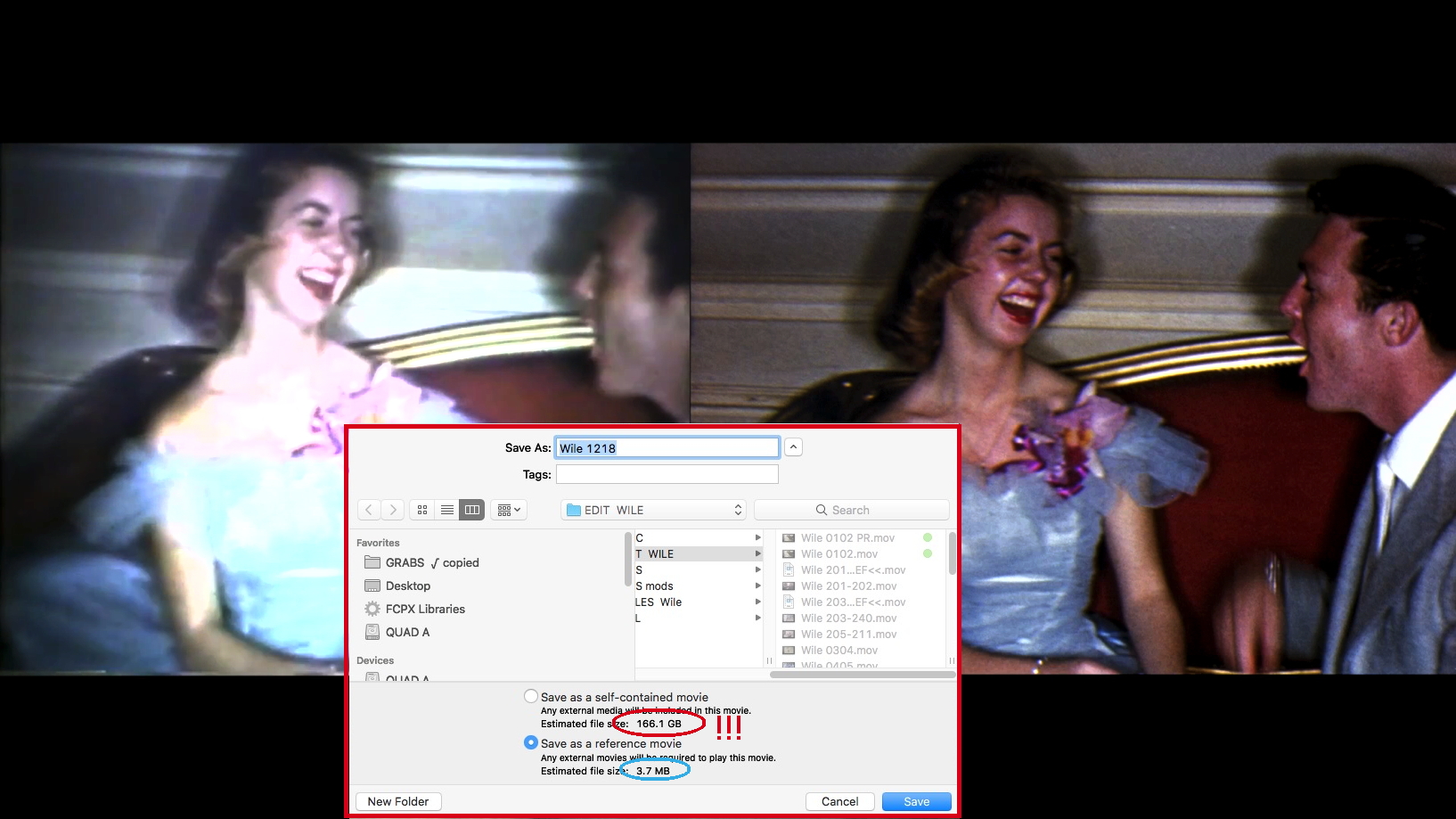
Remember this the next time you're forced to correct a title or credit having a misspelling or omission. Do the correction. Cut the errors from the master and insert the correction. SAVE AS REFERENCE MOVIE. Can't do that (multiple cuts or trims) using Quicktime Player without saving as another complete file.
Last edit: 29 Sep 2021 18:46 by VTC.
Please Log in to join the conversation.
30 Sep 2021 07:32 #116486
by haotic
Replied by haotic on topic FXPC/COMPRESSOR - Ridiculous export times
Hey joema,
Thanks for a great tip.
I did not know that u could trim vids in quickplayer. That's gonna be useful...
...BUT, I can't trim the 10h master file, dunno why but it's disabled.
If that helps i was told that the file was encoded through vimeo (something like live to file probably) and that might be the problem with really slow exports.
Thanks for a great tip.
I did not know that u could trim vids in quickplayer. That's gonna be useful...
...BUT, I can't trim the 10h master file, dunno why but it's disabled.
If that helps i was told that the file was encoded through vimeo (something like live to file probably) and that might be the problem with really slow exports.
Please Log in to join the conversation.
30 Sep 2021 09:18 - 30 Sep 2021 09:18 #116487
by joema
Replied by joema on topic FXPC/COMPRESSOR - Ridiculous export times
Quicktime Player 10 allows trimming many codecs but not all. If the video file was captured live to file, there is no telling what codec variant was used. I tried it on captures from Snagit and Zoom, and it worked on both of those. That was Quicktime Player 10.5 on Big Sur 11.6 on an iMac Pro.
Re performance of decoding and encoding long-duration H264 files, this is dependent on Intel's "Quick Sync" video acceleration. The capability of Quick Sync varied widely over the years. In general before 2017 (Kaby Lake) it had significant limitations. Your 2014 MacBook Pro has an older Intel CPU, so it might be the version of Quick Sync.
Just because it seemed to work on other files tells us little, since the internal composition of each H264 variant is different. If you had the metadata readout of a clip which seemed to export fast vs one which exported slowly, that might tell us something. A good tool for that is Invisor, which can show metadata from multiple files in a side-by-side spreadsheet-like layout: apps.apple.com/us/app/invisor-media-file...or/id442947586?mt=12
Like VTC mentioned, I formerly also used Quicktime 7 Pro to create video reference files. However since Catalina it longer works, and my recollection is it didn't work that well on Mojave: support.apple.com/en-us/HT201175
Re performance of decoding and encoding long-duration H264 files, this is dependent on Intel's "Quick Sync" video acceleration. The capability of Quick Sync varied widely over the years. In general before 2017 (Kaby Lake) it had significant limitations. Your 2014 MacBook Pro has an older Intel CPU, so it might be the version of Quick Sync.
Just because it seemed to work on other files tells us little, since the internal composition of each H264 variant is different. If you had the metadata readout of a clip which seemed to export fast vs one which exported slowly, that might tell us something. A good tool for that is Invisor, which can show metadata from multiple files in a side-by-side spreadsheet-like layout: apps.apple.com/us/app/invisor-media-file...or/id442947586?mt=12
Like VTC mentioned, I formerly also used Quicktime 7 Pro to create video reference files. However since Catalina it longer works, and my recollection is it didn't work that well on Mojave: support.apple.com/en-us/HT201175
Last edit: 30 Sep 2021 09:18 by joema.
Please Log in to join the conversation.

30 Sep 2021 13:57 #116495
by JoeEditor
Replied by JoeEditor on topic FXPC/COMPRESSOR - Ridiculous export times
"If that helps i was told that the file was encoded through vimeo..."
OH yeah, I'd let HandBreak re-encode that puppy, no matter how long it took. I don't trust Vimeo that much.
OH yeah, I'd let HandBreak re-encode that puppy, no matter how long it took. I don't trust Vimeo that much.
Please Log in to join the conversation.
30 Sep 2021 15:58 #116498
by haotic
Replied by haotic on topic FXPC/COMPRESSOR - Ridiculous export times
Yup, getting it through Handbrake resolved the issue.
After Handbrake encode I was able to trim it with quicktime and smoothly edit in FCPX.
Thank You all for your time, I really appreciate everyones help. I've learned a lot of fun stuff.
Gonna check here more often.
bye
After Handbrake encode I was able to trim it with quicktime and smoothly edit in FCPX.
Thank You all for your time, I really appreciate everyones help. I've learned a lot of fun stuff.
Gonna check here more often.
bye
Please Log in to join the conversation.
