


- Posts: 42
- Thank you received: 0
3 Post Moderation Rule for New Boarders (25 Jan 2021)
New boarders will have their posts moderated - Don't worry if you cannot see your post immediately.
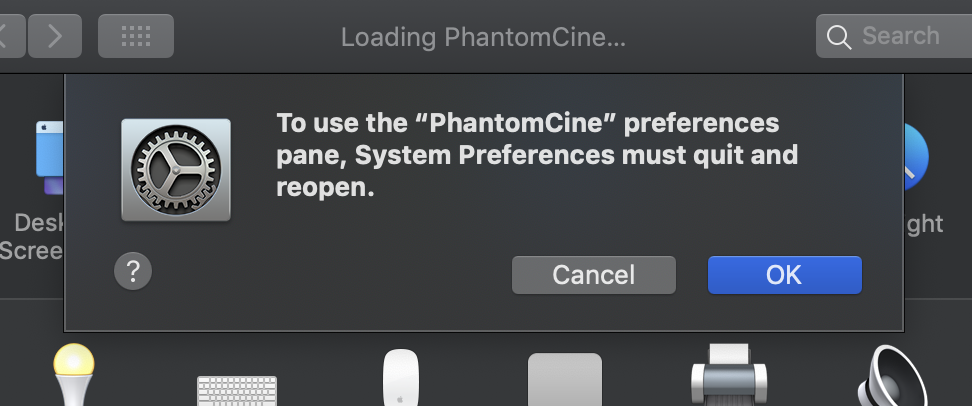
Can't get Glue Tools to work for converting Phantom Footage
- ronny courtens
-

- Offline
- Moderator
-

Less
More
- Posts: 4455
- Thank you received: 962
31 Aug 2021 18:42 #116054
by ronny courtens
Replied by ronny courtens on topic Can't get Glue Tools to work for converting Phantom Footage
If this is the Phantom Cine Toolkit for MacOS, it doesn't work on Catalina or higher and it requires QT 7.6.6 to be installed on your Mac.
- Ronny
- Ronny
Please Log in to join the conversation.
31 Aug 2021 19:25 - 31 Aug 2021 19:26 #116057
by tstiefler
Replied by tstiefler on topic Can't get Glue Tools to work for converting Phantom Footage
Oh no! Is there any other way to convert the footage?
Feels a little absurd that final cut requires a newer version to run and the plugin is being sold for mac without being able to run on fcpx. Must have missed a warning or something.
Feels a little absurd that final cut requires a newer version to run and the plugin is being sold for mac without being able to run on fcpx. Must have missed a warning or something.
Last edit: 31 Aug 2021 19:26 by tstiefler.
Please Log in to join the conversation.
- ronny courtens
-
- Offline
- Moderator
-
Less
More
- Posts: 4455
- Thank you received: 962
31 Aug 2021 20:11 - 31 Aug 2021 20:12 #116058
by ronny courtens
Replied by ronny courtens on topic Can't get Glue Tools to work for converting Phantom Footage
Unless this is footage from the Phantom Flex 4 and the clips have been recorded in ProRes, this has little to do with FCP as the clips need to be converted externally before they can be edited.
Can you tell me the kind of Phantom camera that has been used for the shoot and the format of the footage? Most Phantom RAW clips are image sequences.
- Ronny
Can you tell me the kind of Phantom camera that has been used for the shoot and the format of the footage? Most Phantom RAW clips are image sequences.
- Ronny
Last edit: 31 Aug 2021 20:12 by ronny courtens.
Please Log in to join the conversation.
- ronny courtens
-
- Offline
- Moderator
-
Less
More
- Posts: 4455
- Thank you received: 962
31 Aug 2021 20:30 #116059
by ronny courtens
Replied by ronny courtens on topic Can't get Glue Tools to work for converting Phantom Footage
If the footage is in the .Cine Raw format recorded on the Flex4K, you can use the free version of Resolve to convert it to an editable format. However, Resolve does not understand the metadata included with the CineRaw format. So, your colors may be off. You should process raw settings for CineRaw in Séance first. This is an older explanation of the process, but still valid:
www.sharegrid.com/articles/quick-post-pr...r-the-phantom-flex4k
- Ronny
www.sharegrid.com/articles/quick-post-pr...r-the-phantom-flex4k
- Ronny
Please Log in to join the conversation.
31 Aug 2021 20:45 #116060
by tstiefler
Replied by tstiefler on topic Can't get Glue Tools to work for converting Phantom Footage
It looks like that's another glue tools product. So I'm guessing it won't work with my operating system?
Please Log in to join the conversation.
- ronny courtens
-
- Offline
- Moderator
-
Less
More
- Posts: 4455
- Thank you received: 962
31 Aug 2021 21:20 #116061
by ronny courtens
Replied by ronny courtens on topic Can't get Glue Tools to work for converting Phantom Footage
Séance v3.0 Lite should work unless you have a Hackintosh, which is not supported at all.
There is a free demo mode that you can try before you buy.
- Ronny
There is a free demo mode that you can try before you buy.
- Ronny
Please Log in to join the conversation.
31 Aug 2021 21:42 #116062
by tstiefler
Replied by tstiefler on topic Can't get Glue Tools to work for converting Phantom Footage
Ok cool! So put it in seance, do something there, and then I can edit it in FCPX? Or do I need to go to Da Vinci Resolve and do something there too?
Thanks again for all your help.
Thanks again for all your help.
Please Log in to join the conversation.
- ronny courtens
-
- Offline
- Moderator
-
Less
More
- Posts: 4455
- Thank you received: 962
31 Aug 2021 21:50 #116063
by ronny courtens
Replied by ronny courtens on topic Can't get Glue Tools to work for converting Phantom Footage
My pleasure. Do you have the Phantom files on an external drive or are they still on Cinemag camera drives?
- Ronny
- Ronny
Please Log in to join the conversation.
- ronny courtens
-
- Offline
- Moderator
-
Less
More
- Posts: 4455
- Thank you received: 962
31 Aug 2021 22:10 #116066
by ronny courtens
Replied by ronny courtens on topic Can't get Glue Tools to work for converting Phantom Footage
It’s past midnight here, so I’m off to bed. If the Phantom footage is on an external drive, you won’t need Séance at all. Just read the explanation in the link I have posted and follow the steps starting at “Import”
- Ronny
- Ronny
Please Log in to join the conversation.
