



- Posts: 1
- Thank you received: 0
3 Post Moderation Rule for New Boarders (25 Jan 2021)
New boarders will have their posts moderated - Don't worry if you cannot see your post immediately.
How would I achieve these audio filters from FCPX in a live setting?
28 Aug 2021 00:48 #116010
by cruxal
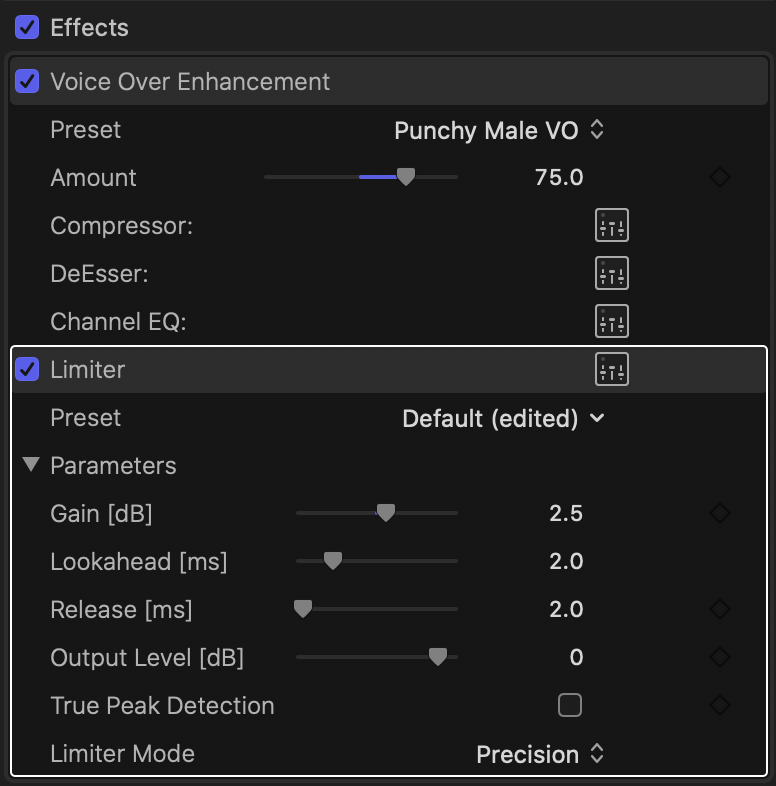
Hey everyone! So I have what I like to call my "secret weapon" for voiceovers and it's basically a combination of a Limiter (+2.5db gain) & Voice Over Enhancement (set to Punchy Male VO @75%) and I'm trying to figure out how I would apply similar filters to my voice live on a PC for streaming on twitch (in a way that puts as little strain on my CPU as possible.)
My current setup I was attempting was basically recreating these filters in Adobe Audition, turning on input monitoring and routing the audio to a program called Virtual Audio Cable which works okay but there's lots of latency and it uses a lot of CPU power. I have an i7 8086k so it's not terrible but streaming gets iffy when I try to do it this way.
If anyone knows of a way that I could replicate these effects that might be better on my CPU I would be soooo appreciative as I've been racking my brain on this for so long and It's not something I can really just google to find help with as many people don't even know VO enhancement exists in FCPX and it works wonders on my USB mic.
I have been considering upgrading to a Shure SM7B with an interface so maybe I could buy guitar pedals for the specific effects like EQ and compressor? I play guitar and have been wanting to get pedals anyways so It wouldn't only be for this specific purpose lol. I really have no idea like I said so let me know if you do.
Below are my settings for these filters in FCPX that i'm hoping to replicate.
My current setup I was attempting was basically recreating these filters in Adobe Audition, turning on input monitoring and routing the audio to a program called Virtual Audio Cable which works okay but there's lots of latency and it uses a lot of CPU power. I have an i7 8086k so it's not terrible but streaming gets iffy when I try to do it this way.
If anyone knows of a way that I could replicate these effects that might be better on my CPU I would be soooo appreciative as I've been racking my brain on this for so long and It's not something I can really just google to find help with as many people don't even know VO enhancement exists in FCPX and it works wonders on my USB mic.
I have been considering upgrading to a Shure SM7B with an interface so maybe I could buy guitar pedals for the specific effects like EQ and compressor? I play guitar and have been wanting to get pedals anyways so It wouldn't only be for this specific purpose lol. I really have no idea like I said so let me know if you do.
Below are my settings for these filters in FCPX that i'm hoping to replicate.
Please Log in to join the conversation.


28 Aug 2021 14:07 - 28 Aug 2021 14:29 #116015
by thinkfilm
Replied by thinkfilm on topic How would I achieve these audio filters from FCPX in a live setting?
Hi,
If I understand correctly what you are trying to do - Audio Hijack is an excellent tool for this job : rogueamoeba.com/audiohijack/
EDIT: Sorry, I re-read your post and I see you may be using a Windows machine for streaming? Audio Hijack is Mac-only. I did Google this which may help: alternativeto.net/software/audio-hijack-pro/?platform=windows
If I understand correctly what you are trying to do - Audio Hijack is an excellent tool for this job : rogueamoeba.com/audiohijack/
EDIT: Sorry, I re-read your post and I see you may be using a Windows machine for streaming? Audio Hijack is Mac-only. I did Google this which may help: alternativeto.net/software/audio-hijack-pro/?platform=windows
Last edit: 28 Aug 2021 14:29 by thinkfilm.
Please Log in to join the conversation.
