




- Posts: 3
- Thank you received: 0
3 Post Moderation Rule for New Boarders (25 Jan 2021)
New boarders will have their posts moderated - Don't worry if you cannot see your post immediately.
I can no longer see Master File in my destination options
- ronny courtens
-

- Offline
- Moderator
-

Less
More
- Posts: 4455
- Thank you received: 962
21 Aug 2021 02:22 #115888
by ronny courtens
Replied by ronny courtens on topic I can no longer see Master File in my destination options
Welcome to the forums!
First thing you can try is to delete your FCP preferences: quit FCP and launch it again while holding de Option + Command Kays pressed down. You will get a message asking if you want to delete your preferences. Confirm and let FCP open. Check if you have your Master File destination back.
- Ronny
First thing you can try is to delete your FCP preferences: quit FCP and launch it again while holding de Option + Command Kays pressed down. You will get a message asking if you want to delete your preferences. Confirm and let FCP open. Check if you have your Master File destination back.
- Ronny
Please Log in to join the conversation.
21 Aug 2021 08:25 - 21 Aug 2021 08:37 #115890
by Revenger
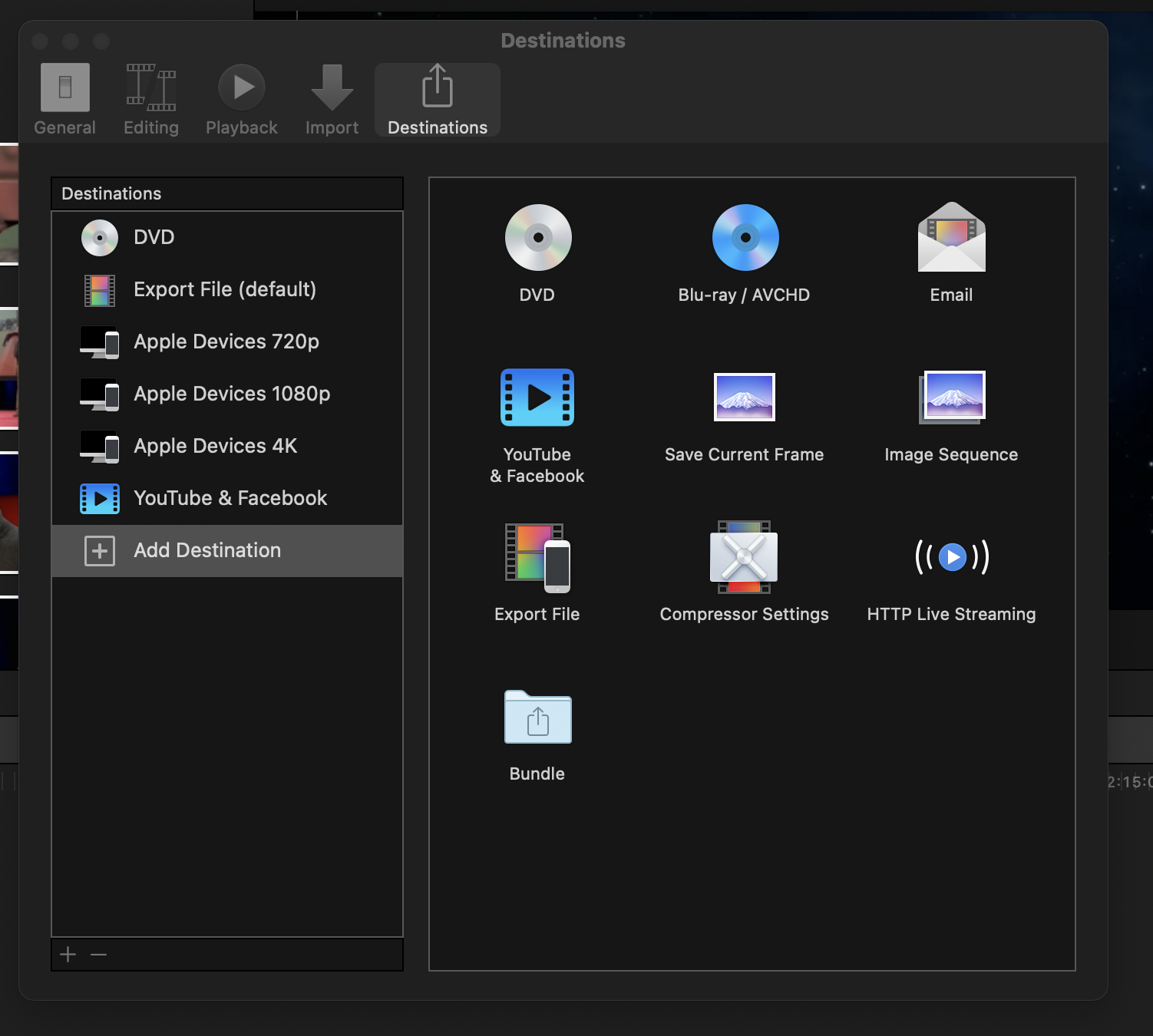 Thanks Ronny - I had tried that - but I have since done it again to no effect. I uninstalled the program and downloaded it an did a fresh install and the problem is still there. No access or option to output to Master File. Any other suggestions?
Replied by Revenger on topic I can no longer see Master File in my destination options
Last edit: 21 Aug 2021 08:37 by Revenger.
Please Log in to join the conversation.
- ronny courtens
-
- Offline
- Moderator
-
Less
More
- Posts: 4455
- Thank you received: 962
21 Aug 2021 08:36 #115891
by ronny courtens
Replied by ronny courtens on topic I can no longer see Master File in my destination options
Export File is the same as Master File. You are not missing anything, it's just a different name for the same thing.
This thread explains why you can see a different name:
www.fcp.co/forum/4-final-cut-pro-x-fcpx/...hat-s-the-difference
But it really doesn't matter, it's the same function.
- Ronny
This thread explains why you can see a different name:
www.fcp.co/forum/4-final-cut-pro-x-fcpx/...hat-s-the-difference
But it really doesn't matter, it's the same function.
- Ronny
Please Log in to join the conversation.


21 Aug 2021 13:22 #115894
by JoeEditor
Replied by JoeEditor on topic I can no longer see Master File in my destination options
All Apple does is put the "Export File" into the left-hand column and rename it "Master File".
Please Log in to join the conversation.
