


- Posts: 65
- Thank you received: 3
3 Post Moderation Rule for New Boarders (25 Jan 2021)
New boarders will have their posts moderated - Don't worry if you cannot see your post immediately.
What Does This Grey Box in Compressor Mean
05 Aug 2021 00:55 #115656
by dgbarar
What Does This Grey Box in Compressor Mean was created by dgbarar
Hello All:
Currently running FCP 10.5.4, Compressor 4.5.4 on an M1 Mac Mini operating under 11.5.1. After successfully sending numerous files from FCP to Compressor for encoding this happened today for the first time. After selecting selecting a file type in Compressor I get this grey box. It does not encode.
I have seen this in the past on an Intel based Mac. However, the grey box did encode. I never received a satisfactory response from Apple on how to resolve. But I did get it to go away when I installed a fresh version of the operating system.
In any case I would like to know what this grey box means and how to resolve without resorting to re-installing the operating system.
Thank you in advance.
Don Barar
Currently running FCP 10.5.4, Compressor 4.5.4 on an M1 Mac Mini operating under 11.5.1. After successfully sending numerous files from FCP to Compressor for encoding this happened today for the first time. After selecting selecting a file type in Compressor I get this grey box. It does not encode.
I have seen this in the past on an Intel based Mac. However, the grey box did encode. I never received a satisfactory response from Apple on how to resolve. But I did get it to go away when I installed a fresh version of the operating system.
In any case I would like to know what this grey box means and how to resolve without resorting to re-installing the operating system.
Thank you in advance.
Don Barar

Please Log in to join the conversation.


05 Aug 2021 14:32 #115658
by VTC
Replied by VTC on topic What Does This Grey Box in Compressor Mean
Seems there's an empty drop zone well in one of the effects used in Final Cut. Compressor can't so anything but encode what you give it so check your FCP project first.
Please Log in to join the conversation.
- ronny courtens
-

- Offline
- Moderator
-

Less
More
- Posts: 4455
- Thank you received: 962
05 Aug 2021 16:50 #115663
by ronny courtens
Replied by ronny courtens on topic What Does This Grey Box in Compressor Mean
Correct. First check if the image in the drop zone shows in FCP. If the drop zone image shows in your FCP project but not in Compressor, the fastest workaround is to export a Master File from FCP and drop that Master File in Compressor to do the final transcode.
- Ronny
- Ronny
Please Log in to join the conversation.
05 Aug 2021 18:24 #115666
by dgbarar
Replied by dgbarar on topic What Does This Grey Box in Compressor Mean
Hi Ron and VTC:
Thank you for this information. Ron, your suggestion of exporting a master file first from FCP then using Compressor for the final encoding has been my work-around.
However, I do not understand the concept of "drop-zone". I read Larry Jordens explanation but I still do not understand. Can you guys enlighten me or provide some URLs that speak more to the topic of "drop-zone".
Don
Thank you for this information. Ron, your suggestion of exporting a master file first from FCP then using Compressor for the final encoding has been my work-around.
However, I do not understand the concept of "drop-zone". I read Larry Jordens explanation but I still do not understand. Can you guys enlighten me or provide some URLs that speak more to the topic of "drop-zone".
Don
Please Log in to join the conversation.
- ronny courtens
-
- Offline
- Moderator
-
Less
More
- Posts: 4455
- Thank you received: 962
05 Aug 2021 19:09 #115667
by ronny courtens
Replied by ronny courtens on topic What Does This Grey Box in Compressor Mean
Hi Don,
Bret Williams has published an excellent tutorial on drop zones in Final Cut Pro:
Hope this helps.
- Ronny
Bret Williams has published an excellent tutorial on drop zones in Final Cut Pro:
Hope this helps.
- Ronny
Please Log in to join the conversation.
05 Aug 2021 19:45 - 05 Aug 2021 19:57 #115668
by VTC
Replied by VTC on topic What Does This Grey Box in Compressor Mean
Something missing either in the FCP project or Compressor's not picking it up in the reference. If the well does have an item in it, swap it for something else then send that segment to Compressor. If the arrow box then disappears replace that temp insert with what you originally intended. It should pick up the change outs successfully.
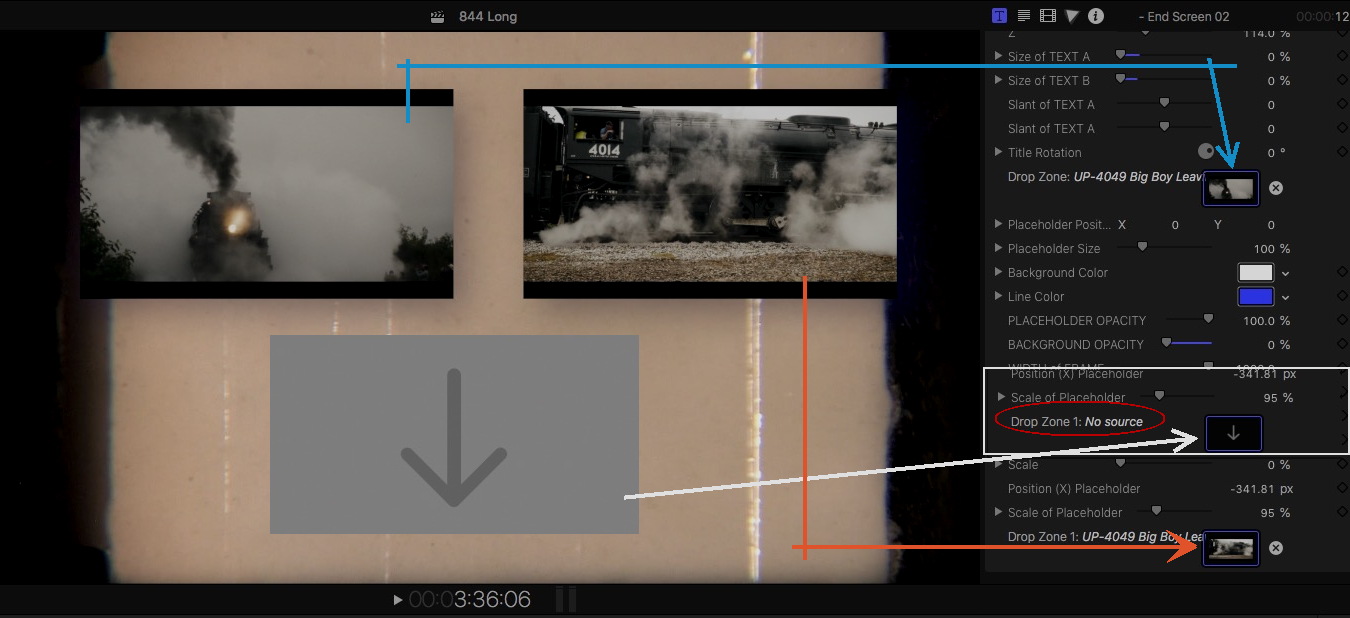
If you don't have anything or want to place in that drop zone / well (say you're using a 3 drop zone template and you only want to use two of them) there should be a way to make that one element disappear, usually by changing the opacity (to zero) or by scaling it to zero.
If you don't have anything or want to place in that drop zone / well (say you're using a 3 drop zone template and you only want to use two of them) there should be a way to make that one element disappear, usually by changing the opacity (to zero) or by scaling it to zero.
Last edit: 05 Aug 2021 19:57 by VTC.
Please Log in to join the conversation.
06 Aug 2021 00:38 #115670
by dgbarar
Replied by dgbarar on topic What Does This Grey Box in Compressor Mean
Hi Ron:
Thank you for the video on Drop Zones. I now understand the concept. However, there are no drop zones in this FCPX project. The only motion templates that I have used are adjustments layers that created in Motion--these have no drop zones associated with them. This project is very simple a few video clips with adjustment layers.
Incidentally, I decided to save the project to a new library. When I send the new project (from the new library) to Compressor no grey boxes appear.
Does this help?
Don
Thank you for the video on Drop Zones. I now understand the concept. However, there are no drop zones in this FCPX project. The only motion templates that I have used are adjustments layers that created in Motion--these have no drop zones associated with them. This project is very simple a few video clips with adjustment layers.
Incidentally, I decided to save the project to a new library. When I send the new project (from the new library) to Compressor no grey boxes appear.
Does this help?
Don
Please Log in to join the conversation.
