




- Posts: 3
- Thank you received: 0
3 Post Moderation Rule for New Boarders (25 Jan 2021)
New boarders will have their posts moderated - Don't worry if you cannot see your post immediately.
Large Edited video download error...HELP
20 Jul 2021 14:07 #115492
by TomG333
Large Edited video download error...HELP was created by TomG333
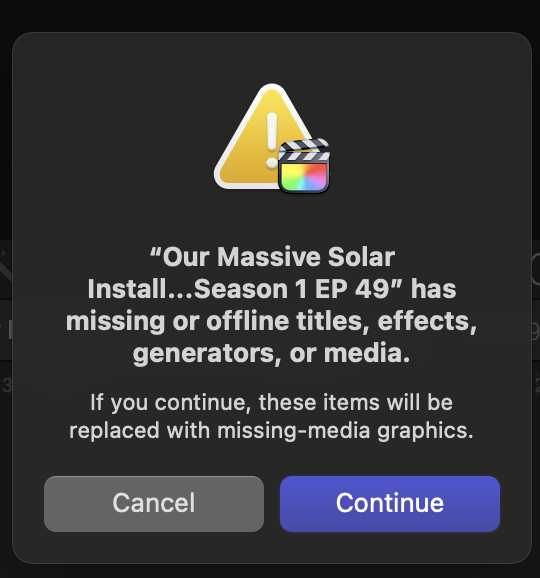
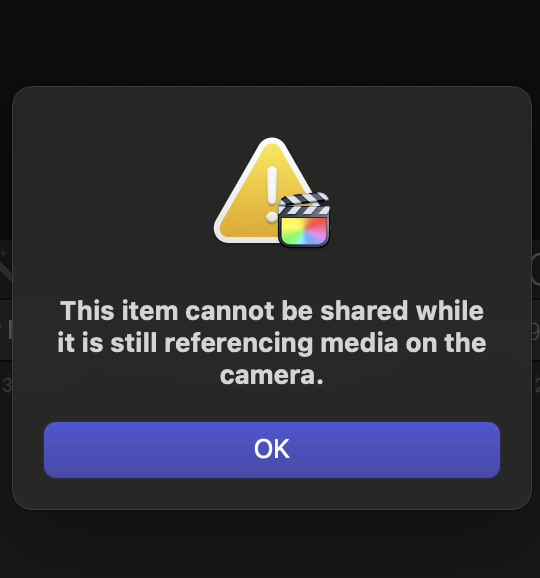
I edited a large file video to download to me desktop and then to youtube. I keep getting an error message, I have no camera files loading or in the progress of loading, see captured screen. This video took me several hours and I need help downloading and solving this problem. I can't go further than the errors.
Please Log in to join the conversation.


20 Jul 2021 19:49 #115494
by VidGreg
Replied by VidGreg on topic Large Edited video download error...HELP
Hi Tom
Just from the 2 images posted, looks like FCP cannot find the imported media files. The second image noting Camera card files, suggests that FCP did not finish importing the files off the camera card. Is it possible that you pulled the card out before FCP finished the import process? Importing is done in the background and is suspended while editing. It is possible to start editing while the importing is taking place and if you don't check the background process for importing, you might pull the card early, or quit FCP before the process is 100% finished.
It is also possible that you do have the complete files, but FCP just cannot find them. This will also throw a Missing Files Yellow Triangle on the missing clips. You can often just re-link, but I think the files never made it into FCP from the camera card.
If you still have the involved camera card(s), you might be able to re-import the media and then be able to reLink or replace the clips involved.
Hope this Helps, Greg
Just from the 2 images posted, looks like FCP cannot find the imported media files. The second image noting Camera card files, suggests that FCP did not finish importing the files off the camera card. Is it possible that you pulled the card out before FCP finished the import process? Importing is done in the background and is suspended while editing. It is possible to start editing while the importing is taking place and if you don't check the background process for importing, you might pull the card early, or quit FCP before the process is 100% finished.
It is also possible that you do have the complete files, but FCP just cannot find them. This will also throw a Missing Files Yellow Triangle on the missing clips. You can often just re-link, but I think the files never made it into FCP from the camera card.
If you still have the involved camera card(s), you might be able to re-import the media and then be able to reLink or replace the clips involved.
Hope this Helps, Greg
Please Log in to join the conversation.
20 Jul 2021 20:04 #115496
by TomG333
Replied by TomG333 on topic Large Edited video download error...HELP
I thought that may have been the problem so I deleted the two parts that I had just added to be edited and I got the same results. See I had been putting several video clips on the timeline over the past week and just needed to ad two small clips. Once I finished I tried to download the finished video to my desktop and then to youtube. I have uploaded over 50 video's in the past and never had this problem. The thought of re-editing the video from my video clips on the hard-drive in giving me a headache.
Please Log in to join the conversation.
20 Jul 2021 20:06 #115497
by TomG333
Replied by TomG333 on topic Large Edited video download error...HELP
Another thing is I can play the timeline and it appears perfect, the video just will not download to the desktop because of the warning.
Please Log in to join the conversation.

21 Jul 2021 01:19 #115502
by JoeEditor
Replied by JoeEditor on topic Large Edited video download error...HELP
Try ignoring the warning and export anyway. What happens?
Also, from the Browser, right-click one each video file used, one by one, and select Show In Finder.
Also, from the Browser, right-click one each video file used, one by one, and select Show In Finder.
Please Log in to join the conversation.

21 Jul 2021 14:18 #115503
by joema
The error messages are: "...has missing or offline titles, effects, generators or media", and "This item cannot be shared while it is still referencing media on the camera".
I know you said you have no camera files loading, but the 2nd error message is often seen in that case. It commonly happens when media is imported from a camera card and the import interrupted.
Ben Halsall discusses that in this video:
You can also verify the location of all media files. Those files may be either imported within the library, or could be "referenced media" pointed to by symlinks. Unfortunately there is no built-in FCP command which will list all those media file pathnames. There is a 3rd-party product Final Cut Library Manager which has an optional feature that creates a .csv file for all files in a library: www.arcticwhiteness.com/finalcutlibrarymanager/
If you are familiar with terminal you can go inside the library bundle and list all the media files and the resolved symlinks. Example (using my own library names):
cd ~/Movies/LibraryName.fcpbundle/EventName/Original\ Media
ls -l
In case there are missing templates you could try the free 3rd-party tool X-Library Check: www.spherico.com/filmtools/
Replied by joema on topic Large Edited video download error...HELP
TomG333 wrote: ...I keep getting an error message, I have no camera files loading or in the progress of loading, see captured screen....
The error messages are: "...has missing or offline titles, effects, generators or media", and "This item cannot be shared while it is still referencing media on the camera".
I know you said you have no camera files loading, but the 2nd error message is often seen in that case. It commonly happens when media is imported from a camera card and the import interrupted.
Ben Halsall discusses that in this video:
You can also verify the location of all media files. Those files may be either imported within the library, or could be "referenced media" pointed to by symlinks. Unfortunately there is no built-in FCP command which will list all those media file pathnames. There is a 3rd-party product Final Cut Library Manager which has an optional feature that creates a .csv file for all files in a library: www.arcticwhiteness.com/finalcutlibrarymanager/
If you are familiar with terminal you can go inside the library bundle and list all the media files and the resolved symlinks. Example (using my own library names):
cd ~/Movies/LibraryName.fcpbundle/EventName/Original\ Media
ls -l
In case there are missing templates you could try the free 3rd-party tool X-Library Check: www.spherico.com/filmtools/
Please Log in to join the conversation.
22 Jul 2021 14:50 #115508
by VidGreg
Replied by VidGreg on topic Large Edited video download error...HELP
Hey Joema
Just want to say Thank You for your contributions to this forum.
The link to Ben Halsall video is great. If a picture is worth a 1,000 words, a video with a 1,000 words must be worth 100,000 words, so glad I'm not trying to write them. The vid explains everything I was trying to say.
Thanks for all the Terminal commands as well.
Have a great day and Happy Editing
Greg
Just want to say Thank You for your contributions to this forum.
The link to Ben Halsall video is great. If a picture is worth a 1,000 words, a video with a 1,000 words must be worth 100,000 words, so glad I'm not trying to write them. The vid explains everything I was trying to say.
Thanks for all the Terminal commands as well.
Have a great day and Happy Editing
Greg
Please Log in to join the conversation.
