




- Posts: 28
- Thank you received: 0
3 Post Moderation Rule for New Boarders (25 Jan 2021)
New boarders will have their posts moderated - Don't worry if you cannot see your post immediately.
Why do longer videos have choppy playback when at the 2+ hour mark?
28 Jun 2021 14:30 #115253
by Shadowfax
Playback is perfect to begin with, but if I skip ahead to around the 2 hour mark, playback suddenly becomes choppy/laggy. If I go back to the beginning, playback is fine again, so it's not like my computer is being overworked or anything. Also, I have plenty of free space and RAM.
Please Log in to join the conversation.
- Tom Wolsky
-

- Offline
- Moderator
-

28 Jun 2021 17:16 #115257
by Tom Wolsky
Replied by Tom Wolsky on topic Why do longer videos have choppy playback when at the 2+ hour mark?
What's the computer and drives? What's are the media specs? What are the project properties? What OS? What FCP version?
Please Log in to join the conversation.
29 Jun 2021 00:02 #115263
by Shadowfax


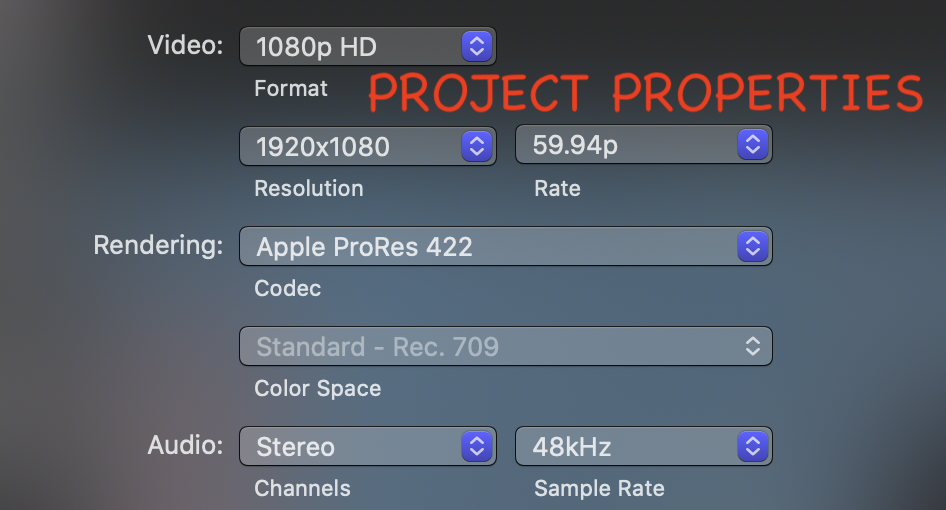
Replied by Shadowfax on topic Why do longer videos have choppy playback when at the 2+ hour mark?
FCP 10.5.3Tom Wolsky wrote: What's the computer and drives? What's are the media specs? What are the project properties? What OS? What FCP version?
Please Log in to join the conversation.


01 Jul 2021 12:12 #115290
by joema
Replied by joema on topic Why do longer videos have choppy playback when at the 2+ hour mark?
One possibility is you have effects at the 2 hr mark that slow down the timeline. Try making a snapshot duplicate of the timeline, open that, remove all Fx via CMD+A to select and Edit>Remove Effects. Then check playback smoothness at various points on the timeline, esp. the 2 hr mark.
Another possibility is you're using background rendering and it hasn't had a chance to auto-render to cache the 2 hr point. For evaluating things like this it's often best to disable background rendering in FCP preferences, delete all render files via File>Delete Generated Library Files>Delete Render Files>All. That avoids performance variation caused by various timeline regions being rendered vs not rendered.
After removing all Fx from a snapshot of the timeline, if it's still slow, please post the detailed media characteristics. You can do that by using the 3rd-party tool MediaInfo or Invisor. I personally like Invisor because it has a side-by-side comparison mode that allows inspection of multiple clip metadata in an Excel-like grid: apps.apple.com/us/app/invisor-media-file...or/id442947586?mt=12
Another possibility is you're using background rendering and it hasn't had a chance to auto-render to cache the 2 hr point. For evaluating things like this it's often best to disable background rendering in FCP preferences, delete all render files via File>Delete Generated Library Files>Delete Render Files>All. That avoids performance variation caused by various timeline regions being rendered vs not rendered.
After removing all Fx from a snapshot of the timeline, if it's still slow, please post the detailed media characteristics. You can do that by using the 3rd-party tool MediaInfo or Invisor. I personally like Invisor because it has a side-by-side comparison mode that allows inspection of multiple clip metadata in an Excel-like grid: apps.apple.com/us/app/invisor-media-file...or/id442947586?mt=12
Please Log in to join the conversation.
