



- Posts: 272
- Thank you received: 2
3 Post Moderation Rule for New Boarders (25 Jan 2021)
New boarders will have their posts moderated - Don't worry if you cannot see your post immediately.
Share to Apple Devices 1080p is suddenly pixellated after upgrade, migration
24 Jun 2021 05:40 - 24 Jun 2021 05:41 #115139
by Slaughter
Share to Apple Devices 1080p is suddenly pixellated after upgrade, migration was created by Slaughter
Prior to upgrading my imac and migrating over,and prior to upgrading from FCPX 10.4.6 > 10.4.10I could happily export (“share”) as follows and the video quality was virtually indistinguishable from a Master export:
Share > Apple Devices 1080p > Format = ComputerCodec = H2.64 Better QualityResiolution = 1280 x 720Colour space = Rec 709
All of a sudden, since the upgrade and migration, such a share produces a very pixellated looking output - which is particularly apparent with text cards such as the screenshot attached.One screenshot - the clean, nice looking one - is from a MASTER export, the other is from Apple Devices 1080p export.I’ve never seen FCPX do this before.
Because I need to keep file sizes manageable, especially when sending files to the person paying me to do a job - I’m now forced to export a huge master file and then run the thing though a third party app (FF-Works) to create a file that is not only even smaller in size than the Apple Devices 1080p FCPX file but looks as crisp as it should, with no pixellation apparent. This all demonstrates that FCPX has magically decided to start handling its 1080p export process differently, ie degrades the footage in a way that it never has previously.
I have tried trashing prefs this made no difference.
Has anyone else encountered this inexplicable change in behaviour, and is there a solution?
imac pro 2019
Mojave 10.14.6 (can't upgrade as Pro Tools is too expensive to upgrade)
FCPX 10.4.10 (can't upgrade as can't uprade past Mojave for above stated reason)
Share > Apple Devices 1080p > Format = ComputerCodec = H2.64 Better QualityResiolution = 1280 x 720Colour space = Rec 709
All of a sudden, since the upgrade and migration, such a share produces a very pixellated looking output - which is particularly apparent with text cards such as the screenshot attached.One screenshot - the clean, nice looking one - is from a MASTER export, the other is from Apple Devices 1080p export.I’ve never seen FCPX do this before.
Because I need to keep file sizes manageable, especially when sending files to the person paying me to do a job - I’m now forced to export a huge master file and then run the thing though a third party app (FF-Works) to create a file that is not only even smaller in size than the Apple Devices 1080p FCPX file but looks as crisp as it should, with no pixellation apparent. This all demonstrates that FCPX has magically decided to start handling its 1080p export process differently, ie degrades the footage in a way that it never has previously.
I have tried trashing prefs this made no difference.
Has anyone else encountered this inexplicable change in behaviour, and is there a solution?
imac pro 2019
Mojave 10.14.6 (can't upgrade as Pro Tools is too expensive to upgrade)
FCPX 10.4.10 (can't upgrade as can't uprade past Mojave for above stated reason)


Last edit: 24 Jun 2021 05:41 by Slaughter. Reason: my formatting was not adhered to
Please Log in to join the conversation.
26 Jun 2021 10:15 #115192
by Slaughter
Replied by Slaughter on topic Share to Apple Devices 1080p is suddenly pixellated after upgrade, migration
Anyone experienced this issue before?
Please Log in to join the conversation.
- ronny courtens
-

- Offline
- Moderator
-

Less
More
- Posts: 4455
- Thank you received: 962
26 Jun 2021 12:54 #115194
by ronny courtens
Replied by ronny courtens on topic Share to Apple Devices 1080p is suddenly pixellated after upgrade, migration
Nope, never have seen this before. And it looks like no-one else has seen this either.
So I did a test, exporting a clip with a title using the exact setting you have described:

Then I compared the original title in FCP side-by-side with the exported H.264 and an exported ProRes 422 Master file:
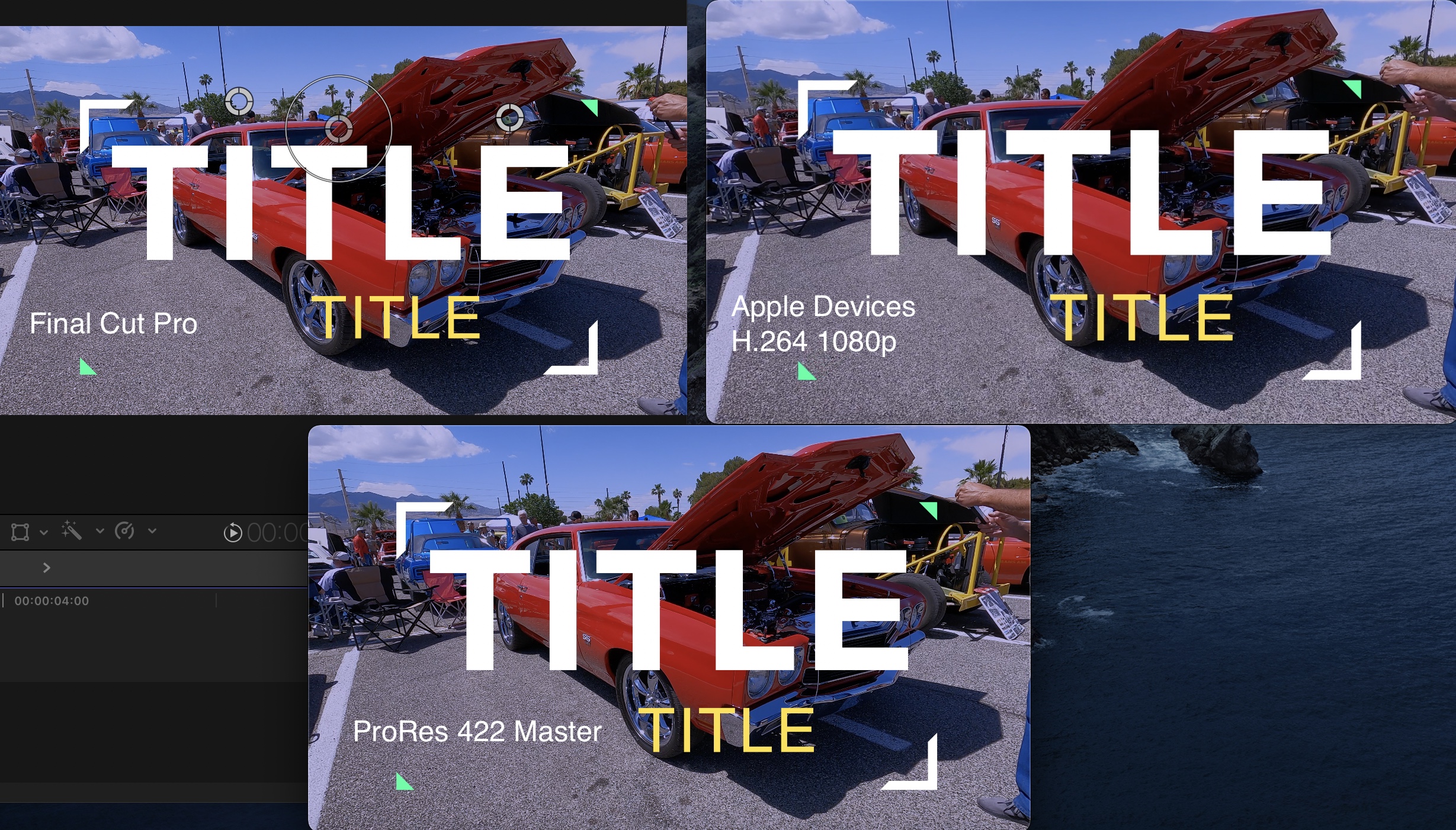
I can see no real difference in the titles, and certainly not the kind of pixelation you have.
Of course, I'm not running an older OS nor an older version of FCP. But I haven't seen any similar reports in the past years either, where the master file is crisp and only the H.264 export is as pixelated as you show it to be.
So yes, this could be related to the migration and the updates. Actually, any issues you have reported lately seem to relate to this. So my question would be: why don't you downgrade again to the OS and FCP version that worked for you?
Or you could keep your current OS for your old ProTools which seems to work with this configuration, and use a fast external SSD as a second boot drive with the latest OS and FCP versions. Best of both worlds. This is how you can do this: https://eshop.macsales.com/blog/55907-using-an-external-drive-as-your-startup-drive-part-1/
- Ronny
So I did a test, exporting a clip with a title using the exact setting you have described:
Then I compared the original title in FCP side-by-side with the exported H.264 and an exported ProRes 422 Master file:
I can see no real difference in the titles, and certainly not the kind of pixelation you have.
Of course, I'm not running an older OS nor an older version of FCP. But I haven't seen any similar reports in the past years either, where the master file is crisp and only the H.264 export is as pixelated as you show it to be.
So yes, this could be related to the migration and the updates. Actually, any issues you have reported lately seem to relate to this. So my question would be: why don't you downgrade again to the OS and FCP version that worked for you?
Or you could keep your current OS for your old ProTools which seems to work with this configuration, and use a fast external SSD as a second boot drive with the latest OS and FCP versions. Best of both worlds. This is how you can do this: https://eshop.macsales.com/blog/55907-using-an-external-drive-as-your-startup-drive-part-1/
- Ronny
Please Log in to join the conversation.
- ronny courtens
-
- Offline
- Moderator
-
Less
More
- Posts: 4455
- Thank you received: 962
26 Jun 2021 13:06 #115197
by ronny courtens
Replied by ronny courtens on topic Share to Apple Devices 1080p is suddenly pixellated after upgrade, migration
Something just came to my mind. Have you actually been moving from an older computer to this iMac Pro and was the timeline you try to export created on the older Mac? In that case, do a test: create a new Library in FCP, create a new Project with a title and try to export that to H.264. Is it still pixelated?
- Ronny
- Ronny
Please Log in to join the conversation.
26 Jun 2021 13:10 #115198
by Slaughter
Replied by Slaughter on topic Share to Apple Devices 1080p is suddenly pixellated after upgrade, migration
That's a good idea Ronny, I will try this.
Was about to post the following reply - I may as well complete it - but yes, your suggestion makes sense. Will take a look tomorrow (it's near midnight here in Oz) and report back....
Thanks,
I am on the same OS, no change there.
I don't want to downgrade from my 2019 imac pro back to my old 2014 imac - for obvious reasons. I don't think you were actually suggesting this but hanging computers may well have caused the problem - it shouldn't have - but it may have - and if so, the only solution is to work out why FCPX has magically changed its behaviour in this context because my 2014 imac can't handle a 4k workload.
If it's 10.4.10 that is the problem - this is VERY strange - as you say, nobody else seems to have this issue.
I am not sure that I can downgrade to FCPX 10.4.6, because I had to *upgrade my libraries* to work with 10.4.10. Are libraries *backward* compatible? I'm loathe to risk it. I can back everything up, but gosh, this is a length to go to over an issue that shouldn't be an issue.
If the only way to address the problem is to go back to 10.4.6 - presuming my libraries can be backwards - read (I am not going to redo the 30-40 hours of work I have completed since upgrading) - then I'd at least like to give it another week or so to see if I am literally the only person on the planet who reads this forum for whom a 1080p export suddenly, inexplicably, illogically produces a low resolution mess.
There must be some setting that was changed thanks to Apple's rubbish "migration" process which doesn't really migrate everything at all...
Was about to post the following reply - I may as well complete it - but yes, your suggestion makes sense. Will take a look tomorrow (it's near midnight here in Oz) and report back....
Thanks,
I am on the same OS, no change there.
I don't want to downgrade from my 2019 imac pro back to my old 2014 imac - for obvious reasons. I don't think you were actually suggesting this but hanging computers may well have caused the problem - it shouldn't have - but it may have - and if so, the only solution is to work out why FCPX has magically changed its behaviour in this context because my 2014 imac can't handle a 4k workload.
If it's 10.4.10 that is the problem - this is VERY strange - as you say, nobody else seems to have this issue.
I am not sure that I can downgrade to FCPX 10.4.6, because I had to *upgrade my libraries* to work with 10.4.10. Are libraries *backward* compatible? I'm loathe to risk it. I can back everything up, but gosh, this is a length to go to over an issue that shouldn't be an issue.
If the only way to address the problem is to go back to 10.4.6 - presuming my libraries can be backwards - read (I am not going to redo the 30-40 hours of work I have completed since upgrading) - then I'd at least like to give it another week or so to see if I am literally the only person on the planet who reads this forum for whom a 1080p export suddenly, inexplicably, illogically produces a low resolution mess.
There must be some setting that was changed thanks to Apple's rubbish "migration" process which doesn't really migrate everything at all...
Please Log in to join the conversation.
- ronny courtens
-
- Offline
- Moderator
-
Less
More
- Posts: 4455
- Thank you received: 962
26 Jun 2021 13:17 #115199
by ronny courtens
Replied by ronny courtens on topic Share to Apple Devices 1080p is suddenly pixellated after upgrade, migration
FCP is very tightly integrated with the OS and with the hardware. That's why it's so blazing fast. But that's also why migrating projects from an older configuration to a newer one can cause issues because so much changes under the hood with every update.
If you don't have these issues with a brand-new FCP project but only with projects that were created on the old configuration, you might try to just copy/paste the old projects into a fresh timeline. Fingers crossed.
Have a good night and let us know how it goes.
- Ronny
If you don't have these issues with a brand-new FCP project but only with projects that were created on the old configuration, you might try to just copy/paste the old projects into a fresh timeline. Fingers crossed.
Have a good night and let us know how it goes.
- Ronny
Please Log in to join the conversation.


26 Jun 2021 21:10 #115203
by joema
I have a 2017 10-core iMac Pro. I tried this on FCP 10.5.3 and I don't see it.
Is that a built-in FCP font or is it a 3rd-party effect? If so can you reproduce this by selecting a similar built-in FCP font of similar size and color? Is it possible it might be an incompatibility problem with a 3rd-party effect or font?
Replied by joema on topic Share to Apple Devices 1080p is suddenly pixellated after upgrade, migration
Slaughter wrote: ...There must be some setting that was changed thanks to Apple's rubbish "migration" process which doesn't really migrate everything at all...
I have a 2017 10-core iMac Pro. I tried this on FCP 10.5.3 and I don't see it.
Is that a built-in FCP font or is it a 3rd-party effect? If so can you reproduce this by selecting a similar built-in FCP font of similar size and color? Is it possible it might be an incompatibility problem with a 3rd-party effect or font?
Please Log in to join the conversation.
27 Jun 2021 03:00 - 27 Jun 2021 03:09 #115211
by Slaughter
Replied by Slaughter on topic Share to Apple Devices 1080p is suddenly pixellated after upgrade, migration
This gets stranger and stranger.
Joema: These text cards are all JPGs or PSD. I create all text cards in PS, flatten and export as JPGs, so not font business in FCPX at all.
Ronny: Wow, this is weird.It makes no difference whether I am exporting from a timeline I have been working on since the old config, or if I create a brand new one within a new project and event.
WHITE / BW seems to be fine (ah... what the?)
There's an issue with colours, especially red. Take a look at the "STILL" ie photo comparison (you'll have to zoom in closely to the red component of the image to see the pixellation).


Take note of the BW component which is relatively ok in the 1080p export, but the colour component is awful.Same with text - white text seems fine, coloured is not so fine.What.... on earth... is going on here?


PS the reason there are several "old post text deleted" posts above (aside from the fact that users cannot delete posts) is that this form is very clunky when it comes to attachments and I had to make several attempts to have them all appear.
Joema: These text cards are all JPGs or PSD. I create all text cards in PS, flatten and export as JPGs, so not font business in FCPX at all.
Ronny: Wow, this is weird.It makes no difference whether I am exporting from a timeline I have been working on since the old config, or if I create a brand new one within a new project and event.
WHITE / BW seems to be fine (ah... what the?)
There's an issue with colours, especially red. Take a look at the "STILL" ie photo comparison (you'll have to zoom in closely to the red component of the image to see the pixellation).
Take note of the BW component which is relatively ok in the 1080p export, but the colour component is awful.Same with text - white text seems fine, coloured is not so fine.What.... on earth... is going on here?
PS the reason there are several "old post text deleted" posts above (aside from the fact that users cannot delete posts) is that this form is very clunky when it comes to attachments and I had to make several attempts to have them all appear.
Last edit: 27 Jun 2021 03:09 by Slaughter.
Please Log in to join the conversation.
- ronny courtens
-
- Offline
- Moderator
-
Less
More
- Posts: 4455
- Thank you received: 962
27 Jun 2021 05:07 #115218
by ronny courtens
Replied by ronny courtens on topic Share to Apple Devices 1080p is suddenly pixellated after upgrade, migration
Thank you for the extra information, very useful.
I have done some more tests based on your latest post. We are getting closer. Can you send me the original of the photo that you have posted, as well as the original of the colored "Happiness" title? Not the screenshots, the original media that you have used in FCP.
You can send them here: ronnycourtens@mac.com
Thanks!
- Ronny
I have done some more tests based on your latest post. We are getting closer. Can you send me the original of the photo that you have posted, as well as the original of the colored "Happiness" title? Not the screenshots, the original media that you have used in FCP.
You can send them here: ronnycourtens@mac.com
Thanks!
- Ronny
Please Log in to join the conversation.
27 Jun 2021 05:23 #115219
by Slaughter
Replied by Slaughter on topic Share to Apple Devices 1080p is suddenly pixellated after upgrade, migration
Thanks so much Ronny - email sent. Just to keep this thread comprehensive, I'll add the info that I emailed:
Note that the pink iteration of the title was not a separate file, but this same one, simply colour adjusted within FCPX... which makes this an even more curious and specific problem...
Note that the pink iteration of the title was not a separate file, but this same one, simply colour adjusted within FCPX... which makes this an even more curious and specific problem...
Please Log in to join the conversation.
- ronny courtens
-
- Offline
- Moderator
-
Less
More
- Posts: 4455
- Thank you received: 962
27 Jun 2021 07:45 #115220
by ronny courtens
Replied by ronny courtens on topic Share to Apple Devices 1080p is suddenly pixellated after upgrade, migration
I have done some more testing with the media you have sent. Also on older versions of FCP, to rule out the application. I cannot reproduce the pixelation your are experiencing in any of the tests I have done.
This is a screenshot of a ProRes422 export next to an Apple Devices H.264 export. The screenshots show your photo with your PSD title (bottom title, colored in red), and an original title in FCP (top title). I have made the screenshot on a 4K display with both movies side by side at native resolution (1080p) and I don't see the artifacts you have:

As you ar not seeing these issues on your 2014 iMac either, my guess is that this has to be related to the iMac Pro. Is this a machine you have bought from someone else? There could be something wrong with that GPU. While I know FCP inside out, Joe is much more an expert on the hardware side. So I suggest we wait until he chimes in.
- Ronny
This is a screenshot of a ProRes422 export next to an Apple Devices H.264 export. The screenshots show your photo with your PSD title (bottom title, colored in red), and an original title in FCP (top title). I have made the screenshot on a 4K display with both movies side by side at native resolution (1080p) and I don't see the artifacts you have:
As you ar not seeing these issues on your 2014 iMac either, my guess is that this has to be related to the iMac Pro. Is this a machine you have bought from someone else? There could be something wrong with that GPU. While I know FCP inside out, Joe is much more an expert on the hardware side. So I suggest we wait until he chimes in.
- Ronny
Please Log in to join the conversation.
27 Jun 2021 07:55 #115221
by Slaughter
Replied by Slaughter on topic Share to Apple Devices 1080p is suddenly pixellated after upgrade, migration
Thanks.
Gosh, I hope it isn't my GPU because I'll be without a machine whilst it gets repaired...
The imac pro was bought from a colleague as basically new, still in box but it is still under Apple Care, which was transferred to me, so i'm ok there.
It seems illogical that the GPU would be at fault, though - hasn't such a problem been ruled out by the fact that I can produce Master exports with nil artifacts?
I just tried an export at 720p - and guess what. No artifacts. It's only the 1080p setting that does this.
Darn it, I am going to have to back up my libraries, uninstall, install 10.4.6, convert my libraries and see if the same thing happens there.
Gosh, I hope it isn't my GPU because I'll be without a machine whilst it gets repaired...
The imac pro was bought from a colleague as basically new, still in box but it is still under Apple Care, which was transferred to me, so i'm ok there.
It seems illogical that the GPU would be at fault, though - hasn't such a problem been ruled out by the fact that I can produce Master exports with nil artifacts?
I just tried an export at 720p - and guess what. No artifacts. It's only the 1080p setting that does this.
Darn it, I am going to have to back up my libraries, uninstall, install 10.4.6, convert my libraries and see if the same thing happens there.
Please Log in to join the conversation.
- ronny courtens
-
- Offline
- Moderator
-
Less
More
- Posts: 4455
- Thank you received: 962
27 Jun 2021 08:08 - 27 Jun 2021 08:14 #115222
by ronny courtens
Replied by ronny courtens on topic Share to Apple Devices 1080p is suddenly pixellated after upgrade, migration
I agree you should be okay on the GPU side as this is like a new machine.You can also rule out FCP 10.4.10, the screenshot I posted was with that version. So I don't think you will have to do something drastic like reversing your Libraries to 10.4.6. With this information, let's focus on the export settings.
Try exporting a Master File using the Computer > H.264 setting, as in the screenshot here:

Does that work, or is it still pixelated?
- Ronny
Try exporting a Master File using the Computer > H.264 setting, as in the screenshot here:
Does that work, or is it still pixelated?
- Ronny
Last edit: 27 Jun 2021 08:14 by ronny courtens.
Please Log in to join the conversation.
27 Jun 2021 08:17 #115223
by Slaughter
Replied by Slaughter on topic Share to Apple Devices 1080p is suddenly pixellated after upgrade, migration
Pixellated - which was surprising...
My project settings are different to yours, hence could not replicate the higher resolution setting. See attached...


My project settings are different to yours, hence could not replicate the higher resolution setting. See attached...
Please Log in to join the conversation.
- ronny courtens
-
- Offline
- Moderator
-
Less
More
- Posts: 4455
- Thank you received: 962
27 Jun 2021 08:31 #115224
by ronny courtens
Replied by ronny courtens on topic Share to Apple Devices 1080p is suddenly pixellated after upgrade, migration
Ah, so you actually have a 720p project. That changes everything. I will do some tests based on 720p in 10.4.10. Will get back to you in a minute.
- Ronny
- Ronny
Please Log in to join the conversation.
27 Jun 2021 08:32 #115225
by Slaughter
Replied by Slaughter on topic Share to Apple Devices 1080p is suddenly pixellated after upgrade, migration
I'm sorry, I should have been clear about that - that's remiss on my part!
Please Log in to join the conversation.
- ronny courtens
-
- Offline
- Moderator
-
Less
More
- Posts: 4455
- Thank you received: 962
27 Jun 2021 08:36 #115226
by ronny courtens
Replied by ronny courtens on topic Share to Apple Devices 1080p is suddenly pixellated after upgrade, migration
No problem at all, I assumed you were working in 1080p as you were exporting to 1080p.
Blowing up 720p to 1080p is a different process, which I'm testing now with 10.4.10. on Catalina and Big Sur (I don't have any Macs on Mojave anymore).
- Ronny
Blowing up 720p to 1080p is a different process, which I'm testing now with 10.4.10. on Catalina and Big Sur (I don't have any Macs on Mojave anymore).
- Ronny
Please Log in to join the conversation.
- ronny courtens
-
- Offline
- Moderator
-
Less
More
- Posts: 4455
- Thank you received: 962
27 Jun 2021 09:24 #115227
by ronny courtens
Replied by ronny courtens on topic Share to Apple Devices 1080p is suddenly pixellated after upgrade, migration
Okay, I was confused because you were using Apple Devices 1080 as your export setting. So I thought your project was 1080p.
I have put the title in a 720p timeline and I have exported it using the Apple Devices 720 export setting. The title is of course a bit softer due to the heavy H.264 compression, but I don't see much pixelation when playing the H.264 file at its original size:

Can you try the same, using the Apple Devices 720 setting instead of 1080?
Thanks!
I have put the title in a 720p timeline and I have exported it using the Apple Devices 720 export setting. The title is of course a bit softer due to the heavy H.264 compression, but I don't see much pixelation when playing the H.264 file at its original size:
Can you try the same, using the Apple Devices 720 setting instead of 1080?
Thanks!
Please Log in to join the conversation.
27 Jun 2021 09:32 #115228
by Slaughter
Replied by Slaughter on topic Share to Apple Devices 1080p is suddenly pixellated after upgrade, migration
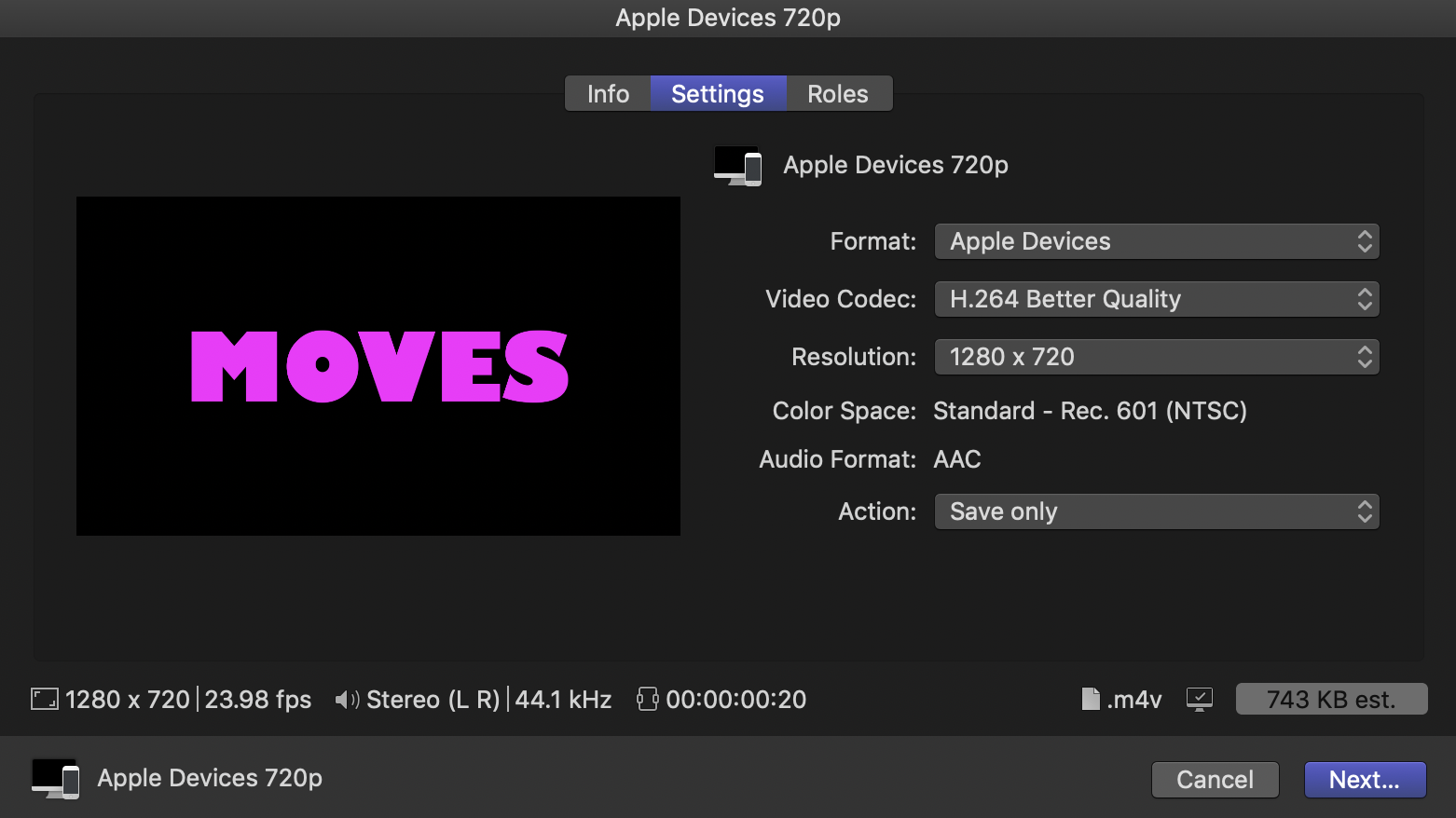
My settings attached just to make sure I did this correctly.
The output file is an .m4v (it will never make sense to me .mp4 is not the default for all non-master outputs)
Yes, coloured text is pixellated
The output file is an .m4v (it will never make sense to me .mp4 is not the default for all non-master outputs)
Yes, coloured text is pixellated
Please Log in to join the conversation.
- ronny courtens
-
- Offline
- Moderator
-
Less
More
- Posts: 4455
- Thank you received: 962
27 Jun 2021 10:05 #115229
by ronny courtens
Replied by ronny courtens on topic Share to Apple Devices 1080p is suddenly pixellated after upgrade, migration
Your settings are correct. The Apple Devices setting always creates an m.4v wrapped H.264 because m.4v is the standard for Apple devices. If you want an .mp4 wrapped H.264, you need to choose the Master File > Computer setting. But that's just changing the wrapper, it shouldn't make any difference as to the .H264 quality.
Can you post a screenshot that shows the exported file in QT player set at native playback resolution (CMD 1)?
What surprises me is that you said before: I just tried an export at 720p - and guess what. No artifacts. It's only the 1080p setting that does this.
So what setting did you use when doing that export at 720p?
- Ronny
Can you post a screenshot that shows the exported file in QT player set at native playback resolution (CMD 1)?
What surprises me is that you said before: I just tried an export at 720p - and guess what. No artifacts. It's only the 1080p setting that does this.
So what setting did you use when doing that export at 720p?
- Ronny
Please Log in to join the conversation.
